1. Wprowadzenie
This manual provides detailed instructions for the installation, operation, and maintenance of your litillbuly Android 13 Car Stereo Radio. This head unit is designed for Chevrolet Chevy Camaro models from 2010 to 2015, offering advanced features such as Wireless CarPlay, Android Auto, GPS navigation, Bluetooth connectivity, and more. Please read this manual thoroughly before installation and use to ensure proper function and safety.
2. Koniec produktuview
Główne cechy:
- System Android 13: Equipped with 4GB RAM and 64GB ROM for smooth performance.
- 10.33-inch HD 1080P Capacitive Touch Screen: Provides a clear and responsive display.
- Bezprzewodowy CarPlay i Android Auto: Bezproblemowa integracja ze smartfonem umożliwiająca nawigację, wykonywanie połączeń, wysyłanie wiadomości i słuchanie muzyki.
- Zestaw głośnomówiący Bluetooth: Do bezpiecznego dzwonienia i strumieniowego przesyłania dźwięku.
- Sterowanie z kierownicy (SWC): Retains original vehicle steering wheel control functionality.
- Wbudowany procesor DSP: Enhances audio quality with various EQ settings.
- Online & Offline GPS Navigation: Pre-loaded North American maps with real-time traffic support via online apps.
- Pomoc przy cofaniu: Supports connection to a rear camera for parking assistance.
- Link lustrzany: Kompatybilny z urządzeniami z systemem Android i iOS.
- WiFi/WLAN Internet: Access online content and download apps.

Image: The litillbuly 10.33-inch car stereo head unit seamlessly integrated into a Chevrolet Camaro dashboard, showcasing its Android interface with various application icons.

Image: Visual representation highlighting the 10.33-inch screen size and confirming compatibility with Chevrolet Camaro models from 2010 to 2015.
Zawartość pudełka:
W skład pakietu wchodzą wszystkie niezbędne elementy do instalacji i eksploatacji:
- litillbuly Android 13 Car Stereo Head Unit
- Złącze zasilania
- Adapter anteny
- Oryginalny adapter USB
- Installation Tools (Screwdriver, Crowbar)
- Dekoder magistrali CAN
- OEM Rear Camera Cable
- Linia odwrotna
- Kabel RCA
- Mikrofon
- Kable USB (x2)
- Głośnik
- Antena 4G
- Antena GPS
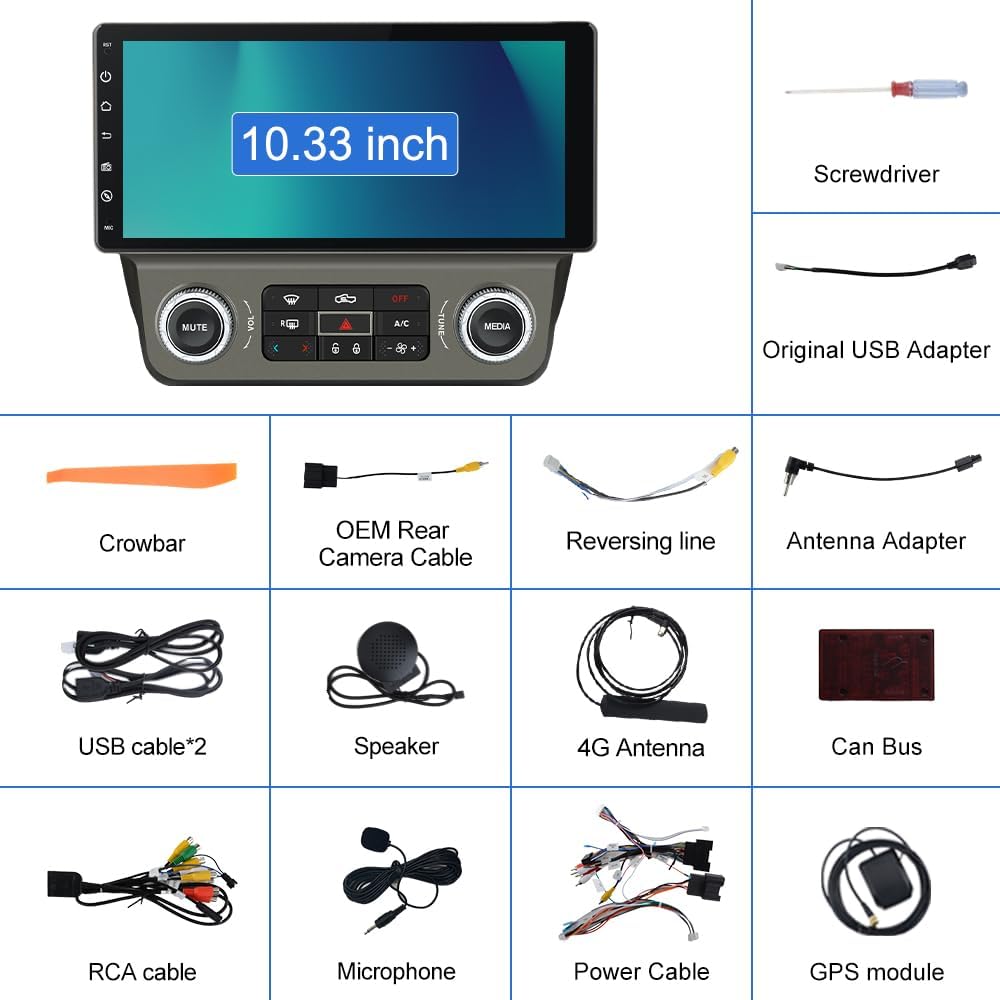
Image: A comprehensive diagram illustrating all components included in the package, such as the head unit, various cables, antennas, and installation tools.
3. Konfiguracja i instalacja
Installation requires basic mechanical ability and common tools. It is recommended to disconnect the vehicle's battery before beginning the installation process.
3.1 Pre-Installation Check:
- Verify all components listed in the 'What's in the Box' section are present.
- Ensure your Chevrolet Chevy Camaro is within the compatible model years (2010-2015).
3.2 Removal of Factory Unit:
Carefully remove the existing factory radio and trim panels using the provided crowbar and screwdriver. Refer to your vehicle's specific service manual for detailed instructions on panel removal.

Image: A visual comparison showing the vehicle's dashboard before and after the installation of the litillbuly car stereo, demonstrating the integrated fit.
3.3 Połączenia okablowania:
- Connect the main power cable harness to the new head unit and the vehicle's wiring. The included Can Bus decoder ensures proper communication with the vehicle's systems.
- AC Function Adapter: Connect the dedicated adapter to ensure the AC function works correctly. This adapter typically connects to the CANBUS TX/RX, Power Cable, CANBUS Box, AC Connector, and External Speakers.
- Antena GPS: Podłącz antenę GPS i skieruj ją do miejsca z czystym dostępem view nieba, zazwyczaj na desce rozdzielczej lub pod przednią szybą.
- Antena 4G: Connect the 4G antenna for cellular data connectivity.
- Kable USB: Connect the two USB cables for external device connectivity.
- Mikrofon: Podłącz zewnętrzny mikrofon, aby poprawić jakość rozmów.
- Kamera cofania (opcjonalnie): If installing a reversing camera, connect the reversing line and the camera's power and video cables. The red cable (2) connects to the backup light '+' and the black cable (1) connects to 'GND'.

Image: A detailed wiring diagram illustrating how to connect the AC function adapter to the car stereo system, showing connections for CANBUS, power, and AC.

Image: A wiring diagram demonstrating the correct connections for a reversing camera, indicating where to connect the red wire to the backup light and the black wire to ground.
3.4 Montaż końcowy:
Once all connections are secure, carefully mount the head unit into the dashboard opening and reattach any removed trim panels. Reconnect the vehicle's battery.
4. Instrukcja obsługi
4.1 Pierwsze włączenie:
After installation, turn on your vehicle's ignition. The head unit will boot up, displaying the Android 13 interface.

Image: The Android 13 logo, signifying the operating system running on the car stereo unit.
4.2 Bezprzewodowy CarPlay i Android Auto:
Connect your iPhone or Android phone wirelessly via Bluetooth. Once connected, you can access phone functions, navigation, music, and messaging through the head unit's display or voice assistant.

Image: The car stereo screen displaying both Wireless CarPlay and Android Auto interfaces, showing various compatible applications.

Image: A visual representation of the Wireless CarPlay and Android Auto features, demonstrating how they integrate with the car stereo for smartphone functionality.
4.3 Bluetooth Hands-Free:
Pair your phone via Bluetooth to make and receive calls safely. The external microphone enhances voice clarity. Adjust volume using the head unit or steering wheel controls.
4.4 Steering Wheel Controls (SWC):
The unit supports your vehicle's original steering wheel controls for functions like volume adjustment, track skipping, and answering calls. Configuration may be required in the system settings.

Image: The car stereo screen showing a navigation map, alongside an illustration of how steering wheel controls can be used to operate the unit.

Image: An icon representing Steering Wheel Controls (SWC), with visual cues for common functions like volume, track change, and call management.
4.5 Nawigacja:
The unit comes with pre-installed North American maps for offline use. For real-time traffic and online mapping, connect to WiFi and download preferred navigation apps from the app store.

Image: A GPS icon, symbolizing the navigation capabilities of the car stereo system.
4.6 Media Playback:
Enjoy music and videos from various sources, including USB drives, Bluetooth streaming, and online services via WiFi. The built-in DSP allows for sound customization with preset EQ modes (jazz, rock, pop, classic, etc.).
4.7 Reversing Assistance:
When a compatible rear camera is connected, the display automatically switches to the camera view when the vehicle is put into reverse, providing visual assistance for parking.

Image: The car stereo screen showing a reverse assist view with dynamic parking guidelines, alongside a display of Bluetooth music playback.

Image: A reverse assist icon, signifying the parking assistance feature of the car stereo.
4.8 Split Screen Functionality:
The head unit supports split-screen mode, allowing you to run two applications simultaneously, such as navigation and music playback.

Zdjęcie: Pokaz na ekranie radia samochodowegoasing its split-screen capability, with a music player on one side and a navigation map on the other.
5. Konserwacja
- Czyszczenie ekranu: Do czyszczenia ekranu dotykowego używaj miękkiej, niepozostawiającej włókien ściereczki. Unikaj środków czyszczących o właściwościach ściernych i rozpuszczalników.
- Aktualizacje oprogramowania: Okresowo sprawdzaj dostępność aktualizacji oprogramowania w ustawieniach systemu, aby zapewnić optymalną wydajność i dostęp do nowych funkcji.
- Opieka ogólna: Chronić urządzenie przed kurzem i ekstremalnymi temperaturami.
6. Rozwiązywanie Problemów
Jeśli napotkasz problemy, zapoznaj się z poniższymi typowymi problemami i rozwiązaniami:
| Problem | Możliwa przyczyna / rozwiązanie |
|---|---|
| Urządzenie nie włącza się. | Check power cable connections and vehicle's fuse box. Ensure the vehicle's battery is charged. |
| AC/Heat controls not working correctly or draining battery. | Verify the AC function adapter is correctly connected as per the wiring diagram. Ensure the CANBUS decoder is properly installed and configured. Some vehicle models may require specific software settings or additional adapters for full AC control compatibility, especially if the original vehicle had separate driver/passenger controls. Consult a professional installer if issues persist. |
| Brak dźwięku lub słaba jakość dźwięku. | Check speaker connections. Verify audio settings and EQ. Ensure volume is not muted. |
| Sygnał GPS jest słaby lub niedokładny. | Upewnij się, że antena GPS jest zainstalowana w miejscu z wolnym dostępem view nieba. Sprawdź połączenie antenowe. |
| Brak połączenia bezprzewodowego CarPlay/Android Auto. | Ensure Bluetooth is enabled on both the head unit and your phone. Forget and re-pair the device. Update phone's operating system. |
| Reverse camera not displaying. | Check the reversing camera's power and video connections. Ensure the reversing line is correctly connected to the vehicle's backup light signal. Confirm camera compatibility. |
| Google Maps (or other online apps) requires phone tethering. | This unit supports WiFi connectivity. For online maps and other internet-dependent apps, you can either connect to a mobile hotspot from your phone (tethering) or use a dedicated 4G SIM card if the unit supports it (check specifications). |
| Slow boot-up time. | A slight delay during boot-up is normal for Android systems. If excessively slow, try clearing cache or performing a factory reset (backup data first). |
| Temperature display issues. | Verify CANBUS settings related to climate control. Ensure all wiring for AC functions is correct. This may be a compatibility issue with specific vehicle climate control systems. |
7. Specyfikacje
| Funkcja | Szczegół |
|---|---|
| System operacyjny | Android 13 |
| BARAN | 4 GB |
| ROM | 64 GB |
| Rozmiar wyświetlacza | 10.33 cali |
| Rezolucja | 1280x480 |
| Łączność | Bluetooth, Wi-Fi, 4G (via antenna) |
| Cechy specjalne | Wireless CarPlay, Android Auto, DSP, Mirror Link, Steering Wheel Control, Reversing Assistance |
| Typ mapy | North America (pre-loaded) |
| Tryb wyjścia audio | Stereofoniczny |
| Typ montażu | Montaż na desce rozdzielczej |
| Wymiary produktu | 10.33 x 5.81 x 10.33 cala |
| Waga przedmiotu | 5.02 funta |
8. Informacje o gwarancji
This litillbuly car stereo unit comes with a 1-letnia gwarancja od daty zakupu. Niniejsza gwarancja obejmuje wady produkcyjne i usterki powstałe w wyniku normalnego użytkowania. Prosimy zachować dowód zakupu na wypadek roszczeń gwarancyjnych. Gwarancja nie obejmuje uszkodzeń spowodowanych nieprawidłową instalacją, niewłaściwym użytkowaniem, wypadkami lub nieautoryzowanymi modyfikacjami.
9. Wsparcie i kontakt
For further assistance, technical support, or warranty inquiries, please contact litillbuly customer service through the retailer where the product was purchased. You may also refer to the official litillbuly webodwiedź naszą witrynę, aby uzyskać dodatkowe zasoby lub informacje kontaktowe.