
1. Wprowadzenie
This manual provides detailed instructions for the installation, operation, and maintenance of the Yitouniu EWeLink 2-Channel Smart WiFi Switch Relay. This device enables remote control of household appliances and electronic devices via a mobile application, RF remote control, and voice commands through smart assistants like Alexa and Google Home. It supports various operating modes and timing functions to enhance smart home automation.
2. Informacje dotyczące bezpieczeństwa
- Przed przystąpieniem do instalacji lub prac konserwacyjnych należy odłączyć zasilanie, aby zapobiec porażeniu prądem.
- Installation should be performed by qualified personnel or under strict adherence to electrical safety guidelines.
- Nie przekraczaj maksymalnego prądu i objętościtagoceny określone dla urządzenia.
- Trzymaj urządzenie z dala od wody, wilgoci i ekstremalnych temperatur.
- Verify all wiring connections are secure and correct before restoring power.
3. Koniec produktuview
The Yitouniu EWeLink Smart WiFi Switch Relay is a compact, 2-channel device designed for integrating traditional appliances into a smart home system. It features WiFi and Bluetooth connectivity for app control and supports RF 433MHz for remote control.

Obraz 3.1: Przód view of the Yitouniu EWeLink Smart WiFi Switch Relay. The device is white with branding and connection labels visible.

Obraz 3.2: Zbliżenie view of the Yitouniu EWeLink Smart WiFi Switch Relay, showing input terminals (N, L), output terminals (NO, COM, NC), and model information.

Image 3.3: The compact size of the Yitouniu EWeLink Smart WiFi Switch Relay, held in a hand for scale.
4. Specyfikacje
| Parametr | Wartość |
|---|---|
| Wejście Voltage | AC/DC 85-250V, Micro USB 5V input |
| Maksymalny prąd | 10A |
| Maksymalna moc | 2200 W |
| Standard WiFi | WiFi 2.4GHz b/n/g + Bluetooth (IEEE 802.11b/g/n) |
| Temperatura pracy | -20°C do 70°C |
| Tworzywo | ABS ognioodporny |
| Wymiary produktu | 2.76 x 1.77 x 1.1 cala |
| Waga przedmiotu | 1.76 uncji |
| Typ kontaktu | Normalnie otwarty |
| Międzynarodowa Ocena Ochrony | IP65 |
| Orzecznictwo | FCC |
5. Konfiguracja i instalacja
5.1 instrukcje okablowania
The device supports both AC/DC 85-250V input and Micro USB 5V input. Ensure correct wiring based on your application. The relay has Normally Open (NO), Common (COM), and Normally Closed (NC) contacts for controlling external devices.
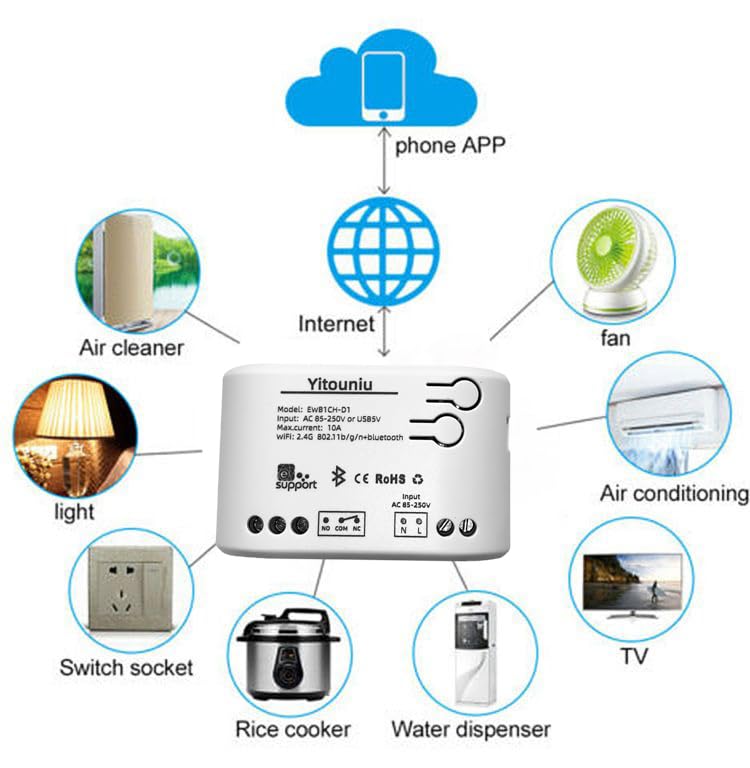
Image 5.1: Diagram illustrating the connectivity of the Yitouniu EWeLink Smart WiFi Switch Relay to various household appliances like lights, fans, and air conditioners, all controlled via a phone app and the internet.
5.2 Pobieranie i parowanie aplikacji
- Pobierz eWeLink aplikację z Apple App Store lub Google Play Store.
- Zarejestruj konto i zaloguj się.
- Power on the Smart WiFi Switch Relay.
- Open the eWeLink app, tap the '+' icon to add a device.
- Follow the on-screen instructions to connect the device to your 2.4GHz WiFi network.

Image 5.2: Screenshots of the eWeLink app interface, showing controls for a garage door (ON/OFF) and a scheduling function for setting specific times.
6. Tryby pracy
The device supports three operating modes: self-locking, interlocking, and inching (micromotion). These modes can typically be configured within the eWeLink app or via physical buttons on the device, depending on the specific model variant.
- Tryb samoblokujący: Each channel operates independently. Pressing the button (or app control) turns the relay ON, pressing it again turns it OFF.
- Tryb blokowania: When one channel is turned ON, all other channels are automatically turned OFF. This is useful for applications where only one device should be active at a time.
- Inching (Micromotion) Mode: The relay turns ON for a set duration (e.g., 0.5 seconds to 1 hour) and then automatically turns OFF. This is suitable for momentary actions like garage door openers or pulse controls.
7. Sterowanie aplikacją i sterowanie głosowe
7.1 eWeLink App Features
The eWeLink app provides comprehensive control over your Smart WiFi Switch Relay:
- Zdalne włączanie/wyłączanie: Control connected devices from anywhere with an internet connection.
- Funkcje pomiaru czasu: Set schedules, countdowns, or recurring timers for automatic on/off operations.
- Niezależna kontrola: Każdy z dwóch kanałów może być sterowany niezależnie.
- Udostępnianie urządzenia: Share control of your devices with family members.
- Kontrola grupy: Połącz wiele urządzeń inteligentnych w grupy, aby móc nimi sterować jednocześnie.

Image 7.1: A user remotely controlling home lighting via the eWeLink mobile application, demonstrating the convenience of app-based control.

Image 7.2: Illustration of the eWeLink app's group control and sharing functions, allowing multiple users to manage devices across different rooms.

Image 7.3: The timing function interface within the eWeLink app, enabling users to set specific on/off times for connected appliances.
7.2 Integracja sterowania głosowego
The Yitouniu Smart WiFi Switch Relay is compatible with popular voice assistants, including Amazon Alexa and Google Home/Nest. To enable voice control:
- Ensure your Smart WiFi Switch Relay is successfully paired with the eWeLink app.
- Otwórz aplikację Alexa lub Google Home.
- Przejdź do sekcji „Umiejętności” lub „Współpraca z Google”.
- Szukaj and enable the 'eWeLink Smart Home' skill/service.
- Link your eWeLink account when prompted.
- Discover devices. Your Smart WiFi Switch Relay should now be controllable via voice commands.
Examppliki poleceń:
- "Alexa, włącz światło w salonie."
- „Hej Google, wyłącz wentylator”.

Image 7.4: A user interacting with voice assistants like Amazon Alexa and Google Home to control smart devices, highlighting the voice control capability of the relay.
8. Konserwacja
The Yitouniu Smart WiFi Switch Relay requires minimal maintenance. Follow these guidelines:
- Czyszczenie: Wipe the device with a dry, soft cloth. Do not use liquid cleaners or solvents.
- Kontrola połączenia: Okresowo sprawdzaj połączenia przewodów, aby mieć pewność, że są bezpieczne.
- Aktualizacje oprogramowania układowego: Keep the eWeLink app updated to receive the latest firmware for the device, which may include performance improvements and new features.
9. Rozwiązywanie Problemów
- Urządzenie nie łączy się z siecią Wi-Fi:
- Upewnij się, że Twoja sieć Wi-Fi obsługuje częstotliwość 2.4 GHz. Urządzenie nie obsługuje sieci 5 GHz.
- Sprawdź, czy hasło WiFi wprowadzone w aplikacji jest prawidłowe.
- Przesuń urządzenie bliżej routera WiFi.
- Uruchom ponownie urządzenie i router.
- Urządzenie jest offline w aplikacji:
- Sprawdź, czy Twoje domowe połączenie internetowe jest aktywne.
- Sprawdź czy urządzenie jest zasilane.
- Uruchom ponownie urządzenie.
- Sterowanie głosowe nie działa:
- Confirm the eWeLink skill/service is enabled and linked in your Alexa or Google Home app.
- Ensure the device is named clearly in the eWeLink app and discovered by your voice assistant.
- Sprawdź swoje połączenie internetowe.
- Device not responding to RF remote:
- Ensure the RF remote is paired with the switch. Refer to the RF pairing instructions (if applicable to your specific remote).
- Sprawdź baterię w pilocie RF.
10. Co znajduje się w pudełku
Po otwarciu opakowania produktu w jego wnętrzu powinny znajdować się następujące elementy:
- 1 x Yitouniu Wifi 2-Channel Relay Switch
- 1 x Instrukcja obsługi (ten dokument)
11. Gwarancja i wsparcie
This product comes with a standard manufacturer's warranty. For specific warranty terms, conditions, and duration, please refer to the documentation included with your purchase or contact Yitouniu customer support. For technical assistance or further inquiries, please visit the official Yitouniu webodwiedź witrynę lub skontaktuj się z ich kanałami obsługi klienta.