
1. Koniec produktuview
The STUDIOFINIX 4-Channel Mini Bluetooth Amplifier is designed to power passive speakers, offering versatile connectivity options including Bluetooth 5.1, TWS, AUX, MIC, and USB. Its compact design allows for easy integration into various audio setups, from home entertainment to marine applications.
Główne cechy
- Uniwersalna kompatybilność: Suitable for wall-mounted, ceiling-mounted, marine, bookshelf, and other passive speakers.
- Bluetooth 5.1: Ensures faster transmission speed, longer distance, and stable performance for wireless audio streaming.
- Łatwa instalacja: Small and lightweight design for convenient placement on flat surfaces or within pre-cut speaker openings.
- Wielofunkcyjny: Supports Bluetooth, TWS (True Wireless Stereo), AUX, MIC, and USB inputs, along with MONO output.
Co jest w pudełku
- 4-kanałowy Bluetooth Amplifier Box (x1)
- 24V5A Power Adapter (x1)
- Instrukcja obsługi (x1)
- Śrubokręt (x1)
- Śruby (x2)
- Przewód zasilający (x1)

Image: Contents of the package, including the amplifier, power adapter, power cord, screwdriver, screws, and user manual.
2. Diagram produktu i elementy sterujące
Zapoznaj się z amplifier's layout and control functions.
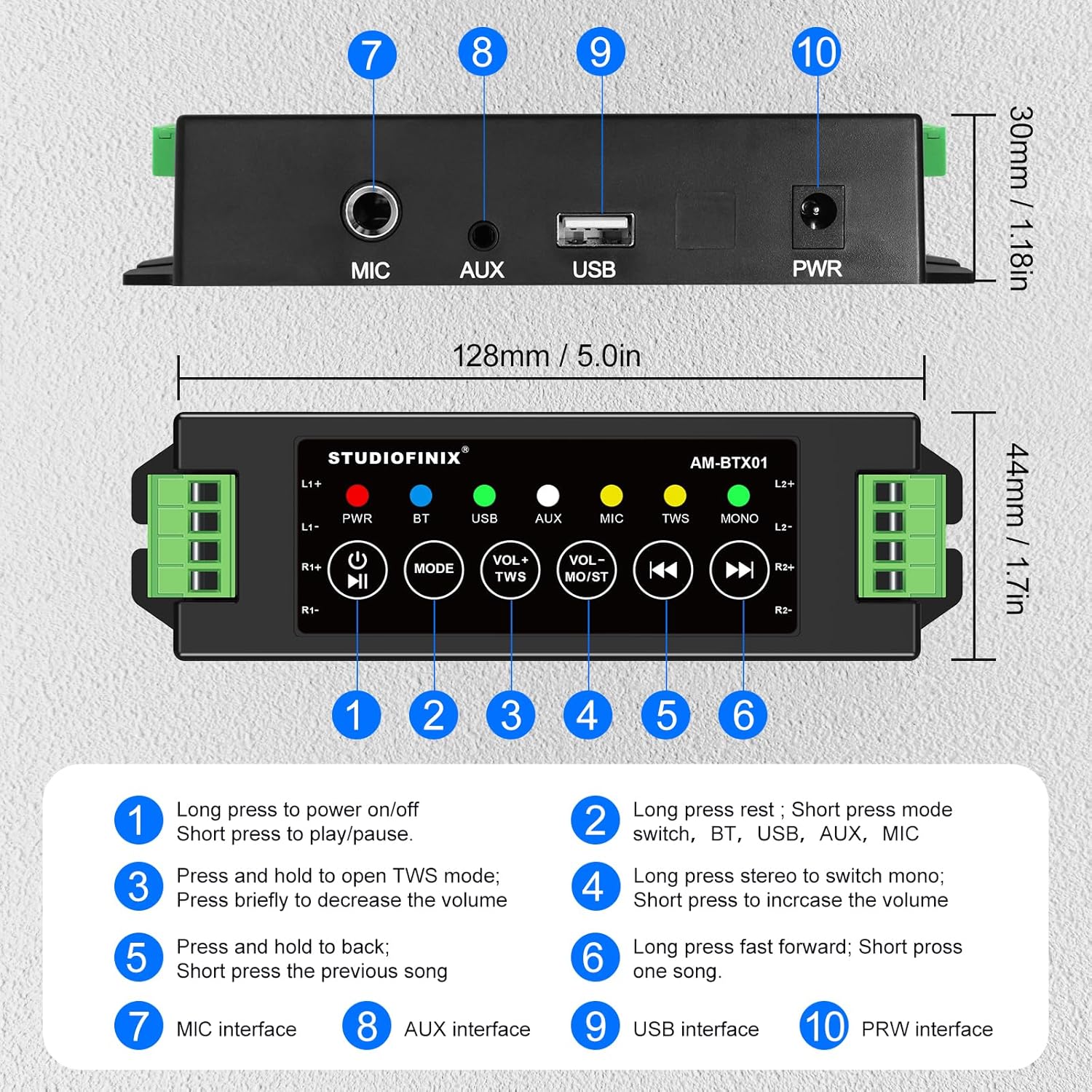
Obraz: góra i tył view z amplifier, highlighting numbered controls and interfaces.
Funkcje sterowania
| NIE. | Control/Interface | Funkcjonować |
|---|---|---|
| 1 | Power Button / Play/Pause | Long press to power on/off. Short press to play/pause audio. |
| 2 | Przycisk trybu | Long press to reset. Short press to switch between BT, USB, AUX, and MIC modes. |
| 3 | VOL- / TWS Button | Press and hold to open TWS mode. Briefly press to decrease the volume. |
| 4 | VOL+ / MONO Button | Long press to switch between stereo and mono output. Briefly press to increase the volume. |
| 5 | Przycisk poprzedniej ścieżki | Press and hold to fast backward. Short press for the previous song. |
| 6 | Przycisk następnego utworu | Long press to fast forward. Short press for the next song. |
| 7 | Interfejs MIC | Input for microphone connection. |
| 8 | Interfejs AUX | Input for auxiliary audio devices. |
| 9 | Interfejs USB | Input for USB audio sources. |
| 10 | Interfejs PWR | Power input for the 24V5A adapter. |
3. Konfiguracja i instalacja
Podłączanie głośników pasywnych
Ten amplifier supports up to four passive speakers. Ensure proper polarity when connecting speaker wires.
- Identify the positive (+) and negative (-) terminals on your passive speakers.
- Connect the positive (+) wire from each speaker to the corresponding L1+, L2+, R1+, R2+ terminals on the ampliyfikator.
- Connect the negative (-) wire from each speaker to the corresponding L1-, L2-, R1-, R2- terminals on the ampliyfikator.
- Use the included screwdriver to secure the speaker wires in the terminal blocks.
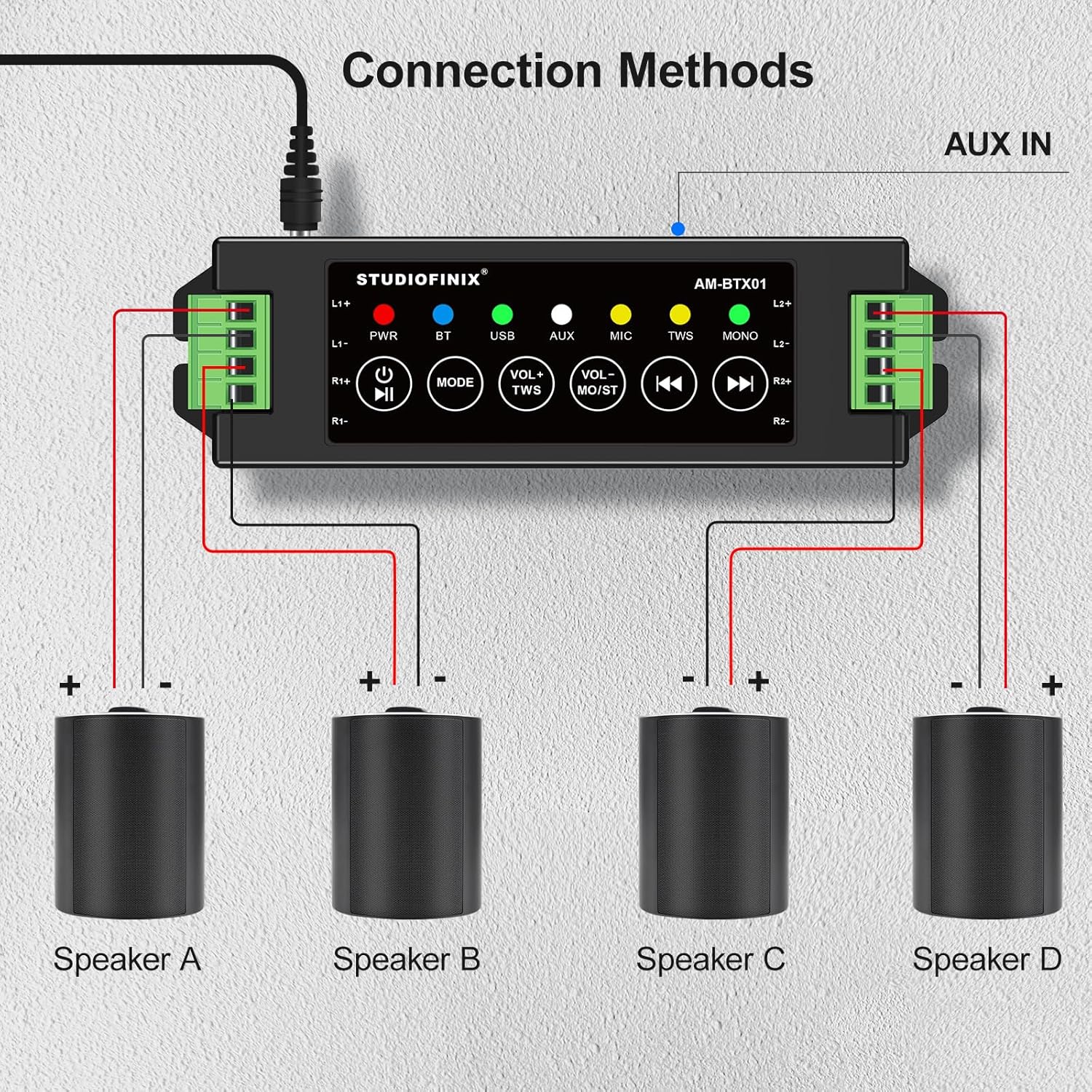
Image: Visual guide for connecting four speakers to the amplifier's output terminals.
Podłączenie zasilania
Connect the provided 24V5A power adapter to the PWR interface (10) on the amplifier, then plug the adapter into a suitable power outlet.

Image: Detail of the amplifier's power input (PWR) and auxiliary input (AUX) ports.
4. Działanie
Włączanie/wyłączanie zasilania
Long press the Power Button (1) to turn the amplifier on or off. The PWR indicator light will illuminate when the device is powered on.
Parowanie Bluetooth
- Zapewnij amplifier is powered on and in Bluetooth (BT) mode. The BT indicator light will flash, indicating it's ready for pairing.
- Na swoim urządzeniu mobilnym (smartfonie, tablecie itp.) włącz Bluetooth i wyszukaj dostępne urządzenia.
- Select "STUDIOFINIX" or a similar name from the list of devices to pair.
- Once paired, the BT indicator light will become solid, and you will hear a confirmation tone.
Tryb TWS (prawdziwe bezprzewodowe stereo)
TWS mode allows you to pair two STUDIOFINIX amplifiers for a true wireless stereo experience.
- Upewnij się, że oba amplifiers are powered on and not connected to any Bluetooth device.
- Na jednym amplifier, press and hold the VOL- / TWS Button (3) until you hear a confirmation tone, indicating TWS pairing mode.
- Te dwa amplifiers will automatically search and pair with each other. Once paired, one amplifier will act as the master and the other as the slave.
- Now, connect your mobile device to the master amplifier via Bluetooth as described above. Audio will play through both amplifiers in stereo.

Image: Visual representation of two amplifiers being paired using the TWS function.
Input Mode Selection (AUX, USB, MIC)
Short press the Mode Button (2) to cycle through the available input modes: Bluetooth (BT), USB, AUX, and MIC. The corresponding indicator light will illuminate for the active mode.
Regulacja głośności i odtwarzanie
- Regulacja głośności: Briefly press the VOL- / TWS Button (3) to decrease volume, and the VOL+ / MONO Button (4) to increase volume.
- Odtwórz/Pauza: Short press the Power Button (1) to play or pause audio.
- Poprzedni/następny utwór: Short press the Previous Track Button (5) for the previous song, and the Next Track Button (6) for the next song.
- Szybkie przewijanie do przodu/do tyłu: Long press the Previous Track Button (5) to fast backward, and the Next Track Button (6) to fast forward.
Przełączanie mono/stereo
Long press the VOL+ / MONO Button (4) to switch the audio output between stereo and mono modes. The MONO indicator light will show the current setting.
5. Rozwiązywanie Problemów
| Problem | Możliwa przyczyna | Rozwiązanie |
|---|---|---|
| Brak zasilania | Zasilacz nie jest podłączony lub jest uszkodzony. | Upewnij się, że zasilacz jest prawidłowo podłączony do amplifier and a working power outlet. Check if the power adapter is functional. |
| Brak dźwięku z głośników | Incorrect speaker wiring; volume too low; wrong input mode selected; device not paired. | Verify speaker wire connections for correct polarity. Increase volume. Ensure the correct input mode (BT, AUX, USB, MIC) is selected. Confirm Bluetooth device is paired. |
| Bluetooth nie łączy się | Amplifier nie jest w trybie parowania; urządzenie jest za daleko; zakłócenia. | Zapewnij amplifier is in BT mode and the BT indicator is flashing. Move your device closer to the amplifier. Avoid strong electromagnetic interference. Try resetting Bluetooth on both devices. |
| Parowanie TWS nie powiodło się | One or both amplifiers already paired; incorrect TWS activation. | Upewnij się, że oba amplifiers are unpaired from other Bluetooth devices. Follow TWS pairing instructions carefully, initiating TWS mode on only one ampnajpierw wymień. |
| Słaba jakość dźwięku | Low quality audio source; speaker impedance mismatch; loose connections. | Użyj wysokiej jakości dźwięku files. Ensure speakers are compatible with the amplifier's output. Check all cable connections. |
6. Specyfikacje
| Funkcja | Szczegół |
|---|---|
| Marka | STUDIOFINIKS |
| Numer modelu | RM |
| Maksymalna moc wyjściowa głośnika | 120 watów |
| Technologia łączności | Bluetooth |
| Tryb wyjścia audio | Stereofoniczny |
| Typ montażu | Montaż ścienny, montaż sufitowy |
| Materiał obudowy | Plastik czy metal |
| Liczba kanałów audio | 4.0 |
| Technologia bezprzewodowa | Bluetooth |
| Protokół łączności | AUX, Bluetooth |
| Metoda kontroli | Dotykać |
| Waga przedmiotu | 0.53 kilograma |
| Kompatybilne urządzenia | Laptop, smartfon, tablet |
| Źródło zasilania | Elektryczny przewodowy |
7. Informacje dotyczące bezpieczeństwa
- Nie wystawiaj na działanie ampodkażać wodą lub nadmierną wilgocią.
- Unikaj umieszczania urządzenia w pobliżu źródeł ciepła lub w miejscu bezpośrednio nasłonecznionym.
- Aby uniknąć uszkodzeń, należy używać wyłącznie dołączonego zasilacza.
- Nie próbuj samodzielnie otwierać ani naprawiać urządzenia. Skontaktuj się z wykwalifikowanym personelem serwisowym.
- Przechowywać w miejscu niedostępnym dla dzieci.
8. Film o produkcie
Video: An official product video from Studiofinix Direct demonstrating the 4-Channel Mini Bluetooth Amplifier for Passive Speakers, showcasing jego cech i funkcjonalności.
9. Gwarancja i wsparcie
This STUDIOFINIX product comes with a limited warranty. For detailed warranty information or technical support, please refer to the contact information provided in your product packaging or visit the official STUDIOFINIX webstrona.