
Wstęp
This manual provides comprehensive instructions for the ProtoArc EK01 Plus Ergonomic Wireless Backlit Keyboard. Please read this guide carefully to ensure proper setup, operation, and maintenance of your device. Keep this manual for future reference.
Zawartość opakowania
Sprawdź, czy w opakowaniu znajdują się wszystkie elementy:
- ProtoArc EK01 Plus Ergonomic Wireless Backlit Keyboard
- Podpórka pod nadgarstek
- Kabel ładujący USB-C
- Odbiornik USB 2.4G
- Instrukcja obsługi
Produkt ponadview
The ProtoArc EK01 Plus is a full-size ergonomic keyboard designed to enhance typing comfort and reduce muscle strain. Its split and curved keyframe design promotes a natural hand and wrist posture.
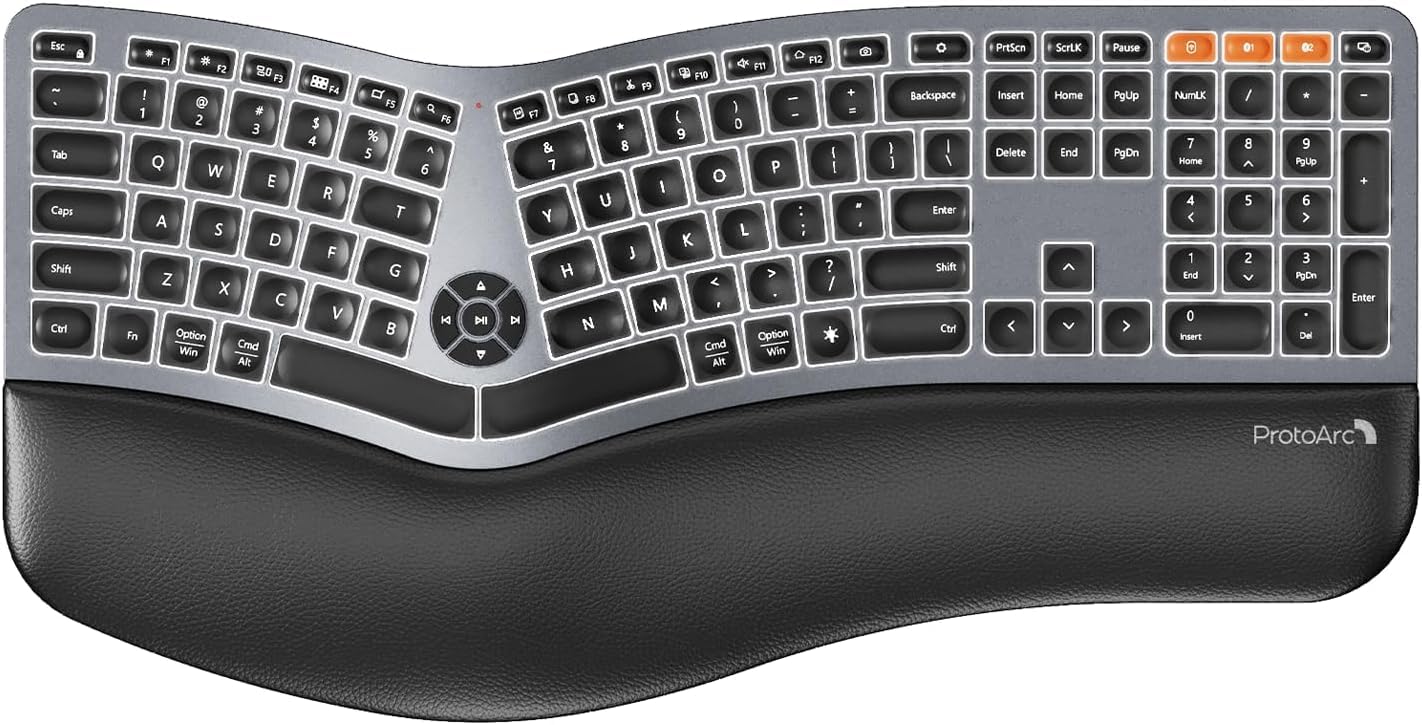
Image 1: ProtoArc EK01 Plus Ergonomic Wireless Backlit Keyboard. This image displays the full keyboard with its split design, integrated wrist rest, and key layout.
Główne cechy:
- Ergonomic Full-Size Design: Features a split, curved keyframe and integrated wrist rest to minimize muscle fatigue and promote proper posture.
- Regulowane nóżki pochylenia: Four adjustable tilt feet allow customization of the keyboard angle for optimal comfort.
- Adjustable Backlighting: Soft white LED backlighting with three adjustable brightness levels (low-medium-high) for comfortable typing in various lighting conditions.
- Łączność wielourządzeniowa: Connects to up to three devices simultaneously via Bluetooth and 2.4G USB. Easily switch between devices with a dedicated key.
- Akumulator USB-C: Equipped with a 2000 mAh rechargeable lithium battery for extended use.
- Automatyczny tryb uśpienia: Enters sleep mode after 60 minutes of inactivity to conserve power, waking up within 3 seconds upon key press.
- Zgodność: Widely compatible with Windows 7/8/10, Mac OS X 10.12 or higher, and Android 4.3 or higher.
Organizować coś
1. Ładowanie klawiatury
- Znajdź port ładowania USB-C na klawiaturze.
- Connect the provided USB-C cable to the keyboard and the other end to a USB power source (e.g., computer USB port, wall adapter).
- Zaświeci się kontrolka ładowania. Po pełnym naładowaniu kontrolka może zmienić kolor lub zgasnąć.
2. Łączenie się z urządzeniami
The keyboard supports both 2.4G USB and Bluetooth connectivity.
2.1. 2.4G USB Connection
- Locate the 2.4G USB receiver (dongle). It is usually stored in a compartment on the keyboard or in the packaging.
- Podłącz odbiornik USB do dostępnego portu USB w komputerze.
- Włącz klawiaturę za pomocą włącznika zasilania.
- Klawiatura powinna automatycznie połączyć się z urządzeniem.
2.2. Połączenie Bluetooth (do 3 urządzeń)
- Włącz klawiaturę.
- Naciśnij i przytrzymaj jeden z przycisków kanału Bluetooth (np. BT1, BT2, Lub BT3) for 3-5 seconds until the indicator light flashes, indicating pairing mode.
- Na swoim urządzeniu (komputerze, tablecie, smartfonie) włącz Bluetooth i wyszukaj nowe urządzenia.
- Select "ProtoArc EK01 Plus" (or similar name) from the list of available devices.
- Postępuj zgodnie z instrukcjami wyświetlanymi na ekranie, aby zakończyć proces parowania. Po nawiązaniu połączenia kontrolka przestanie migać.
- Repeat these steps for up to two additional Bluetooth devices using the other Bluetooth channel keys.
Działanie
1. Przełączanie między urządzeniami
Aby przełączać się między podłączonymi urządzeniami, wystarczy nacisnąć odpowiedni klawisz połączenia:
- Naciskać 2.4G aby przełączyć się na urządzenie podłączone poprzez odbiornik USB.
- Naciskać BT1 to switch to the first Bluetooth device.
- Naciskać BT2 to switch to the second Bluetooth device.
- Naciskać BT3 to switch to the third Bluetooth device.
2. Regulacja podświetlenia
The keyboard features a soft white LED backlight with three brightness levels.
- To cycle through brightness levels (low, medium, high, off), press the dedicated backlight key (refer to keyboard layout for specific key).
3. Sleep Mode and Power Saving
To conserve battery life, the keyboard will automatically enter sleep mode after 60 minutes of inactivity. To wake the keyboard, press any key. The keyboard will be ready for use within 3 seconds.
4. Regulowany kąt nachylenia
The keyboard includes four adjustable tilt feet. Extend or retract these feet to customize the typing angle to your preference, ensuring comfortable wrist positioning whether sitting or standing.
Konserwacja
1. Czyszczenie klawiatury
- Przed czyszczeniem odłącz klawiaturę od wszystkich urządzeń i źródeł zasilania.
- Użyj miękkiej, niestrzępiącej się ściereczki, lekko wyczyśćampPrzetrzyj powierzchnię klawiatury wodą lub łagodnym środkiem czyszczącym.
- Avoid using harsh chemicals, abrasive cleaners, or solvents, as these can damage the keyboard's finish.
- Do czyszczenia przestrzeni między klawiszami należy używać sprężonego powietrza w celu usunięcia kurzu i zanieczyszczeń.
2. Pielęgnacja baterii
- Aby zachować żywotność baterii, ładuj klawiaturę regularnie.
- Unikaj częstego całkowitego rozładowywania akumulatora.
- Jeśli klawiatura będzie przechowywana przez dłuższy czas, przed schowaniem należy naładować ją do około 50%.
Rozwiązywanie problemów
| Problem | Możliwa przyczyna | Rozwiązanie |
|---|---|---|
| Klawiatura nie odpowiada | Low battery; Keyboard off; Incorrect connection mode; USB receiver not plugged in (2.4G); Bluetooth not paired. | Charge the keyboard; Turn on the keyboard; Switch to the correct connection mode (2.4G, BT1/2/3); Ensure USB receiver is securely plugged in; Re-pair Bluetooth. |
| Lag or delayed input | Zakłócenia; Odległość od odbiornika/urządzenia; Niski poziom naładowania baterii. | Move closer to the receiver/device; Ensure no strong interference sources nearby; Charge the keyboard. |
| Podświetlenie nie działa | Podświetlenie wyłączone; niski poziom baterii. | Press the backlight key to adjust brightness; Charge the keyboard. |
| Nie można połączyć się przez Bluetooth | Keyboard not in pairing mode; Device Bluetooth off; Already connected to 3 devices. | Ensure keyboard is in pairing mode (flashing indicator); Enable Bluetooth on your device; Disconnect from an existing Bluetooth device if maximum reached. |
Specyfikacje
| Marka | ProtoArc |
| Numer modelu | EK01 Plus |
| Technologia łączności | Bluetooth, 2.4G USB |
| Opis klawiatury | Ergonomic, Full Size, Split Design |
| Cechy specjalne | Ergonomic, Full Size, Wrist Rest, Backlit, Rechargeable |
| Kolor | Kosmiczna Szarość |
| Obsługa kolorów podświetlenia | Monochromatic (White LED) |
| Tworzywo | Plastikowy |
| Źródło zasilania | Zasilany bateryjnie (bateria litowa 2000 mAh) |
| Typ przełącznika | Membrana |
| Układ klawiatury | QWERTY (UK layout for this variant) |
| Liczba kluczy | 117 |
| Kompatybilne urządzenia | Laptop, PC, Tablet, Windows/Mac/Android |
| Waga przedmiotu | 1.6 kilograma |
| Wymiary (w przybliżeniu) | 48 cm (długość) x 25 cm (szerokość) |
Gwarancja i wsparcie
For warranty information and technical support, please refer to the ProtoArc official website or contact their customer service. Details are typically provided on the product packaging or the official brand store.
ProtoArc Official Store: Visit ProtoArc Store on Amazon


