
Wstęp
The VDIAGTOOL VD70 Lite is a professional-grade OBD2 scanner and diagnostic tool designed for comprehensive vehicle diagnostics and maintenance. It offers a wide array of features including full bi-directional controls, 31+ hot resets, all system diagnostics, and advanced protocol support like CAN FD & DoIP. This manual provides detailed instructions for setting up, operating, maintaining, and troubleshooting your VD70 Lite device, ensuring optimal performance and longevity.

Image: The VDIAGTOOL VD70 Lite diagnostic tool, showcasing its main interface and compact design.
Co jest w pudełku
Upon opening your VDIAGTOOL VD70 Lite package, please verify that all the following components are included:
- 1 x VDIAGTOOL Diagnostic Tool (VD70 Lite)
- 1 x Type-C to Type-C Charge Cable
- 1 x Type-C to Type-A Adapter (for PC connection)
- 1 x DB15 Main Cable
- 1 x US/UK/EU Plug Adapter
- 1 x Skrócona instrukcja obsługi

Image: All components included in the VDIAGTOOL VD70 Lite package, neatly arranged.
Organizować coś
- Ładowanie urządzenia: Connect the VD70 Lite to a power source using the provided Type-C charge cable and plug adapter. Ensure the device is fully charged before first use.
- Łączenie z pojazdem: Locate your vehicle's OBD2 port, typically found under the dashboard on the driver's side. Connect the DB15 Main Cable to the VD70 Lite and then to the vehicle's OBD2 port.
- Włączanie: The device will automatically power on once connected to the vehicle's OBD2 port. If not, press the power button.
- Początkowe ustawienia: Follow the on-screen prompts to select your preferred language (23 languages supported) and configure basic settings.
- Aktualizacje oprogramowania: It is highly recommended to perform a software update immediately after initial setup to ensure you have the latest features and vehicle compatibility. Connect the device to Wi-Fi (2.4 & 5GHz dual-band) and navigate to the "Updates" section on the main menu.
Instrukcja obsługi
1. Pełna diagnostyka systemu
The VD70 Lite performs OE-level diagnostics across all vehicle systems, including Engine, Transmission, Airbag, ABS, ESP, TPMS, Radio, and more. It can read/clear diagnostic trouble codes (DTCs), view live data, freeze frame data, and read ECU information.
- Numer VIN samochodu i automatyczne skanowanie: The device can automatically identify the vehicle's VIN and perform a comprehensive scan of all available modules for quick fault detection.
- Odczyt i kasowanie kodów: Access and clear DTCs from any supported system.
- Transmisja danych na żywo: View real-time sensor data. The device supports 8-in-One data graphing for intuitive analysis and allows data export as CSV for further review.

Image: Diagram illustrating the comprehensive OE-level all systems diagnostic capabilities of the VD70 Lite.
2. Sterowanie dwukierunkowe (testy aktywne)
This feature allows the tool to send commands to vehicle ECUs to perform specific tests and functions, verifying component integrity and operation. Over 4000 active tests are supported.
- Examples: Test windows, doors, ABS motor, radiator fan, fuel injector, wipers, headlights, rear mirrors, sunroof, and more.
- Procedura: Navigate to "Special Function" or "Active Test" menu, select the desired component, and follow on-screen instructions to activate the test.

Image: Visual representation of the bi-directional control function, showing commands sent to and received from vehicle components.
3. 31+ Hot Resets & Maintenance Services
The VD70 Lite provides access to over 31 common maintenance and reset functions, covering nearly all daily service needs for various vehicle makes.
- Key Resets: Oil Reset, ABS Bleed, Crank Sensor Relearn, Idle Relearn, Injector Coding, Window Initialization, HVAC Calibration, Suspension Calibration, Throttle Matching, EPB Reset, SAS Reset, BMS Reset, and more.
- Notatka: Availability of specific functions may vary by vehicle model, year, and VIN. Always verify compatibility before performing a reset.
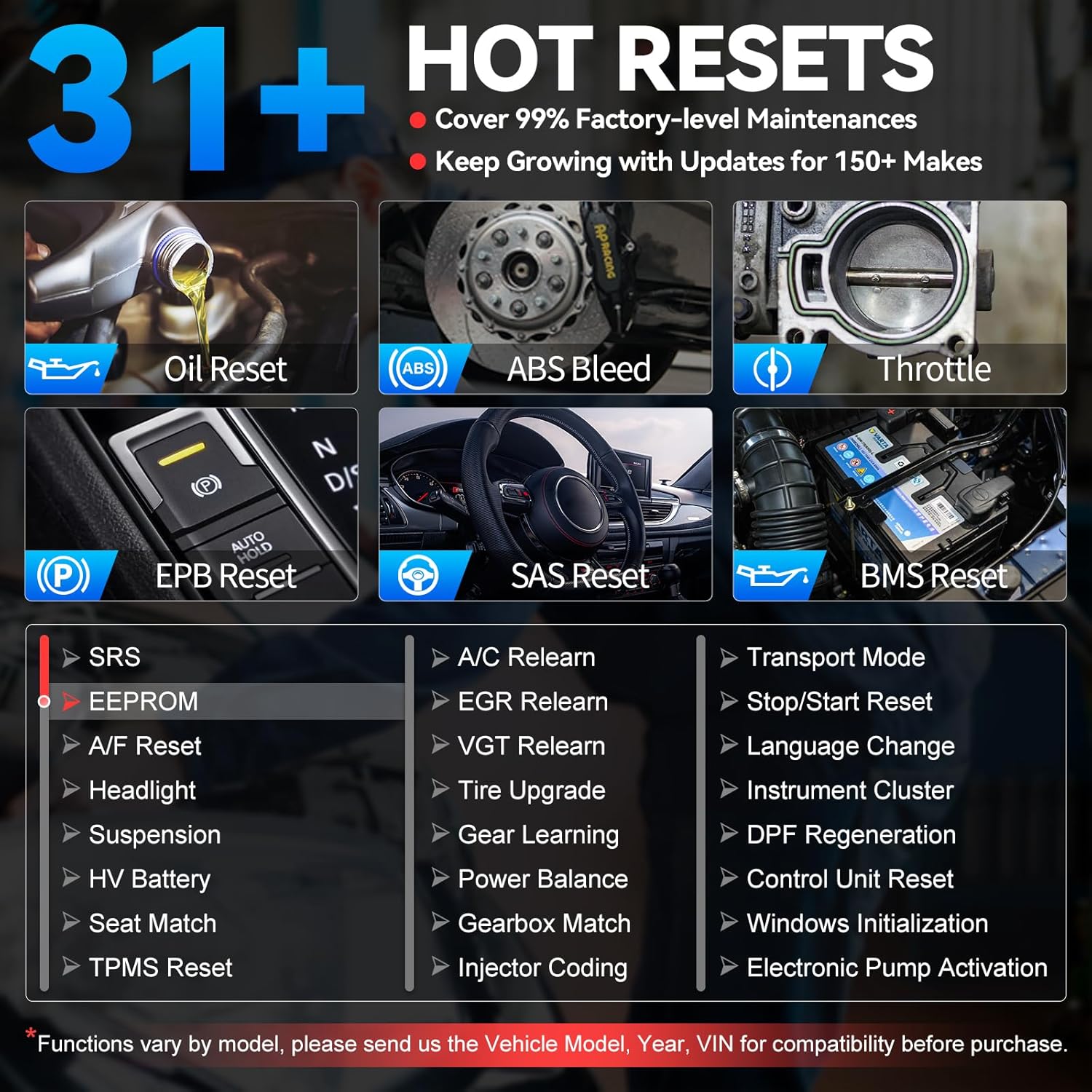
Image: A grid displaying various hot reset functions available on the VD70 Lite, such as Oil Reset, ABS Bleed, and Throttle Matching.
4. Obsługa protokołu CAN FD i DoIP
The VD70 Lite supports advanced communication protocols, ensuring compatibility with modern vehicles and faster diagnostic speeds.
- CAN FD: Supported for GM MY2020+ vehicles.
- DoIP: Supported for BMW E/F/G Chassis, Jaguar, and Land Rover models.
- This eliminates the need for special adapters, saving costs and expanding vehicle coverage.
5. Zabezpieczenie pojazdu
The VD70 Lite supports over 10,000 vehicle models from 150+ brands worldwide, including US, European, and Asian vehicles (mostly for 2005+ cars). It is a global diagnostic scanner with 23 language support.

Image: A collage of various car brands and models, illustrating the wide vehicle coverage of the VD70 Lite.
Konserwacja
- Aktualizacje oprogramowania: The VD70 Lite offers long-term free software updates. Regularly check for updates via the "Updates" icon on the main menu to ensure optimal performance, new features, and expanded vehicle compatibility.
- Czyszczenie: Użyj miękkiego, damp Do czyszczenia urządzenia należy używać ściereczki. Unikać stosowania silnych środków chemicznych i materiałów ściernych.
- Składowanie: Store the device in its protective carrying case in a cool, dry place when not in use to prevent damage.
- Pielęgnacja baterii: The device contains a Lithium Ion battery. Avoid extreme temperatures and prolonged periods of full discharge or full charge to maximize battery life.
Rozwiązywanie problemów
| Problem | Możliwa przyczyna | Rozwiązanie |
|---|---|---|
| Urządzenie nie włącza się. | Not properly connected to OBD2 port; low battery. | Ensure secure connection to OBD2 port. Charge the device fully. |
| Nie można połączyć się z pojazdem. | Incorrect cable connection; vehicle ignition off; incompatible vehicle. | Check cable connections. Turn vehicle ignition to ON position. Verify vehicle compatibility. |
| Aktualizacja oprogramowania nie powiodła się. | Niestabilne połączenie Wi-Fi; za mało pamięci. | Ensure stable Wi-Fi. Clear unnecessary files if storage is low. Retry update. |
| Konkretna funkcja nie działa. | Function not supported by vehicle; incorrect procedure. | Check vehicle compatibility for the specific function. Refer to the Quick Start Guide or contact support. |
For more complex issues, please refer to the "Warranty and Support" section.
Specyfikacje
| Funkcja | Szczegół |
|---|---|
| Model | VD70 Lite |
| System operacyjny | Android 10.0 |
| Rozdzielczość wyświetlacza | 1024x600 |
| Edytor | Czterordzeniowy 1.5GHz |
| Pamięć | 2 GB pamięci RAM + 64 GB pamięci masowej |
| Bateria | 18.25Wh 7.3V Lithium Ion (included) |
| Łączność | 2.4 & 5GHz Dual-Band Wi-Fi, USB-C, DB15 OBD Port |
| Obsługiwane protokoły | CAN FD, DoIP, ISO9141-2, ISO14230-2, ISO15765, K/L-Line, SAE-J1850 VPW, SAE-J1850 PWM, ISO11898, Honda Diag-H Protocol |
| Waga przedmiotu | 5.15 funta |
| Wymiary opakowania | 12.4 x 10.83 x 4.09 cala |
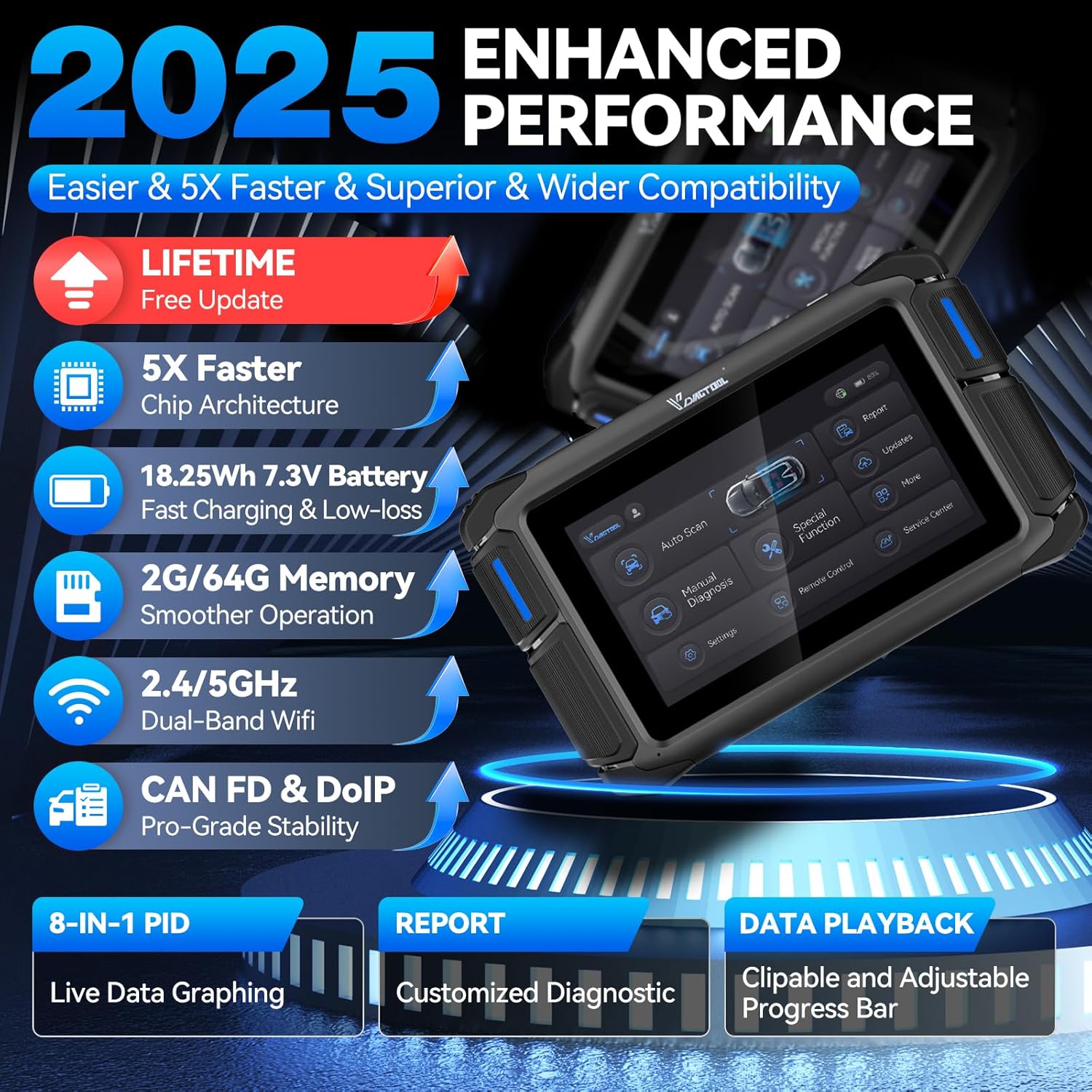
Image: Infographic detailing the enhanced performance features of the 2025 VD70 Lite model, including faster chip architecture and memory.
Gwarancja i wsparcie
VDIAGTOOL is committed to providing exceptional user experiences and stands behind the quality of its products.
- Gwarancja: The VDIAGTOOL VD70 Lite comes with a 2-year warranty from the date of purchase.
- Zasady zwrotu: A 30-day risk-free return/replacement policy is offered.
- Obsługa klienta: 24/7 support is available for any inquiries or assistance.
- Kontakt: Aby uzyskać pomoc, możesz skontaktować się z nami za pośrednictwem poczty elektronicznej pod adresem vdiagtool2@outlook.com. Please provide your tool's Serial Number (S/N) for efficient service.
- Zasoby internetowe: For additional help, check the product page on Amazon.com and look for "Get Product Support" or "Ask a question."