
1. Wprowadzenie
Dziękujemy za zakupasing the EsaSam Double Din Car Stereo Multimedia Radio. This manual provides detailed instructions for the installation, operation, and maintenance of your new car stereo system. Please read this manual thoroughly before installation and use to ensure proper function and to prevent damage.
2. Informacje dotyczące bezpieczeństwa
- Aby uniknąć uszkodzenia układu elektrycznego pojazdu lub samego urządzenia, przed montażem należy zawsze skonsultować się ze specjalistą.
- Nie używaj urządzenia w sposób rozpraszający Cię podczas jazdy. Zawsze priorytetem jest bezpieczeństwo na drodze.
- Aby zapobiec zwarciom, należy upewnić się, że wszystkie połączenia przewodów są solidne i właściwie zaizolowane.
- Unikaj wystawiania urządzenia na działanie ekstremalnych temperatur, długotrwałego bezpośredniego światła słonecznego i nadmiernej wilgoci.
- Nie należy podejmować prób demontażu ani modyfikacji urządzenia. Może to spowodować unieważnienie gwarancji i uszkodzenie.
3. Zawartość opakowania
Sprawdź, czy w opakowaniu znajdują się wszystkie elementy:
- EsaSam Car Stereo Head Unit (9-inch touchscreen)
- Power Adapter Harness
- Frame for Lada Granta 2018-2019
- Antena GPS
- Tył AHD View Kamera
- Mikrofon zewnętrzny
- RCA Cable (Audio Out, AUX In, Subwoofer Out)
- Kable USB
- 4G Antenna (if applicable to your model variant)

Obraz: Ponadview of included accessories such as RCA cables, reversing camera, microphone, GPS antenna, and 4G antenna.
4. Koniec produktuview i kluczowe cechy
The EsaSam Double Din Car Stereo is an advanced multimedia system designed for the Lada Granta 2018-2019. It features a 9-inch high-definition IPS touchscreen and runs on the Android 12 operating system, offering a wide range of functionalities for an enhanced driving experience.
- System operacyjny: Android 12
- Edytor: 4-core (for m100s model)
- Pamięć: 1GB RAM + 32GB ROM (for m100s model)
- Wyświetlacz: 9-inch IPS Capacitive Multi-Touch Screen, 1024*600 resolution
- Łączność: Built-in WiFi, Bluetooth 4.0, 4G LTE support (with SIM card slot)
- Nawigacja: Integrated GPS with support for online and offline maps (GPS antenna included)
- Audio: FM/AM/RDS Radio (AM: 520-1700 Hz, FM: 87.5-108.5MHz), AUX-IN, Subwoofer audio output, various sound effects.
- Multimedia: HD 1080P video playback, USB support, file manager for Android apps.
- Integracja: Wireless Carplay & Android Auto, Steering Wheel Control (SWC) support, Mirror Link (Android & iOS), AHD Rear View Wejście kamery.
- Dodatkowe funkcje: Dual Zone function, Day/Night UI switching, Multi-language support.
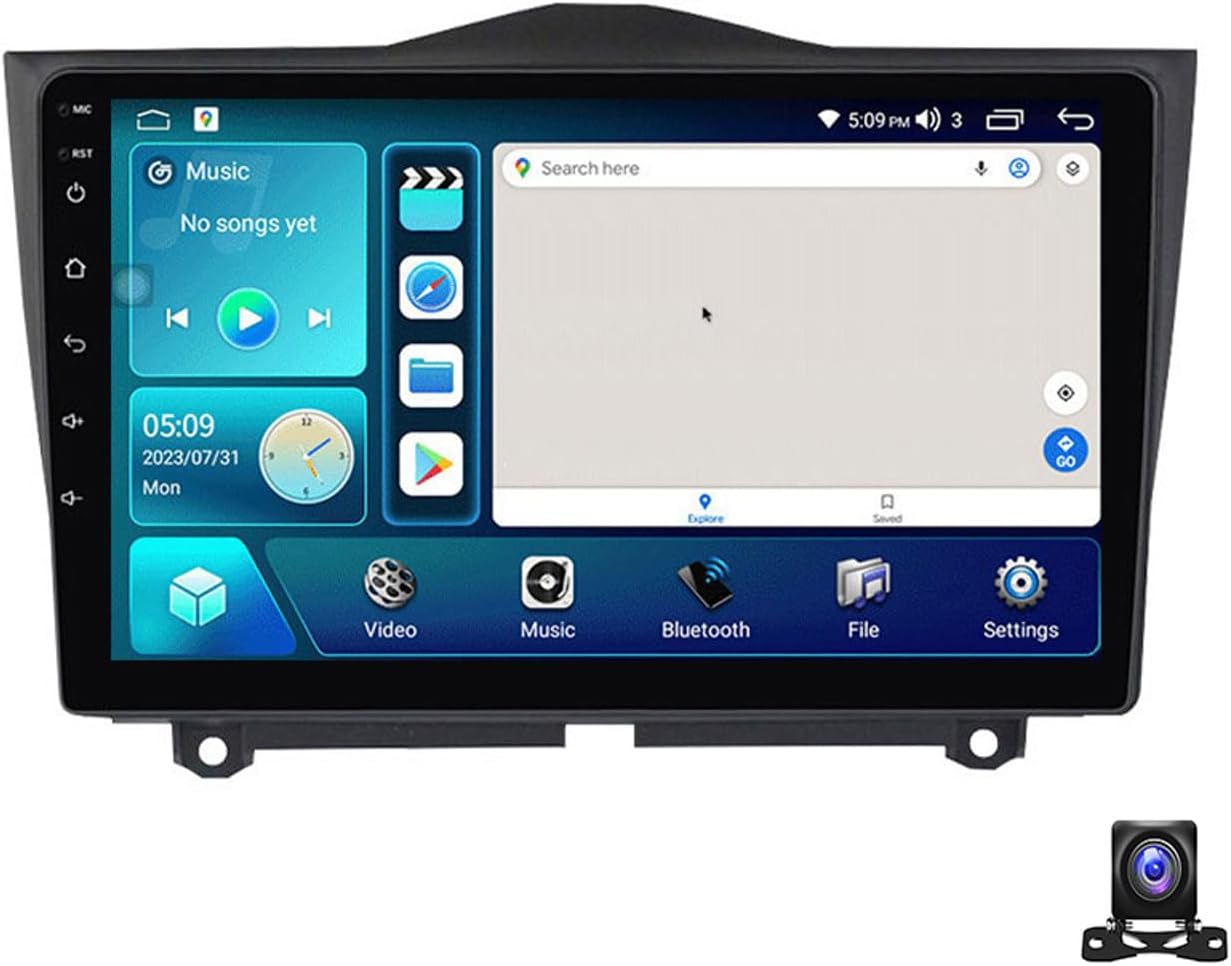
Obraz: Przód view of the EsaSam 9-inch car stereo head unit.
5. Konfiguracja i instalacja
5.1 Zalecana instalacja przez profesjonalistę
Due to the complexity of car electrical systems, professional installation is highly recommended to ensure correct wiring and to prevent damage to your vehicle or the stereo unit.
5.2 Kroki instalacji powyżejview
- Usuń oryginalną jednostkę: Carefully remove the existing car stereo and trim from your Lada Granta dashboard.
- Podłącz wiązkę przewodów: Connect the provided power adapter harness to the vehicle's wiring. Ensure all connections are secure. Refer to the wiring diagram below.
- Podłącz urządzenia peryferyjne: Connect the GPS antenna, external microphone, AHD rear view camera, and any other accessories (USB, 4G antenna) to the corresponding ports on the head unit.
- Funkcjonalność testu: Before fully securing the unit, temporarily power it on to test basic functions like power, display, and sound.
- Zainstaluj jednostkę główną: Mount the EsaSam head unit into the dashboard opening using the provided frame. Secure it firmly.
- Montaż końcowy: Zamontuj ponownie wszystkie usunięte elementy wykończeniowe.

Image: Comparison showing the car dashboard before and after the EsaSam car stereo installation.
5.3 Schemat okablowania (ogólny)
The following image illustrates typical wiring connections. Specific wire colors and functions may vary slightly. Always refer to the labels on your harness.

Obraz: Szczegółowy view of the rear connections of the car stereo, showing ports for USB, WiFi, 4G, and other inputs, along with setup steps for Carplay/Android Auto.
5.4 Pierwsze włączenie i ustawienia podstawowe
Po instalacji włącz zapłon pojazdu. Urządzenie powinno włączyć się automatycznie.
- Język: Navigate to Settings > System > Languages & input to select your preferred language.
- Data i godzina: Set the correct date and time in Settings > System > Date & time.
- Hasło fabryczne: For M100S models, the factory password is 8888. This may be required for certain system settings.
5.5 Połączenie sieciowe
Connect your unit to the internet for online navigation, app downloads, and other features.
- Wi-Fi: Go to Settings > Network & internet > Wi-Fi. Turn Wi-Fi on and select your network, then enter the password. The unit supports 5GHz Wi-Fi for faster transmission.
- 4G LTE: If your unit supports 4G (check specifications) and you have a 4G SIM card, insert it into the designated slot. The unit will automatically connect to the 4G network.
6. Instrukcja obsługi
6.1 Interfejs użytkownika i nawigacja
The unit features an intuitive Android interface. Swipe left/right on the home screen to access different apps and widgets. The UI supports automatic day and night mode switching for optimal visibility.

Image: Demonstrates Day and Night UI switching, along with interfaces for Steering Wheel Control, Bluetooth functions, and FM/AM Radio.
6.2 Nawigacja GPS
Access the Navigation app from the home screen. The unit supports global positioning systems (GPS, BDS, GLONASS) and can use both online and offline maps. For offline maps, download them via Wi-Fi first.
Image: Displays the GPS navigation interface, including real-time traffic conditions and support for split-screen view with other applications like music.
Radio 6.3 FM/AM
Tap the 'Radio' icon to access the FM/AM tuner. You can manually tune, auto-scan for stations, and save your favorite frequencies. The unit supports RDS (Radio Data System) for displaying station information.
- Zakres częstotliwości FM: 87.5-108.5MHz
- Zakres częstotliwości AM: 520-1700 XNUMX Hz
6.4 Funkcjonalność Bluetooth
Podłącz swój smartfon przez Bluetooth, aby wykonywać połączenia w trybie głośnomówiącym i przesyłać strumieniowo muzykę.
- Łączenie w pary: Go to Settings > Connected devices > Bluetooth. Turn Bluetooth on. On your phone, search for the car stereo (usually named 'CarBT' or similar) and pair.
- Rozmowy bez użycia rąk: Once paired, you can make and receive calls directly from the stereo screen. Your phone's contact list can be synchronized.
- Muzyka Bluetooth: Przesyłaj strumieniowo dźwięk z telefonu do radia samochodowego.
6.5 Bezprzewodowy CarPlay i Android Auto
Connect your smartphone for a seamless integration of phone features onto the car stereo display.
- Połączenie bezprzewodowe: Ensure your phone's Wi-Fi and Bluetooth are on. Open the 'CarPlay' or 'Android Auto' app on the stereo. Follow the on-screen instructions to connect your phone.
- Połączenie przewodowe: For Android Auto, you may also connect via a USB cable.
6.6 Odtwarzanie multimediów
Odtwarzaj dźwięk i wideo filez różnych źródeł.
- USB: Insert a USB drive into the USB port. The unit will detect media files (audio, video, images) and allow playback through the 'Music' or 'Video' apps.
- Obsługiwane formaty: Supports HD 1080P video playback and various audio formats.
6.7 Sterowanie z kierownicy (SWC)
The unit supports your vehicle's original steering wheel controls for safe operation.
- Konfiguracja: Go to Settings > Car settings > Steering Wheel Control.
- Funkcja uczenia się: Follow the on-screen instructions to assign functions to your steering wheel buttons. Press a button on the steering wheel, then select the desired function on the screen.
6.8 Tył View Kamera
W zestawie tylny AHD view camera provides a clear image when reversing.
- Po włączeniu biegu wstecznego wyświetlacz automatycznie przełączy się na kamerę view.
- Ensure the camera is properly installed and connected to the 'CAM IN' port.
6.9 Funkcja podzielonego ekranu
Możliwość jednoczesnego uruchomienia na ekranie dwóch aplikacji, np. nawigacji i odtwarzania muzyki, pozwala na usprawnienie wykonywania wielu zadań jednocześnie.
- To activate, open one app, then long-press the recent apps button or drag another app from the recent apps list to one side of the screen.
7. Funkcje zaawansowane (akcesoria opcjonalne)
The EsaSam car stereo supports various optional accessories that can be purchased separately to expand its functionality.

Image: Illustrates optional features such as ADAS DVR, OBD II diagnostic tool, and TPMS (Tire Pressure Monitoring System) integration.
7.1 ADAS DVR (Advanced Driver-Assistance Systems Digital Video Recorder)
Connect an optional ADAS DVR for features like front vehicle distance prediction, front vehicle anti-collision warning, and lane deviation warning. This requires a compatible DVR unit.
7.2 OBD II (On-Board Diagnostics)
Connect an optional OBD II adapter to diagnose your car's status, view real-time data, and check fault codes. This requires a compatible OBD II adapter.
7.3 TPMS (system monitorowania ciśnienia w oponach)
Integrate an optional TPMS to monitor tire pressure and temperature in real-time. This requires a compatible TPMS receiver and sensors.
7.4 DSP (Cyfrowy Procesor Dźwięku)
The unit includes a Digital Sound Processor, allowing for advanced audio customization. Access the DSP settings in the system menu to adjust equalizer, sound effects (pop, rock, jazz), and other audio parameters for an optimized listening experience.
8. Konserwacja
- Czyszczenie: Do czyszczenia ekranu i urządzenia używaj miękkiej, suchej ściereczki. Unikaj środków czyszczących o właściwościach ściernych i rozpuszczalników.
- Aktualizacje oprogramowania: Okresowo sprawdzaj dostępność aktualizacji oprogramowania za pomocą ustawień systemowych lub strony producenta. webwitrynę, aby zapewnić optymalną wydajność i dostęp do nowych funkcji.
- Unikaj przegrzania: Ensure proper ventilation around the unit. If a cooling fan is present, ensure it is not obstructed.
9. Rozwiązywanie Problemów
Jeśli napotkasz problemy, zapoznaj się z poniższymi typowymi problemami i rozwiązaniami:
| Problem | Możliwa przyczyna | Rozwiązanie |
|---|---|---|
| Urządzenie nie włącza się. | Nieprawidłowe okablowanie, przepalony bezpiecznik, problem z zasilaniem. | Check power connections and vehicle fuses. Consult a professional if necessary. |
| Brak dźwięku. | Speaker wiring issue, volume too low, mute activated. | Check speaker connections, increase volume, ensure unit is not muted. |
| Utrata lub niedokładny sygnał GPS. | Antena GPS jest zablokowana lub odłączona, słaby zasięg satelitarny. | Upewnij się, że antena GPS jest prawidłowo zainstalowana i ma zapewnioną przejrzystość. view nieba. Sprawdź połączenie antenowe. |
| Brak połączenia Bluetooth. | Bluetooth wyłączony w urządzeniu lub telefonie, nieprawidłowy proces parowania. | Upewnij się, że Bluetooth jest włączony na obu urządzeniach. Usuń poprzednie sparowania i sparuj ponownie. |
| Tył view kamera nie wyświetla obrazu. | Camera wiring issue, camera faulty, reverse trigger not connected. | Check camera power and video connections. Ensure reverse trigger wire is correctly connected. |
W przypadku problemów nieujętych w tym miejscu lub gdy podane rozwiązania nie rozwiążą problemu, skontaktuj się z obsługą klienta.
10. Specyfikacje
The following specifications apply to the 4 core m100s 1g+32g model:
- Model: 4 core m100s 1g+32g
- System operacyjny: Android 12
- Edytor: 4-rdzeniowy
- BARAN: 1 GB DDR3
- ROM: 32 GB
- Rozmiar ekranu: 9 cali
- Rozdzielczość ekranu: 1024*600
- Typ ekranu: IPS Capacitive Multi-Touch
- Wersja Bluetooth: 4.0
- Wi-Fi: Built-in (supports 5GHz)
- Tuner radiowy: FM/AM z RDS
- Częstotliwość FM: 87.5-108.5MHz
- Częstotliwość AM: 520-1700 XNUMX Hz
- Wyjście wideo: Support HD 1080P
- Wyjście audio: AUX-IN, Subwoofer output
- Zgodność: Lada Granta 2018-2019
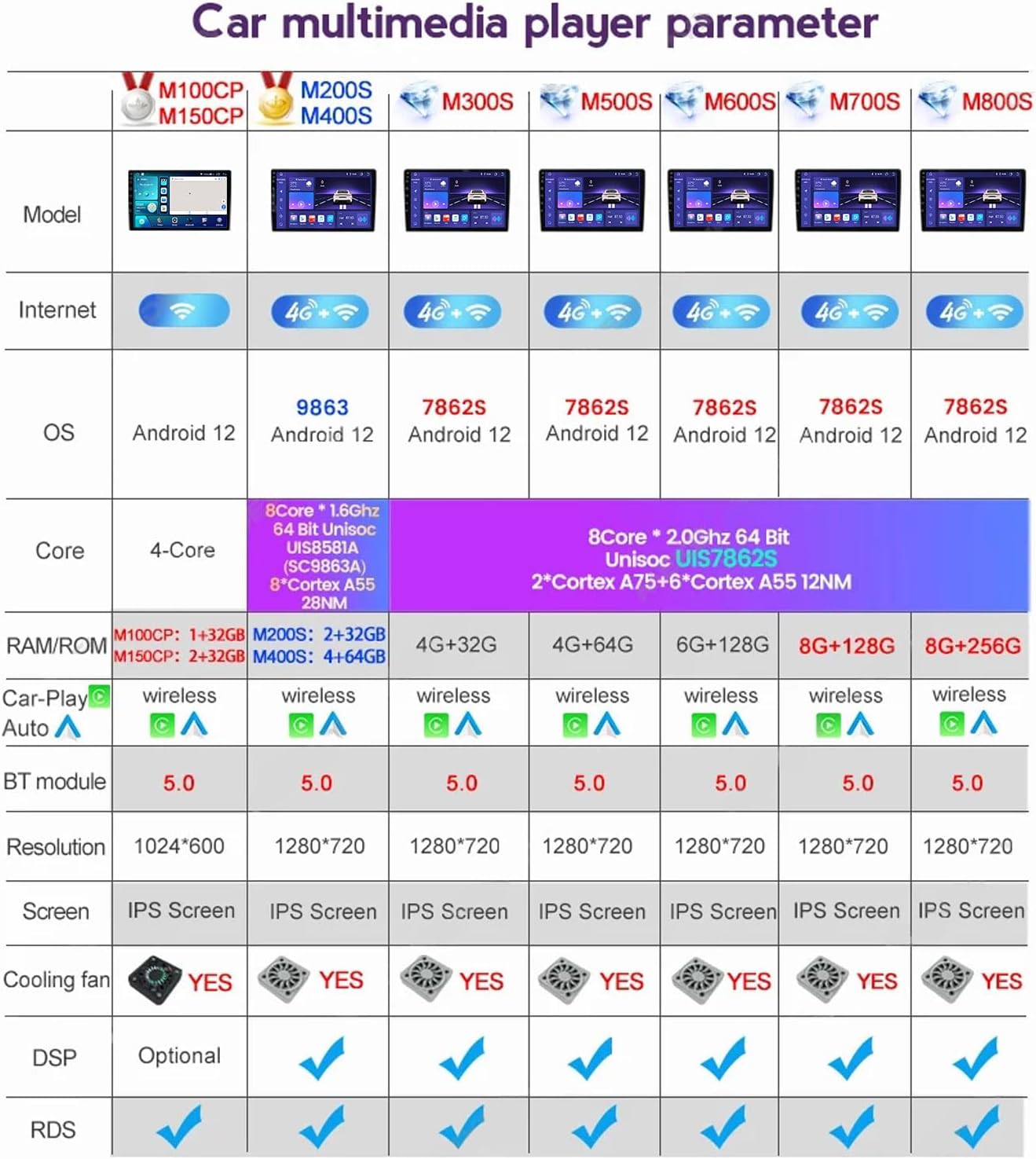
Image: Parameter table detailing specifications for different EsaSam car multimedia player models, including core count, RAM/ROM, OS, and features.
11. Gwarancja i wsparcie
11.1 Informacje o gwarancji
This product is covered by a standard manufacturer's warranty. Please refer to your purchase documentation or contact the seller for specific warranty terms and duration. The warranty typically covers defects in materials and workmanship under normal use.
11.2 Obsługa klienta
If you require technical assistance, have questions about installation, or encounter any issues not covered in this manual, please contact EsaSam customer support through the retailer where you purchased the product. Provide your model number (4 core m100s 1g+32g) and a detailed description of the issue for efficient support.