
1. Wprowadzenie
This manual provides essential information for the safe and efficient operation of your Sharp GX-BT190 Portable Bluetooth Speaker. Please read it thoroughly before using the device and retain it for future reference.
2. Informacje dotyczące bezpieczeństwa
- Nie wystawiaj głośnika na działanie ekstremalnych temperatur, bezpośredniego światła słonecznego i wysokiej wilgotności.
- Do not disassemble, repair, or modify the speaker. This may void the warranty and pose safety risks.
- Ensure the charging port cover is securely closed when using the speaker near water to maintain its IP67 rating.
- Należy używać wyłącznie dołączonego kabla ładującego lub certyfikowanego odpowiednika.
- Trzymaj głośnik z dala od dzieci i zwierząt domowych.
- Unikaj słuchania przy wysokim poziomie głośności przez dłuższy czas, aby zapobiec uszkodzeniu słuchu.
3. Zawartość opakowania
- Sharp GX-BT190 Portable Bluetooth Speaker
- Kabel ładujący USB
- Falrep
- Instrukcja obsługi
4. Koniec produktuview

Przód view of the Sharp GX-BT190 speaker, showing the central speaker grille with the Sharp logo and the LED light ring.

Strona view of the Sharp GX-BT190 speaker, highlighting the textured speaker grille and the integrated lanyard.
Tył view of the Sharp GX-BT190 speaker, showing the control buttons and the sealed charging port cover.
Elementy sterujące i wskaźniki:
- Przycisk zasilania: Naciśnij i przytrzymaj, aby włączyć/wyłączyć.
- Przycisk zwiększania głośności / następnego utworu (+): Krótkie naciśnięcie zwiększa głośność, długie naciśnięcie przełącza na następny utwór.
- Przycisk zmniejszania głośności / poprzedniego utworu (-): Krótkie naciśnięcie powoduje zmniejszenie głośności, długie naciśnięcie powoduje przejście do poprzedniego utworu.
- Play/Pause / Call Button (►||): Short press to play/pause, answer/end calls. Long press to reject calls.
- Mode / Light Button (M): Short press to cycle through LED light modes. Long press to turn off LED lights.
- Port ładowania USB-C: For charging the speaker. Ensure the rubber cover is sealed when not charging.
- Wskaźnik LED: Wyświetla stan ładowania i parowania Bluetooth.
5. Konfiguracja
5.1 Ładowanie głośnika
- Open the rubber cover on the back of the speaker to access the USB-C charging port.
- Connect the provided USB charging cable to the speaker's USB-C port.
- Podłącz drugi koniec kabla USB do zasilacza USB (nie ma go w zestawie) lub do portu USB komputera.
- Podczas ładowania wskaźnik LED będzie świecić, a po pełnym naładowaniu wyłączy się.
- Close the rubber cover securely after charging to maintain the speaker's waterproof rating.
5.2 Włączanie/wyłączanie
- Włączanie: Naciśnij i przytrzymaj przycisk zasilania przez około 3 sekundy. Usłyszysz sygnał dźwiękowy, a dioda LED zacznie migać.
- Aby wyłączyć: Naciśnij i przytrzymaj przycisk zasilania przez około 3 sekundy. Usłyszysz sygnał dźwiękowy, a dioda LED zgaśnie.
5.3 parowanie Bluetooth
- Ensure the speaker is powered on and the LED indicator is flashing, indicating it is in pairing mode.
- Na swoim urządzeniu mobilnym włącz Bluetooth i wyszukaj dostępne urządzenia.
- Select "GX-BT190" from the list of devices.
- Po sparowaniu dioda LED przestanie migać i zacznie świecić światłem ciągłym, a Ty usłyszysz dźwięk potwierdzający.
- Głośnik automatycznie połączy się ponownie z ostatnio sparowanym urządzeniem po włączeniu, jeżeli urządzenie znajduje się w zasięgu, a Bluetooth jest włączony.
5.4 Prawdziwe bezprzewodowe parowanie stereo (TWS)
TWS allows you to pair two GX-BT190 speakers together for a stereo audio experience.

Two Sharp GX-BT190 speakers, one red and one blue, positioned together, illustrating the True Wireless Stereo (TWS) pairing feature.
- Ensure both GX-BT190 speakers are powered on and not connected to any Bluetooth device.
- Na jednym z głośników (będzie to głośnik główny) naciśnij dwukrotnie przycisk zasilania. Głośnik przejdzie w tryb parowania TWS.
- Oba głośniki automatycznie wyszukają się i połączą. Po pomyślnym sparowaniu TWS usłyszysz dźwięk potwierdzenia.
- Once TWS paired, connect your mobile device to the primary speaker via Bluetooth as described in section 5.3.
- To disconnect TWS, double-press the Power button on either speaker.
6. Obsługa
6.1 Odtwarzanie dźwięku
- Odtwórz/Pauza: Krótko naciśnij przycisk odtwarzania/pauzy.
- Zwiększenie głośności: Naciśnij krótko przycisk „+”.
- Ściszanie: Naciśnij krótko przycisk '-'.
- Następny utwór: Naciśnij i przytrzymaj przycisk „+”.
- Poprzedni utwór: Naciśnij i przytrzymaj przycisk '-'.
6.2 Rozmowy w trybie głośnomówiącym
- Odbierz połączenie: Naciśnij krótko przycisk Odtwórz/Pauza, gdy usłyszysz połączenie przychodzące.
- Zakończ połączenie: Naciśnij krótko przycisk Odtwórz/Pauza podczas połączenia.
- Odrzuć połączenie: Naciśnij i przytrzymaj przycisk Odtwórz/Pauza, gdy usłyszysz połączenie przychodzące.
6.3 LED Mood Lights
- Short press the 'M' (Mode/Light) button to cycle through the 6 available LED mood light modes.
- Long press the 'M' button to turn off the LED lights.
6.4 Wodoodporność i pyłoszczelność (IP67)

The Sharp GX-BT190 speaker partially submerged in water, demonstrating its IP67 waterproof and dustproof capabilities.
The GX-BT190 speaker is rated IP67, meaning it is protected from dust ingress and can withstand immersion in water up to 1 meter for 30 minutes. To ensure this protection:
- Always ensure the rubber cover for the charging port is fully and securely sealed before exposing the speaker to water or dust.
- Nie zanurzaj celowo głośnika na dłuższy czas lub na głębokość większą niż zalecana.
- After exposure to water, wipe the speaker dry with a soft cloth before charging.
7. Konserwacja
7.1 Czyszczenie
- Przetrzyj głośnik miękką, damp płótno.
- Nie należy używać środków czyszczących o właściwościach ściernych, alkoholu ani rozpuszczalników chemicznych.
- Ensure the speaker is dry before charging or storing.
7.2 Przechowywanie
- Przechowuj głośnik w chłodnym, suchym miejscu, z dala od bezpośredniego światła słonecznego i ekstremalnych temperatur.
- Jeśli akumulator będzie przechowywany przez dłuższy czas, należy go okresowo ładować (np. co 3 miesiące), aby zachować jego sprawność.
8. Rozwiązywanie Problemów
| Problem | Rozwiązanie |
|---|---|
| Głośnik nie włącza się. | Upewnij się, że bateria jest naładowana. Podłącz głośnik do źródła zasilania za pomocą kabla USB. |
| Nie można sparować przez Bluetooth. | Ensure the speaker is in pairing mode (LED flashing). Turn off and on Bluetooth on your device. Move the speaker closer to your device. Clear previous Bluetooth connections on your device. |
| Brak dźwięku lub niski poziom głośności. | Increase the volume on both the speaker and your connected device. Ensure the speaker is properly paired. |
| Niska jakość dźwięku. | Move the speaker closer to your device. Ensure there are no obstructions between the speaker and your device. Try playing a different audio source. |
| Parowanie TWS nie powiodło się. | Ensure both speakers are GX-BT190 models and are not connected to any other Bluetooth device. Try powering both speakers off and on, then re-attempt TWS pairing. |
9. Specyfikacje

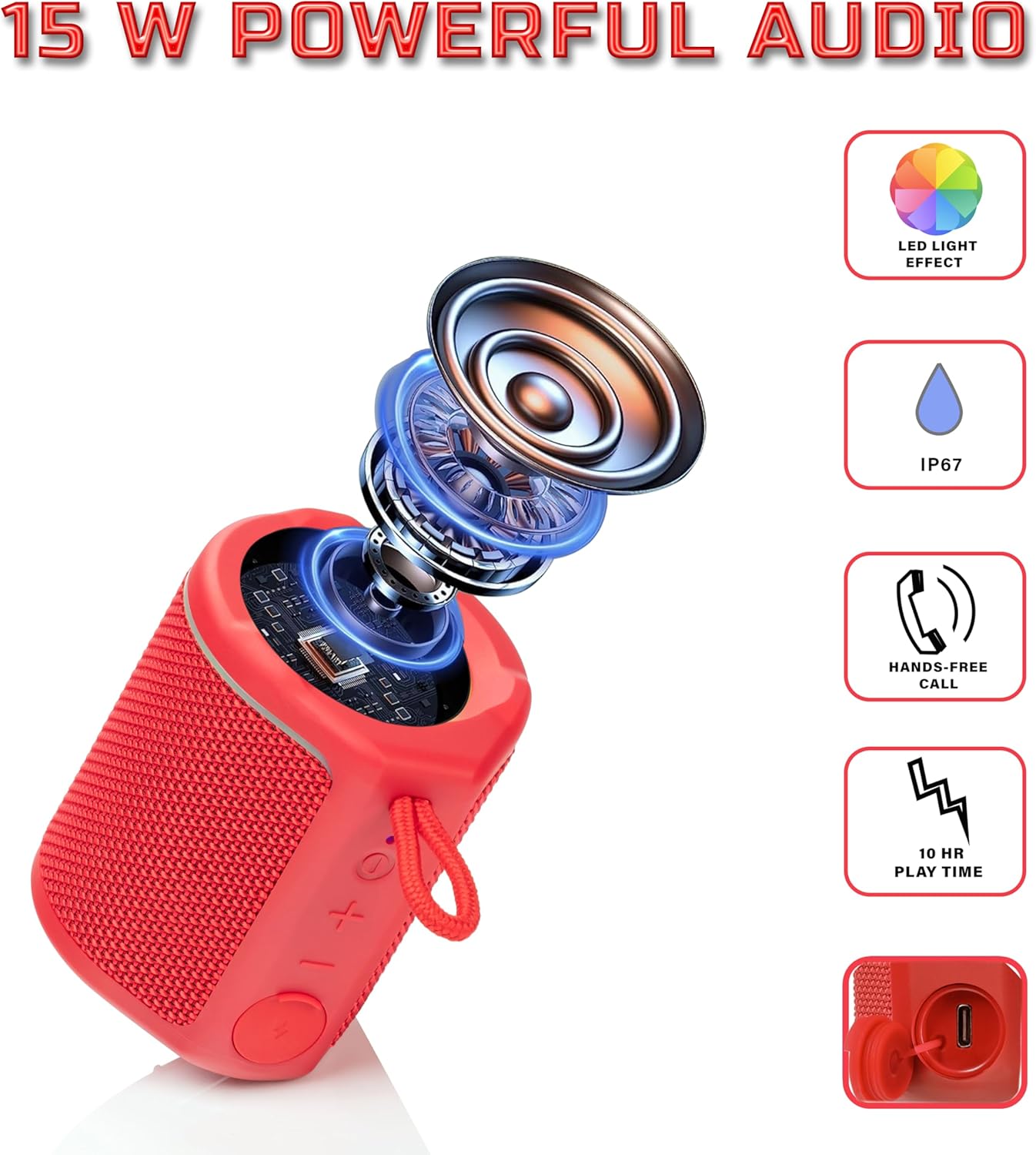
Diagram illustrating the internal components of the Sharp GX-BT190 speaker, including the speaker driver, and highlighting features like LED light effect, IP67 rating, hands-free call function, and battery life.
| Funkcja | Szczegół |
|---|---|
| Numer modelu | GX-BT190 |
| Technologia łączności | Bluetooth |
| Maksymalna moc wyjściowa głośnika | 10 watów |
| Stopień wodoodporności | IP67 |
| Żywotność baterii | Do 15 godzin |
| Typ baterii | 1 litowo-jonowy (w zestawie) |
| Pojemność baterii | 1200 mAh |
| Wymiary produktu (Gł. x Szer. x Wys.) | 7.5 x 7.5 x 7.5 cm (w przybliżeniu) |
| Waga przedmiotu | 226.8 g (8 uncji) |
| Zasięg bezprzewodowej | Do 33 stóp |
| Dodatkowe funkcje | LED Light, True Wireless Stereo (TWS), Hands-Free Calling |
10. Gwarancja
The Sharp GX-BT190 Portable Bluetooth Speaker comes with a 1-Year Limited Warranty from the date of purchase. This warranty covers manufacturing defects under normal use. It does not cover damage caused by misuse, accidents, unauthorized modifications, or normal wear and tear. Please retain your proof of purchase for warranty claims.
11. Wsparcie
For technical assistance, warranty inquiries, or further information regarding your Sharp GX-BT190 speaker, please contact Sharp Inc. customer support:
- Kontakt do producenta: Sharp Inc
- Telefon: 1-800-BE-SHARP