
Bonsaii L418-C
Instrukcja obsługi laminatora termicznego Bonsaii L418-C 9 cali
Model: L418-C
Wstęp
This manual provides detailed instructions for the safe and efficient operation of your Bonsaii L418-C 9-Inch Thermal Laminator. Please read this manual thoroughly before use and retain it for future reference.
Główne cechy
- Never Jam Technology: Patented anti-jam technology ensures smooth laminating performance.
- Wszechstronny i przenośny: Accommodates A4 paper and is compatible with 3-5 mil pouches. Compact dimensions (13.07"L x 4.41"W x 2.44"H) make it suitable for various environments.
- Szybko i sprawnie: Heats up in approximately 3 minutes with a laminating speed of ≥270mm/min, producing high-quality results free from wrinkles, bubbles, and curling.
- Wielofunkcyjny: Ideal for teachers, parents, and businesses for protecting documents and photos in home, classroom, or office settings.
Ważne instrukcje bezpieczeństwa
- Przed użyciem należy przeczytać wszystkie instrukcje.
- Keep the appliance away from water or moisture.
- Nie używaj, jeśli przewód zasilający lub wtyczka są uszkodzone.
- Podczas użytkowania zapewnić odpowiednią wentylację.
- Przechowywać w miejscu niedostępnym dla dzieci.
- Odłączaj, gdy nie jest używany lub przed czyszczeniem.
- Use only recommended laminating pouches.
- Do not attempt to laminate items thicker than specified pouch thickness.
Zawartość opakowania
Your Bonsaii L418-C Thermal Laminator package should include:
- Bonsaii L418-C Thermal Laminator
- Laminating Pouches (A4 and A5 sizes, 30 pieces)
- Trymer do papieru
- Zaokrąglacz narożników
- Dziurkacz
Produkt ponadview
Familiarize yourself with the components of your laminator for optimal use.

Koszty ogólne view of the black Bonsaii L418-C thermal laminator. It shows a document being fed into the machine, with several laminating pouches and a paper trimmer visible next to it. The control panel with 'READY' and 'POWER' indicators is on the right.
Elementy sterujące i wskaźniki
- Przycisk zasilania: Turns the laminator on/off.
- 3mil/5mil/Photo Switch: Selects the desired pouch thickness setting.
- Kontrolka gotowości: Illuminates green when the laminator has reached the optimal temperature for laminating.
- Wskaźnik zasilania: Illuminates red when the laminator is powered on.
- Insert Sealed Edge: Indicates the correct orientation for feeding pouches.
Organizować coś
- Place the laminator on a flat, stable surface with adequate space for feeding and exiting documents.
- Upewnij się, że wyłącznik zasilania jest w pozycji „WYŁ”.
- Podłącz przewód zasilający do standardowego gniazdka elektrycznego.
- Turn the power switch to the "ON" position. The red Power indicator light will illuminate.
- Select the desired pouch thickness (3mil or 5mil/Photo) using the switch.
- Allow the laminator to preheat. The green "READY" indicator light will illuminate when the machine is ready (approximately 3-5 minutes).
Instrukcja obsługi
Laminating a Document
- Prepare your document: Place the item to be laminated inside a laminating pouch, ensuring it is centered and there is a small margin around the edges.
- Select the correct setting: Ensure the laminator is set to the appropriate pouch thickness (3mil for standard paper, 5mil for thicker items or photos).
- Insert the pouch: With the sealed edge of the pouch first, carefully insert it straight into the laminator's entry slot.
- Allow the machine to feed: The laminator will automatically pull the pouch through. Do not force or pull the pouch.
- Retrieve the laminated item: Once the pouch exits the rear of the machine, allow it to cool on a flat surface before handling.
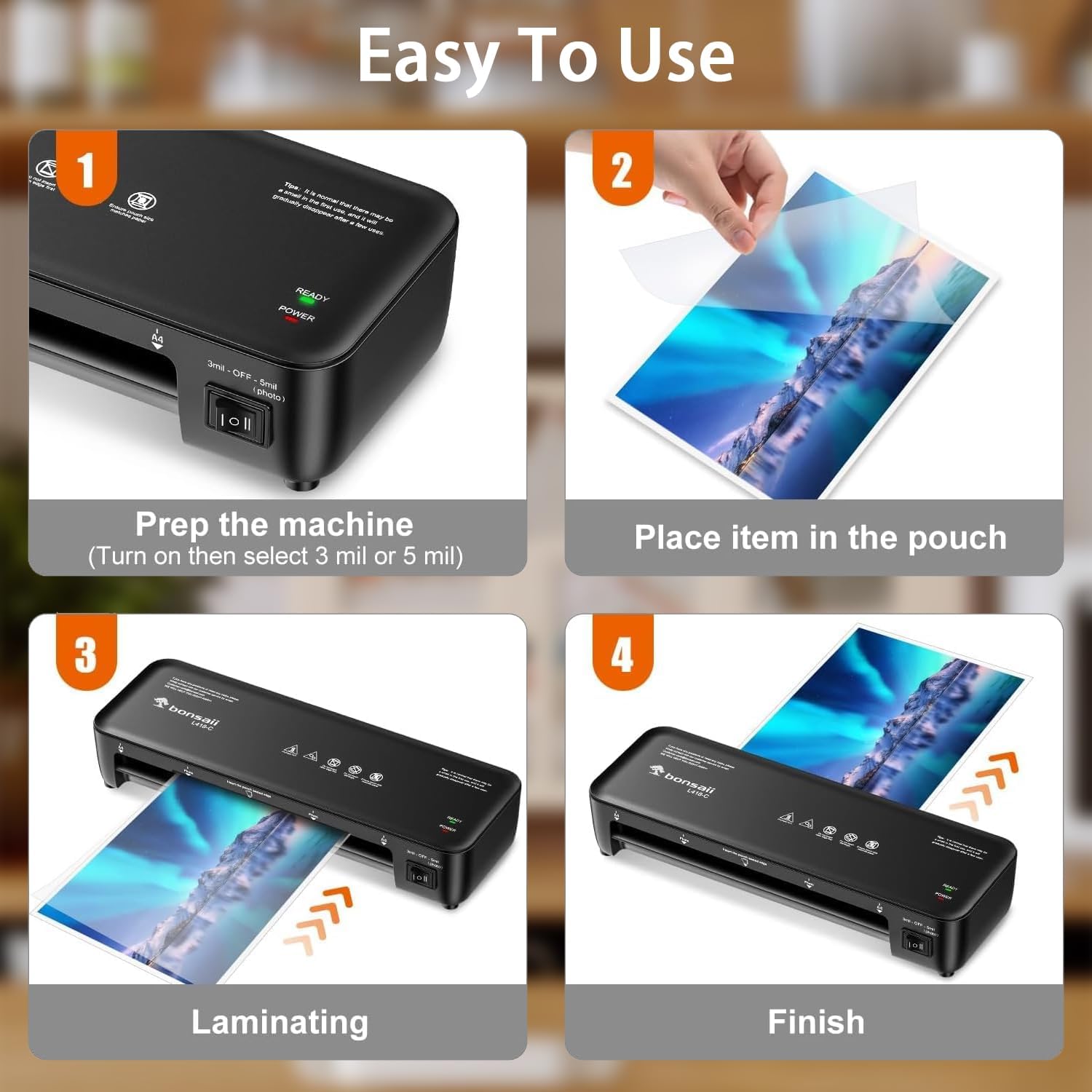
A visual guide showing four steps for laminating: 1. Prep the machine by turning it on and selecting 3mil or 5mil. 2. Place the item in the pouch. 3. Insert the pouch into the laminator for processing. 4. Retrieve the finished laminated item.
Using the Anti-Jam Feature
The Bonsaii L418-C features "Never Jam Technology" to prevent paper jams. In the rare event of a jam, the openable cover allows for easy access to clear the rollers.
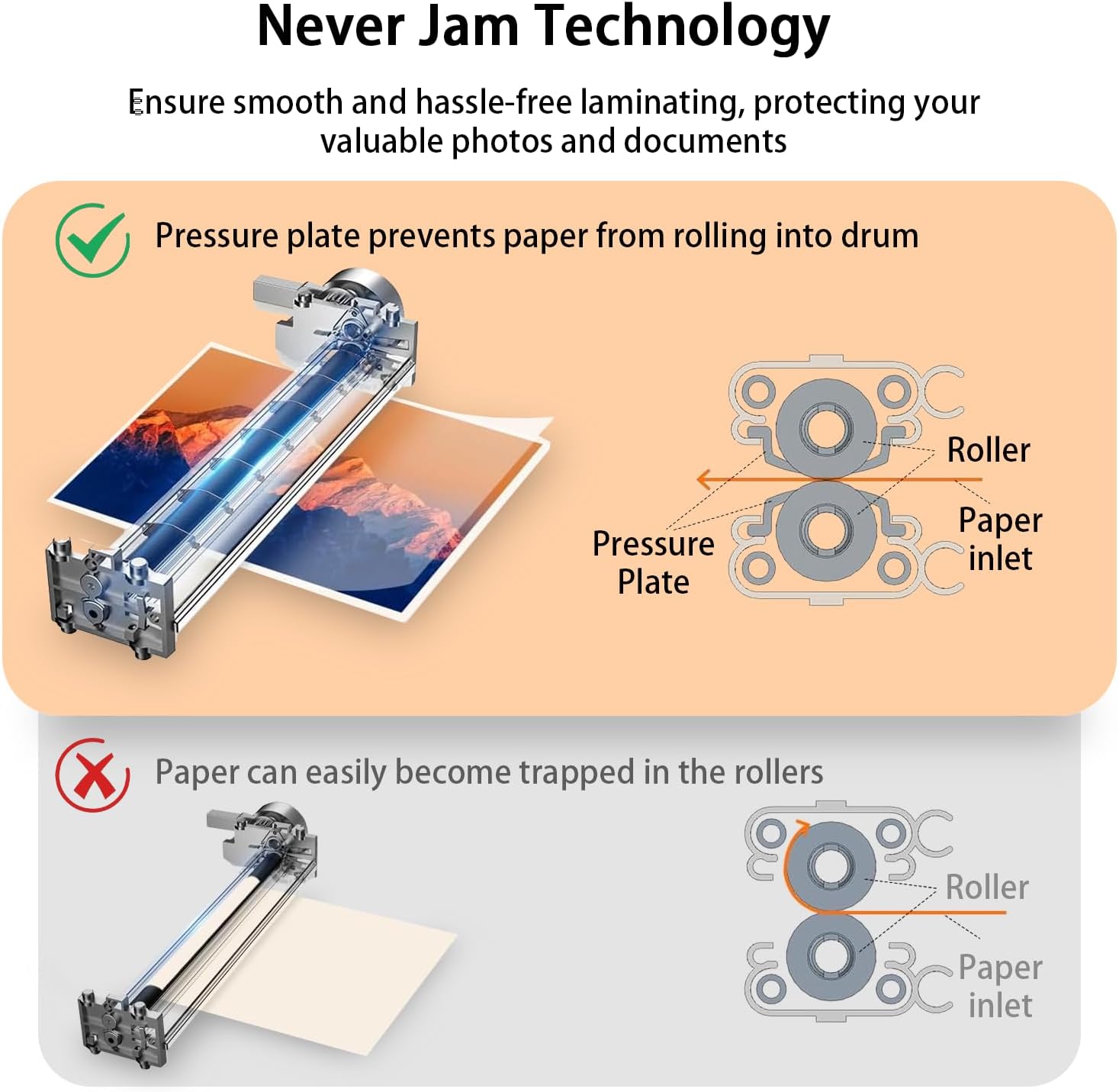
A diagram showing how the laminator's pressure plate prevents paper from rolling into the drum, contrasting it with a scenario where paper can easily become trapped in rollers without this technology.
Korzystanie z akcesoriów
The included paper trimmer, corner rounder, and hole punch can be used to customize your laminated documents.
Konserwacja
- Czyszczenie: Ensure the laminator is unplugged and cool before cleaning. Wipe the exterior with a soft, dry cloth. Do not use abrasive cleaners or solvents.
- Czyszczenie wałków: Periodically run a cleaning sheet (not included) through the laminator to remove adhesive residue from the rollers.
- Składowanie: Przechowuj laminator w chłodnym i suchym miejscu, gdy nie jest używany.
Rozwiązywanie problemów
| Problem | Możliwa przyczyna | Rozwiązanie |
|---|---|---|
| Laminator się nie włącza | Not plugged in, power switch off | Check power connection, ensure switch is ON |
| Green "READY" light not illuminating | Niewystarczający czas nagrzewania | Odczekaj 3–5 minut na podgrzanie |
| Zacięcie papieru | Incorrect insertion, wrong pouch size | Use the anti-jam feature (if available), open cover to clear |
| Bubbles or wrinkles | Incorrect temperature setting, old pouches | Ensure correct mil setting, use fresh pouches |
| Slight odor on first use | Normal manufacturing residue | Odor will dissipate after a few uses |
Specyfikacje
| Funkcja | Szczegół |
|---|---|
| Model | L418-C |
| Marka | Bonsai |
| Rozmiar arkusza | 9 Inches (A4 compatible) |
| Grubość torebki | 3 mil, 5 mil |
| Czas rozgrzewki | <4 minut |
| Prędkość laminowania | ≥270mm/min |
| Wymiary produktu | 13.07" dł. x 4.41" szer. x 2.44" wys. |
| Waga przedmiotu | 2.03 funtów |
| Kolor | Czarny |
Gwarancja i wsparcie
Bonsaii provides a 1-year warranty for this product. For any questions, troubleshooting assistance, or warranty claims, please contact Bonsaii customer service. Refer to the product packaging or official Bonsaii webstrona dla danych kontaktowych.