
IXITAB FS8233Pro
FS8233Pro Touch Smart Digital Multimeter User Manual
Model: FS8233Pro | Brand: IXITAB
1. Wprowadzenie
The IXITAB FS8233Pro is an advanced, automatic smart digital multimeter designed for professional electricians and DIY enthusiasts. Featuring an intelligent sensing touch screen, this device offers convenient operation and clear display for various electrical measurements. Its rechargeable lithium battery ensures long-lasting performance without the need for frequent battery replacements. The FS8233Pro is equipped with intelligent anti-burning fuse protection and a durable silicone protective case, enhancing both safety and hardware longevity. This manual provides comprehensive instructions for safe and effective use of your multimeter.
2. Informacje dotyczące bezpieczeństwa
Always adhere to safety precautions when operating electrical testing equipment. Failure to do so may result in injury or damage to the device.
- Nie należy przekraczać maksymalnych wartości wejściowych określonych dla każdego zakresu pomiarowego.
- Przed dokonaniem pomiarów należy upewnić się, że przewody pomiarowe są w dobrym stanie i prawidłowo podłączone.
- Avoid using the multimeter in wet environments or with wet hands.
- Nie próbuj mierzyć objtage or current on circuits exceeding the device's rated capacity.
- Zawsze odłączaj zasilanie obwodu przed dokonaniem pomiaru rezystancji, pojemności lub ciągłości.
- Należy zachować ostrożność podczas pracy z obwodami pod napięciem.
- Refer to local electrical codes and safety standards.
3. Zawartość opakowania
Sprawdź, czy w przesyłce znajdują się wszystkie elementy:
- 1 x FS8233Pro Digital Multimeter
- 1 x Instrukcja obsługi
- 1 x kabel ładujący (USB)
- 1 x para przewodów pomiarowych

Image: The FS8233Pro multimeter shown with its standard accessories, including the red and black test leads and a USB charging cable.
4. Koniec produktuview
The FS8233Pro features a large, clear LCD display and intuitive touch controls for ease of use.

Obraz: Zbliżenie view of the FS8233Pro's front panel, highlighting its large digital display and touch-sensitive buttons for various functions like HOLD, AUTO, NCV, Live, and input jacks.
4.1 kluczowych cech:
- Intelligent Sensing Touch Screen: For convenient operation and clear display.
- Akumulator litowy: Long life, USB charging.
- Automatyczne wykrywanie: Eliminates the need for manual gear shifting.
- Intelligent Anti-Burning Fuse: Enhanced safety protection.
- Silikonowe etui ochronne: Prevents shock and protects hardware.
- Podświetlenie: Umożliwia wyczyszczenie vieww ciemnych warunkach.
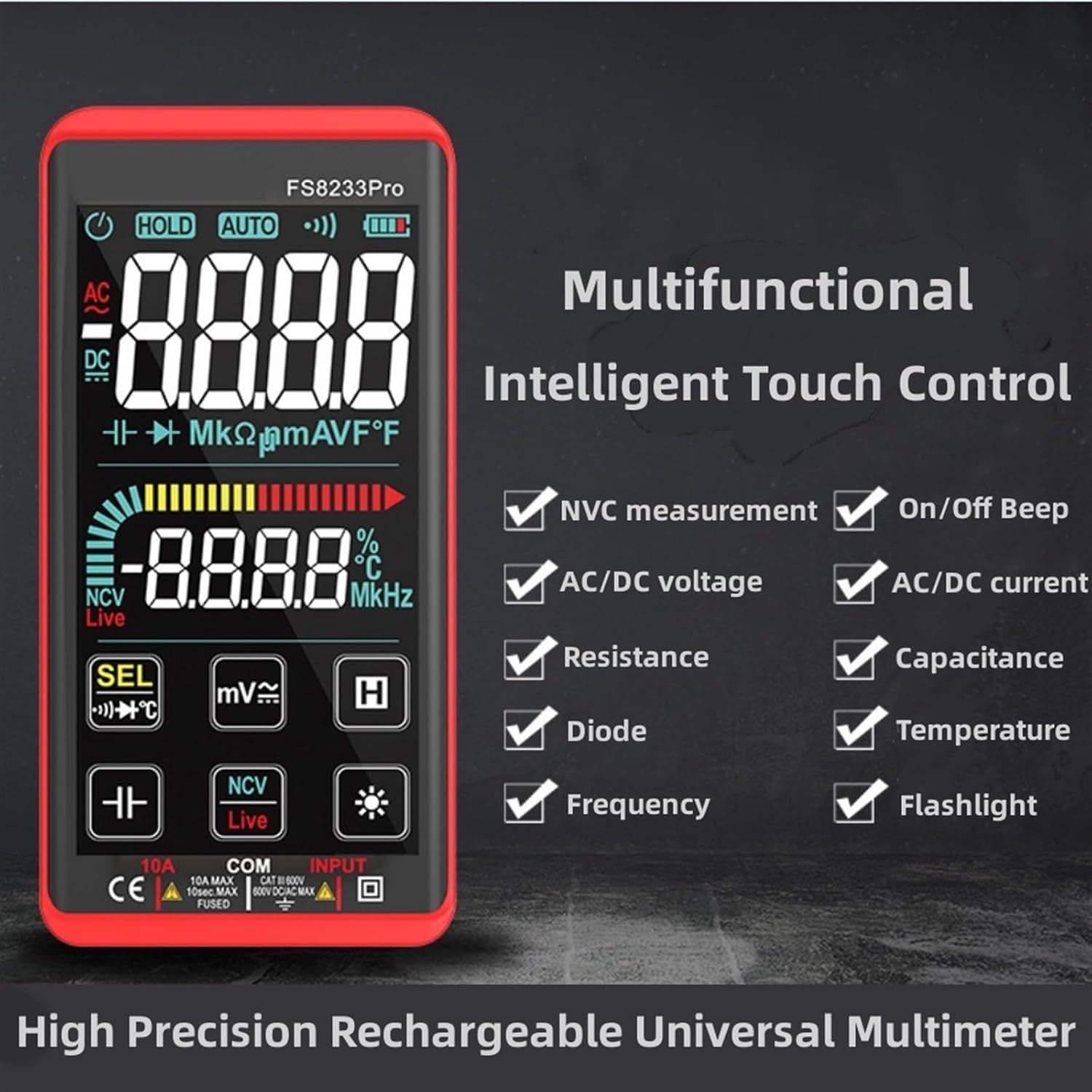
Image: A promotional image showcasing the multifunctional intelligent touch control features of the FS8233Pro, including NVC measurement, AC/DC voltage, resistance, diode, frequency, on/off beep, AC/DC current, capacitance, temperature, and flashlight.
5. Konfiguracja
5.1 Pierwsze ładowanie
Before first use, fully charge the multimeter's internal lithium battery. Connect the provided USB charging cable to the multimeter's charging port and to a standard USB power adapter (not included) or a computer USB port. The battery indicator on the display will show charging status.
5.2 Podłączanie przewodów pomiarowych
Insert the red test lead into the "INPUT" jack and the black test lead into the "COM" (common) jack. Ensure they are securely inserted.
6. Instrukcja obsługi
The FS8233Pro features automatic detection, simplifying measurement selection. Simply turn on the device and it will automatically identify the measurement type for most common functions.

Image: A hand interacting with the touch-sensitive display of the FS8233Pro multimeter, demonstrating its "Intelligent Movement Touch Sensing" for sensitive and fast measurements.
6.1 Włączanie/wyłączanie zasilania
Press the power button (usually indicated by a power symbol) to turn the multimeter on or off. The device will automatically shut down after approximately 15 minutes of inactivity to conserve battery life.
6.2 Objętość ACtage (ACV) Measurement
- Podłącz przewody pomiarowe równolegle do napięcia ACtagŹródło.
- The multimeter will automatically detect AC voltage.
- Range: 0.5V-750V (Accuracy: 1%+5)
6.3 Objętość DCtage (DCV) Measurement
- Podłącz przewody pomiarowe równolegle do napięcia stałegotagźródło, obserwując biegunowość.
- The multimeter will automatically detect DC voltage.
- Range: 0.5V-1000V (Accuracy: 0.5%+3)
6.4 Pomiar rezystancji
- Przed pomiarem rezystancji należy upewnić się, że obwód jest odłączony od napięcia.
- Podłącz przewody pomiarowe do mierzonego elementu.
- Range: 0.1Ω-99.999MΩ (Accuracy: 1%+3)
6.5 Pomiar częstotliwości
- Podłącz przewody pomiarowe do źródła sygnału.
- Range: 40Hz-10000Hz (Accuracy: 0.5%+3)
6.6 Pomiar pojemności
- Przed pomiarem należy upewnić się, że kondensator jest rozładowany.
- Podłącz przewody pomiarowe do zacisków kondensatora.
- Range: 10nF-60000μF (Accuracy: 4.5%+5)
6.7 Pomiar temperatury
- Use the appropriate temperature probe (if included, or purchased separately) and connect it to the multimeter.
- Range: -40°C to 1000°C (Accuracy: 2%+5)
6.8 On & Off Beep (Continuity)
- Podłącz przewody pomiarowe do obwodu lub elementu.
- If the resistance of the tested circuit is less than 50Ω, the auxiliary buzzer will sound, indicating continuity.
6.9 Test diody
- Podłącz przewody pomiarowe do diody.
- The display will show the approximate diode forward voltagwartość.
6.10 NCV (objętość bezkontaktowa)tage) Wykrywanie
- Wybierz funkcję NCV.
- Zbliż górną część multimetru do objętości prądu przemiennegotagŹródło.
- There are three alarm modes (visual and audible) according to the detected voltagsiła.
6.11 Live Line Identification
- Select the Live function.
- Insert the red test lead into the suspected live line.
- If it is a live line, "Live" will appear on the screen, and an alarm sound will be emitted.
7. Konserwacja
7.1 Czyszczenie
Wipe the multimeter's casing z reklamąamp cloth. Do not use abrasive cleaners or solvents. Ensure the device is off and disconnected from any power source before cleaning.
7.2 Przechowywanie
Store the multimeter in a cool, dry place, away from direct sunlight and extreme temperatures. If storing for extended periods, ensure the battery is partially charged (around 50%) to prolong its lifespan.
7.3 Pielęgnacja baterii
The built-in lithium battery is designed for long life. Avoid fully discharging the battery frequently. Recharge as needed. If the device will not be used for a long time, charge it every 3 months to maintain battery health.
8. Rozwiązywanie Problemów
| Problem | Możliwa przyczyna | Rozwiązanie |
|---|---|---|
| Multimetr nie włącza się. | Bateria jest rozładowana. | Naładuj multimetr za pomocą dołączonego kabla USB. |
| Niedokładne odczyty. | Incorrect measurement mode; Damaged test leads; Environmental interference. | Ensure correct mode is selected (though often automatic); Check test leads for damage; Move away from strong electromagnetic fields. |
| Brak sygnału dźwiękowego. | Resistance is too high; Test leads not making good contact. | Ensure resistance is below 50Ω; Re-seat test leads firmly. |
| Automatyczne wyłączanie następuje zbyt szybko. | Inactivity timer. | The device is designed to shut down after approximately 15 minutes of inactivity. This is normal operation. |
9. Specyfikacje
| Parametr | Zakres / Wartość | Dokładność |
|---|---|---|
| AC Objętośćtage (ACV) | 0.5 V-750 V | (1% + 5) |
| Objętość DCtage (prąd stały) | 0.5 V-1000 V | (0.5% + 3) |
| Opór | 0.1Ω-99.999MΩ | (1% + 3) |
| Częstotliwość | 40Hz-10000Hz | (0.5% + 3) |
| Pojemność | 10nF-60000μF | (4.5% + 5) |
| Temperatura | -40°C do 1000°C | (2% + 5) |
| Continuity Beep Threshold | < 50Ω | Brak |
| Automatyczne wyłączanie | Około. 15 minuty bezczynności | Brak |
| Źródło zasilania | Akumulator litowy do ponownego ładowania | Brak |
| Producent | IXITAB | Brak |
| Model | FS8233Pro | Brak |
10. Gwarancja i wsparcie
For warranty information and technical support, please refer to the contact details provided by your retailer or visit the official IXITAB webZachowaj paragon jako dowód zakupu na wypadek reklamacji.
Aby uzyskać dodatkową pomoc, możesz skontaktować się ze sprzedawcą bezpośrednio za pośrednictwem platformy, na której dokonano zakupu produktu.
Ask a question about this manual
Ask about setup, troubleshooting, compatibility, parts, safety, or missing instructions. Manuals+ will review the question and use this page’s manual context to help answer it.