
Wstęp
This manual provides detailed instructions for the setup, operation, maintenance, and troubleshooting of your RIOWOIS DS6341 14-inch Soundbar with Wired Subwoofer. This 2.1 channel home theater system is designed to enhance your audio experience for smart TVs, computers, gaming consoles, and smartphones, offering deep bass and versatile connectivity options.
Co jest w pudełku
Upewnij się, że po rozpakowaniu znajdują się wszystkie elementy:
- Soundbar (14.2 Inches) with Wired Subwoofer (4 Inch)
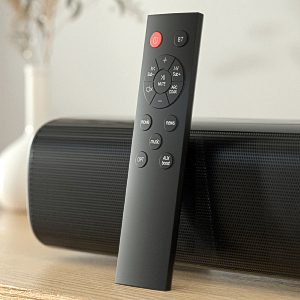
- Zdalne sterowanie
- Zestawy do montażu na ścianie
- Kabel AUX 3.5 mm
- Kabel optyczny
- Zasilacz
- Instrukcja obsługi

Produkt ponadview
The RIOWOIS DS6341 system features a compact soundbar and a powerful 4-inch wired subwoofer, designed for optimal audio performance in various settings.
Funkcje listwy dźwiękowej:
- Kompaktowa konstrukcja: 14.2 inches in length, slim and sleek for small spaces.
- Dual Full-Range Speakers: Delivers clear and high-quality sound.
- Wszechstronna łączność: Supports Bluetooth, Optical, and AUX connections.
- Zintegrowane sterowanie: Buttons on the soundbar for basic operations.
Wired Subwoofer Features:
- 4-inch Driver: Provides deep, rich bass for immersive audio.
- Adjustable Bass: Allows customization of bass levels via remote control.
- Połączenie przewodowe: Ensures stable and consistent bass performance.


Organizować coś
The soundbar system is designed for easy setup. Follow these steps for initial installation:
- Podłącz subwoofer: Connect the wired subwoofer to the 'SUB OUT' port on the soundbar using the provided cable.
- Podłączenie zasilania: Connect the power adapter to the 'DC IN' port on the soundbar, then plug the adapter into a standard wall outlet.
- Połączenie audio (wybierz jedno):
- Optyczny: Connect the optical cable from your TV's 'Optical Out' port to the 'OPT IN' port on the soundbar.
- AUX: Connect the 3.5mm AUX cable from your device's 'Audio Out' port to the 'AUX IN' port on the soundbar.
- Bluetooth: Power on the soundbar. Press the 'BT' button on the remote control to enter Bluetooth pairing mode. On your device (TV, smartphone, etc.), search for 'SineAudio DS6341 V1.1' in the Bluetooth settings and pair.
- Baterie zdalne: Włóż dwie baterie AAA (nie ma ich w zestawie) do pilota.
- Montaż na ścianie (opcjonalnie): Use the provided wall mount kits to securely attach the soundbar to a wall. Ensure proper stud placement for stability.
Instrukcja obsługi
Control your soundbar using the included remote or the integrated buttons on the unit.
- Włączanie/wyłączanie: Press the power button on the remote or the soundbar.
- Regulacja głośności: Use the '+' and '-' buttons on the remote or soundbar to adjust volume.
- Wybór źródła wejściowego: Press the 'BT', 'OPT', or 'AUX' buttons on the remote to switch between Bluetooth, Optical, or AUX input modes.
- Tryby dźwięku: Use the 'Movie', 'Music', or 'News' buttons on the remote to select optimized audio profiledla różnych typów treści.
- Regulacja basów: Use 'Sub+' and 'Sub-' buttons on the remote to increase or decrease subwoofer bass levels.
- Niemy: Press the 'Mute' button on the remote to temporarily silence the audio.
Konserwacja
Aby zapewnić długą żywotność i optymalną wydajność systemu soundbar, należy przestrzegać poniższych wskazówek dotyczących konserwacji:
- Czyszczenie: Do czyszczenia powierzchni soundbara i subwoofera używaj miękkiej, suchej ściereczki. Unikaj stosowania płynnych środków czyszczących i materiałów ściernych.
- Umieszczenie: Place the soundbar and subwoofer on a stable, flat surface or mount securely to a wall. Avoid placing near heat sources, direct sunlight, or in areas with high humidity.
- Wentylacja: Ensure adequate ventilation around the units to prevent overheating.
Rozwiązywanie problemów
If you encounter any issues with your RIOWOIS DS6341 Soundbar, please refer to the following common solutions:
- Delayed Audio: If the soundbar has delayed audio, this can often be resolved via the audio settings on your TV.
- Brak dźwięku/zniekształcony dźwięk:
- Ensure all cables (power, audio, subwoofer) are securely connected.
- Verify the correct input source is selected on the soundbar (BT, OPT, AUX).
- Check the volume levels on both the soundbar and your connected device.
- Ważny: The soundbar does not support Dolby and DTS audio formats. Please disable Dolby and DTS settings on your TV, Netflix, Amazon Prime Video, HBO, Hulu, YouTube, and other streaming video applications.
- AUX Connection Issues: For AUX cable connection, ensure the audio cable is plugged into a 'Line OUT' or 'Audio OUT' connector on your TV, not 'Line IN' or 'Audio IN'. The audio cable should connect to the TV audio output and the soundbar audio input. Double-click the AUX boost button on the remote control to restore volume if needed.
- Pilot nie działa:
- Sprawdź, czy baterie są prawidłowo włożone i nie są rozładowane.
- The remote control is not compatible with universal or TV remotes.
- Problemy z parowaniem Bluetooth: Ensure the soundbar is in Bluetooth pairing mode (indicated by a flashing blue light). Check your device's Bluetooth list for 'SineAudio DS6341 V1.1'.
Specyfikacje
| Funkcja | Szczegół |
|---|---|
| Nazwa modelu | DS6341 |
| Typ głośnika | Soundbar |
| Funkcja specjalna | Bass Boost, Wired Subwoofer |
| Zalecane zastosowania | For Computers, Home Entertainment, Gaming, Media Consumption |
| Kompatybilne urządzenia | Desktop, Gaming Console, Smartphone, Television |
| Średnica subwoofera | 4 cali |
| Konfiguracja kanału dźwięku przestrzennego | 2.1 |
| Rozmiar głośnika | 14.2 cali |
| Maksymalna moc wyjściowa głośnika | 80 watów |
| Technologia łączności | Bluetooth |
| Technologia komunikacji bezprzewodowej | Bluetooth |
| Zasięg Bluetooth | 10 metrów |
| Tryb wyjścia audio | Stereofoniczny |
| Typ montażu | Montaż ścienny |
| Wymiary produktu | 4.8" gł. x 15" szer. x 11" wys. |
| Waga przedmiotu | 6.63 funta |
Gwarancja i wsparcie
Your RIOWOIS DS6341 Soundbar comes with a 3-letnia gwarancja producenta. For any issues or support needs, please contact our after-sales service team. We offer 24/7 assistance and can provide replacement remote controls, auxiliary cables, or optical cables free of charge upon request.
Skontaktuj się z pomocą techniczną: Please send an email to our customer service team for prompt assistance. We aim to resolve all issues within 24 hours.
Zasady zwrotu: Zakupy spełniające kryteria można zwrócić w ciągu 30 dni.
Rozszerzone plany ochrony: Można zakupić dodatkowe plany ochrony:
- 2-letni plan ochrony
- 3-letni plan ochrony
- NEW Complete Protect (monthly billing)