
1. Wprowadzenie
This manual provides essential information for setting up, operating, maintaining, and troubleshooting your Xiaomi Redmi 13C smartphone. Please read this guide carefully to ensure proper use and optimal performance of your device.
The Xiaomi Redmi 13C is a new product featuring 128GB storage and 6GB RAM, with Dual SIM capability, in Midnight Black. This device is supplied by a specialized distributor.
2. Co znajduje się w pudełku
Po rozpakowaniu Xiaomi Redmi 13C sprawdź, czy w pudełku znajdują się wszystkie poniższe elementy:
- Smartfon Xiaomi Redmi 13C
- Kabel USB
- Rumak
- Narzędzie do wyjmowania tacki SIM
3. Urządzenie ponadview
Familiarize yourself with the key components of your Redmi 13C.

Rysunek 3.1: Koniecview of Xiaomi Redmi 13C key features, including its 6.74-inch 90Hz display, 50MP AI triple camera, 5000mAh battery with 18W fast charging, and powerful octa-core processor.
The Redmi 13C features a large 6.74-inch display with a 90Hz refresh rate for smooth visuals. It is equipped with a 50MP AI triple camera system and a robust 5000mAh battery supporting 18W fast charging. The device is powered by an octa-core processor, ensuring efficient performance.
4. Konfiguracja
4.1. Wkładanie karty SIM i SD
Your Redmi 13C supports Dual SIM cards and expandable storage via a microSD card (up to 128GB). Use the provided SIM tray ejector tool to open the SIM card slot.
- Znajdź tackę na kartę SIM znajdującą się z boku telefonu.
- Włóż narzędzie do wyjmowania karty SIM do małego otworu obok tacki i naciśnij mocno, aż tacka wyskoczy.
- Umieść kartę(y) nano-SIM i/lub kartę microSD w wyznaczonych gniazdach na tacce. Upewnij się, że złote styki są skierowane w dół.
- Ostrożnie włóż tackę z powrotem do telefonu.
4.2. Pierwsze włączenie i konfiguracja
- Naciśnij i przytrzymaj przycisk zasilania, aż pojawi się logo Xiaomi.
- Postępuj zgodnie z instrukcjami wyświetlanymi na ekranie, aby wybrać język i region, połączyć się z siecią Wi-Fi i skonfigurować konto Google.
- You can also set up fingerprint recognition for enhanced security during this initial setup.
5. Obsługa urządzenia
5.1. Funkcje wyświetlacza

Figure 5.1: The Redmi 13C features an immersive 6.74-inch display, providing a fluid visual experience.
The Redmi 13C boasts a 6.74-inch display with a 90Hz refresh rate, offering a smooth and immersive viewing experience for all your content. The maximum display resolution is 720x1600 pixels with a 16:9 aspect ratio.
5.2. Korzystanie z aparatu
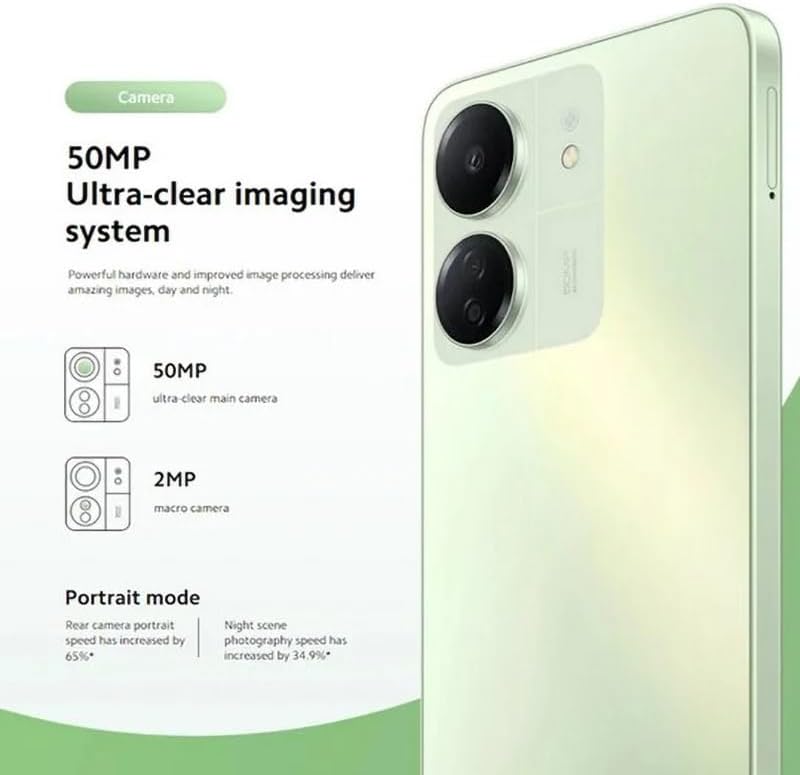
Figure 5.2: The Redmi 13C's 50MP Ultra-clear imaging system includes a 50MP main camera and a 2MP macro camera, supporting Portrait and Night modes.
The device is equipped with a 50MP Ultra-clear imaging system. The rear camera setup includes a 50MP main sensor and a 2MP macro camera. The front camera has an 8MP sensor. Utilize various shooting modes such as Portrait mode and Night mode to capture high-quality photos in different conditions.
5.3. Zarządzanie baterią
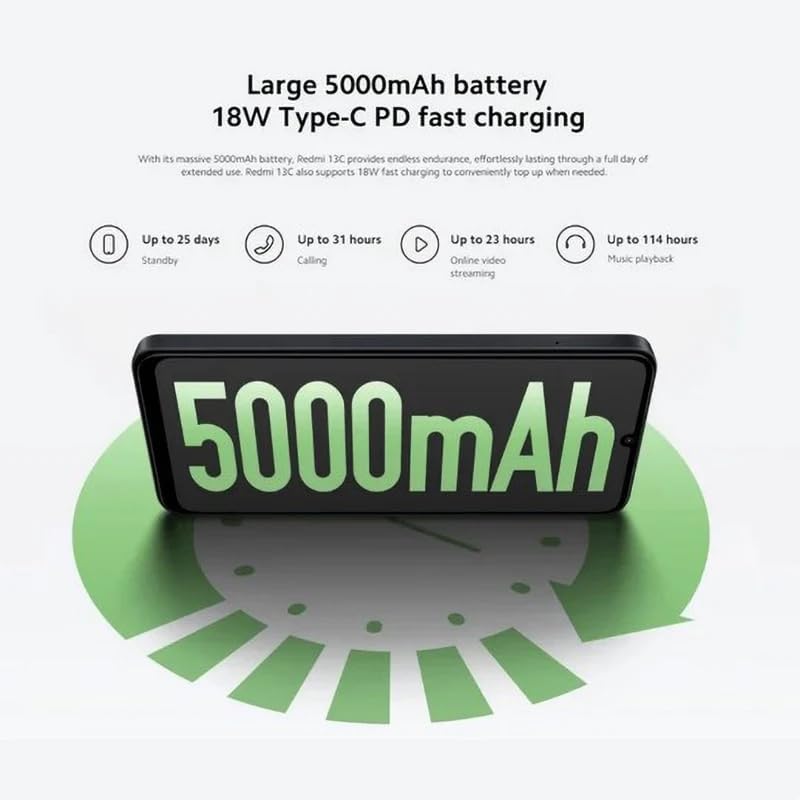
Figure 5.3: The Redmi 13C features a large 5000mAh battery with 18W Type-C PD fast charging, offering extended usage times.
Your Redmi 13C comes with a large 5000mAh Lithium-ion battery, providing extended usage. It supports 18W Type-C PD fast charging, allowing for quick power-ups. For optimal battery life, use the provided charger and avoid extreme temperatures.
- Do 25 dni czuwania
- Up to 31 hours calling
- Up to 23 hours online video streaming
- Do 114 godzin odtwarzania muzyki
5.4. Wydajność

Figure 5.4: The Redmi 13C is powered by an Octa-core MediaTek Helio G85 processor, delivering smooth and stable performance.
The Redmi 13C is powered by a MediaTek Helio G85 octa-core processor, ensuring smooth and stable performance for daily tasks and applications. It comes with 6GB of RAM and 128GB of internal storage, expandable up to 1TB with a microSD card.
5.5 Łączność i bezpieczeństwo
The device supports Wi-Fi, Bluetooth, and 4G cellular technology. It is an unlocked phone, allowing use with various wireless carriers. For security, the Redmi 13C includes a fingerprint recognition feature.
6. Konserwacja
6.1. Czyszczenie urządzenia
To clean your Redmi 13C, use a soft, lint-free cloth. Avoid using harsh chemicals or abrasive materials, as these can damage the screen and finish. The device is not water-resistant, so avoid exposure to liquids.
6.2. Aktualizacje oprogramowania
Regularly check for and install software updates to ensure your device has the latest features, security patches, and performance improvements. You can usually find this option in the phone's settings under "About phone" or "System updates."
6.3. Pielęgnacja baterii
To prolong battery life, avoid fully discharging the battery frequently. Charge your phone using the original charger and cable. Do not expose the device to extreme heat or cold.
7. Rozwiązywanie Problemów
W tej sekcji znajdziesz informacje na temat typowych problemów, które możesz napotkać w swoim urządzeniu Redmi 13C.
- Urządzenie nie włącza się: Upewnij się, że bateria jest naładowana. Podłącz telefon do ładowarki i odczekaj kilka minut przed ponownym włączeniem.
- Aplikacje ulegają awarii lub zawieszają się: Close background apps. Clear the cache of the problematic app or reinstall it. If the issue persists, consider a factory reset (back up your data first).
- Słaba żywotność baterii: Reduce screen brightness, disable unnecessary features like GPS or Bluetooth when not in use, and check for apps consuming excessive power in battery settings.
- Problemy z łącznością sieciową: Ensure your SIM card is properly inserted. Try restarting the device. Check your network settings and contact your carrier if problems persist.
- Czytnik linii papilarnych nie działa: Ensure your finger is clean and dry. Re-register your fingerprints in the security settings.
8. Specyfikacje
| Funkcja | Specyfikacja |
|---|---|
| Marka | XIAOMI |
| Nazwa modelu | Redmi 13C |
| System operacyjny | Android |
| Rozmiar zainstalowanej pamięci RAM | 6 GB |
| Pojemność pamięci masowej | 128 GB (możliwość rozszerzenia do 1 TB) |
| Model procesora | MediaTek Helio G85 (Octa-core) |
| Prędkość procesora | Do 2.0 GHz |
| Typ wyświetlacza | AMOLED |
| Rozmiar wyświetlacza | 6.74 cali |
| Maksymalna rozdzielczość wyświetlacza | 720x1600 |
| Częstotliwość odświeżania | 90 Hz |
| Rear Camera Sensor Resolution | 50 Megapixels (Main), 2 Megapixels (Macro) |
| Front Camera Sensor Resolution | 8 megapiksela |
| Pojemność baterii | 5000 mAh (litowo-jonowy) |
| Ładowanie | 18W Type-C PD Fast Charging |
| Technologia łączności | Bluetooth, Wi-Fi, 4G LTE |
| Gniazda kart SIM | Dual SIM (Nano) |
| Bezpieczeństwo biometryczne | Rozpoznawanie odcisków palców |
| Gniazdo słuchawkowe | USB typu C |
| Kolor | Północny Czarny |
| Waga przedmiotu | 410 gram |
| Poziom wodoodporności | Nie jest wodoodporny |
| Rok modelowy | 2023 |
9. Gwarancja i wsparcie
9.1. Informacje o gwarancji
The Xiaomi Redmi 13C comes with a standard manufacturer's warranty. Please refer to the warranty card included with your product for specific terms and conditions. Spare parts availability is stated as 2 years.
9.2. Official Documents and Support
For additional information and support, you can refer to the official user guide and data transparency statement:
For further assistance, please visit the official XIAOMI support webwitryny lub skontaktuj się z obsługą klienta.