
Wstęp
Thank you for choosing the ACEZUK M01 Car Jump Starter. This device is designed to provide a reliable emergency start for your vehicle, act as a portable power bank, and offer a multi-mode LED flashlight. Please read this manual carefully before use to ensure proper operation and safety.
Składniki produktu
The ACEZUK M01 package includes the following items:
- ACEZUK M01 Rozrusznik samochodowy
- Inteligentna bateria Clamps (Czerwony i Czarny)
- Kabel ładujący USB-C
- Instrukcja obsługi
- Storage Pouch (Note: A storage case is not included with this model.)

Image: Contents of the ACEZUK M01 package. This image displays the jump starter unit, smart battery clamps, a USB-C charging cable, the user manual, and a soft storage pouch.
Specyfikacje
| Marka | ACEZUK |
| Model | M01 |
| Prąd szczytowy | 6000A |
| Pojemność baterii | 12800mAh |
| Tomtage | 12 wolty |
| Kompatybilność silnika | Do 7.0 l benzyny, 5.5 l oleju napędowego |
| Skład ogniw baterii | Litowo-jonowy |
| Waga przedmiotu | 730 gram |
| Typ dopasowania pojazdu | Uniwersalne dopasowanie |

Image: The 2.5-inch LCD screen on the ACEZUK M01 jump starter. The screen clearly shows the battery charge level, input/output indicators, and alerts for extreme temperatures, ensuring the device is ready for use.
Konfiguracja i ładowanie
Opłata początkowa
Before first use, fully charge the ACEZUK M01 jump starter. Connect the provided USB-C charging cable to the device's Type-C input port and a suitable USB power adapter (not included). The LCD screen will indicate the charging status. A full charge is recommended for optimal performance.
Sprawdzanie poziomu naładowania baterii
2.5-calowy ekran LCD wyświetla aktualny poziom naładowania bateriitage. It is recommended to maintain the battery level above 25% for successful jump starts. Recharge the device when the battery level is low.
Instrukcja obsługi: Uruchamianie pojazdu za pomocą kabli rozruchowych
Aby uruchomić pojazd za pomocą kabli rozruchowych, należy postępować zgodnie z poniższymi krokami:
- Podłącz inteligentny kabel: Włóż inteligentną baterięamp cable into the jump starter's output port. Ensure a secure connection.
- Dołącz Clamps do baterii: Podłącz czerwony dodatni (+) clamp to the positive (+) terminal of your vehicle's battery. Connect the black negative (-) clamp do ujemnego (-) bieguna akumulatora pojazdu.
- Pojazd startowy: Kiedy klamps are securely connected and the smart cable indicator shows a ready state (refer to the smart cable's indicator lights for specific signals), start your vehicle's engine.
- Usuń Clamps: Po uruchomieniu silnika natychmiast wyjmij inteligentną lampkę.amps from the vehicle battery terminals, then disconnect the smart cable from the jump starter.
Ważny: Zawsze zdejmuj clamps from the car battery immediately after the engine starts to prevent damage to the jump starter or vehicle.
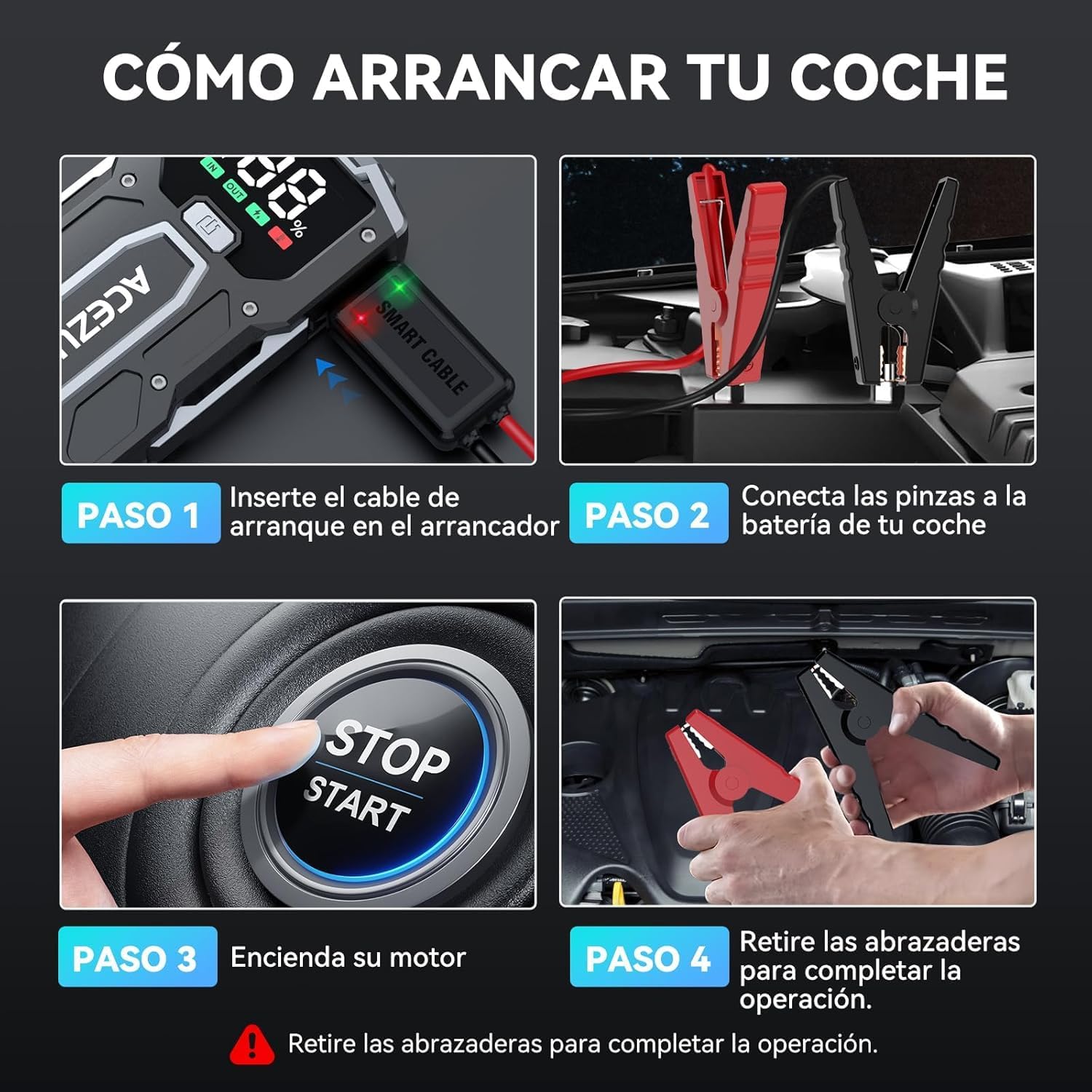
Image: A visual guide demonstrating the four steps to jump start a car. Step 1 shows inserting the smart cable into the jump starter. Step 2 shows connecting the clamps to the car battery. Step 3 shows starting the car engine. Step 4 shows removing the clamppo uruchomieniu samochodu.

Image: The ACEZUK M01 jump starter connected to a vehicle battery. The image highlights its 6000A peak current capability and compatibility with 7.0L gasoline and 5.5L diesel engines, operating at 12V.
Funkcja Power Bank
The ACEZUK M01 can also function as a 12800mAh portable power bank to charge your electronic devices.
- Port wyjściowy: It features a USB output port (5V/2.4A) for charging smartphones, tablets, e-readers, and other USB-powered devices.
- Port wejściowy: The Type-C port (5V/2A, 9V/2A) is used for recharging the jump starter itself.
Simply connect your device's charging cable to the USB output port on the jump starter to begin charging.

Image: The ACEZUK M01 jump starter acting as a power bank, simultaneously charging a smartphone and a tablet. This illustrates its 12800mAh capacity and compatibility with various USB-chargeable devices like game consoles, phones, iPads, drones, earphones, smartwatches, and cameras.
Funkcja latarki LED
The M01 includes a built-in LED flashlight with three modes for various situations:
- Oświetlenie: Standard steady light for general visibility.
- Fast Strobe: Rapid flashing light for signaling or attracting attention.
- Powolne miganie (SOS): Slow, rhythmic flashing for emergency signaling.
To activate and cycle through the flashlight modes, press the dedicated flashlight button on the device.

Image: The ACEZUK M01 jump starter highlighting its multifunctional LED flashlight. The image shows the three available modes: Illumination, Slow Flash (SOS), and Rapid Flashing, useful for various outdoor and emergency scenarios.
Funkcje bezpieczeństwa
The ACEZUK M01 is equipped with 8 types of intelligent safety protections to ensure safe operation and prevent damage:
- Ochrona przeciwiskrowa
- Ochrona przed odwrotną polaryzacją
- Zabezpieczenie nadprądowe
- Ochrona przed wysoką temperaturą
- Ochrona przed przeładowaniem
- Zabezpieczenie przed nadmiernym rozładowaniem
- Przepełnienietage Ochrona
- Ochrona przeciwzakłóceniowa
Inteligentna bateriaamps feature an indicator that provides audible warnings and flashing lights in case of incorrect connection or other issues.

Image: A diagram detailing the 8 intelligent safety protections integrated into the smart clamps. These protections include safeguards against overheating, overcharging, over-discharging, overvoltage, short circuits, reverse polarity, and anti-interference, ensuring a secure jump start.
Konserwacja
- Regularnie ładuj: Aby przedłużyć żywotność akumulatora, ładuj urządzenie rozruchowe co najmniej raz na trzy miesiące, nawet jeśli nie jest używane.
- Składowanie: Przechowuj urządzenie w chłodnym i suchym miejscu, z dala od bezpośredniego światła słonecznego i ekstremalnych temperatur.
- Czyszczenie: Do czyszczenia urządzenia używaj miękkiej, suchej ściereczki. Nie używaj silnych środków chemicznych ani materiałów ściernych.
- Sprawdź kable: Okresowo sprawdzaj inteligentną klatkęampSprawdź przewody i kable pod kątem uszkodzeń lub zużycia. W razie potrzeby wymień.
Rozwiązywanie problemów
Urządzenie nie włącza się
- Ensure the device is charged. Check the LCD screen for battery level.
- If the battery is low, recharge the unit.
Vehicle Does Not Start
- Sprawdź, czy inteligentnyamps are correctly connected to the vehicle battery terminals (red to positive, black to negative).
- Ensure the smart cable is fully inserted into the jump starter.
- Verify that the jump starter's battery level is above 25%.
- Jeśli inteligentny clamp indicator shows an error, refer to the indicator's specific meaning (e.g., reverse polarity, short circuit) and correct the issue.
- The vehicle's battery might be severely discharged or damaged. In such cases, the jump starter may not be able to start the vehicle.
Power Bank nie ładuje urządzeń
- Upewnij się, że urządzenie rozruchowe jest odpowiednio naładowane.
- Verify that the charging cable is properly connected to both the jump starter's USB output and your device.
- Aby wykluczyć problemy z kablem lub urządzeniem, wypróbuj inny kabel ładujący lub inne urządzenie.
Gwarancja i wsparcie
For warranty information or technical support, please refer to the contact details provided with your purchase or visit the official ACEZUK webStrona. Zachowaj dowód zakupu na wypadek roszczeń gwarancyjnych.