
Wstęp
This manual provides comprehensive instructions for the JIARUIXIN JR1839 2.4G Bluetooth Remote Control, designed for use with children's electric ride-on cars. Please read this manual carefully before use to ensure proper operation and safety.
Organizować coś
1. Instalacja baterii
The remote control requires two AAA (1.5V) batteries. To install, locate the battery compartment on the back of the remote, loosen the screw, and insert the batteries according to the polarity markings. Secure the cover by tightening the screw.
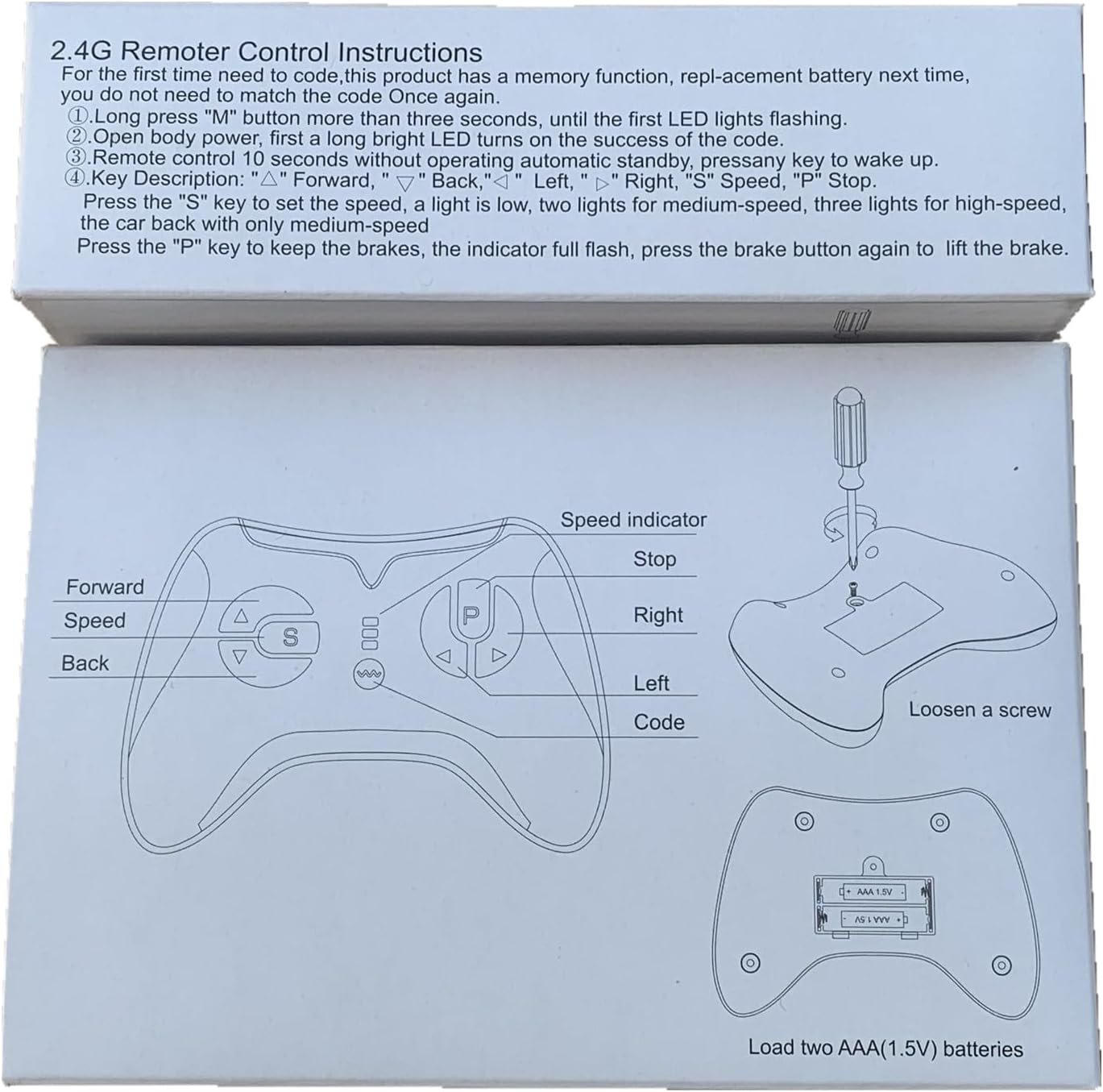
Figure 1: Remote control diagram illustrating battery compartment and button functions.

Rysunek 2: Tył view of the remote control, highlighting the battery cover.
2. Pairing (Match Code) Instructions
Follow these steps to pair the remote control with your electric ride-on car:
- Upewnij się, że w pilocie zdalnego sterowania znajdują się nowe baterie.
- Turn off the power switch on the electric ride-on vehicle.
- On the remote control, press and hold the "▲" (Forward) and "▼" (Back) keys simultaneously for 3 seconds. The first LED indicator on the remote will begin to flicker, indicating it is in pairing mode.
- While the remote's LED is flickering, turn on the power switch of the electric ride-on vehicle.
- The red indicator light on the remote should stop flashing and remain solid, indicating successful pairing.
- If pairing is unsuccessful, turn off both devices and repeat the steps. The remote control has a memory function, so re-pairing is generally not required after battery replacement.

Figure 3: Detailed pairing instructions and remote control layout.
Instrukcja obsługi
Familiarize yourself with the remote control buttons and their functions:

Rycina 4: Przód view of the JR1839 remote control.
- ▲ (Forward): Moves the vehicle forward.
- ▼ (Back): Moves the vehicle backward.
- ◀ (Left): Turns the vehicle left.
- ▶ (Right): Turns the vehicle right.
- S (Speed): Press this button to cycle through speed settings.
- 1 LED lit: Low speed
- 2 LEDs lit: Medium speed
- 3 LEDs lit: High speed
- P (Brake/Stop): Press and hold this key to engage the brake. All LED indicators will flicker while the brake is active. Release the key to disengage the brake.
The remote control is intended for use by adults to supervise and control the ride-on vehicle for children.
Konserwacja
- Keep the remote control dry and away from moisture.
- Clean the remote control with a soft, dry cloth. Do not use harsh chemicals or abrasive cleaners.
- Replace batteries promptly when the remote's performance degrades. Always use new AAA (1.5V) batteries.
- Store the remote control in a safe place when not in use, away from extreme temperatures.
Rozwiązywanie problemów
- Pilot nie odpowiada:
- Sprawdź, czy baterie są prawidłowo zainstalowane i wystarczająco naładowane. W razie potrzeby wymień je.
- Ensure the remote is properly paired with the ride-on car by following the "Pairing Instructions" section.
- Verify that the ride-on car's power switch is on and its battery is charged.
- Interference issues:
- To urządzenie jest zgodne z częścią 15 przepisów FCC. Jego działanie podlega następującym dwóm warunkom: (1) To urządzenie nie może powodować szkodliwych zakłóceń i (2) To urządzenie musi akceptować wszelkie odbierane zakłócenia, w tym zakłócenia, które mogą powodować niepożądane działanie.
- Jeśli wystąpią zakłócenia, spróbuj zmienić orientację lub położenie anteny odbiorczej.
- Zwiększ odległość między urządzeniem i odbiornikiem.
- Podłącz urządzenie do gniazdka w innym obwodzie niż ten, do którego podłączony jest odbiornik.
- Aby uzyskać pomoc, należy zwrócić się do sprzedawcy lub doświadczonego technika radiowo-telewizyjnego.
- Pilot zdalnego sterowania nie łączy się:
- Ensure the ride-on car is turned off before initiating the pairing sequence.
- Hold the "▲" I "▼" keys for the full 3 seconds until the LED flickers.
- Turn on the car's power switch immediately after the remote enters pairing mode.
Ważny: Changes or modifications to this unit not expressly approved by the party responsible for compliance could void the user's authority to operate the equipment.
Specyfikacje
| Model | JR1839 |
| Marka | JIARUIXIN |
| Technologia łączności | Bluetooth 2.4G |
| Typ kontrolera | Gamepad |
| Kolor | Czarny |
| Zasilacz | DC 3.0V (2 baterie 1.5V AAA, brak w zestawie) |
| Częstotliwość | 2.407 GHz-2.473 GHz (moc wyjściowa szczytowa: 5 dBm) |
| Wymiary produktu | 4.9 x 3.8 x 2 cala |
| Waga przedmiotu | 2.88 uncji |
Gwarancja i wsparcie
For warranty information or technical support, please contact the manufacturer or your retailer. Ensure you have your product model number (JR1839) and purchase details available when seeking assistance.
The remote controller is only to be used with adult's guidance.
Oświadczenie o zgodności z FCC
To urządzenie jest zgodne z częścią 15 przepisów FCC. Eksploatacja podlega następującym dwóm warunkom:
- Urządzenie to nie może powodować szkodliwych zakłóceń.
- Urządzenie musi akceptować wszelkie odbierane zakłócenia, w tym zakłócenia mogące powodować niepożądane działanie.
Notatka: To urządzenie zostało przetestowane i uznane za zgodne z limitami dla urządzeń cyfrowych klasy B, zgodnie z częścią 15 przepisów FCC. Limity te mają na celu zapewnienie rozsądnej ochrony przed szkodliwymi zakłóceniami w instalacjach mieszkalnych. To urządzenie generuje, wykorzystuje i może emitować energię o częstotliwości radiowej i jeśli nie zostanie zainstalowane i używane zgodnie z instrukcją, może powodować szkodliwe zakłócenia w komunikacji radiowej. Nie ma jednak gwarancji, że zakłócenia nie wystąpią w konkretnej instalacji. Jeśli to urządzenie powoduje szkodliwe zakłócenia w odbiorze radia lub telewizji, co można ustalić, wyłączając i włączając urządzenie, zachęca się użytkownika do podjęcia próby skorygowania zakłóceń za pomocą jednego lub kilku z następujących środków:
- Zmiana orientacji lub położenia anteny odbiorczej.
- Zwiększ odległość między urządzeniem i odbiornikiem.
- Podłącz urządzenie do gniazdka w innym obwodzie niż ten, do którego podłączony jest odbiornik.
- Aby uzyskać pomoc, należy zwrócić się do sprzedawcy lub doświadczonego technika radiowo-telewizyjnego.
Urządzenie zostało ocenione pod kątem spełnienia ogólnego wymogu ekspozycji RF. Urządzenie może być używane w warunkach przenośnej ekspozycji bez ograniczeń.