
Ampire CPM 101
AMPInstrukcja obsługi monitora smartfona IRE CPM 101
Model: CPM 101
1. Wprowadzenie
This user manual provides comprehensive instructions for the installation, operation, and maintenance of your AMPIRE CPM 101 Smartphone Monitor. Please read this manual thoroughly before using the device to ensure proper functionality and safety.
2. Informacje dotyczące bezpieczeństwa
Aby zapobiec uszkodzeniu urządzenia lub obrażeniom ciała, należy zawsze przestrzegać następujących środków ostrożności:
- Nie próbuj demontować ani modyfikować urządzenia.
- Przed włączeniem zasilania upewnij się, że wszystkie połączenia są zabezpieczone.
- Unikaj wystawiania urządzenia na działanie ekstremalnych temperatur, bezpośredniego światła słonecznego i wilgoci.
- Install the monitor in a location that does not obstruct the driver's view or interfere with vehicle safety systems.
- Należy używać wyłącznie dostarczonych kabli i akcesoriów.
3. Koniec produktuview
Ten AMPIRE CPM 101 is a 10-inch high-resolution touchscreen monitor designed to integrate smartphone functionalities like Apple CarPlay and Android Auto into your vehicle. It also supports the display of an optional rearview kamera.
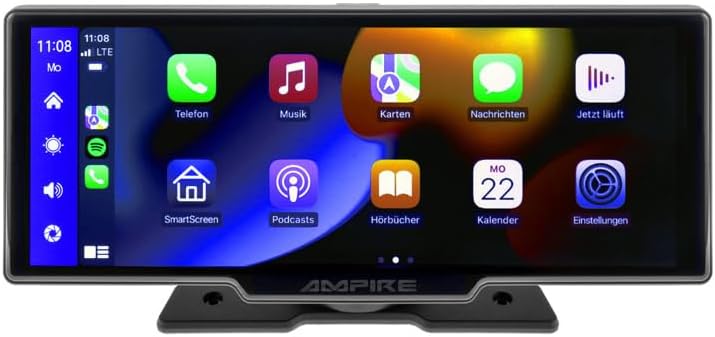
Rycina 3.1: Przód view z AMPIRE CPM 101 monitor showing the user interface with various app icons.

Rysunek 3.2: AMPIRE CPM 101 monitor with its base, highlighting key features such as Bluetooth, Apple CarPlay, Android Auto, 1080p Full HD, Wi-Fi, and 10-inch display.

Rysunek 3.3: Zawartość AMPIRE CPM 101 package, including the monitor, rearview camera, and various connection cables.

Rysunek 3.4: AMPIRE CPM 101 monitor displaying a split screen with navigation on one side and a rearview obraz z kamery po drugiej stronie.
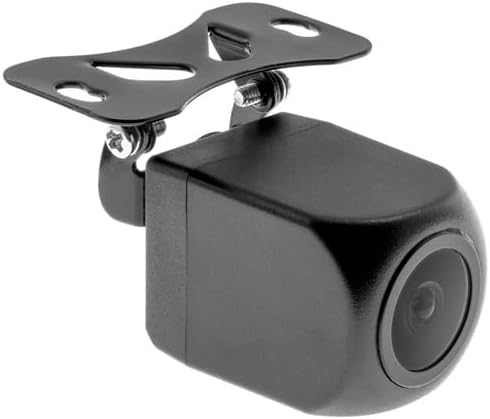
Rysunek 3.5: Zbliżenie view of the compact rearview camera with its mounting bracket.
4. Konfiguracja i instalacja
Ten AMPIRE CPM 101 is designed for easy integration into most vehicles. Professional installation is recommended for optimal performance and safety.
4.1. Zawartość opakowania
Przed rozpoczęciem instalacji należy sprawdzić, czy wszystkie komponenty są obecne:
- AMPIRE CPM 101 Monitor
- Power Cable Set
- Tyłview Camera (optional, if included in your package)
- Kabel połączeniowy kamery
- Uchwyt montażowy
- Instrukcja obsługi
4.2. Montaż monitora
- Wybierz odpowiednie miejsce na pulpicie, które nie będzie Ci przeszkadzać. view lub zakłócać działanie poduszek powietrznych.
- Dokładnie oczyść powierzchnię montażową.
- Attach the mounting bracket to the monitor.
- Securely mount the monitor to the dashboard using the provided adhesive or screws, ensuring it is stable.
4.3. Połączenia okablowania
Connect the power cable set to your vehicle's power source (ACC, B+, GND). If installing a rearview camera, connect its video cable to the monitor's camera input and its power cable to the vehicle's reverse light circuit for automatic activation.
- Czerwony przewód: Connect to ACC (Accessory Power).
- Żółty przewód: Connect to B+ (Constant Power).
- Czarny przewód: Connect to GND (Ground).
- Reverse Trigger Wire (if applicable): Connect to the vehicle's reverse light positive wire.
5. Instrukcja obsługi
5.1. Włączanie/wyłączanie zasilania
The monitor will power on automatically when the vehicle's ignition is turned on (ACC power). To manually turn off, press and hold the power button (if available) or turn off the vehicle's ignition.
5.2. Connecting to Apple CarPlay / Android Auto
The CPM 101 supports wireless connection to Apple CarPlay and Android Auto. Notatka: Devices with only 2.4 GHz Wi-Fi are not supported. iPhone 5 or newer is required for Apple CarPlay.
- Upewnij się, że Bluetooth i Wi-Fi w Twoim smartfonie są włączone.
- On the CPM 101 monitor, navigate to the "Phone" or "Connect" menu.
- Wybierz opcję „Sparuj nowe urządzenie” lub podobną.
- On your smartphone, search for and select the CPM 101 in the Bluetooth device list.
- Potwierdź kod parowania na obu urządzeniach.
- Once paired via Bluetooth, the monitor will automatically establish a Wi-Fi connection for CarPlay or Android Auto.
5.3. Using the Rearview Kamera
Jeśli tyłview camera is connected, the monitor will automatically switch to the camera view when the vehicle is put into reverse gear. The image will revert to the previous screen when taken out of reverse.
5.4. Ustawienia systemowe
Access the system settings menu on the monitor to adjust display brightness, audio output, language, and other preferences. Refer to the on-screen prompts for specific setting options.
6. Konserwacja
Aby zapewnić długowieczność i optymalną wydajność Twojego AMPIRE CPM 101 monitor, follow these maintenance guidelines:
- Czyszczenie ekranu: Delikatnie przetrzyj ekran miękką, niepozostawiającą włókien ściereczką. W przypadku uporczywych plam delikatnie przetrzyj.ampen the cloth with water or a screen-cleaning solution. Do not use abrasive cleaners or solvents.
- Ogólne sprzątanie: Keep the monitor and its surroundings free from dust and debris. Use a soft brush or compressed air to clean vents and connectors.
- Temperatura: Avoid exposing the device to extreme hot or cold temperatures for prolonged periods.
- Składowanie: If storing the vehicle for an extended period, consider disconnecting the monitor's power to prevent battery drain.
7. Rozwiązywanie Problemów
Jeśli napotkasz problemy z urządzeniem AMPIRE CPM 101 monitor, refer to the following common problems and solutions:
| Problem | Możliwa przyczyna | Rozwiązanie |
|---|---|---|
| Monitor się nie włącza. | Brak zasilania, luźne połączenie, przepalony bezpiecznik. | Check power cable connections. Verify vehicle's fuse box. Ensure ignition is on. |
| Nie można połączyć się z Apple CarPlay/Android Auto. | Smartphone Wi-Fi/Bluetooth off; incompatible phone; 2.4 GHz Wi-Fi only. | Ensure Bluetooth and Wi-Fi are on. Check phone compatibility (iPhone 5+). Confirm phone supports 5 GHz Wi-Fi. Re-pair device. |
| Tyłview kamera nie wyświetla obrazu. | Camera not connected; reverse trigger wire not connected; faulty camera. | Check camera video and power connections. Ensure vehicle is in reverse. Test camera if possible. |
| Bez dźwięku. | Volume too low; incorrect audio output setting; Bluetooth not connected. | Increase volume. Check audio output settings on monitor. Ensure Bluetooth is connected to your vehicle's audio system. |
Jeśli po wypróbowaniu tych rozwiązań problem nadal występuje, skontaktuj się z obsługą klienta.
8. Specyfikacje
Below are the technical specifications for the AMPIRE CPM 101 Smartphone Monitor:
| Funkcja | Specyfikacja |
|---|---|
| Marka | Ampgniew |
| Rozmiar wyświetlacza | 10 cali |
| Typ wyświetlacza | LCD, Color Screen |
| Technologia łączności | Bluetooth, WiFi |
| Kompatybilne urządzenia | Smartphones with Apple CarPlay or Android Auto (wireless connection) |
| Cechy specjalne | Wireless Apple CarPlay & Android Auto, Optional Rearview Wyświetlacz aparatu |
| Tryb wyjścia audio | Stereofoniczny |
| Moc wyjściowa | 50 watów |
| Wymiary produktu | Wymiary 29 x 15 x 10 cm |
| ASIN | B0CKLSWGY7 |
| Pierwsza dostępna data | 6 października 2023 r. |
9. Gwarancja i wsparcie
For warranty information and technical support, please refer to the documentation included with your purchase or visit the official Ampgniew webZachowaj dowód zakupu na wypadek roszczeń gwarancyjnych.
Wsparcie online: www.ampire.de
Ask a question about this manual
Ask about setup, troubleshooting, compatibility, parts, safety, or missing instructions. Manuals+ will review the question and use this page’s manual context to help answer it.