
JBL JBLBB3WIFI
Instrukcja obsługi przenośnego głośnika JBL Boombox 3 Wi-Fi
Model: JBLBB3WIFI
Marka: JBL
1. Wprowadzenie
The JBL Boombox 3 Wi-Fi is a powerful portable speaker designed to deliver massive JBL Original Pro Sound with deep bass. It offers versatile connectivity options including Wi-Fi and Bluetooth, allowing for high-definition music streaming both indoors and outdoors. Its robust design is waterproof and dustproof, making it suitable for various environments. The speaker also features a built-in power bank for charging external devices and utilizes eco-friendly materials in its construction.

Rycina 1: Przód view of the JBL Boombox 3 Wi-Fi Portable Speaker.
2. Konfiguracja
2.1. Ładowanie głośnika
Before initial use, fully charge your JBL Boombox 3 Wi-Fi speaker. The speaker is powered by a Lithium Ion battery. A full charge typically takes approximately 4.5 hours. Use the provided AC power cord to connect the speaker to a power outlet. The battery indicator lights on the speaker will show the charging progress.
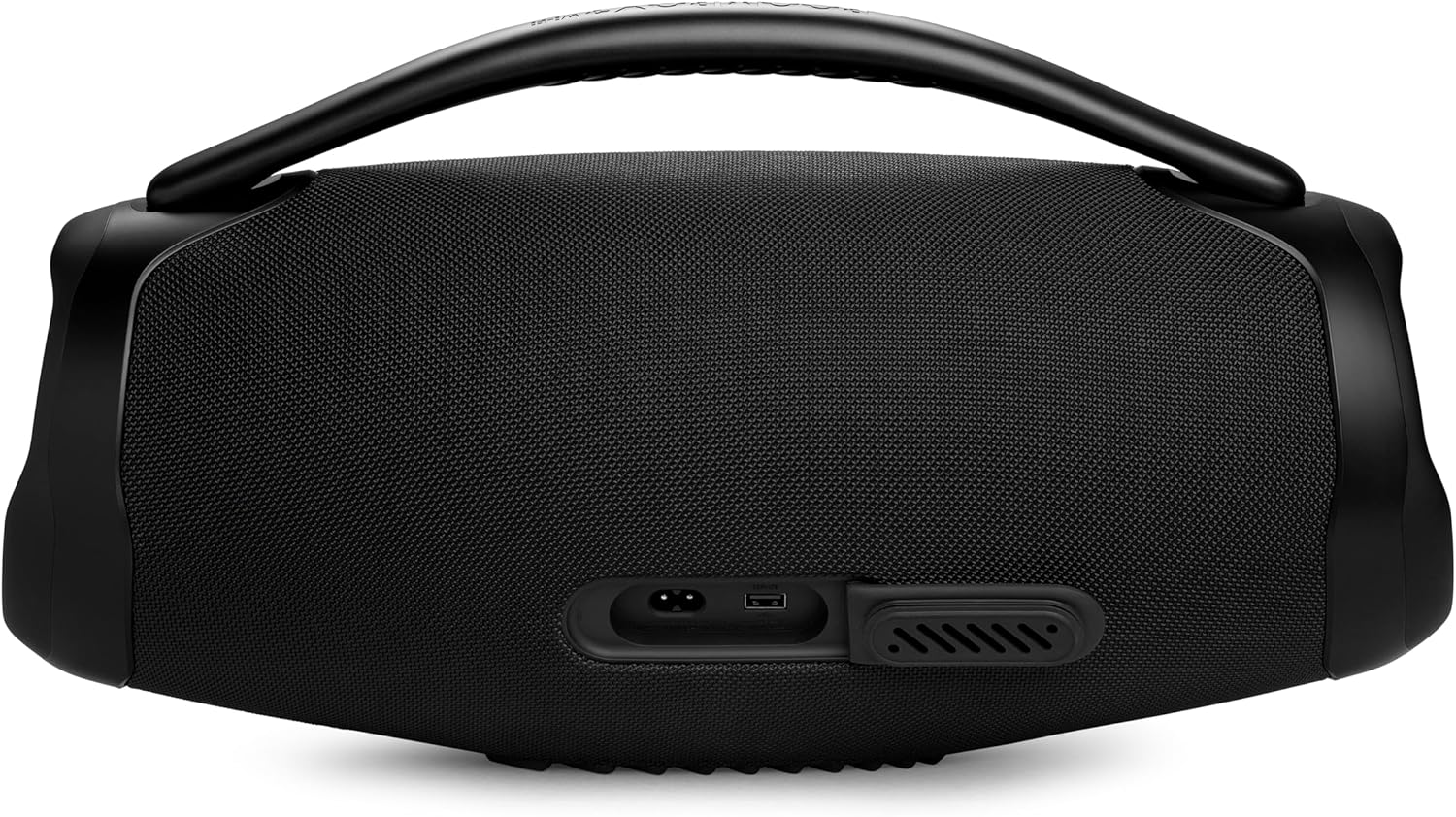
Rysunek 2: Tył view of the speaker, highlighting the charging port.
2.2. Włączanie/wyłączanie zasilania
Press the power button located on the top panel of the speaker to turn it on or off. A startup sound will indicate the speaker is active.

Figure 3: Top panel controls including the power button.
2.3. Połączenie początkowe (Bluetooth)
- Turn on the JBL Boombox 3 Wi-Fi speaker.
- Press the Bluetooth button on the top panel to enter pairing mode. The Bluetooth indicator will blink.
- On your mobile device, navigate to Bluetooth settings and select 'JBL Boombox 3' from the list of available devices.
- Po nawiązaniu połączenia wskaźnik Bluetooth będzie świecił światłem ciągłym.
2.4. Wi-Fi Setup via JBL One App
For Wi-Fi connectivity and advanced features, download the JBL One App from your device's app store. The app guides you through connecting the speaker to your Wi-Fi network and allows for personalized settings, EQ adjustments, and access to integrated music services.
3. Obsługa głośnika
3.1. Podstawowe sterowanie
- Przycisk zasilania: Włącza/wyłącza głośnik.
- Przycisk Bluetooth: Inicjuje parowanie Bluetooth.
- Przyciski głośności (+/-): Reguluje głośność odtwarzania.
- Przycisk Odtwórz/Pauza: Steruje odtwarzaniem muzyki.
3.2. Łączność Wi-Fi i Bluetooth
The JBL Boombox 3 Wi-Fi offers seamless switching between Wi-Fi and Bluetooth. When connected via Wi-Fi, you can stream high-definition audio, including 3D Dolby Atmos, without interruptions from phone calls or notifications. For outdoor use or when Wi-Fi is unavailable, switch to Bluetooth for reliable wireless audio.

Figure 4: The speaker supports both indoor Wi-Fi and outdoor Bluetooth connectivity.
3.3. Połączenie wielogłośnikowe
The JBL Boombox 3 Wi-Fi supports multi-speaker connections over Wi-Fi, allowing you to pair multiple compatible JBL Wi-Fi speakers for a synchronized audio experience. This feature is managed through the JBL One App.
4. Główne cechy
- Potężny dźwięk JBL Original Pro: Experience deep, powerful bass and clear audio thanks to its 3-way speaker design, including a built-in subwoofer, two mid-range drivers, and dual tweeters.
- High-Definition Audio & 3D Dolby Atmos: Stream high-definition audio content, including 3D Dolby Atmos, over Wi-Fi for an immersive listening experience.
- Dłuższa żywotność baterii: Enjoy up to 24 hours of playtime on a single charge, ensuring music playback for all-day adventures.
- Wodoodporność i pyłoszczelność (IP67): The speaker is rated IP67, making it resistant to water and dust, suitable for various outdoor conditions.
- Wbudowany Power Bank: Charge your mobile devices directly from the speaker using its integrated power bank feature.
- Self-Tuning Feature: Dual built-in microphones detect the speaker's surroundings and optimize audio quality for the best possible sound experience in any location.
- Materiały przyjazne dla środowiska: Constructed with post-consumer recycled plastic and recycled fabric for the speaker grille, and packaged in FSC-certified paper with soy ink.

Figure 5: Internal components contributing to the speaker's sound quality.

Figure 6: The speaker provides up to 24 hours of continuous playback.

Figure 7: The speaker's passive radiator and durable, waterproof exterior.
5. Konserwacja
- Czyszczenie: Użyj miękkiego, damp cloth to clean the speaker's exterior. Avoid using harsh chemicals or abrasive materials.
- Składowanie: Store the speaker in a cool, dry place when not in use. Ensure all port covers are securely closed to maintain its waterproof and dustproof rating.
- Pielęgnacja baterii: For optimal battery longevity, avoid fully discharging the battery frequently. Charge the speaker regularly, even if not in constant use.
6. Rozwiązywanie Problemów
- Głośnik nie włącza się: Ensure the battery is charged. Connect the speaker to a power source using the provided AC cord.
- Brak dźwięku: Check the volume level on both the speaker and your connected device. Ensure the speaker is properly connected via Bluetooth or Wi-Fi.
- Problemy z parowaniem Bluetooth: Make sure the speaker is in pairing mode (Bluetooth indicator blinking). Turn off and on your device's Bluetooth, then try pairing again. Ensure no other devices are actively connected to the speaker.
- Problemy z łącznością Wi-Fi: Verify your Wi-Fi network is active and within range. Use the JBL One App to reconfigure Wi-Fi settings if necessary.
- Słaba jakość dźwięku: Ensure the speaker is placed on a stable surface. Adjust EQ settings via the JBL One App. Check for obstructions between the speaker and your device if using Bluetooth.
7. Specyfikacje
| Funkcja | Specyfikacja |
|---|---|
| Nazwa modelu | JBL |
| Typ głośnika | Przenośny głośnik bezprzewodowy |
| Technologia łączności | Bluetooth, WiFi |
| Wersja Bluetooth | 5.3 |
| Zasięg Bluetooth | 100 metrów |
| Źródło zasilania | Zasilany bateryjnie |
| Pojemność baterii | 9600 mAh |
| Czas ładowania | 4.5 godzin |
| Pauza w szkole | Do 24 godzin |
| Poziom wodoodporności | IP67 (wodoodporność i pyłoszczelność) |
| Maksymalna moc wyjściowa głośnika | 200 watów |
| Odpowiedź częstotliwościowa | 20 kHz |
| Tryb wyjścia audio | Dźwięk przestrzenny 3D |
| Wymiary produktu | 7.9" gł. x 10.1" szer. x 20" wys. |
| Waga przedmiotu | 15 funtów |
| Tworzywo | Plastikowy |
| Kolor | Czarny |
8. Co znajduje się w pudełku
- 1 x JBL Boombox 3 Wi-Fi Speaker
- AC power cord (AC plug and quantity varies by region)
- Szybki przewodnik
- Karta gwarancyjna
- Karta bezpieczeństwa
9. Oficjalny film o produkcie
Film 1: Oficjalny produktview of the JBL Boombox 3 Wi-Fi speaker by Harman Kardon.
10. Gwarancja i wsparcie
The JBL Boombox 3 Wi-Fi speaker comes with a limited warranty. For detailed warranty information, please refer to the included Warranty Card. For product support, troubleshooting assistance, or service inquiries, please visit the official JBL webodwiedź witrynę lub skontaktuj się z obsługą klienta JBL.
Ask a question about this manual
Ask about setup, troubleshooting, compatibility, parts, safety, or missing instructions. Manuals+ will review the question and use this page’s manual context to help answer it.