
1. Koniec produktuview
The EsaSam M150s is an advanced Android 12 car stereo system featuring a 9-inch capacitive multi-touch screen. It integrates GPS navigation, Bluetooth 4.0, FM/AM radio, and multimedia playback capabilities. Designed specifically for Fiat Bravo models from 2007 to 2012, this unit enhances your vehicle's infotainment system with modern connectivity and features like Carplay, Android Auto, and Mirror Link.
Key features include HD 1080P video support, a 1024x600 resolution display, dual-zone function, and support for external devices such as a backup camera and USB storage.
2. Zawartość opakowania
Sprawdź, czy wszystkie wymienione poniżej elementy znajdują się w Twojej paczce. Jeśli brakuje któregokolwiek z nich lub jest on uszkodzony, skontaktuj się z obsługą klienta.
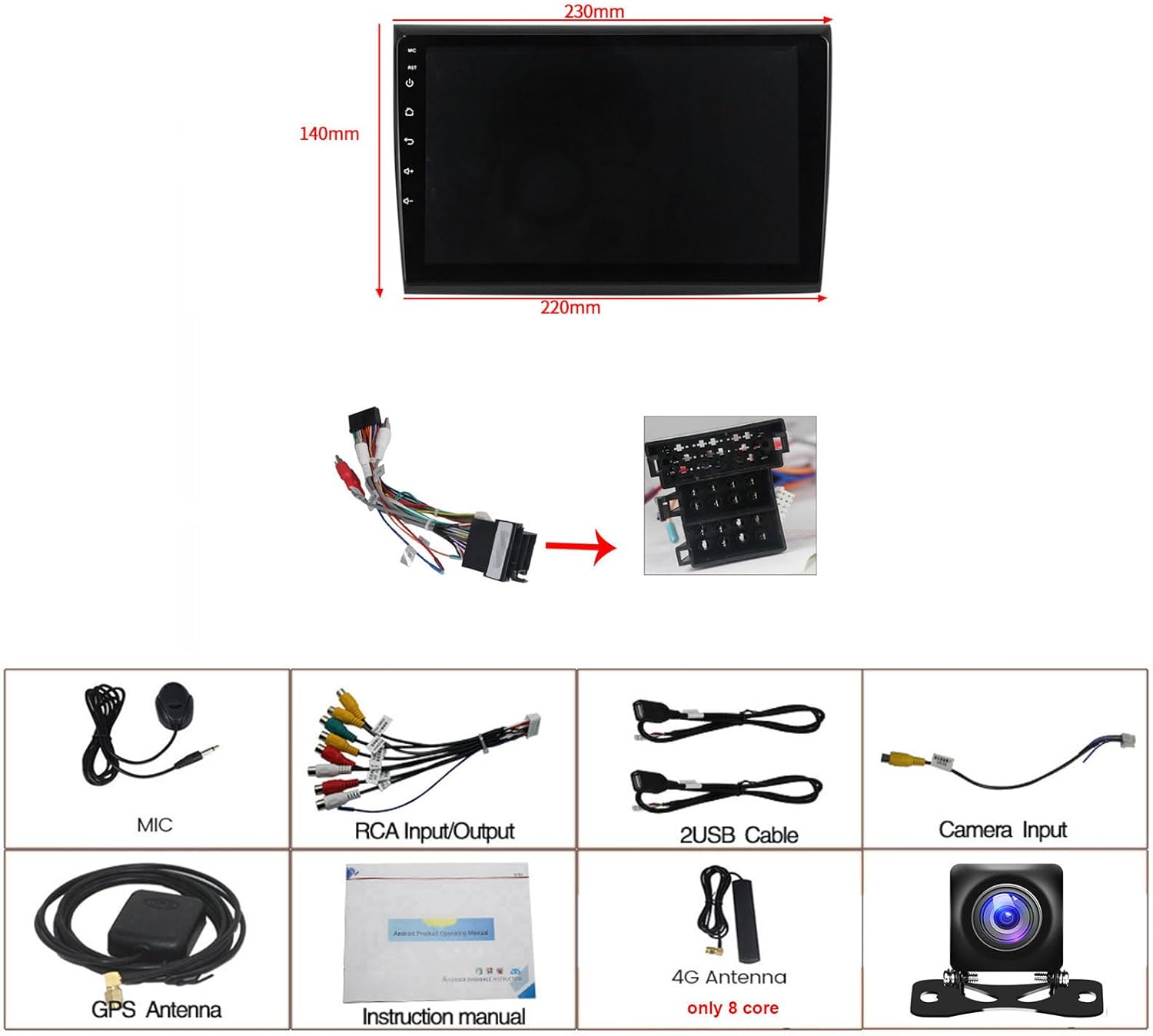
Image: Dimensions of the 9-inch car stereo unit (230mm top width, 220mm bottom width, 140mm height) and a visual representation of all included accessories.
- EsaSam M150s Car Stereo Unit
- Power Harness (specific for Fiat Bravo 2007-2012)
- Mikrofon zewnętrzny
- Tył AHD View Kamera
- Antena GPS
- Kable wejściowe/wyjściowe RCA
- Kable 2 x USB
- Instrukcja obsługi
- 4G Antenna (for 8-core models only, M150s is 4-core)
3. Zgodność
This car stereo is designed for direct fitment in the following vehicle models:
- Fiat Bravo: 2007, 2008, 2009, 2010, 2011, 2012
Before installation, ensure your vehicle's dashboard opening matches the dimensions of the stereo unit. If unsure, consult a professional installer or contact customer support with a picture of your car's center console.
4. Konfiguracja i instalacja
Zaleca się zlecenie instalacji profesjonalnemu fachowcowi. Przed rozpoczęciem instalacji należy odłączyć akumulator pojazdu, aby zapobiec uszkodzeniom elektrycznym.
4.1 Kontrola przed instalacją
Compare your original car stereo setup with the new unit. The image below illustrates a typical before and after installation scenario.

Image: Left panel shows the original Fiat Bravo dashboard with the factory radio. Right panel shows the same dashboard with the EsaSam 9-inch Android stereo installed, displaying its interface.
4.2 połączeń przewodów
Connect the provided power harness to the car stereo and the vehicle's wiring loom. Ensure all connections are secure. Refer to the wiring diagram in the included instruction manual for detailed pin assignments.
- Uprząż mocy: Connects to vehicle's power, ground, and speaker wires.
- Antena GPS: Connect to the GPS port on the back of the unit and mount in a location with a clear view nieba (np. deska rozdzielcza).
- Kable USB: Connect to the USB ports on the unit and route to a convenient location for external storage or device charging.
- Tył AHD View Kamera: Connect the camera's video output to the 'CAM IN' RCA port and its power to the vehicle's reverse light circuit.
- Mikrofon zewnętrzny: Connect to the dedicated microphone input for improved call quality.
4.3 Konfiguracja sterowania z kierownicy
To enable steering wheel controls, navigate to the system settings on the stereo. Locate the 'Steering Wheel Control' or 'Canbus Protocol' learning function. Follow the on-screen prompts to assign functions to your vehicle's steering wheel buttons.
4.4 Factory Password
For accessing certain advanced settings or factory reset options, the factory password for M150s models is 8888.
5. Instrukcja obsługi
5.1 Podstawowy interfejs i nawigacja
Upon startup, the unit displays the main Android interface. Navigate through applications by touching the icons. Swipe gestures can be used for additional screens or menus.

Image: A collage demonstrating the Android operating system, Bluetooth connectivity, FM/AM radio interface, 1080P video playback, GPS navigation, Mirror Link functionality, and the reverse camera view.
Radio 5.2 FM/AM
Access the 'Radio' application from the main menu. You can scan for stations, save presets, and switch between FM and AM bands. The radio supports frequencies: AM: 520-1700 Hz, FM: 87.5-108.5MHz.
5.3 Łączność Bluetooth
Pair your smartphone via Bluetooth 4.0 for hands-free calling and audio streaming. Go to 'Settings' > 'Bluetooth', enable Bluetooth on your phone, search for the stereo's device name, and pair. You can synchronize your phone's contact list for easy dialing.
5.4 Nawigacja GPS
The unit has a built-in GPS module. It supports both online navigation apps (e.g., Google Maps, Waze) and offline maps. For offline maps, connect to Wi-Fi to download map data for your region. The dual-zone function allows you to listen to music while navigation instructions are active.
5.5 Odtwarzanie multimediów USB/SD
Connect USB drives or SD cards (via adapter, if applicable) to play audio and video files. The unit supports various formats and allows you to manage files through the built-in file menedżer.
5.6 Łącze lustrzane
The Mirror Link function allows you to display your smartphone's screen on the car stereo. This feature supports both Android and iOS devices. Follow the instructions within the 'Mirror Link' app on the stereo to establish a connection.
6. Zaawansowane funkcje
6.1 CarPlay i Android Auto
The M150s supports both Wireless CarPlay and Wired Android Auto. Connect your iPhone via Bluetooth/Wi-Fi for CarPlay or your Android phone via USB for Android Auto to access compatible apps, navigation, and voice assistants directly from the stereo's screen.

Image: A collage illustrating the split-screen function, steering wheel control integration, the optional cooling fan (for M200s-M700s models), and the interfaces for Wireless CarPlay and USB Cable for Android Auto.
6.2 Funkcja podzielonego ekranu
Utilize the split-screen feature to run two applications simultaneously, such as navigation and music playback. This improves multitasking and convenience while driving.
6.3 Wejście kamery cofania
Po włączeniu biegu wstecznego w pojeździe system automatycznie wyświetla sygnał z podłączonego tylnego radia AHD. view kamera zapewniająca wyraźny obraz view obszaru za pojazdem w celu bezpieczniejszego parkowania i manewrowania.
6.4 Obsługa rejestratora ADAS DVR (opcjonalnie)
The unit supports an optional ADAS (Advanced Driver-Assistance Systems) DVR. When connected, this system can provide features like front vehicle distance prediction, anti-collision warnings, and lane departure warnings, enhancing driving safety.

Image: A collage displaying different UI interfaces (UI05, UI13, UI17, UI22), the ADAS DVR system with front collision and lane departure warnings, the DSP sound equalizer settings, and the 4G LTE connection with a SIM card slot.
6.5 DSP Processor (Digital Sound Processor)
The built-in DSP allows for advanced audio tuning, including equalizer settings, sound effects, and music styles (pop, rock, jazz, etc.), to optimize your in-car audio experience.
6.6 Łączność 4G LTE (opcjonalnie)
For models M200s, M300s, M400s, M500s, M600s, M700s, 4G LTE connectivity is supported via a SIM card. This enables online music streaming, video playback, and internet access directly from the stereo. The M150s model does not support 4G LTE.
6.7 5GHz WiFi Support
The unit supports 5GHz WiFi (802.11 b/g/n) for faster and more stable wireless connections, particularly beneficial for online navigation and app downloads.

Image: A collage illustrating the optional 360 panoramic camera system, 5GHz WiFi support, a comparison between 960x540 and 1280x720 resolutions, and a screenshot of the Android 11 system information.
6.8 360 Panoramic Camera (Optional)
The stereo supports an optional 360-degree panoramic camera system (requires additional purchase and installation of four cameras). This system provides a comprehensive view around the vehicle, significantly improving driving and parking safety.
7. Rozwiązywanie Problemów
- Brak zasilania: Sprawdź wszystkie połączenia zasilania i bezpieczniki pojazdu. Upewnij się, że zapłon jest włączony.
- Brak dźwięku: Sprawdź połączenia głośników. Sprawdź poziom głośności i ustawienia wyjścia audio.
- Utrata sygnału GPS: Upewnij się, że antena GPS jest prawidłowo podłączona i zamontowana w miejscu z wolnym dostępem. view nieba.
- Problemy z połączeniem Bluetooth: Upewnij się, że Bluetooth jest włączony zarówno w zestawie stereo, jak i w telefonie. Spróbuj rozparować i ponownie sparować urządzenia.
- Sterowanie na kierownicy nie działa: Re-enter the steering wheel control learning menu in settings and re-assign functions. Check CANbus connections if applicable.
- System jest powolny lub nie odpowiada: Try restarting the unit. If issues persist, a factory reset may be necessary (Factory Password: 8888). Należy pamiętać, że przywrócenie ustawień fabrycznych spowoduje usunięcie wszystkich danych i ustawień użytkownika.
- Kamera cofania nie jest wyświetlana: Check the camera's power and video connections. Ensure the camera is properly wired to the reverse light trigger.
8. Specyfikacje
| Funkcja | Specyfikacja |
|---|---|
| Model | M150-tki |
| System operacyjny | Android 12 |
| Rozmiar ekranu | 9 cali |
| Rozdzielczość ekranu | 1024 x 600 (supports 1920x1080 video playback) |
| Typ ekranu dotykowego | Pojemnościowy Multi-Touch |
| Edytor | Czterordzeniowy |
| BARAN | 1GB / 2GB (depending on specific M150s variant) |
| ROM | 16GB / 32GB (depending on specific M150s variant) |
| Wersja Bluetooth | 4.0 |
| Wi-Fi | Built-in (supports 5GHz 802.11 b/g/n) |
| GPS | Built-in GPS module, supports online/offline maps |
| Tuner radiowy | FM/AM (FM: 87.5-108.5MHz, AM: 520-1700 Hz) |
| Wyjście wideo | Full RCA Output |
| Wyjście audio | Subwoofer audio output, various sound effects |
| Łączność | USB, AUX-IN, Camera Input, DVR Input |
| Zawarte komponenty | External Microphone, AHD Rear View Camera, GPS Navigation System |
9. Gwarancja i wsparcie
For warranty information, technical support, or service inquiries, please refer to the contact details provided with your purchase documentation or visit the official EsaSam webZachowaj dowód zakupu na wypadek roszczeń gwarancyjnych.