
1. Koniec produktuview
The JWX Monitor Mount Bar is designed to integrate seamlessly with pegboard systems, providing a flexible and space-saving solution for mounting monitors. It supports screens from 14 to 32 inches and offers 360-degree rotation, tilt, and swivel capabilities.

Image 1.1: The JWX Monitor Mount Bar, designed for pegboard integration, shown with a monitor attached.
2. Zawartość opakowania
Przed rozpoczęciem instalacji należy sprawdzić, czy wszystkie elementy są obecne.
- Monitor Mount Bar
- Płyta montażowa VESA
- Sprzęt montażowy (śruby, podkładki, dystanse)
- Instrukcja obsługi
3. Konfiguracja i instalacja
3.1 Sprawdzenie zgodności
Ensure your monitor is compatible with VESA mounting patterns of 50x50mm, 75x75mm, or 100x100mm. The mount supports monitors between 14 and 32 inches and up to 33 lbs (15 kg).

Image 3.1: Illustration of VESA mounting patterns (50x50mm, 75x75mm, 100x100mm) and supported screen sizes (14-27 inches shown, up to 32 inches supported).
The mount is designed to fit JWX Pegboard Standing Shelf Units. Verify your pegboard system is compatible.

Image 3.2: The monitor mount bar shown fitting various JWX pegboard standing shelf units, demonstrating compatibility.
3.2 Kroki instalacji
- Zamontuj płytkę VESA do monitora: Secure the VESA mounting plate to the back of your monitor using the appropriate screws and spacers from the hardware kit. Ensure a snug fit without overtightening.
- Mount Bar to Pegboard: Position the monitor mount bar onto your pegboard system at the desired height. The bar is designed to hook into the pegboard holes. Ensure it is level and securely seated.
- Attach Monitor to Bar: Carefully lift the monitor (with the VESA plate attached) and slide it onto the mounting mechanism on the bar. Secure it in place using the provided locking mechanism or screws.
- Dostosuj wysokość (jeśli dotyczy): If your pegboard system allows, adjust the height of the entire monitor mount bar to achieve an ergonomic viewpozycja.

Image 3.3: The monitor mount bar demonstrating height adjustability on a pegboard system, allowing users to find an optimal viewpozycja.
4. Operating the Monitor Mount
The JWX Monitor Mount offers multiple adjustment options for optimal viewkomfort.
- Obrót o 360 stopni: Rotate your monitor from landscape to portrait orientation as needed.
- Regulacja kąta pochylenia: Adjust the vertical tilt of your monitor to reduce glare and improve viewkąty.
- Left-Right Tilt: Fine-tune the horizontal tilt for perfect alignment.
- Horizontal Stabilizing Movement: Slide the monitor horizontally along the bar to center it or position it precisely.

Image 4.1: Visual representation of the monitor mount's adjustment capabilities, including 360-degree rotation, tilt, and horizontal movement along the bar.
5. Konserwacja
Regular maintenance ensures the longevity and proper function of your monitor mount.
- Czyszczenie: Przetrzyj uchwyt miękką, suchą ściereczką. Unikaj środków czyszczących o działaniu ściernym i rozpuszczalników.
- Kontrola: Periodically check all screws and connections to ensure they are secure. Tighten any loose fasteners.
- Smarowanie: No lubrication is typically required for this product. If movement becomes stiff, consult customer support.
6. Rozwiązywanie Problemów
- Monitor is not stable: Ensure all VESA screws are tightened securely to the monitor and the monitor is properly seated on the mount bar. Verify the mount bar is firmly attached to the pegboard. Check that the monitor weight does not exceed 33 lbs.
- Trudności z regulacją monitora: Check for any obstructions. Ensure the adjustment mechanisms are not overtightened. If the issue persists, contact customer support.
- Mount does not fit pegboard: Confirm that your pegboard system is a JWX Pegboard Standing Shelf Unit or a compatible system.
7. Specyfikacje
| Funkcja | Specyfikacja |
|---|---|
| Marka | JWX |
| Model | B0CDH12LSG |
| Typ montażu | Pegboard Standing Shelf Unit Mount |
| Tworzywo | Metal |
| Rodzaj wykończenia | Malowane proszkowo |
| Waga przedmiotu | 2.99 funta (1.36 kilograma) |
| Wymiary opakowania | 29 x 5.5 x 5 cala |
| Głębokość przedmiotu | 1.5 cali |
| Rozmiar | 28 1/8'' * 1 3/16'' |
| Zgodność ze standardem VESA | 50x50mm, 75x75mm, 100x100mm |
| Obsługa rozmiaru ekranu | 14-32 cala |
| Nośność | Do 33 funtów (15 kg) |
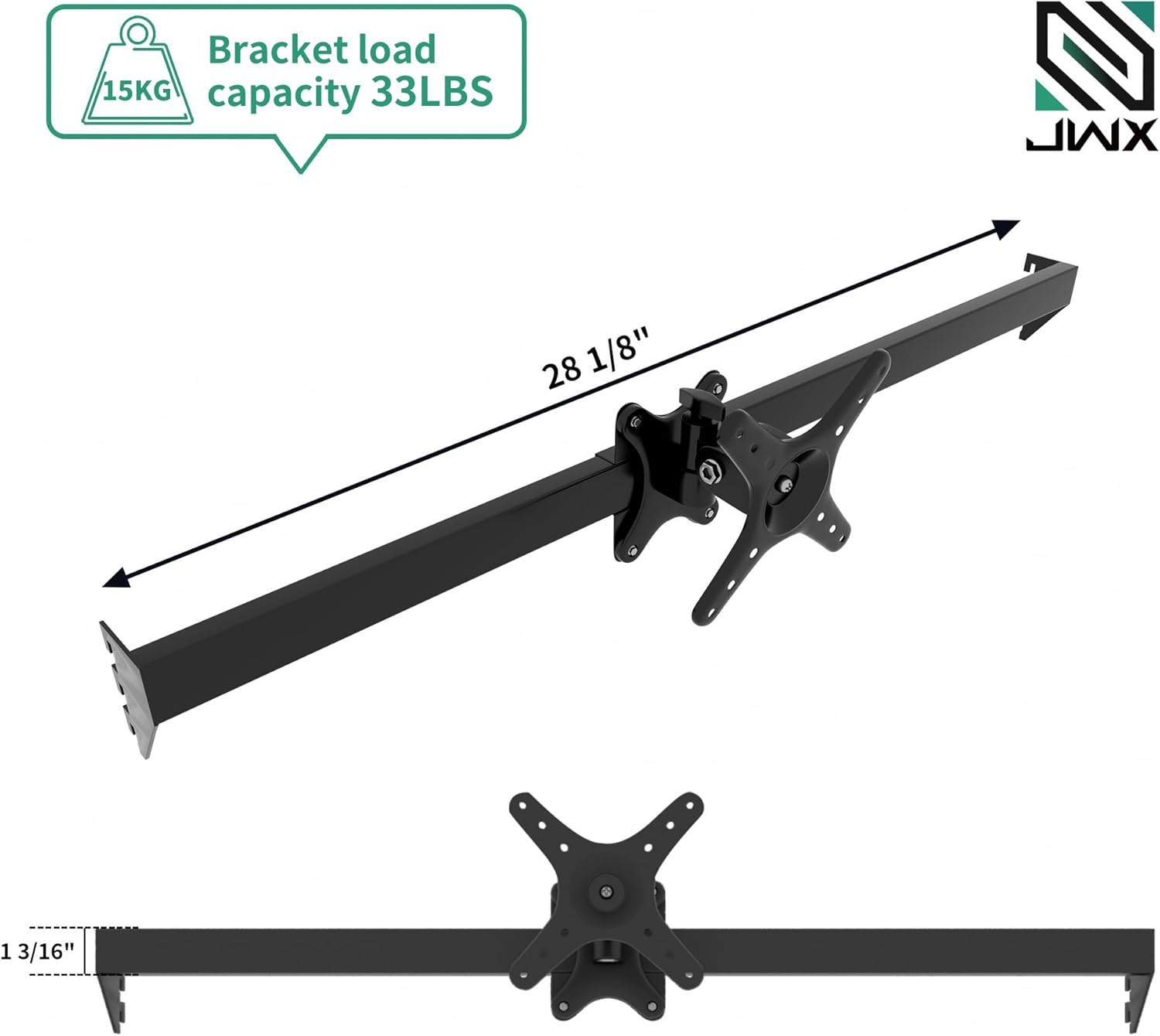
Image 7.1: Detailed dimensions of the monitor mount bar and its 33 lbs (15 kg) weight capacity.
8. Gwarancja i wsparcie
The JWX Monitor Bar includes a 12-month warranty and a 30-day return policy for any reason. For any questions or assistance, please contact our professional after-sales customer service team, available 24/7.
For support, please refer to the contact information provided with your purchase or visit the official JWX webstrona.