
CPS IAQPRO-B0CD31BV78
Instrukcja obsługi miernika jakości powietrza w pomieszczeniach CPS IAQPRO Advanced
Your comprehensive guide to setting up, operating, and maintaining your CPS IAQPRO meter for accurate indoor air quality monitoring.
Produkt ponadview
The CPS IAQPRO Advanced Indoor Air Quality Meter is a Bluetooth-enabled device designed to monitor various indoor air quality parameters. It provides accurate measurements for VOCs, CO2, PM2.5, PM10, humidity, temperature, dew point, and pressure, making it suitable for both smart home users and professionals.
Główne cechy:
- Small design for use in compact spaces.
- Provides accurate measurements to help maintain safe air quality.
- Dynamic light indicator communicates air quality information.
- Wireless connection to the monitor via the CPSLinkPro app.
Zawartość pudełka:
- Monitor jakości powietrza
- Etui transportowe
- Kabel USB
- Zasilacz
Wizualizacje produktu

Przód view of the CPS IAQPRO meter, showcasing its compact cylindrical design and illuminated green light band indicating good air quality.
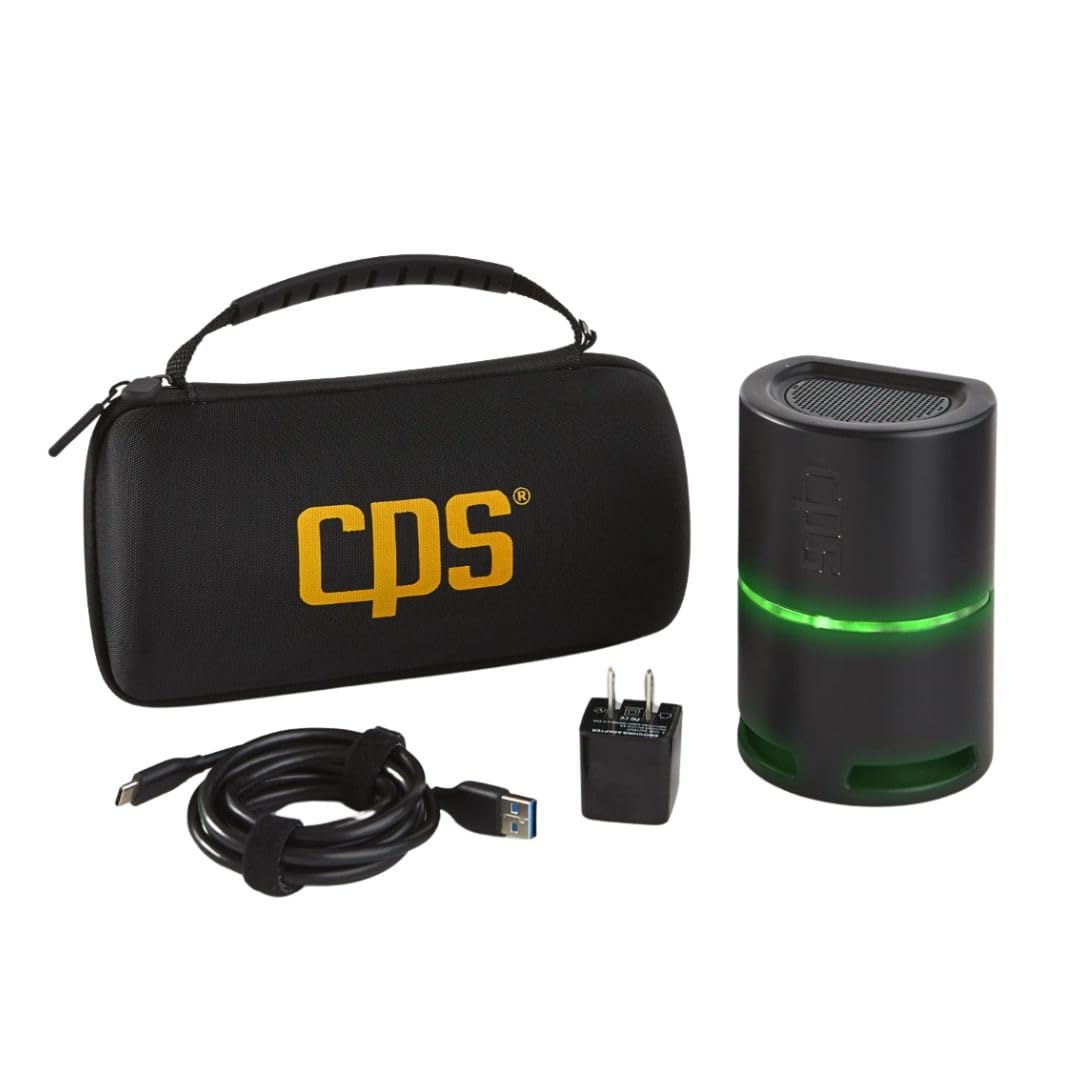
The CPS IAQPRO meter alongside its branded carrying case, USB cable, and power adapter, demonstrating the complete package.

A hand holding a smartphone displaying the CPSLinkPro app, showing real-time air quality readings from the connected IAQPRO meter.

Two individuals discussing air quality data displayed on a tablet, with the IAQPRO meter positioned on a nearby table, highlighting its professional application.

Zbliżenie view of the CPS IAQPRO meter next to a smartphone, showcasing the detailed air quality metrics and comfort zone graph available in the CPSLinkPro app.
Organizować coś
Follow these steps to set up your CPS IAQPRO Advanced Indoor Air Quality Meter:
- Naładuj urządzenie: Before first use, ensure the IAQPRO meter is fully charged using the provided USB cable and power adapter.
- Pobierz aplikację: Download the "CPSLinkPro" app from your device's app store (available on Google Play and the App Store).
- Place the Meter: Place the IAQPRO meter in the area you wish to test. Ensure it is on a stable, flat surface and not obstructed. The device will begin analyzing air quality factors immediately.
- Połącz przez Bluetooth: Open the CPSLinkPro app on your smartphone or tablet. Navigate to the "Devices" section and select your IAQPRO meter from the list of available devices by pressing the "ADD" button. The meter's light bar will turn blue when successfully connected.
Setup and Connectivity Overview:
This video demonstrates the initial setup of the CPS IAQPRO meter, including app connection, device placement, and the dynamic light bar indicator. It also shows how the device analyzes various air quality factors.
Instrukcja obsługi
Once connected, the CPSLinkPro app provides comprehensive control and monitoring capabilities:
- View Live Readings: Access the "Dashboard" screen in the app to view live air quality readings for 8 different factors, updated every second. The light bar on the device changes color (green, yellow, red) according to the air quality.
- Perform Timed Tests: Go to the "Tests" section to perform a default 30-minute or custom-timed indoor air quality test. Running a test calculates averages for 9 key air quality factors, including a comfort zone graph, to help reveal potential issues.
- Identify Causes and Solutions: After a test is completed, the app allows you to select "Causes & Solutions" for any abnormal readings. You can identify the cause (e.g., Air Handler) and select a required solution or service (e.g., Clean & Sanitize).
- Generuj raporty: Follow the on-screen instructions to generate a comprehensive report with prices for recommended services. This report can be instantly shared with customers via email.
App Functionality and Reporting:
This video provides a detailed walkthrough of the CPSLinkPro app's features, including live data dashboard, timed test execution, identification of causes and solutions for air quality issues, and the generation of professional reports.
Specyfikacje
| Atrybut | Wartość |
|---|---|
| Wymiary opakowania | 9.13 x 4.69 x 4.17 cala |
| Waga | 10.4 uncji |
| Producent | CPS |
| ASIN | B0CD31BV78 |
| Pierwsza dostępna data | 1 maja 2020 r. |
For detailed measurement accuracy and ranges, please refer to the CPSLinkPro app's specifications section or the official user guide.
Konserwacja
To ensure optimal performance and longevity of your CPS IAQPRO meter, consider the following general maintenance guidelines:
- Czyszczenie: Gently wipe the exterior of the device with a soft, dry cloth. Avoid using abrasive cleaners or solvents.
- Składowanie: When not in use, store the meter in its provided carrying case in a cool, dry place, away from direct sunlight and extreme temperatures.
- Pielęgnacja czujnika: Do not obstruct the air intake or exhaust vents. Avoid exposing the device to excessive dust or moisture, which can affect sensor accuracy.
No specific user-serviceable parts are inside the device. Do not attempt to disassemble the unit.
Rozwiązywanie problemów
If you encounter issues with your CPS IAQPRO meter, consider the following common troubleshooting steps:
- Problemy z połączeniem: Ensure Bluetooth is enabled on your mobile device and the IAQPRO meter is within range. Try restarting both the meter and the app.
- Niedokładne odczyty: Ensure the device is placed in an area with good airflow and away from direct sources of pollutants or extreme temperatures. Allow sufficient time for readings to stabilize.
- Funkcjonalność aplikacji: Ensure your CPSLinkPro app is updated to the latest version. If issues persist, try reinstalling the app.
For detailed troubleshooting guidance and specific solutions based on air quality readings, refer to the "Causes & Solutions" feature within the CPSLinkPro app. This feature is designed to help diagnose and address identified air quality concerns.
Gwarancja i wsparcie
For comprehensive support and warranty information regarding your CPS IAQPRO Advanced Indoor Air Quality Meter, please refer to the following resources:
- Oficjalny podręcznik użytkownika: A detailed user guide in PDF format is available for download: Pobierz instrukcję użytkownika (PDF).
- CPS Official Store: Visit the official CPS store on Amazon for additional product information, FAQs, and contact options: Visit CPS Store.
- Gwarancja: Specific warranty terms and conditions are typically outlined in the official user guide or on the manufacturer's website. Please consult these resources for detailed warranty coverage.