
1. Wprowadzenie i koniecview
This manual provides comprehensive instructions for the safe and efficient operation of your XWJNE 3000 Watt Pure Sine Wave Power Inverter. This device is designed to convert 12V DC power from a battery source to 110V/120V AC power, suitable for a wide range of applications including vehicles, RVs, remote workplaces, and emergency power needs.
The XWJNE inverter delivers a true 3000 watts of continuous power and a peak power of 6000 watts, ensuring stable and reliable electricity for your devices. It features a remote control, LED display, multiple protection mechanisms, and dual cooling fans for optimal performance and safety.

Image: XWJNE Pure Sine Wave Power Inverter, ideal for various applications.
2. Funkcje produktu
- Czysta fala sinusoidalna na wyjściu: Delivers true 3000W continuous power (6000W peak) for sensitive electronics, with a conversion efficiency of up to 94.2%.
- Pilot zdalnego sterowania i wyświetlacz LED: Equipped with a clear LCD display showing input/output voltage, battery capacity, and protection indicators. A 16.4ft remote control allows convenient power on/off and status monitoring.
- System wielu zabezpieczeń: Features isolated voltage protection against low/over-voltage, overheating, overload, reverse polarity, and short circuits.
- Dwa wentylatory chłodzące: Two intelligent cooling fans activate automatically when temperature exceeds 50°C or load is over 50%, providing efficient heat dissipation.
- Wszechstronna łączność: Includes 2x 110V/120V AC output sockets and 1x 5V DC USB output for various devices.

Image: The inverter supports multiple battery inputs (GEL, AGM, SLD, FLD, LI) and powers various AC devices like laptops, microwaves, TVs, fridges, and coffee makers.

Image: Comparison highlighting the XWJNE Pure Sine Wave Inverter's low THD (less than 4%), remote control feature, 90% efficiency, and low noise levels.
3. Co znajduje się w pudełku
Upon unboxing your XWJNE Power Inverter, you should find the following components:
- 1 x XWJNE 3000W Power Inverter
- 2 x Car Battery Cables (Red for positive, Black for negative)
- 1 x Remote Controller (with 16.4ft cable)
- 1 x Klucz
- 1 x kabel do ładowania telefonu 3 w 1
- Zapasowe bezpieczniki
- Uziemienie
- Instrukcja obsługi (ten dokument)
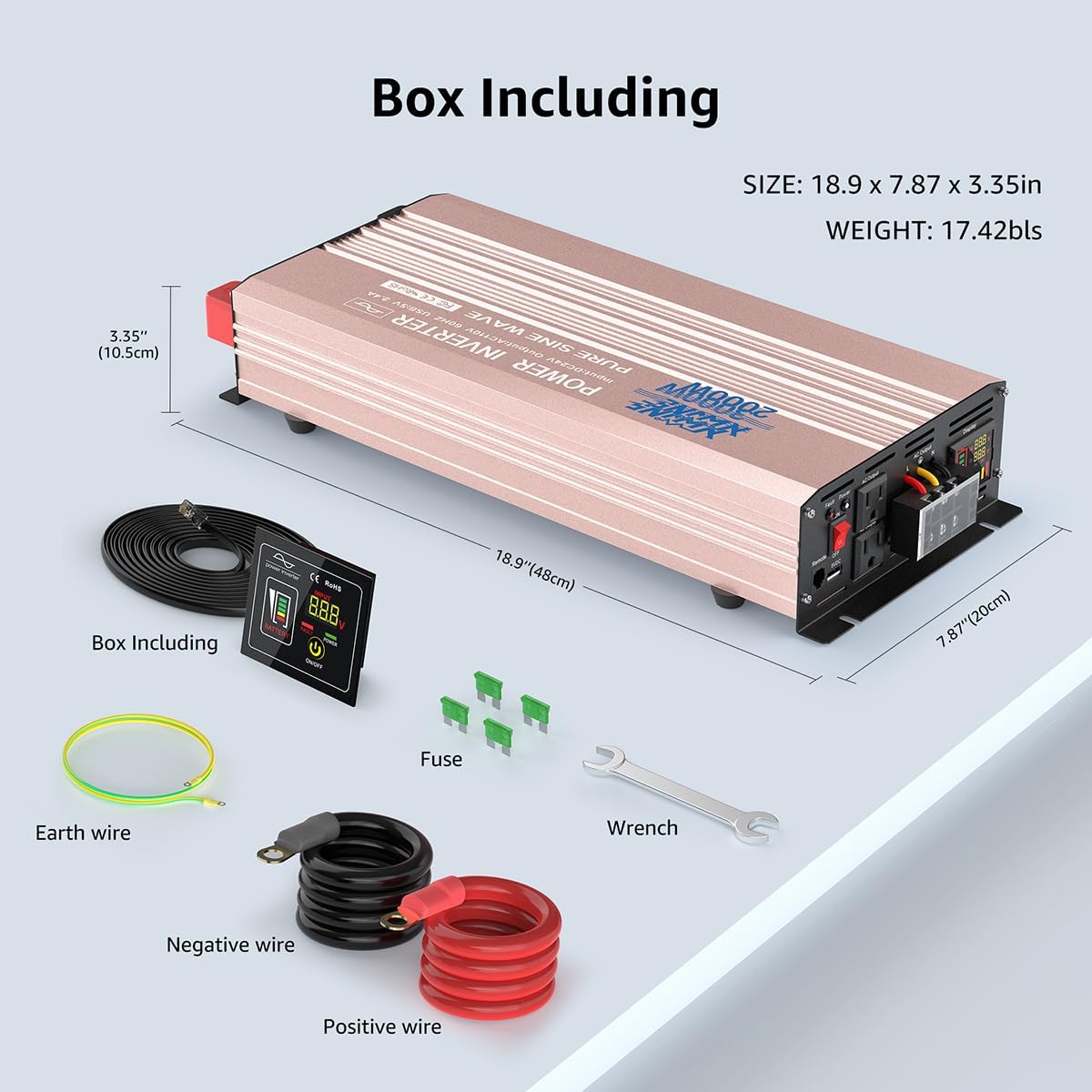
Obraz: Wizualna reprezentacja wszystkich elementów zawartych w opakowaniu produktu.
4. Konfiguracja i instalacja
Proper installation is crucial for the safe and effective operation of your inverter. Please follow these steps carefully:
- Wybierz lokalizację: Select a dry, well-ventilated area for the inverter. Ensure it is away from direct sunlight, heat sources, and flammable materials. The inverter should be mounted securely.
- Podłączenie akumulatora:
- Connect the red positive (+) battery cable to the positive (+) terminal on the inverter.
- Connect the black negative (-) battery cable to the negative (-) terminal on the inverter.
- Connect the other end of the red positive (+) cable to the positive (+) terminal of your 12V battery.
- Connect the other end of the black negative (-) cable to the negative (-) terminal of your 12V battery.
- Upewnij się, że wszystkie połączenia są dobrze dokręcone i bezpieczne, aby zapobiec łukowaniu elektrycznemu i przegrzaniu.
- Grunt: Connect the provided green/yellow ground wire to the grounding screw on the inverter and to a suitable ground point (e.g., vehicle chassis or earth ground). This is essential for safety.
- Połączenie zdalnego sterowania: Plug the remote control cable into the "Remote" port on the inverter. The remote display can be mounted in a convenient location for easy access.

Obraz: Szczegółowy view of the inverter's front panel (AC outlets, USB, display, power switch, remote port, earth wire) and rear panel (positive/negative terminals, cooling fans).

Image: How the power inverter works within a system, converting power from a battery (charged by solar panel and charge controller) to power various loads.
Wideo instalacyjne:
Video: This video provides a visual guide to the product's features and demonstrates the installation process, including connecting the battery cables and remote control.
5. Instrukcja obsługi
- Włączanie: After ensuring all connections are secure, switch the main power button on the inverter to the "ON" position. The LED display will illuminate, showing battery voltage i status wyjściowy.
- Korzystanie z pilota: The remote control allows you to turn the inverter on/off and monitor its status from a distance. Press the "ON/OFF" button on the remote to control the inverter.
- Podłączanie urządzeń: Plug your AC devices into the 110V/120V AC outlets and USB devices into the 5V DC USB port. Ensure the total wattage of connected devices does not exceed the inverter's continuous power rating (3000W).
- Monitorowanie wydajności: The LED display provides real-time information on input voltage, objętość wyjściowatage, battery capacity, and any protection indications (e.g., fault).
- Wyłączanie: Before disconnecting any devices or the inverter from the battery, switch the inverter off using either the main power button or the remote control.

Image: The remote control unit allows for convenient operation of the inverter, especially in crampspacje.
Product Use Demonstration:
Video: This video provides a detailed product introduction and demonstrates various use cases and operational aspects of the inverter.
6. Funkcje bezpieczeństwa i zabezpieczenia
Your XWJNE Power Inverter is equipped with multiple safety features to protect both the device and your connected electronics:
- Low/Over-Voltage Ochrona: Automatically shuts down if input voltage jest za niskie lub za wysokie.
- Zabezpieczenie przed przegrzaniem: Dual cooling fans activate when internal temperature exceeds 50°C, and the unit shuts down if temperatures become critical.
- Zabezpieczenie przed przeciążeniem: Prevents damage from excessive power draw by shutting down when load exceeds capacity.
- Ochrona przed odwrotną polaryzacją: Chroni przed nieprawidłowym podłączeniem akumulatora.
- Zabezpieczenie przed zwarciem: Safeguards against short circuits in the output.
- na białym tletage Ochrona: Ensures perfect protection for your devices by isolating input and output.

Obraz: Wizualnyview of the inverter's comprehensive safety features, including low-voltage, przettage, output short circuit, compression, load shock, overpower, and overtemperature protection.
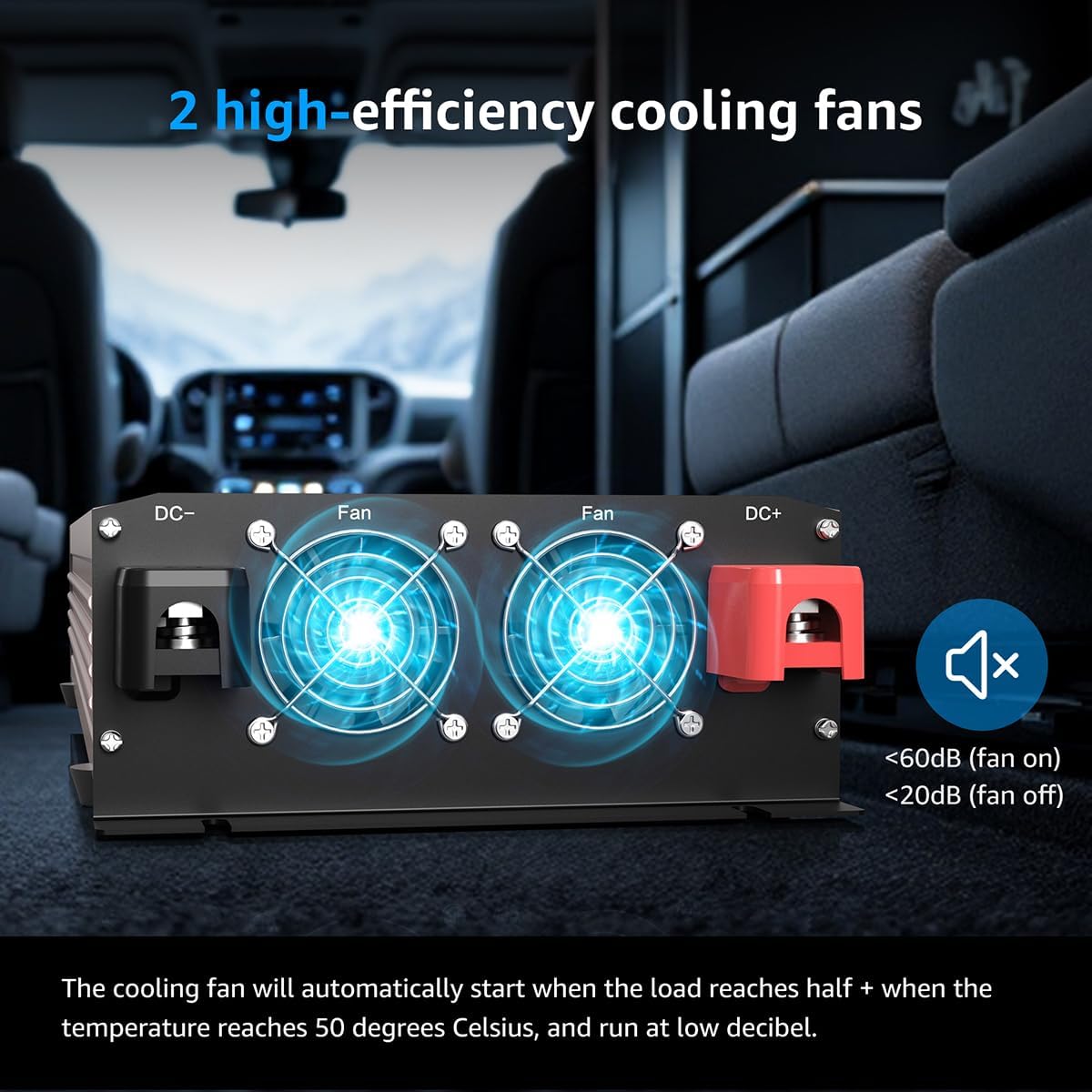
Image: The dual cooling fans ensure efficient heat dissipation, activating automatically when needed to prevent overheating.
7. Konserwacja
To ensure the longevity and optimal performance of your XWJNE Power Inverter, regular maintenance is recommended:
- Zachowaj czystosc: Regularly clean the exterior of the inverter with a dry cloth. Ensure ventilation openings and cooling fans are free from dust and debris.
- Sprawdź połączenia: Periodically inspect all cable connections (battery, ground, and output) to ensure they are tight and free from corrosion. Loose connections can lead to overheating and reduced performance.
- Stan baterii: Monitor your 12V battery's health and charge level. A healthy battery is essential for the inverter's efficient operation.
- Składowanie: Jeśli falownik będzie przechowywany przez dłuższy czas, należy odłączyć go od akumulatora i przechowywać w chłodnym, suchym miejscu.
8. Rozwiązywanie Problemów
If you encounter issues with your XWJNE Power Inverter, refer to the following common troubleshooting steps:
| Problem | Możliwa przyczyna | Rozwiązanie |
|---|---|---|
| Falownik się nie włącza | Luźne połączenia akumulatora, niski poziom naładowania akumulatoratage, faulty power switch. | Check and tighten battery cables. Charge or replace battery. Ensure power switch is fully engaged. |
| Brak wyjścia AC | Overload, short circuit, overheating, low battery voltage. | Reduce load. Check for shorted devices. Allow inverter to cool. Charge battery. Check fault indicator on display. |
| Fault indicator is on | Overload, over-temperature, low/over-voltage, reverse polarity. | Refer to the LED display for specific fault codes/indicators and address the underlying issue. Disconnect and reconnect after resolving. |
| Wentylatory nie działają | Normal operation (fans activate under load/temperature), fan malfunction. | Fans are temperature-controlled; they will only run when needed. If inverter is hot and fans are off, contact support. |
If troubleshooting steps do not resolve the issue, please contact XWJNE customer support for assistance.
9. Specyfikacje
- Nazwa modelu: XWJNE
- Ciągła moc: 3000 watów
- Moc szczytowa: 6000 watów
- Wejście Voltage: 12V prądu stałego
- Objętość wyjściatage: 110V/120V prąd zmienny
- Częstotliwość wyjściowa: 60 Hz
- Wyjście USB: 5V DC, 2.4A (2 ports)
- Efektywność konwersji: Do 94.2%
- Waga przedmiotu: 17.42 funta
- Wymiary opakowania: 22.76 x 10.24 x 5.75 cala
- Producent: XWJNE
10. Gwarancja i wsparcie
Specific warranty details for the XWJNE Power Inverter are not provided in this manual. For warranty information, technical support, or service inquiries, please refer to the contact information provided with your product packaging or visit the official XWJNE webstrona.
Aby uzyskać dodatkowe zasoby, zapoznaj się z Instrukcja obsługi (PDF).