
1. Wprowadzenie
Thank you for choosing the Sunbox Smart Night Light and Sunrise Alarm Clock, Model BL-HXD03. This device combines multiple functionalities including a personalized wake-up light, ambient night light, white noise sound machine, and Bluetooth speaker, all controllable via an intuitive app or remote. This manual provides essential information to help you set up and operate your device effectively.
2. Informacje dotyczące bezpieczeństwa
Please read all safety instructions before using this product to prevent injury or damage.
- Nie wystawiaj urządzenia na działanie wody ani nadmiernej wilgoci.
- Używaj wyłącznie dołączonego zasilacza.
- Przechowywać w miejscu niedostępnym dla dzieci i zwierząt domowych.
- Nie próbuj samodzielnie demontować ani naprawiać urządzenia. Skontaktuj się z obsługą klienta, aby uzyskać pomoc.
- Podczas pracy urządzenia należy zapewnić odpowiednią wentylację.
3. Zawartość opakowania
Sprawdź, czy w przesyłce znajdują się wszystkie elementy:
- Sunbox Smart Night Light Unit (Model BL-HXD03)
- Zdalne sterowanie
- Zasilacz
- Instrukcja obsługi (ten dokument)

Image: The Sunbox Smart Night Light, showcasing its circular design, digital display, included remote control, and a smartphone screen displaying the companion app.
4. Konfiguracja
4.1 Połączenie zasilania
- Unpack the Sunbox Smart Night Light and its power adapter.
- Connect the power adapter to the DC input port on the back of the device.
- Plug the power adapter into a standard wall outlet. The device display should illuminate.
4.2 Pobieranie i parowanie aplikacji
For full functionality, download the companion app and pair it with your device.
- Szukaj the "Smart Q Wake Up Light" app on your smartphone's app store (iOS or Android).
- Zainstaluj i otwórz aplikację.
- Upewnij się, że Bluetooth jest włączony w Twoim smartfonie.
- Follow the in-app instructions to discover and pair with your Sunbox Smart Night Light.
- Upon first connection, the app will automatically calibrate the device's time.
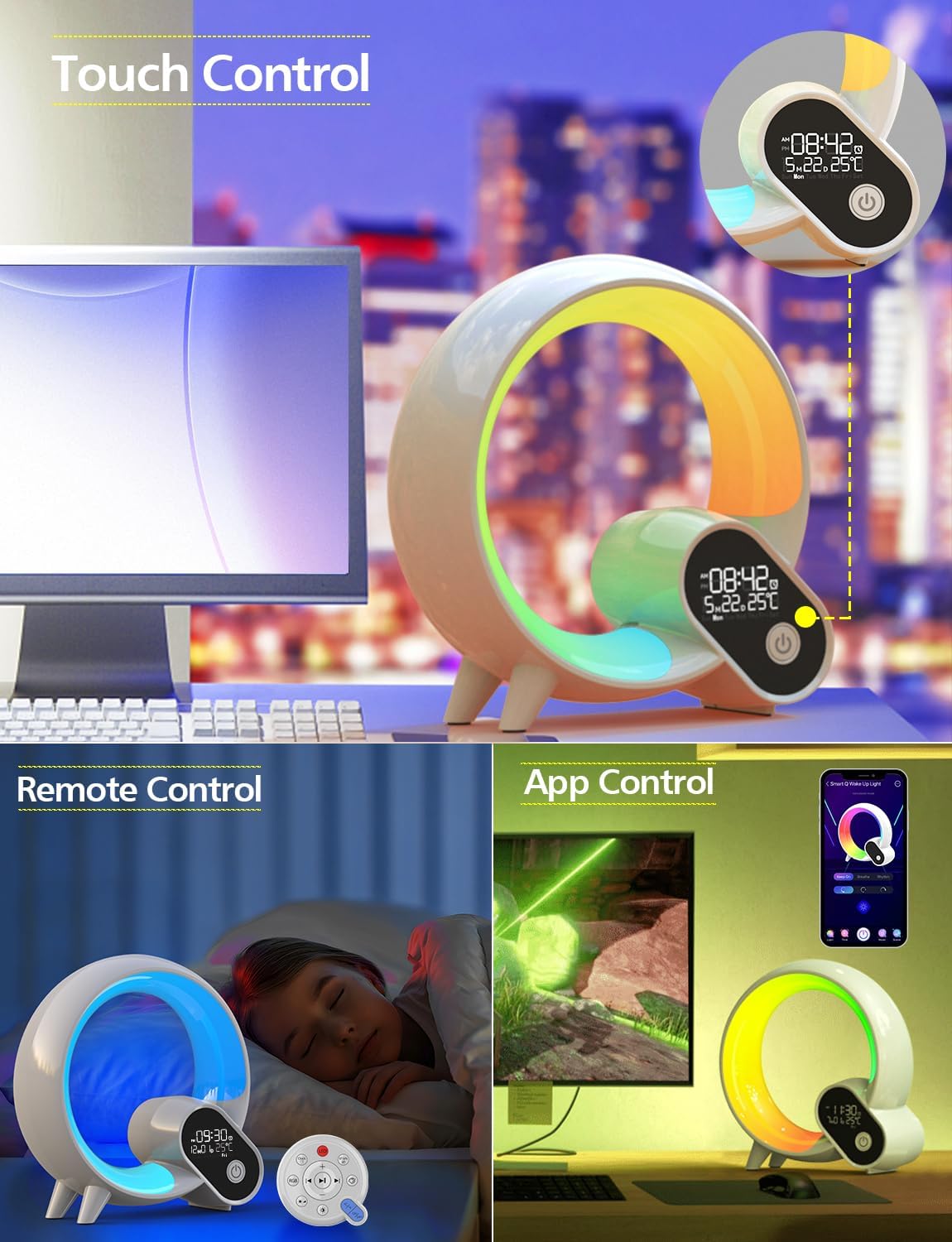
Image: The Smart Night Light demonstrating its various control methods: touch buttons on the device, a dedicated remote control, and a smartphone app interface.
5. Instrukcja obsługi
5.1 Funkcje oświetlenia
- Włącz/Wyłącz: Press the power button on the device or remote to turn the light on or off.
- Regulacja jasności: Use the brightness controls on the remote, app, or touch controls on the device to adjust light intensity from 0% to 100%.
- Wybór kolorów: Choose from 8 preset colors using the remote or device controls. The app offers 16 million color options for personalized ambiance.

Image: The Smart Night Light illustrating four distinct brightness levels, from dim to bright, suitable for various activities like sleeping, relaxing, reading, and working.

Image: A close-up of the Smart Night Light showcasing a spectrum of vibrant color options available for ambient lighting.
5.2 Funkcje budzika
- Ustawianie alarmów: Use the app to set multiple alarms. You can customize alarm times, days of the week, and associated sounds/lights.
- Symulacja wschodu słońca: The wake-up light feature gradually transitions from dark to soft warm white light 2 minutes before your set alarm time, simulating a natural sunrise.
- Funkcja drzemki: Tap the device or press the snooze button on the remote to activate snooze, providing a temporary delay before the alarm sounds again.

Image: The Smart Night Light on a bedside table, displaying the time and temperature, with icons indicating alarm, snooze, and countdown functions.
5.3 White Noise Sound Machine
The device offers 15 nature sounds to aid sleep or relaxation:
- Waves, White Noise, Summer Night, Thunderstorm, Water, Frog, Wind Chimes, Waterfalls, Rain, Birds, Breeze, Fire, Lullabies (3 variations).
- Wybór dźwięku: Cycle through sounds using the remote or app.
- Regulacja głośności: Adjust the volume using the remote or app.
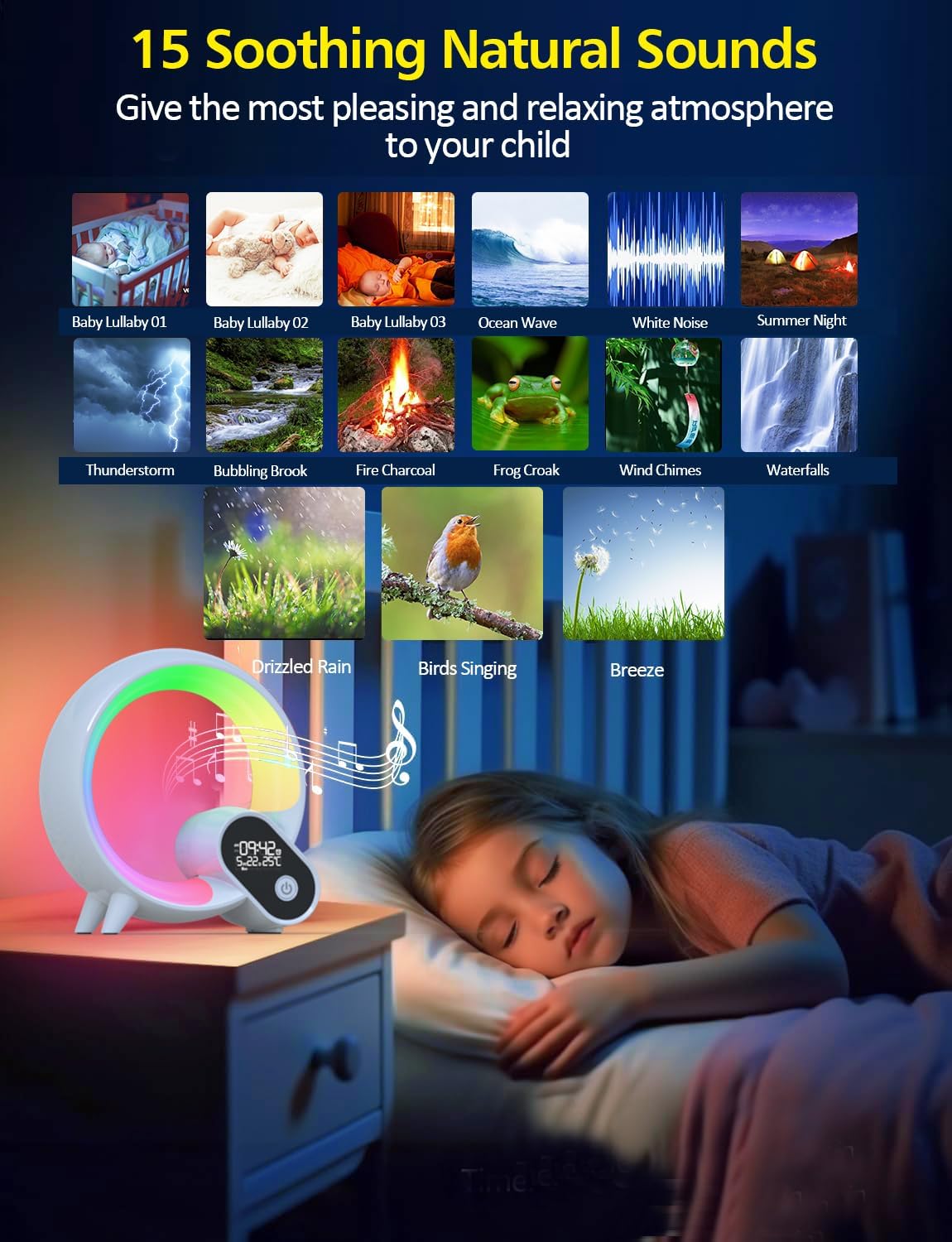
Image: The Smart Night Light with a visual representation of 15 soothing natural sounds, including baby lullabies, ocean waves, white noise, and various nature sounds, designed to create a relaxing atmosphere.
Głośnik Bluetooth 5.4
- Łączenie w pary: Ensure Bluetooth is enabled on your smartphone. Select "BL-HXD03" from your device's Bluetooth settings to pair.
- Odtwarzanie dźwięku: Once paired, you can stream your favorite music or audio content directly through the device's speaker.

Image: The Smart Night Light with musical notes and a Bluetooth icon, indicating its functionality as a Bluetooth speaker for playing phone music.
Metody sterowania 5.5
- Zdalne sterowanie: The included remote allows for convenient adjustment of light colors, sounds, alarm settings, and snooze mode.
- Sterowanie dotykowe: The device features touch-sensitive controls for basic functions like power and brightness.
- Kontrola aplikacji: The "Smart Q Wake Up Light" app provides comprehensive control over all features, including personalization of light colors, sounds, alarms, and multiple scene settings.
6. Konserwacja
- Czyszczenie: Przetrzyj urządzenie miękką, suchą ściereczką. Nie używaj środków czyszczących o właściwościach ściernych ani rozpuszczalników.
- Składowanie: Jeśli urządzenie nie będzie używane przez dłuższy czas, należy je przechowywać w chłodnym i suchym miejscu, z dala od bezpośredniego światła słonecznego i ekstremalnych temperatur.
7. Rozwiązywanie Problemów
| Wydanie | Możliwe rozwiązanie |
|---|---|
| Urządzenie nie włącza się. | Upewnij się, że zasilacz jest prawidłowo podłączony zarówno do urządzenia, jak i do sprawnego gniazdka ściennego. Spróbuj użyć innego gniazdka. |
| Lights are not responding. | Check if the device is powered on. Ensure the remote control has working batteries and is pointed at the device. Try controlling via the app. |
| Problemy z połączeniem Bluetooth. | Ensure Bluetooth is enabled on your smartphone and the device is within range. Try unpairing and re-pairing the device in your phone's Bluetooth settings. Restart both the device and your phone. |
| Alarm not working as expected. | Verify alarm settings in the app, including time, days, and sound/light preferences. Ensure the device is powered on. |
| Wyświetlany czas jest nieprawidłowy. | Connect the device to the app for automatic time calibration. Ensure your smartphone's time is correct. |
8. Specyfikacje
| Funkcja | Szczegół |
|---|---|
| Numer modelu | BL-HXD03 |
| Marka | Sunbox |
| Wymiary (gł. x szer. x wys.) | 8.6" x 8.4" x 3.3" |
| Waga przedmiotu | 1.5 funta (0.68 kilograma) |
| Tworzywo | Akrylonitryl Butadienowo-styrenowy |
| Typ źródła światła | PROWADZONY |
| Liczba źródeł światła | 8 |
| Cotage | 8 watów |
| Tomtage | 5 wolty |
| Metoda kontroli | Aplikacja, zdalny |
| Cechy specjalne | Możliwość przyciemniania, energooszczędność |
| Źródło zasilania | Battery Powered (Note: Product description states 'Battery Powered' but also 'Is Cordless? No'. This implies it has a battery for backup/portability but requires a power source for full function or charging.) |
| UPC | 765133539765 |
9. Gwarancja i wsparcie
For warranty information or technical support, please refer to the contact details provided with your purchase or visit the official Sunbox webstrona. Zachowaj dowód zakupu na potrzeby roszczeń gwarancyjnych.
10. Filmy produktowe
No relevant product videos from the seller were found in the provided data. The available videos pertain to a different product (Christmas trees).