
Wstęp
Thank you for choosing the Kisonli KS-1981 Wireless Stereo Speaker. This manual provides essential information for the safe and efficient operation of your device. Please read it carefully before use and retain it for future reference.
Produkt ponadview
The Kisonli KS-1981 is a portable wireless stereo music speaker designed for versatile audio playback. It features Bluetooth connectivity, FM radio, and support for USB, AUX, and TF card inputs. Its compact design and clear sound make it suitable for various uses.

Rycina 1: Przód view of the Kisonli KS-1981 Wireless Stereo Speaker.
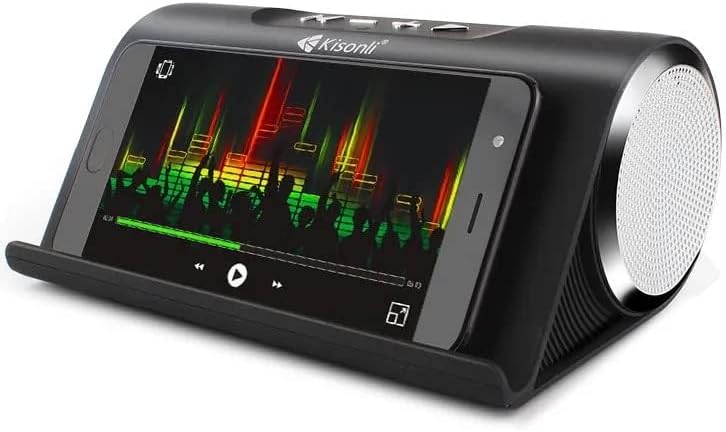
Figure 2: Kisonli KS-1981 speaker with a smartphone in its integrated stand, demonstrating media playback.
Organizować coś
1. Ładowanie głośnika
Before first use, fully charge the speaker. Connect the provided USB charging cable to the speaker's charging port and the other end to a USB power adapter (not included) or a computer's USB port. The charging indicator light will illuminate during charging and turn off when fully charged.
2. Włączanie/wyłączanie zasilania
- To power on: Press and hold the Power button (usually marked with an 'M' or power symbol) for a few seconds until you hear an audible prompt or see an indicator light.
- Aby wyłączyć: Naciśnij i przytrzymaj przycisk zasilania ponownie przez kilka sekund.
3. Parowanie Bluetooth
- Ensure the speaker is powered on and in Bluetooth mode (it usually defaults to this mode or can be switched using the 'M' button). The Bluetooth indicator light will flash, indicating it's ready for pairing.
- Włącz Bluetooth w swoim smartfonie, tablecie lub innym urządzeniu.
- Szukaj available Bluetooth devices and select "KS-1981" from the list.
- Once paired, the speaker will emit a confirmation sound, and the Bluetooth indicator light will stop flashing.
4. Connecting via AUX/USB/TF Card
- Tryb AUX: Connect one end of a 3.5mm audio cable (not included) to the speaker's AUX port and the other end to your audio device's headphone jack. Press the 'M' button to switch to AUX mode.
- Tryb USB: Włóż dysk flash USB zawierający dźwięk w formacie MP3 filePodłącz go do portu USB. Głośnik automatycznie przełączy się w tryb USB i rozpocznie odtwarzanie.
- Tryb karty TF: Włóż kartę TF (MicroSD) zawierającą dźwięk MP3 fileWłóż kartę TF do gniazda. Głośnik automatycznie przełączy się w tryb karty TF i rozpocznie odtwarzanie.
Instrukcja obsługi
Funkcje przycisków
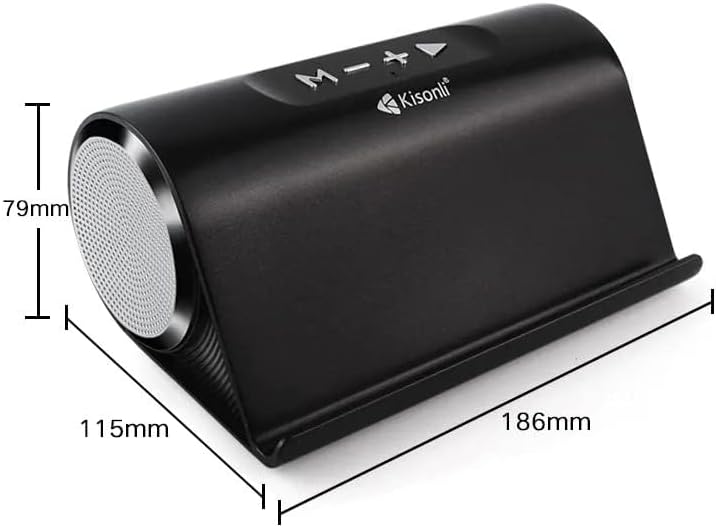
Rysunek 3: Góra view of the Kisonli KS-1981 speaker showing control buttons and dimensions.
- Przycisk „M” (tryb/zasilanie):
- Długie naciśnięcie: włączanie/wyłączanie.
- Short press: Switch between Bluetooth, FM Radio, AUX, USB, and TF card modes.
- Przycisk '-' (zmniejszanie głośności/poprzedni utwór):
- Krótkie naciśnięcie: zmniejszenie głośności.
- Long press: Go to the previous track/station.
- Przycisk „+” (zwiększanie głośności/następny utwór):
- Krótkie naciśnięcie: zwiększenie głośności.
- Long press: Go to the next track/station.
- Przycisk Odtwórz/Pauza (►/−):
- Krótkie naciśnięcie: odtwarzanie/pauza muzyki.
- In FM mode, long press to auto-scan and save FM stations.
Obsługa radia FM
- Przełącz na tryb FM za pomocą przycisku „M”.
- Long press the Play/Pause button to automatically scan and save available FM radio stations.
- Use the '+' and '-' buttons (long press) to navigate between saved stations.
Konserwacja
- Czyszczenie: Use a soft, dry cloth to clean the speaker's surface. Do not use abrasive cleaners, alcohol, or solvents.
- Składowanie: Przechowuj głośnik w chłodnym, suchym miejscu, z dala od bezpośredniego światła słonecznego i ekstremalnych temperatur.
- Pielęgnacja baterii: Aby przedłużyć żywotność baterii, unikaj częstego całkowitego rozładowywania. Ładuj głośnik regularnie, nawet jeśli nie jest używany przez dłuższy czas.
- Wodoodporność: The product is listed as water-resistant, but not waterproof. Avoid submerging it in water or exposing it to heavy rain.
Rozwiązywanie problemów
| Problem | Rozwiązanie |
|---|---|
| Głośnik nie włącza się. | Upewnij się, że bateria jest naładowana. Podłącz głośnik do źródła zasilania i spróbuj ponownie. |
| Brak dźwięku. | Check the volume level on both the speaker and your connected device. Ensure the correct input mode is selected (Bluetooth, AUX, USB, TF). |
| Parowanie Bluetooth nie powiodło się. | Ensure the speaker is in Bluetooth pairing mode. Turn off and on Bluetooth on your device. Move the speaker closer to your device. Clear previous Bluetooth connections on your device. |
| Słaby odbiór radia FM. | Relocate the speaker to an area with better signal. Extend any integrated antenna if available. |
| Karta USB/TF nie jest obsługiwana. | Zapewnij files are in a compatible format (e.g., MP3). Check if the card/drive is inserted correctly. Try a different USB/TF card. |
Specyfikacje
| Funkcja | Szczegół |
|---|---|
| Nazwa marki | Kisonli |
| Nazwa modelu | KS-1981 |
| Maksymalna moc wyjściowa głośnika | 16 watów |
| Technologia łączności | USB, Bluetooth |
| Tryb wyjścia audio | Stereofoniczny |
| Typ montażu | Stały podłogowe |
| Tworzywo | Poliuretan termoplastyczny |
| Typ głośnika | Multimedia |
| Cechy specjalne | Bluetooth, bezprzewodowy |
| Zalecane zastosowania | For Televisions, For Computers, For Smartphones or Tablets, For Music Players |
| Średnica głośnika niskotonowego | 4 cali |
| Kolor | Blue (Note: Product images show black, but specification lists blue) |
| Wodoodporny | Tak |
| Metoda kontroli | Dotykać |
| Rozmiar głośnika | 30 centymetrów |
| Poziom wodoodporności | Not Water Resistant (Conflicting with 'Water Resistant: Yes' above, user should refer to product packaging for clarity) |
| Konkretne zastosowania | Muzyka |
| Wymiary produktu (gł. x szer. x wys.) | Wymiary 10 x 18 x 8 cm |
| Waga przedmiotu | 1.32 funtów |
| Kompatybilne urządzenia | Tablet, Laptop, Smartphone |
| Źródło zasilania | Zasilany bateryjnie |
| Zawarte komponenty | Ear Pads (Note: This seems incorrect for a speaker, likely a data entry error in source) |
| Producent | Kisonli |
| Konfiguracja kanału dźwięku przestrzennego | 2 |
| Technologia komunikacji bezprzewodowej | Bluetooth |
| Protokół komunikacyjny | Bluetooth |
| Typ sterownika audio | Dynamiczny sterownik |

Figure 4: Kisonli KS-1981 speaker with its retail packaging and charging/AUX cables.
Gwarancja i wsparcie
Informacje o gwarancji
Ten produkt jest dostarczany z roczna gwarancja from the date of purchase, covering manufacturing defects. Please retain your proof of purchase for warranty claims. The warranty does not cover damage caused by misuse, accidents, unauthorized modifications, or normal wear and tear.
Obsługa klienta
For technical assistance, warranty claims, or any questions regarding your Kisonli KS-1981 speaker, please contact your retailer or the manufacturer's customer service. Refer to the product packaging or the retailer's webodwiedź naszą stronę, aby uzyskać szczegółowe dane kontaktowe.