
1. Wprowadzenie
Welcome to the user manual for your new LETTON v2020 Wireless Keyboard and Mouse Combo. This manual provides essential information for setting up, operating, maintaining, and troubleshooting your device. Please read it thoroughly to ensure optimal performance and longevity of your product.
2. Koniec produktuview
The LETTON v2020 Wireless Keyboard and Mouse Combo offers a comfortable and efficient typing experience with its 104-key typewriter-style design and quiet operation. The accompanying wireless mouse provides silent clicking and precise navigation. Both devices connect wirelessly via a single 2.4GHz USB Nano receiver, ensuring a stable and smooth connection up to 28 feet.
Główne cechy:
- 104 Quiet Keys: Zaprojektowana z myślą o wygodnym i cichym pisaniu.
- Typewriter Retro Round Keycaps: Unique and ergonomic design.
- Połączenie bezprzewodowe 2.4 GHz: Stable and reliable connection up to 28 feet.
- Single Nano Receiver: Connects both keyboard and mouse with one USB receiver.
- 22 klawiszy skrótu: Convenient hotkeys for media, email, screen control, and internet functions.
- Cicha mysz bezprzewodowa: Provides whisper-quiet clicking.
- Energy-Saving Sleep Mode: Automatically activates after inactivity to conserve battery life.
- Szeroka kompatybilność: Supports Windows 7, 8, 10, XP, PC, and Mac.
Wizualizacje produktu:

Figure 2.1: The LETTON v2020 Wireless Keyboard and Mouse Combo, showcasing its multi-green color scheme and retro round keycaps.

Rysunek 2.2: Szczegółowy view of the keyboard's unique retro rounded keycaps, designed for comfortable typing.

Figure 2.3: The top-down perspective of the keyboard highlights the smart indicator lights for Caps Lock, Num Lock, and Power (also serving as a low battery indicator).

Figure 2.4: The underside and side view of the wireless mouse, detailing its battery compartment, the slot for the USB receiver, and the scroll wheel with forward/backward buttons.

Figure 2.5: A technical diagram illustrating the precise dimensions of the keyboard (445 x 136 x 30 mm), mouse (99 x 71 x 38 mm), and the compact USB receiver.
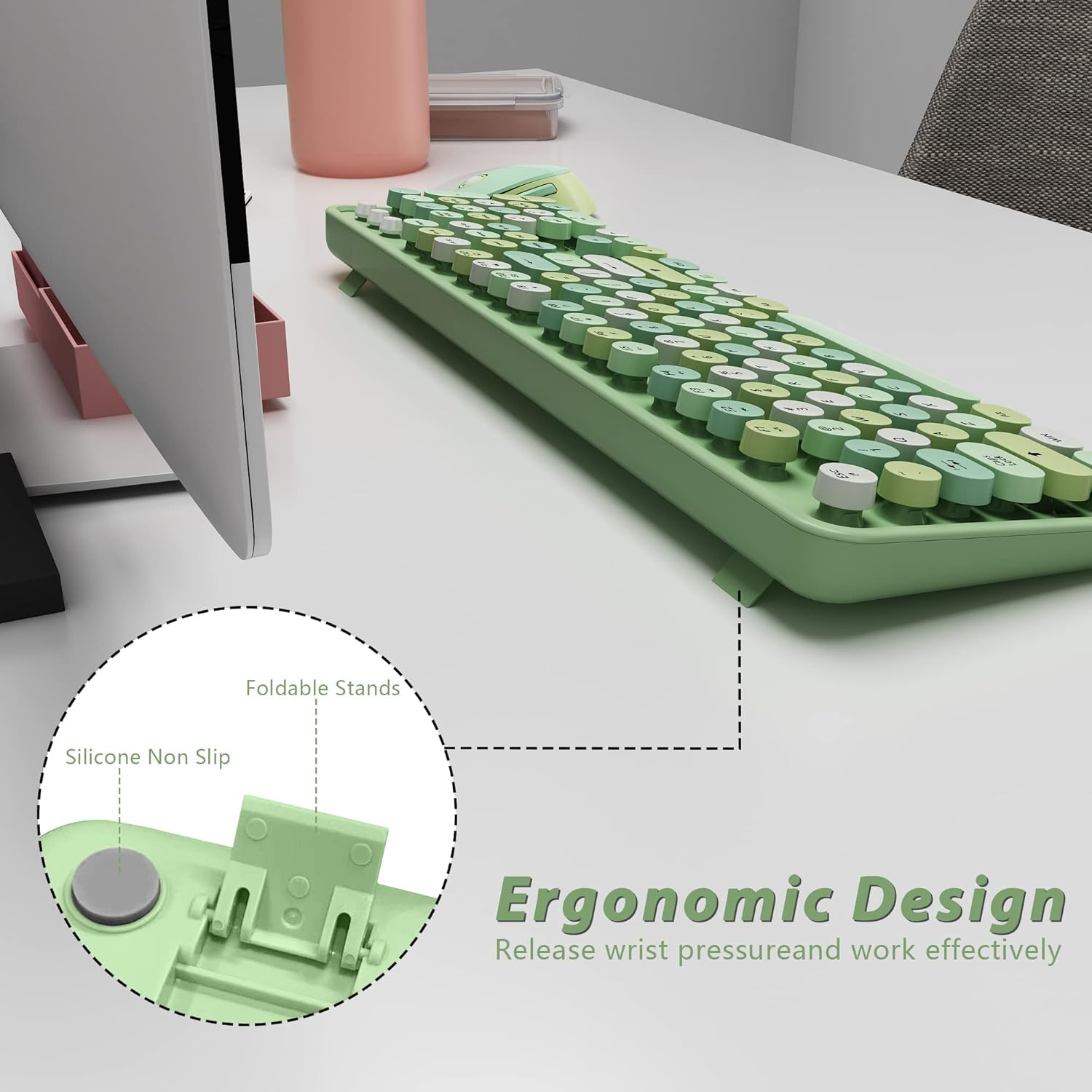
Figure 2.6: The ergonomic design of the keyboard's underside, featuring foldable stands for adjustable tilt and non-slip silicone pads for stability.
3. Instrukcje konfiguracji
Follow these steps to quickly set up your LETTON v2020 Wireless Keyboard and Mouse Combo.
- Zainstaluj baterie:
- For the keyboard: Open the battery compartment on the underside and insert one AAA battery (dołączony).
- For the mouse: Open the battery compartment on the underside and insert one AA battery (dołączony).
- Locate the USB Nano Receiver: The small USB Nano receiver is typically stored within the mouse's battery compartment for safekeeping. Gently remove it.
- Podłącz odbiornik: Plug the USB Nano receiver into an available USB 2.0 port on your computer (PC or Mac).
- Włączanie: Ensure both the keyboard and mouse are switched ON. The devices are designed for plug-and-play functionality and should connect automatically within seconds.

Figure 3.1: The USB Nano receiver is inserted into a laptop, establishing a wireless connection for both the keyboard and mouse.
Video 3.1: This video demonstrates the simple plug-and-play setup process for the wireless keyboard and mouse combo, including inserting the USB receiver.
4. Instrukcja obsługi
Your LETTON v2020 combo is designed for intuitive use. Here are some key operational aspects:
Funkcje klawiatury:
- Standardowe pisanie: The 104-key layout provides a full range of alphanumeric, function, and navigation keys.
- Klawisze skrótu: Utilize the 22 dedicated shortcut keys for quick access to media controls (play/pause, volume), email, screen functions, and internet browsing. Refer to the keycap legends for specific functions.
- Kontrolki: The keyboard features indicator lights for Caps Lock, Num Lock, and a Power/Low Battery indicator. A blinking power light signifies low battery.
Funkcje myszy:
- Ciche klikanie: Enjoy a quiet working environment with the mouse's silent click design.
- Kółko przewijania: The scroll wheel allows for smooth vertical navigation.
- Przyciski do przodu/do tyłu: Convenient side buttons for quick navigation in web przeglądarki lub file odkrywcy.
Oszczędność energii:
- Automatyczny tryb uśpienia: The keyboard enters energy-saving sleep mode after 8 minutes of inactivity, and the mouse after 5 minutes.
- Budzić się: Simply click any key or button to wake the devices within seconds.

Figure 4.1: The keyboard and mouse are shown on a desk, with text indicating their auto-sleep feature after periods of inactivity to conserve battery.
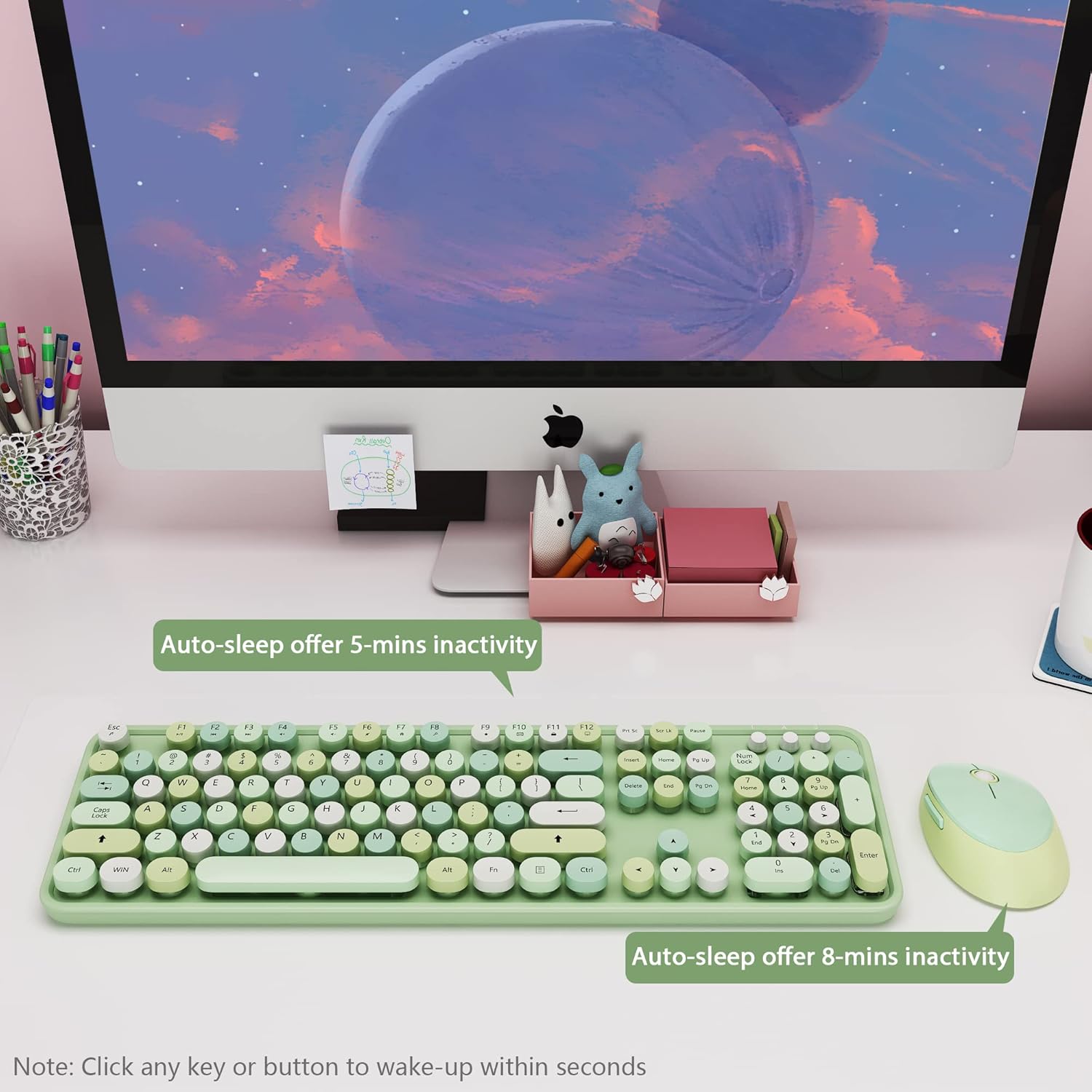
Figure 4.2: This image highlights the wide compatibility of the keyboard and mouse with Windows 7, Windows 8, Windows 10, Windows XP, and Mac operating systems.
Wideo 4.1: Krótki pokaz wideoasing the stylish design and practical features of the wireless keyboard and mouse set.
5. Konserwacja
Proper maintenance ensures the longevity and performance of your wireless combo.
- Wymiana baterii: When the low battery indicator on the keyboard blinks, replace the AAA battery. Replace the AA battery in the mouse when its performance degrades.
- Czyszczenie: Do czyszczenia powierzchni klawiatury i myszy użyj miękkiej, suchej ściereczki. Do dokładniejszego czyszczenia użyj lekkoamp cloth can be used, ensuring no moisture enters the internal components. Avoid harsh chemicals.
- Składowanie: When not in use for extended periods, turn off both devices and store them in a cool, dry place.
6. Rozwiązywanie Problemów
If you encounter issues with your wireless keyboard and mouse combo, try the following solutions:
- Brak połączenia/opóźnienie:
- Ensure the USB Nano receiver is securely plugged into a working USB port on your computer.
- Check that both the keyboard and mouse are switched ON.
- Replace batteries in both devices if the low battery indicator is active or if performance is inconsistent.
- Move the devices closer to the USB receiver to rule out range issues (maximum 28 feet).
- Spróbuj podłączyć odbiornik do innego portu USB.
- Klawisze nie reagują:
- Sprawdź poziom naładowania baterii i w razie potrzeby wymień.
- Sprawdź, czy klawiatura nie jest w trybie uśpienia (naciśnij dowolny klawisz, aby ją wybudzić).
- Aby przywrócić połączenie, odłącz i ponownie podłącz odbiornik USB.
- Mouse Not Moving/Clicking:
- Sprawdź poziom naładowania baterii i w razie potrzeby wymień.
- Ensure the mouse is switched ON and not in sleep mode (click any button to wake).
- Wyczyść czujnik optyczny znajdujący się na spodzie myszy.
- Upewnij się, że mysz jest używana na odpowiedniej powierzchni.
7. Specyfikacje
| Funkcja | Szczegół |
|---|---|
| Marka | LETTON |
| Numer modelu | wersja 2020 |
| Kolor | Multi-Green |
| Technologia łączności | Radio Frequency, USB (2.4GHz) |
| Funkcja specjalna | Round Key, Ergonomic Design, Hotkeys |
| Kompatybilne urządzenia | Laptop, komputer osobisty |
| Kompatybilna rodzina systemów operacyjnych | Windows (Windows 7, 8, 10, XP), Mac |
| Układ klawiatury | QWERTY (104 Keys) |
| Orientacja dłoni myszy | Oburęczny |
| Wymiary klawiatury | 445 x 136 x 30 mm (około 17.5 x 5.3 x 1.2 cala) |
| Wymiary myszy | 99 x 71 x 38 mm (około 3.9 x 2.8 x 1.5 cala) |
| Waga przedmiotu | 0.4 kilograma (ok. 0.88 funty) |
| Źródło zasilania | Battery Powered (1x AAA for keyboard, 1x AA for mouse, included) |
8. Gwarancja i wsparcie
The LETTON v2020 Wireless Keyboard and Mouse Combo comes with a 1-letnia gwarancja od daty zakupu. Niniejsza gwarancja obejmuje wady produkcyjne i zapewnia, że produkt jest wolny od wad materiałowych i wykonawczych przy normalnym użytkowaniu.
For warranty claims, technical support, or any inquiries regarding your product, please contact LETTON customer service through the retailer where you purchased the item or visit the official LETTON brand store online. Please retain your proof of purchase for warranty validation.