
Wstęp
Thank you for choosing the Baseus Adaman Digital Display Power Bank (Model: PPAD070001). This portable power bank is designed to provide reliable and efficient charging for your electronic devices. Please read this manual carefully before use to ensure proper operation and to maximize the lifespan of your device.
Informacje dotyczące bezpieczeństwa
- Nie wystawiaj powerbanku na działanie ekstremalnych temperatur, bezpośredniego światła słonecznego ani ognia.
- Unikaj upuszczania, rozmontowywania i modyfikowania urządzenia.
- Przechowywać z dala od wody i innych płynów.
- Używaj wyłącznie certyfikowanych kabli ładujących i adapterów.
- Przechowywać w miejscu niedostępnym dla dzieci.
- Jeśli powerbank puchnie, przecieka lub wydziela nietypowy zapach, należy natychmiast zaprzestać jego używania.
Zawartość opakowania
- Baseus Adaman Digital Display Power Bank (PPAD070001)
- Kabel ładujący USB
- Instrukcja obsługi
Produkt ponadview
The Baseus Adaman Power Bank (Model PPAD070001) is a portable charging solution featuring a digital display for battery status and multiple ports for wide compatibility. Its slim design makes it convenient for travel.

Obraz: Szczyt view of the Baseus Adaman Power Bank showing its various input and output ports. From left to right: Type-C (Input/Output), IP/IN (Input), Micro/IN (Input), USB2 (Output), USB1 (Output).

Obraz: Strona profile of the Baseus Adaman Power Bank, highlighting its slim and portable design.
- Port typu C: Supports both input and output (PD 3.0).
- USB1/USB2 Ports: Output ports for charging devices (QC 3.0).
- Port micro-USB: Input port for charging the power bank.
- IP/IN Port: Input port for charging the power bank (e.g., for Apple Lightning cables).
- Wyświetlacz cyfrowy: Pokazuje aktualny procent naładowania bateriitage.
Organizować coś
Before first use, fully charge the power bank. This ensures optimal battery performance.
Ładowanie Power Banku
- Connect the provided USB charging cable to one of the input ports on the power bank (Type-C, Micro-USB, or IP/IN).
- Podłącz drugi koniec kabla do ładowarki USB (brak w zestawie).
- Cyfrowy wyświetlacz pokaże stan ładowania i procent naładowania bateriitage.
- Once the display shows 100%, the power bank is fully charged. Disconnect it from the charger.
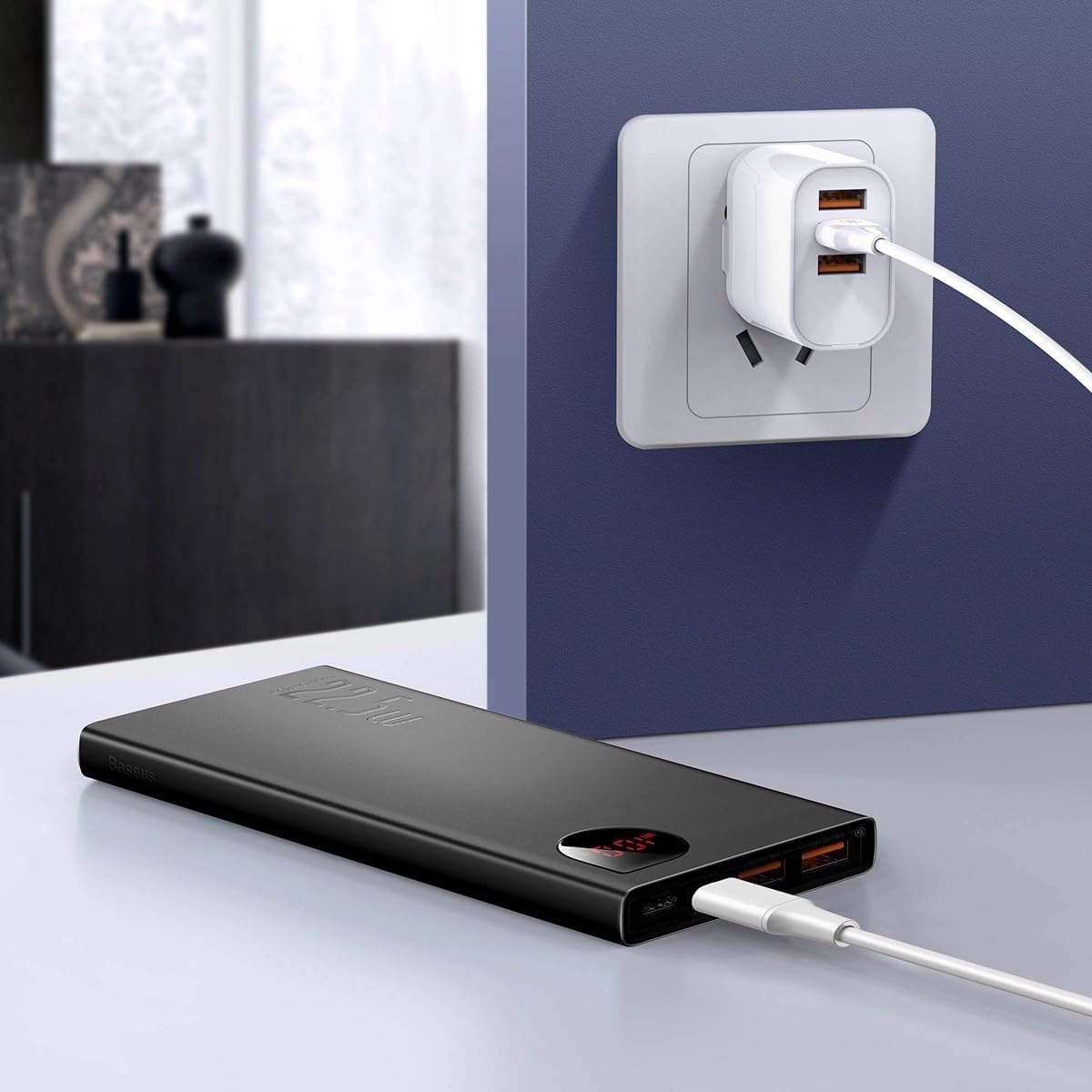
Obraz: The Baseus Adaman Power Bank connected to a wall charger via a USB cable, illustrating the process of recharging the power bank itself.
Instrukcja obsługi
Ładowanie urządzeń
- Connect your device's charging cable to one of the output ports on the power bank (Type-C, USB1, or USB2).
- Podłącz drugi koniec kabla do urządzenia.
- Powerbank automatycznie rozpocznie ładowanie urządzenia. Wyświetlacz cyfrowy pokaże procentowy poziom naładowania baterii.tage.
- Aby zatrzymać ładowanie, wystarczy odłączyć urządzenie od powerbanku.

Obraz: A smartphone being charged by the Baseus Adaman Power Bank, demonstrating the device's charging capability for mobile phones.
Sprawdzanie poziomu naładowania baterii
The digital display on the power bank will show the current battery percentage when it is in use or when a device is connected. If the power bank is idle, you may need to briefly press the power button (if available, not explicitly mentioned but common) to activate the display.
Konserwacja
- Czyść powerbank miękką, suchą ściereczką. Nie używaj silnych środków chemicznych ani materiałów ściernych.
- Przechowuj power bank w chłodnym, suchym miejscu, gdy nie jest używany.
- For optimal battery health, fully charge and discharge the power bank at least once every three months if it's not used regularly.
Rozwiązywanie problemów
| Problem | Możliwa przyczyna | Rozwiązanie |
|---|---|---|
| Power bank nie ładuje urządzeń. | Low battery, faulty cable, incompatible device. | Charge the power bank. Try a different cable. Ensure your device is compatible. |
| Powerbank nie ładuje się. | Faulty charging cable/adapter, damaged port. | Try a different charging cable and wall adapter. Check ports for damage. |
| Wyświetlacz cyfrowy nie działa. | Power bank is off, low battery, malfunction. | Ensure power bank is on or connected to a device. Charge the power bank. If issue persists, contact support. |
Specyfikacje
| Funkcja | Szczegół |
|---|---|
| Numer modelu | PPAD070001 |
| Marka | Baza |
| Pojemność baterii | 10000 mAh |
| Cechy specjalne | Wyświetlacz cyfrowy |
| Typy złączy | Input: USB Type-C, Micro-USB, IP/IN; Output: USB Type-C, USB-A (x2) |
| Tomtage | 5 wolty |
| Aktualny | 5 Amps |
| Moc wyjściowa | Up to 22.5W (PD 3.0, QC 3.0) |
| Skład ogniw baterii | Polimer litowy |
| Liczba portów wyjściowych | 3 (1x Type-C, 2x USB-A) |
| Number of Input Ports | 3 (1x Type-C, 1x Micro-USB, 1x IP/IN) |
| Kompatybilne urządzenia | All Smartphones and other USB-powered devices |
| Przenośny | Tak |
Gwarancja i wsparcie
Ten produkt jest dostarczany z Brak gwarancji as per the provided specifications. For any technical support or inquiries, please refer to the official Baseus webstronie internetowej lub skontaktuj się ze sprzedawcą.
Więcej informacji znajdziesz na stronie: www.baseus.pl