
PPLEE CR1002M
Instrukcja obsługi urządzenia do wytwarzania białego szumu PPLEE 5 w 1
Model: CR1002M
Wstęp
Thank you for choosing the PPLEE 5-in-1 White Noise Machine. This versatile device combines a white noise machine with 42 soothing sounds, a high-fidelity Bluetooth speaker, a dual digital alarm clock, a multi-color night light, and a convenient charging station. Designed to enhance your sleep quality, relaxation, and daily routine, this manual provides detailed instructions for setup, operation, and maintenance.

Figure 1: PPLEE 5-in-1 White Noise Machine Overview
Co jest w pudełku
- 1 x PPLEE Bluetooth Noise Machine Alarm Clock
- 1 x 5V 2A Power Adapter and Cord
- 1 x Instrukcja obsługi
Przewodnik po konfiguracji
1. Podłączenie zasilania
Connect the provided 5V 2A power adapter to the DC jack on the back of the device and plug it into a standard electrical outlet. The device will power on automatically.
2. Battery Installation (Memory Function)
For memory function and to retain time/alarm settings during power outages, install 1 CR2032 battery (not included) into the battery compartment on the bottom of the unit. This battery does not power the main functions of the device, only the memory backup.
3. Ustawianie czasu
- Press and hold the 'TIME SET' button (usually labeled 'HOUR' or 'MIN' with a clock icon) until the hour display flashes.
- Use the 'HOUR' and 'MIN' buttons to adjust the time.
- Naciśnij ponownie przycisk „TIME SET”, aby potwierdzić i wyjść z trybu ustawiania czasu.
- Aby przełączać się między formatem 12-godzinnym i 24-godzinnym, naciśnij przycisk „12/24H”.
Instrukcja obsługi
Sound Machine Operation
The device offers 42 natural soothing sounds across four categories: white noise, fan sounds, lullabies, and nature sounds.
- Wybieranie dźwięków: Press the 'SOUND' button (often represented by a music note or sound wave icon) to cycle through the available sound categories and individual sounds.
- Regulacja głośności: Use the 'VOL+' and 'VOL-' buttons to adjust the volume across 16 levels.
- Wyłącznik czasowy: Press the 'TIMER' button repeatedly to set an automatic shut-off timer for 15, 30, 60, 90, 120, 180, or 480 minutes. The display will show the selected time. To cancel the timer, press the 'TIMER' button until 'OFF' or no timer duration is displayed.

Figure 2: Sound Selection and Timer Functions
Obsługa głośnika Bluetooth
Connect your smartphone or tablet wirelessly to play your favorite audio.
- Łączenie w pary: Press the 'MODE' button until the Bluetooth icon appears on the display and starts flashing. On your device, enable Bluetooth and select 'CR1002M' (or similar) from the list of available devices. The icon will become solid when paired.
- Odtwarzanie dźwięku: Once paired, play audio from your connected device. Use the 'PREV', 'PLAY/PAUSE', and 'NEXT' buttons on the machine to control playback, or control directly from your device.
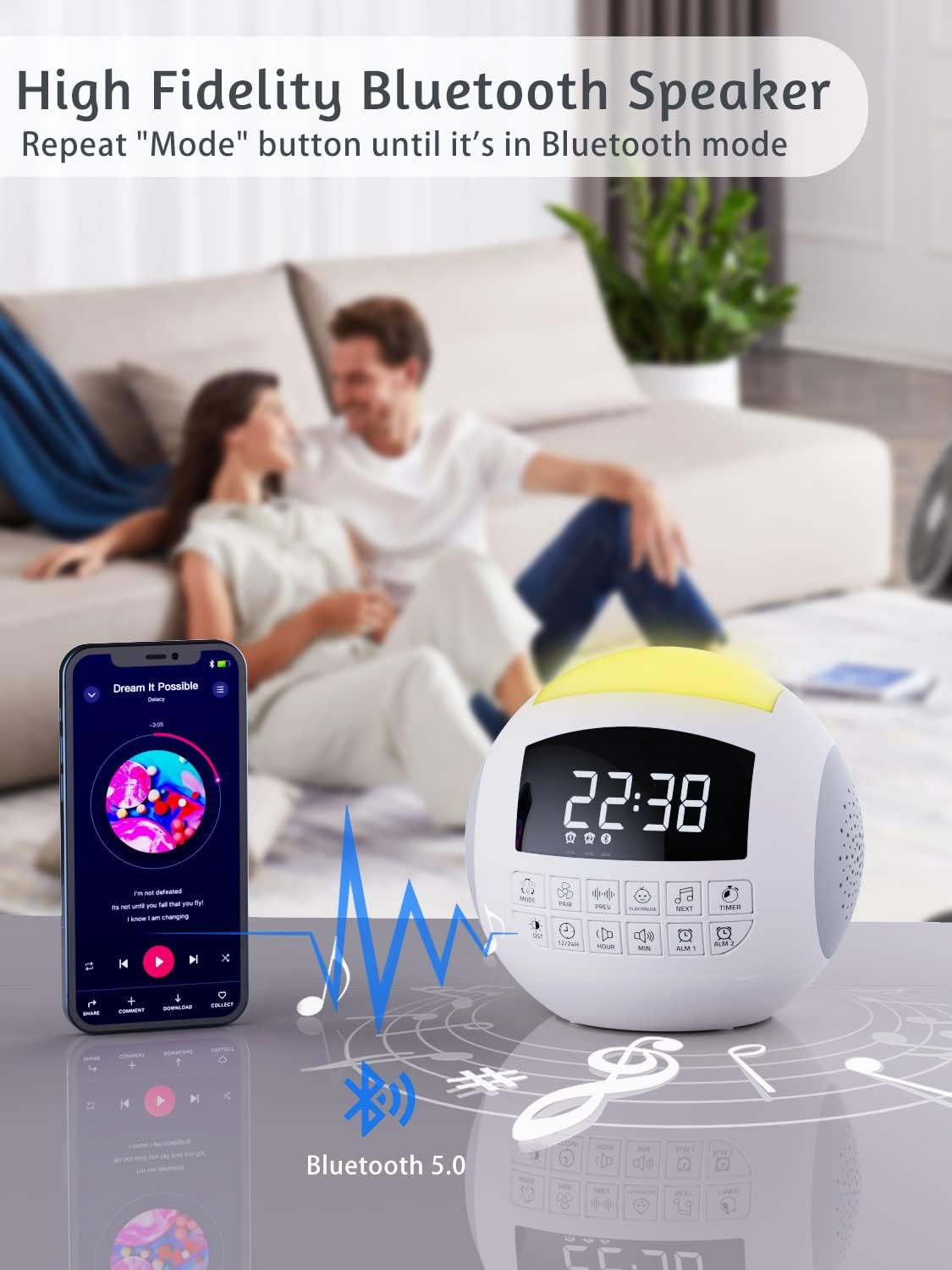
Rysunek 3: Łączność Bluetooth
Alarm Clock Operation
The device features dual alarms with customizable sounds and snooze functionality.
- Ustawianie alarmów: Press and hold 'ALARM 1' or 'ALARM 2' button until the alarm time flashes. Use 'HOUR' and 'MIN' buttons to set the desired alarm time. Press the alarm button again to confirm.
- Wybór dźwięku alarmu: After setting the time, press the alarm button again to select from 9 different alarm sounds.
- Aktywacja/Dezaktywacja alarmu: Press the 'ALARM 1' or 'ALARM 2' button briefly to toggle the alarm on or off. An alarm icon will appear on the display when active.
- Funkcja drzemki: When the alarm sounds, press the large 'SNOOZE' button on top to temporarily silence it for 9 minutes.

Figure 4: Dual Alarm Clock Settings
Działanie światła nocnego
The integrated night light offers 7 colors and adjustable brightness.
- Zmiana kolorów: Press the 'LIGHT' button (often represented by a light bulb icon) to cycle through the 7 solid colors and a gradient color mode.
- Regulacja jasności: Press and hold the 'LIGHT' button to adjust the brightness level (5 levels available).

Figure 5: 7-Color Night Light with Brightness Control
Funkcja ładowania
The device includes a Type-C charging port for the unit itself and dual USB-A ports for charging external devices.
- Ładowanie urządzenia: The unit is powered via its Type-C port using the provided adapter.
- External Device Charging: Connect your smartphone, tablet, or other USB-powered devices to the dual USB-A ports on the back of the unit to charge them.

Figure 6: Charging Ports for External Devices
Funkcja pamięci
The memory function ensures that your time and alarm settings are retained even if the main power is interrupted, thanks to the installed CR2032 battery.

Figure 7: Memory Function with Battery Backup
Konserwacja
- Czyszczenie: Przetrzyj urządzenie miękką, suchą ściereczką. Nie używaj płynnych środków czyszczących ani materiałów ściernych.
- Składowanie: Przechowuj urządzenie w chłodnym i suchym miejscu, jeśli nie będziesz go używać przez dłuższy czas.
- Wymiana baterii: Replace the CR2032 battery annually or if memory function fails.
Rozwiązywanie problemów
| Problem | Możliwa przyczyna | Rozwiązanie |
|---|---|---|
| Urządzenie nie włącza się. | Zasilacz nie jest podłączony lub gniazdko jest uszkodzone. | Ensure adapter is securely plugged into device and a working outlet. |
| Brak dźwięku lub niski poziom głośności. | Volume too low or incorrect sound selected. | Increase volume using 'VOL+' button. Cycle through sounds to ensure one is playing. |
| Brak połączenia Bluetooth. | Urządzenie nie jest w trybie parowania lub znajduje się zbyt daleko od źródła. | Ensure device is in Bluetooth pairing mode (flashing icon). Move source closer. Try re-pairing. |
| Alarm nie włącza się. | Alarm nie został włączony lub głośność jest zbyt niska. | Check if alarm icon is displayed. Increase alarm volume. Verify alarm time is set correctly. |
| Resetowanie czasu/ustawień po wyłączeniu zasilaniatage. | CR2032 battery is dead or not installed. | Install or replace the CR2032 battery. |
Specyfikacje
| Funkcja | Szczegół |
|---|---|
| Wymiary produktu | 5.32 x 5.95 x 6.1 cala |
| Waga przedmiotu | 1.39 funta |
| Numer modelu | CR1002M |
| Kolor | Biały |
| Źródło zasilania | AC Powered (with CR2032 battery backup for memory) |
| Utwory muzyczne | 42 (White Noise, Fan, Lullabies, Nature Sounds) |
| Kolory światła nocnego | 7 Colors + Gradient |
| Poziomy głośności | 16 |
| Poziomy jasności | 5 |
| Timery | 15, 30, 60, 90, 120, 180, 480 minut |
| Dźwięki alarmu | 9 |
| Porty ładowania | Dual USB-A |
Gwarancja i wsparcie
PPLEE products are designed for reliability and performance. For warranty information or technical support, please refer to the contact details provided with your purchase or visit the official PPLEE website. A digital version of this user manual is also available for download at https://m.media-amazon.com/images/I/A1kTUVfZOSL.pdf.