1. Wprowadzenie
This manual provides essential information for the safe and efficient operation of your Admark K420 Class D Professional Power Amplifier. Please read this manual thoroughly before installation and use to ensure optimal performance and to prevent damage to the unit or other equipment. The Admark K420 is a high-performance, four-channel Class D amplifier designed for professional audio applications, delivering 2000 Watts per channel at 8 Ohms.
2. Instrukcje bezpieczeństwa
Aby zmniejszyć ryzyko pożaru, porażenia prądem elektrycznym i obrażeń, należy zawsze przestrzegać poniższych podstawowych zasad bezpieczeństwa:
- Źródło zasilania: Connect the unit only to a power supply of the type described in this manual and marked on the unit.
- Grunt: Aby zapobiec porażeniu prądem elektrycznym, należy upewnić się, że urządzenie jest prawidłowo uziemione.
- Wentylacja: Nie zasłaniaj żadnych otworów wentylacyjnych. Zainstaluj zgodnie z instrukcją producenta. Zachowaj odpowiednią przestrzeń wokół urządzenia, aby zapewnić prawidłowy przepływ powietrza.
- Woda i wilgoć: Nie wystawiać urządzenia na działanie deszczu ani wilgoci. Nie używać w pobliżu wody.
- Ciepło: Nie należy instalować w pobliżu źródeł ciepła, takich jak grzejniki, kratki wentylacyjne, piece lub inne urządzenia (w tym amp(lifiers) wytwarzające ciepło.
- Serwisowanie: Nie próbuj samodzielnie naprawiać tego produktu. Wszelkie czynności serwisowe należy powierzyć wykwalifikowanemu personelowi serwisowemu.
- Kable: Chroń przewód zasilający przed deptaniem i przytrzaśnięciem, zwłaszcza przy wtyczkach, gniazdkach i miejscach, w których wychodzi z urządzenia.
3. Zawartość opakowania
Upon opening the package, please verify that all components are present and in good condition. If any items are missing or damaged, contact your dealer immediately.
- Admark K420 Professional Power Ampżywsze
- Przewód zasilający AC
- Instrukcja obsługi (ten dokument)
5. Konfiguracja
5.1 Montaż w stojaku
The Admark K420 is designed for standard 19-inch rack mounting and occupies 1U of rack space. Ensure the rack is stable and has adequate ventilation. Secure the amplifier using appropriate rack screws.
5.2 Połączenia panelu tylnego
The rear panel provides all input and output connections. Refer to the image below for a visual guide.

Image: Rear panel of the Admark K420 amplifier, displaying four XLR input connectors, four SpeakON output connectors, and the power inlet.
5.2.1 Połączenie zasilania
Connect the supplied AC power cord to the power inlet on the rear panel and then to a suitable grounded AC power outlet. Ensure the amplifier's power switch is in the OFF position before connecting power.
5.2.2 Połączenia wejściowe
Use balanced XLR cables to connect your audio source (e.g., mixer, audio processor) to the XLR input connectors (CH A, CH B, CH C, CH D) on the rear panel. Ensure correct polarity.
5.2.3 Połączenia wyjściowe
Connect your loudspeakers to the SpeakON output connectors (OUTPUT CH A, OUTPUT CH B, OUTPUT CH C, OUTPUT CH D) using appropriate SpeakON cables. Ensure the impedance of your loudspeakers matches the amplifier's specifications (minimum 8 Ohms per channel for full power output). Observe correct wiring for stereo or bridged modes if applicable (refer to specific wiring diagrams on the unit or in advanced documentation).
6. Instrukcja obsługi
The front panel of the Admark K420 provides controls and indicators for monitoring and adjusting the ampoperacja lifiera.
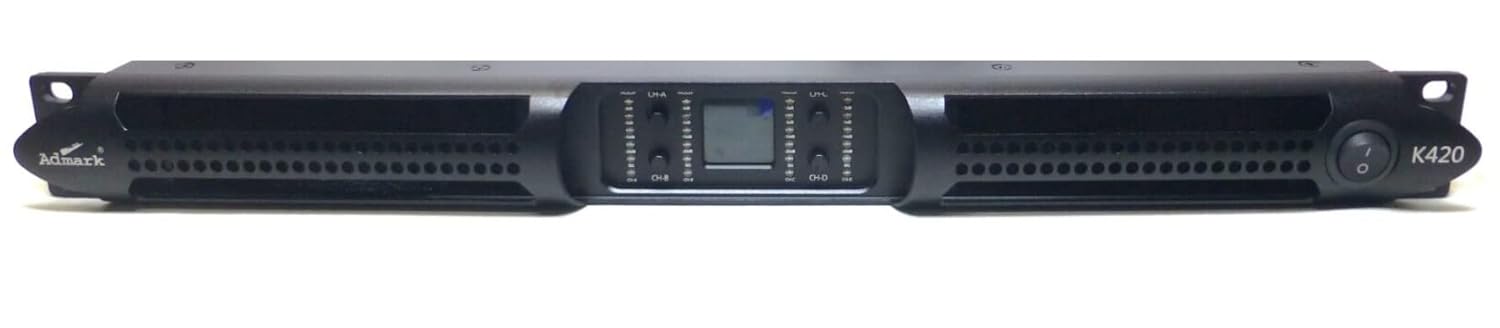
Image: Front panel of the Admark K420 amplifier, featuring the power switch, individual channel level controls, and LED indicators for signal, clip, and protection status.
6.1 Włączanie/wyłączanie
- Włączanie: Ensure all connections are secure and input levels are turned down. Press the power switch on the front panel. The power indicator LED should illuminate.
- Wyłączone: Turn down all input levels, then press the power switch to turn off the ampliyfikator.
6.2 Elementy sterujące i wskaźniki na panelu przednim
- Przycisk zasilania: Przełącza amplifier włączony lub wyłączony.
- Kontrola poziomu kanału: Individual rotary controls for adjusting the output level of each channel (CH A, CH B, CH C, CH D). Start with these controls fully counter-clockwise (minimum) and gradually increase to the desired level.
- Dioda sygnalizacyjna: Illuminates when an audio signal is present on the corresponding channel.
- Klip LED: Illuminates when the output signal is clipping (distorting). Reduce the input level or channel level control immediately to prevent damage to speakers and the ampliyfikator.
- Chroń diodę LED: Świeci się, gdy amplifier's protection circuitry is activated due to fault conditions (e.g., overheating, short circuit). The amplifier will mute its output. Turn off the unit, resolve the issue, and then power it back on.
6.3 Podstawowa obsługa
- Ensure all audio sources and speakers are connected correctly.
- Turn down all channel level controls on the ampliyfikator.
- Power on your audio source equipment first, then the Admark K420 ampliyfikator.
- Stopniowo zwiększaj poziom kontroli kanału na amplifier to achieve the desired volume. Monitor the Signal and Clip LEDs.
- When finished, turn down the amplifier's channel level controls, then power off the amplifier, followed by your audio source equipment.
