
1. Wprowadzenie
The Maxcom MM724 is a simple mobile phone designed for ease of use, featuring straightforward software and practical functions. It is particularly suitable for users who prefer a device without complicated menus. Key features include an emergency SOS button, a built-in flashlight, and Bluetooth connectivity for hearing aid compatibility.
2. Zawartość opakowania
Proszę zaznaczyć pole dotyczące następujących elementów:
- 1 Maxcom MM724 Mobile Phone
- 1 Desktop Charger
- 1 Matching Cords (for charger)
- 1 Instrukcja obsługi (ten dokument)
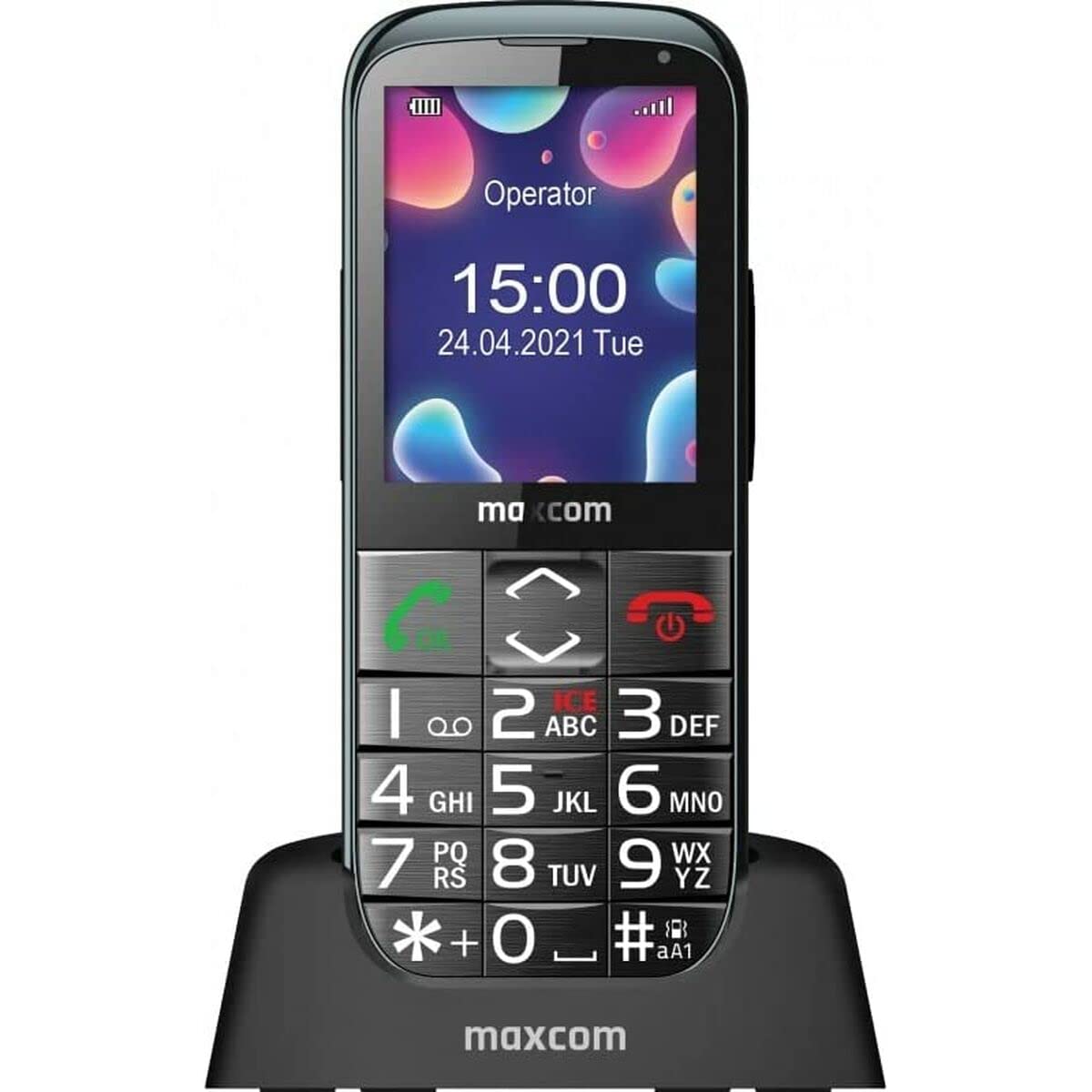
Image: The Maxcom MM724 simple mobile phone, typically black, with a clear display and large buttons.
3. Konfiguracja
3.1. Wkładanie karty SIM i baterii
- Ostrożnie zdejmij tylną obudowę telefonu.
- Włóż kartę(y) SIM do przeznaczonego(ych) gniazda(gniazda) złotymi stykami skierowanymi w dół.
- Włóż baterię, upewniając się, że styki są prawidłowo ustawione.
- Załóż tylną pokrywę, aż zatrzaśnie się na swoim miejscu.
3.2. Ładowanie urządzenia
The Maxcom MM724 uses a convenient desktop charger. To charge your phone:
- Connect the charger cord to a power outlet.
- Place the phone upright into the desktop charging cradle.
- Ensure the charging indicator on the phone or cradle illuminates, indicating that charging has begun.
- For optimal battery life, keep the phone in the cradle when not in use to ensure it is always charged.
4. Instrukcja obsługi
4.1. Włączanie/wyłączanie zasilania
- Włączanie: Press and hold the Power/End Call button (usually red) until the screen lights up.
- Aby wyłączyć: Press and hold the Power/End Call button until the power-off options appear, then confirm.
4.2. Wykonywanie i odbieranie połączeń
- Zadzwonić: Dial the number using the keypad and press the Call button (usually green).
- Aby odebrać połączenie: Press the Call button when the phone rings. The phone is designed to ring very loudly to ensure calls are not missed.
- Aby zakończyć połączenie: Naciśnij przycisk zasilania/zakończenia połączenia.
4.3. Wysyłanie i odbieranie wiadomości
Navigate to the 'Messages' menu to compose new SMS messages or read incoming ones. Use the keypad to type your message.
4.4. Korzystanie z przycisku SOS
The SOS button is located on the back of the phone and is designed for emergencies.
- Organizować coś: Access the phone's settings to pre-define a list of emergency contacts.
- Aktywacja: In an emergency, press and hold the SOS button. The phone will automatically call the pre-defined contacts in sequence until one answers.
4.5. Activating the Flashlight
The phone features a dedicated button for the flashlight, making it easy to activate when needed. Refer to your phone's specific button layout for its location.
4.6. Bluetooth and Hearing Aid Compatibility
The Maxcom MM724 supports Bluetooth connectivity, allowing it to pair with compatible devices, including certain hearing aids. This enables hands-free calling.
- Łączenie w pary: Go to the Bluetooth settings on your phone and enable Bluetooth. Put your hearing aid into pairing mode (consult your hearing aid's manual). Select your hearing aid from the list of available devices on the phone to pair.
- Notatka: Compatibility with hearing aids depends on the hearing aid's features. Consult your audiologist for specific compatibility information. The phone also features a ring line and additional gain for improved audio performance with or without hearing aids.
5. Konserwacja
- Czyszczenie: Do czyszczenia ekranu i obudowy telefonu używaj miękkiej, suchej ściereczki. Unikaj stosowania płynnych środków czyszczących i materiałów ściernych.
- Pielęgnacja baterii: Keep the battery charged regularly. Avoid extreme temperatures, which can affect battery performance and lifespan.
- Składowanie: Jeśli telefon nie będzie używany przez dłuższy czas, należy go przechowywać w chłodnym i suchym miejscu.
6. Rozwiązywanie Problemów
- Telefon się nie włącza: Upewnij się, że bateria jest prawidłowo włożona i naładowana. Podłącz telefon do ładowarki i spróbuj ponownie.
- Brak sygnału sieciowego: Sprawdź, czy karta SIM jest prawidłowo włożona. Przenieś się w miejsce z lepszym zasięgiem sieci. Skontaktuj się z operatorem, jeśli problem będzie się powtarzał.
- Nie można wykonywać/odbierać połączeń: Verify that you have sufficient credit or an active plan. Check network signal strength.
- Problemy z parowaniem Bluetooth: Ensure both devices are in pairing mode and within range. Try restarting both the phone and the Bluetooth device.
7. Specyfikacje
| Marka | Maxcom |
| Nazwa modelu | MM724 |
| System operacyjny | Android |
| Rozmiar ekranu | 3 cali |
| Technologia łączności | Bluetooth |
| Technologia komórkowa | 4G |
| Technologia sieci bezprzewodowej | GSM |
| Kolor | Czarny |
| Waga przedmiotu | 85 gram |
| Operator sieci bezprzewodowej | Odblokowany |
8. Gwarancja i wsparcie
Warranty information for the Maxcom MM724 mobile phone is typically provided with your purchase documentation or can be found on the official Maxcom website. For technical support or service inquiries, please refer to the contact information provided by your retailer or the manufacturer.