
1. Wprowadzenie
This manual provides detailed instructions for the installation and operation of your BUNGPUNG 4K@60Hz HDMI ARC/eARC Audio Extractor Adapter. This device is designed to convert HDMI audio to ARC/eARC audio (such as Dolby Atmos) from an HDMI source to eARC/ARC sound systems. It can also convert ARC/eARC audio from an ARC-enabled TV to AV receivers. The adapter supports various audio formats including LPCM, Dolby True HD, and DTS-HD Master Audio, making it suitable for connecting soundbars like SONOS ARC, Bose 500/700/900, and other eARC/ARC AV receivers.
2. Główne cechy
- HDMI ARC/eARC Audio Conversion: Converts HDMI audio to ARC/eARC audio (e.g., Dolby Atmos) for sound systems, and ARC/eARC audio from TV to AV receivers.
- Obsługa szerokiego formatu audio: Compatible with LPCM, Dolby Digital/Plus/EX, Dolby True HD, DTS, DTS-EX, DTS-96/24, DTS High Res, DTS-HD Master Audio, DSD.
- High Video Resolution: Supports up to 4K@60Hz video resolution.
- Wysoka przepustowość: 18Gbps HDMI 2.0b compliant.
- Content Protection: Zgodny z HDCP 2.3.
- Wysoki zakres dynamiki: Obsługuje HDR.
- Consumer Electronics Control: CEC compliant for integrated control.
- Trwała konstrukcja: Features a durable metal body for rapid heat absorption and dissipation, reducing EMI/RFI noise interference.
- Łatwa instalacja: Compact size and plug-and-play installation.
- Stabilna moc: Independent power supply for stable operation.
3. Zawartość opakowania
Pakiet zazwyczaj zawiera:
- BUNGPUNG 4K@60Hz HDMI ARC/eARC Audio Extractor Adapter (Model: BP-HDC-SWB11A)
- Zasilacz prądu stałego 5 V
- Instrukcja obsługi
4. Koniec produktuview i połączenia
Familiarize yourself with the device's ports and indicators.
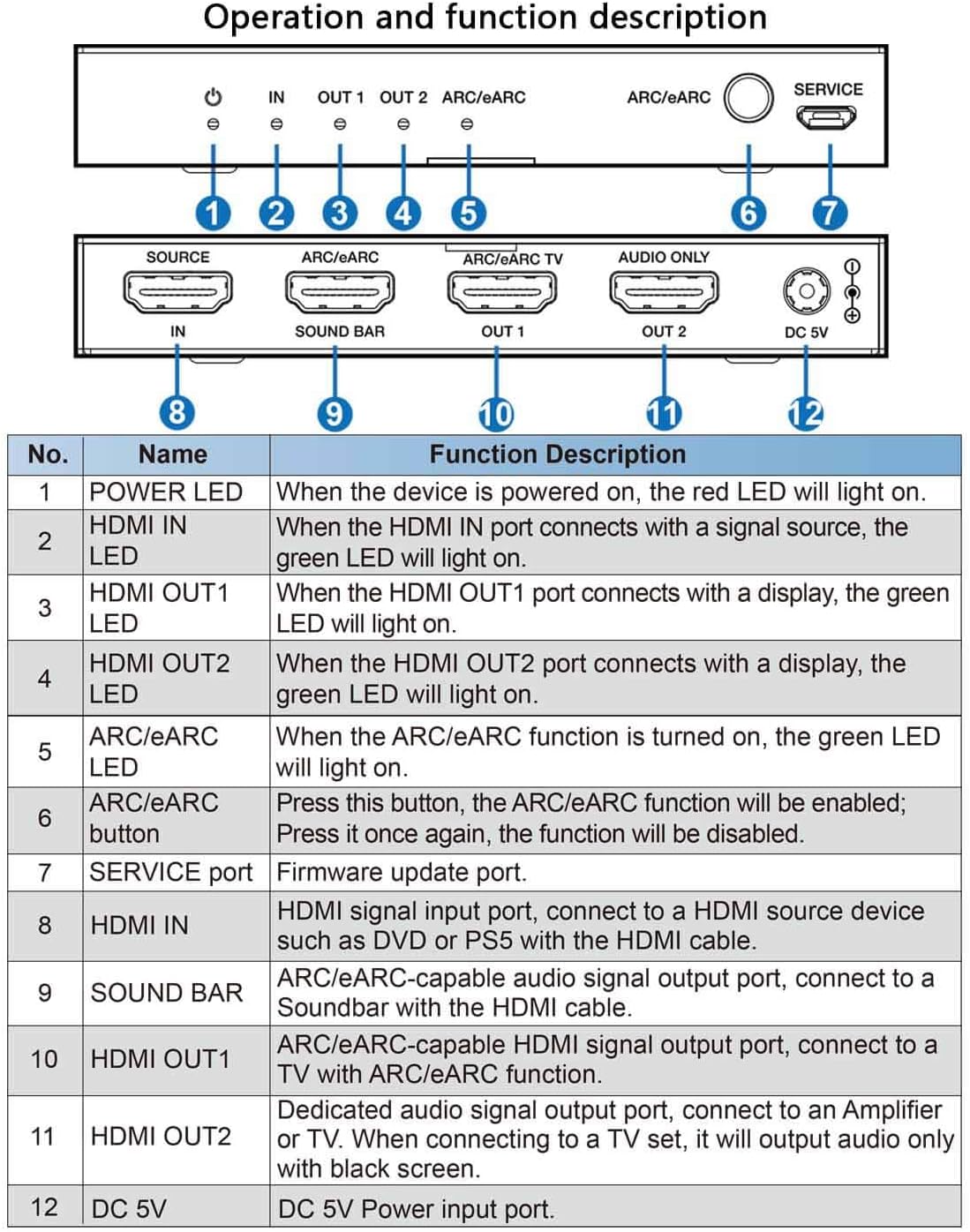
| NIE. | Nazwa | Opis funkcji |
|---|---|---|
| 1 | DIODA ZASILANIA | Gdy urządzenie jest włączone, zaświeci się czerwona dioda LED. |
| 2 | LED WEJŚCIA HDMI | Gdy port HDMI IN połączy się ze źródłem sygnału, zaświeci się zielona dioda LED. |
| 3 | DIODA WYJŚCIA HDMI 1 | Gdy port HDMI OUT1 połączy się z wyświetlaczem, zaświeci się zielona dioda LED. |
| 4 | DIODA WYJŚCIA HDMI 2 | Gdy port HDMI OUT2 połączy się z wyświetlaczem, zaświeci się zielona dioda LED. |
| 5 | Dioda LED ARC/eARC | Gdy funkcja ARC/eARC jest włączona, zapali się zielona dioda LED. |
| 6 | Przycisk ARC/eARC | Naciśnij ten przycisk, funkcja ARC/eARC zostanie włączona; Naciśnij go ponownie, funkcja zostanie wyłączona. |
| 7 | Port serwisowy | Port aktualizacji oprogramowania sprzętowego. |
| 8 | HDMI IN | Wejście sygnału HDMI umożliwia podłączenie do urządzenia źródłowego HDMI, takiego jak DVD lub PS5, za pomocą kabla HDMI. |
| 9 | BAR DŹWIĘKOWY | Port wyjścia sygnału audio z obsługą ARC/eARC, podłącz do listwy dźwiękowej za pomocą kabla HDMI. |
| 10 | WYJŚCIE HDMI1 | Port wyjścia sygnału HDMI z obsługą ARC/eARC, umożliwia podłączenie do telewizora z funkcją ARC/eARC. |
| 11 | WYJŚCIE HDMI2 | Dedykowany port wyjściowy sygnału audio, podłącz do Amplifier or TV. When connecting to a TV set, it will output audio only with black screen. |
| 12 | Prąd stały 5 V | Wejście zasilania DC 5V. |
5. Konfiguracja i instalacja
Follow these steps to set up your HDMI ARC/eARC Audio Extractor Adapter:
- Podłącz źródło HDMI: Connect your HDMI source device (e.g., Blu-ray player, game console) to the "HDMI IN" port on the adapter using a high-quality HDMI cable.
- Podłącz wyświetlacz (opcjonalnie): Connect your TV or monitor to the "HDMI OUT1" port on the adapter using a high-quality HDMI cable. This port supports ARC/eARC functionality.
- Connect Soundbar/AV Receiver:
- If using an ARC/eARC compatible soundbar/AV receiver, connect it to the "SOUND BAR" port on the adapter using an HDMI cable.
- If using a non-ARC/eARC compatible audio amplifier or TV for audio only, connect it to the "HDMI OUT2" port. Note that this port outputs audio only with a black screen if connected to a TV.
- Włączanie: Connect the provided DC 5V power adapter to the "DC 5V" port on the adapter and plug it into a power outlet. The POWER LED will light up.
- Enable ARC/eARC (if needed): If your setup requires ARC/eARC functionality, press the "ARC/eARC" button on the adapter to enable it. The ARC/eARC LED will light up.
Schematy połączeń:
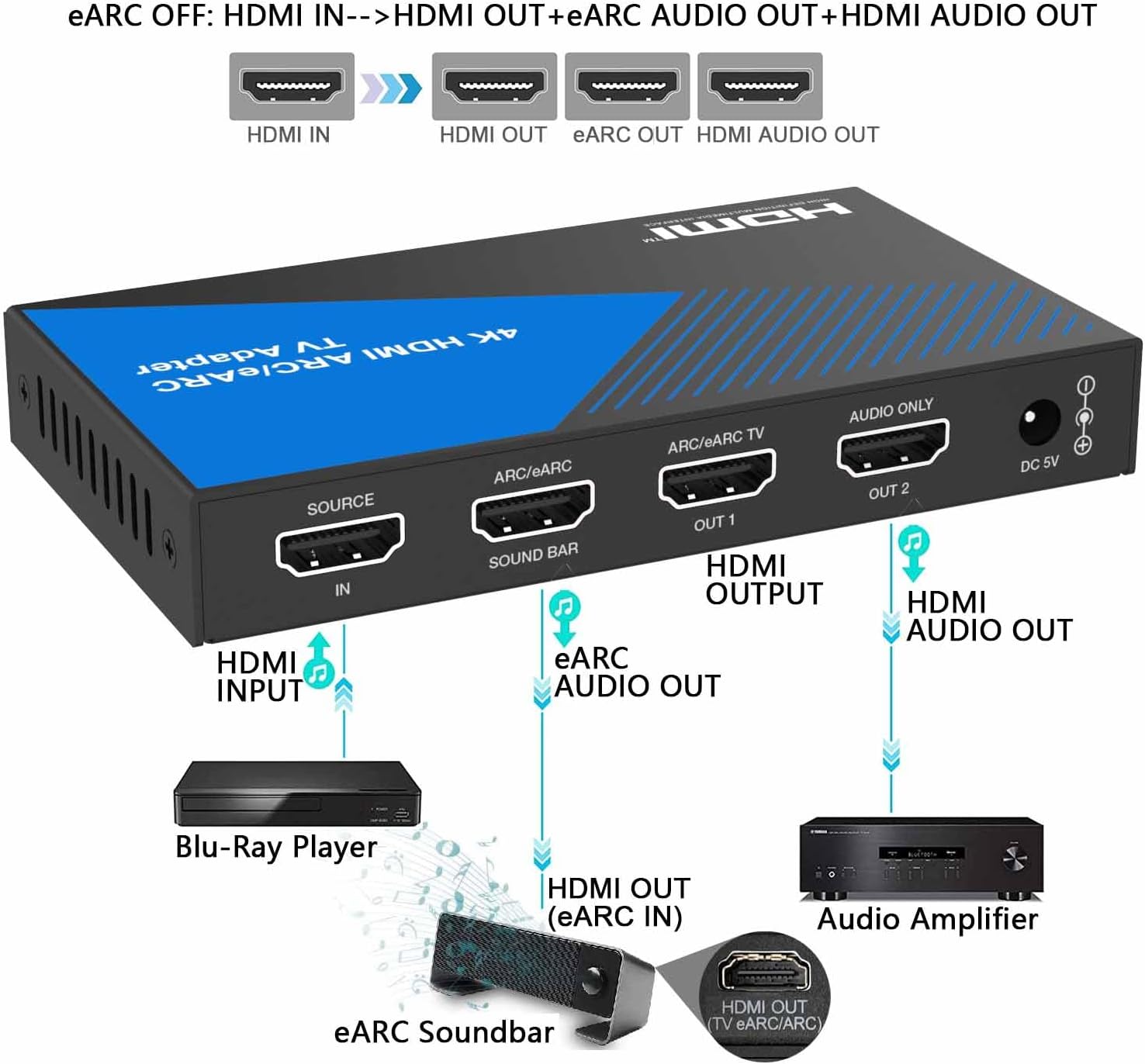
When the ARC/eARC function is OFF, the adapter converts HDMI audio from your source device to the soundbar and also outputs HDMI audio to a display (if connected). No TV connection is required for this mode.
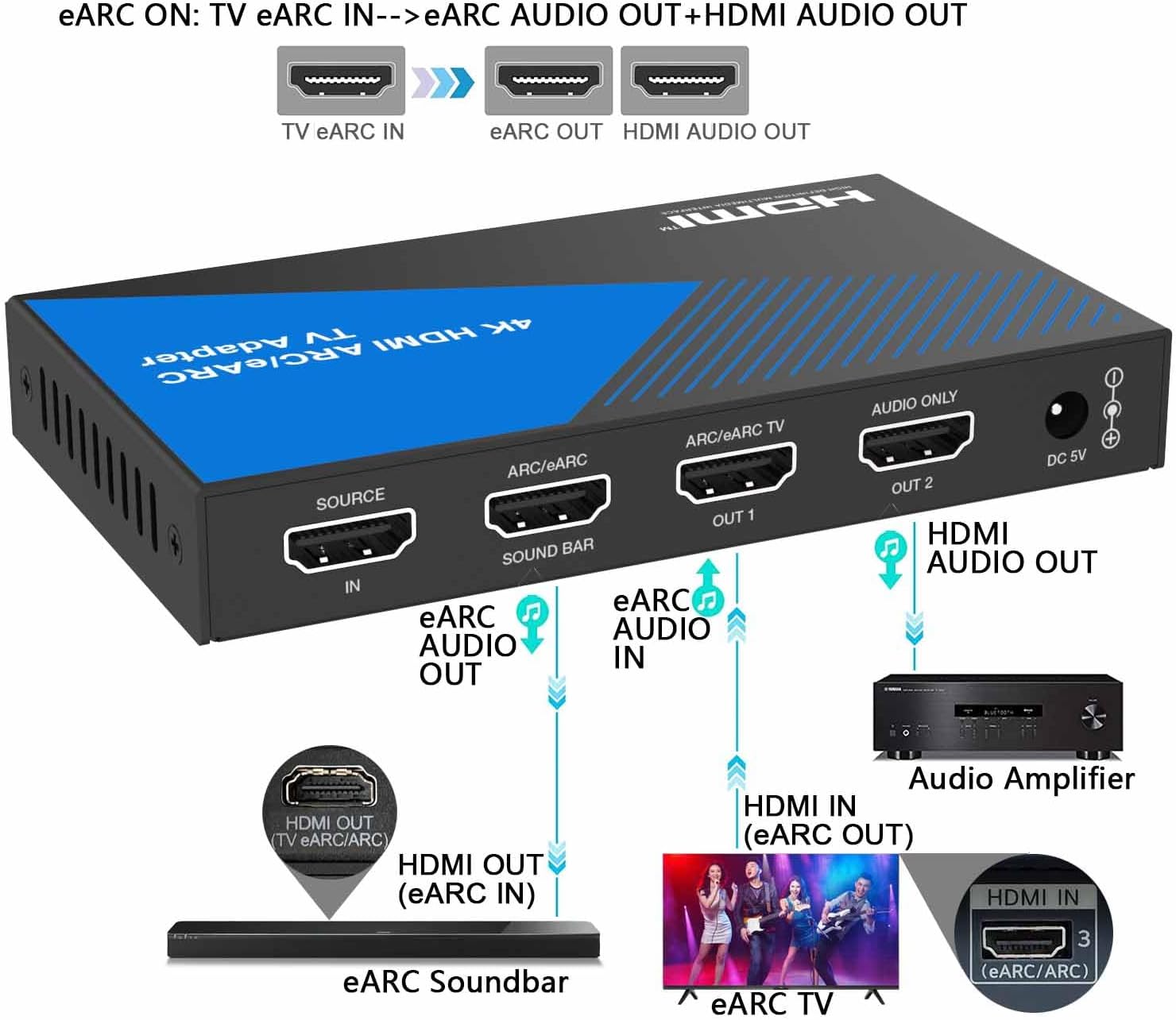
When the ARC/eARC function is ON, the adapter takes ARC/eARC audio from your TV and outputs it to the soundbar, while also providing HDMI audio output. No separate HDMI source device is required for this mode.

Przewodniki wideo dotyczące konfiguracji:
6. Instrukcja obsługi
Once the device is set up, operating it is straightforward:
- Power On All Devices: Ensure all connected devices (HDMI source, TV, soundbar/AV receiver) are powered on.
- Sprawdź diody LED: Check the LEDs on the adapter (POWER, HDMI IN, HDMI OUT1/OUT2, ARC/eARC) to ensure proper signal detection and connection status as described in the Function Description Table.
- Toggle ARC/eARC Function: Use the "ARC/eARC" button to switch between HDMI audio extraction (ARC/eARC OFF) and TV ARC/eARC audio extraction (ARC/eARC ON) modes, depending on your desired audio routing.
- Enjoy Audio and Video: Your audio and video signals should now be routed correctly through your connected devices.
7. Rozwiązywanie Problemów
Jeśli napotkasz problemy, wypróbuj następujące rozwiązania:
- Brak zasilania: Ensure the DC 5V power adapter is securely connected to both the adapter and a working power outlet. Check the POWER LED.
- Brak obrazu/dźwięku:
- Sprawdź, czy wszystkie kable HDMI są prawidłowo podłączone do właściwych portów.
- Check the HDMI IN/OUT LEDs on the adapter to confirm signal detection.
- Ensure your TV/monitor and sound system are set to the correct input source.
- Try bypassing the adapter to confirm the source and display devices are working independently.
- ARC/eARC Not Working:
- Ensure the ARC/eARC function is enabled on the adapter (ARC/eARC LED should be green).
- Verify that your TV and soundbar/AV receiver both support ARC/eARC and that the feature is enabled in their respective settings.
- Use high-quality HDMI cables that support ARC/eARC.
- Problemy z jakością dźwięku:
- Ensure all devices are compatible with the selected audio format.
- Check the audio settings on your source device and TV to ensure they are outputting the desired format.
8. Specyfikacje
| Funkcja | Szczegół |
|---|---|
| Wymiary produktu | 4.72 x 2.76 x 0.63 cala |
| Numer modelu przedmiotu | BP-HDC-SWB11A |
| Obsługa rozdzielczości wideo | Do 4K@60Hz |
| Wersja HDMI | HDMI 2.0b |
| Przepustowość łącza | 18 Gb/s |
| Zgodność z HDCP | HDCP2.3 jest standardem, który umożliwia: |
| Obsługa HDR | Tak |
| Wsparcie CEC | Tak |
| Formaty audio | LPCM, Dolby Digital / Plus / EX, Dolby True HD, DTS, DTS-EX, DTS-96/24, DTS High Res, DTS-HD Master Audio, DSD |
| Zasilacz | Prąd stały 5 V |
| Materiał obudowy | Metal |

9. Gwarancja i wsparcie
This product is covered by a one-year warranty from the date of purchase. If you have any questions about compatibility or initial defects, please feel free to contact BUNGPUNG customer support.