
WGP WGP Smart Watch GTS2
Instrukcja obsługi zegarka WGP Smart Watch GTS2
Model: GTS2 | Brand: WGP
Wstęp
This manual provides detailed instructions for the setup, operation, maintenance, and troubleshooting of your WGP Smart Watch GTS2. Please read this manual carefully before using the device to ensure proper functionality and to maximize your user experience.

Obraz: Przód view of the WGP Smart Watch GTS2, displaying various health and time metrics.
1. Konfiguracja
1.1 Ładowanie urządzenia
Before first use, fully charge your WGP Smart Watch GTS2. Connect the magnetic charging cable to the charging points on the back of the watch and plug the USB end into a compatible power adapter (not included) or a computer USB port. A full charge typically provides up to 12 days of battery life.
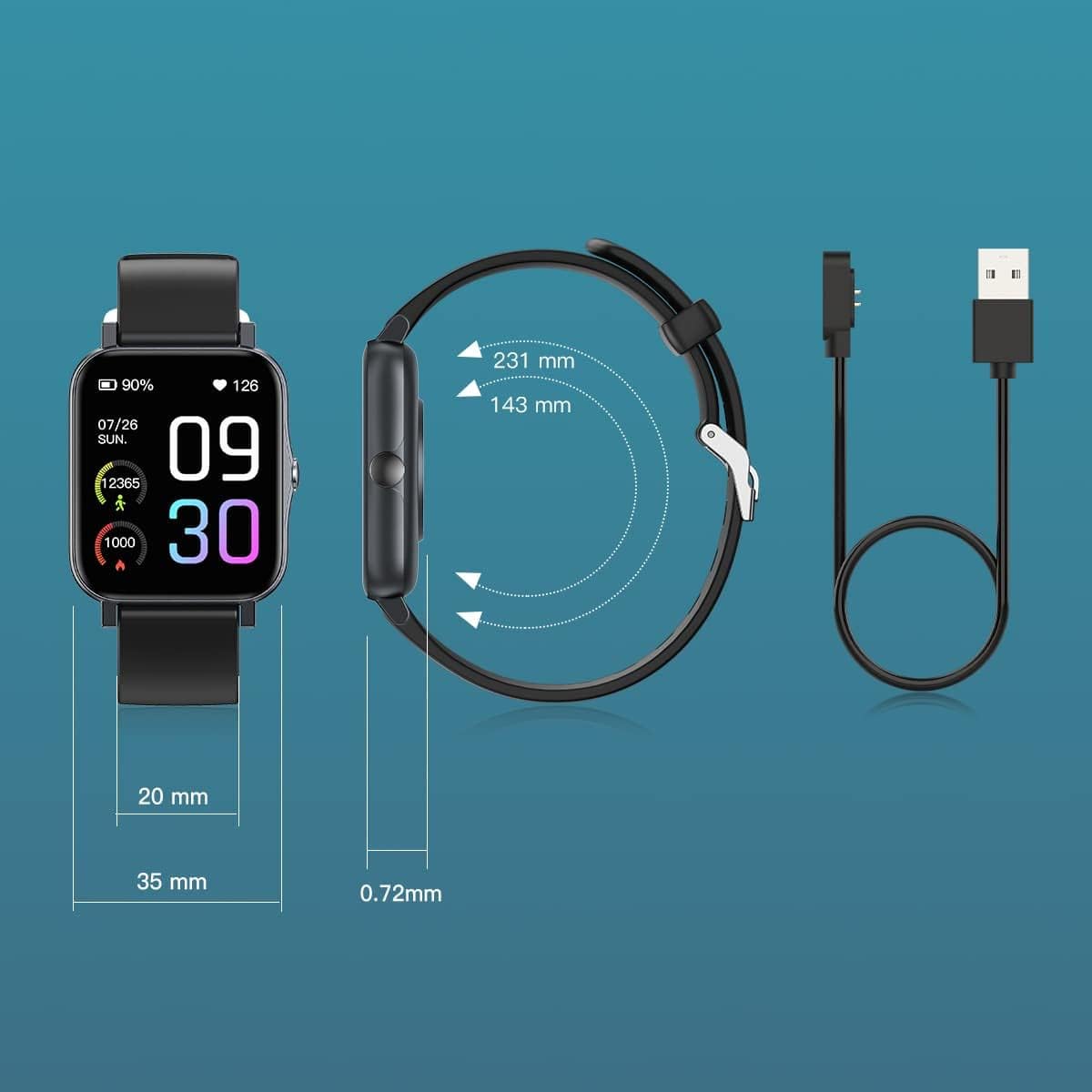
Image: Diagram illustrating the watch dimensions and the magnetic charging cable for power input.
1.2 Instalacja i parowanie aplikacji
To unlock the full features of your smart watch, download the companion application. The recommended application is Runmifit, available on both Android and iOS app stores. Follow these steps:
- Scan the QR code provided in the watch's packaging or search for "Runmifit" in your device's app store.
- Zainstaluj aplikację na swoim smartfonie.
- Open the Runmifit app and follow the on-screen instructions to create an account or log in.
- Włącz Bluetooth w swoim smartfonie.
- Within the app, navigate to the device pairing section and select "WGP Smart Watch GTS2" from the list of available devices.
- Potwierdź prośbę o sparowanie na zegarku i smartfonie.

Image: A smartphone screen showing a QR code for pairing the watch with the Runmifit application.
2. Obsługa smartwatcha
2.1 Podstawowa nawigacja
The WGP Smart Watch GTS2 features a 1.7-inch full-screen display. Navigate through menus and functions by swiping left, right, up, or down, and tap to select options. The side button typically serves as a power button or a back button, depending on the context.
2.2 trybów sportowych
The watch supports over 100 built-in sports modes, catering to various indoor and outdoor activities. To access sports modes:
- Swipe on the watch face to find the "Sports" or "Workout" icon.
- Dotknij, aby przejść do wyboru trybu sportowego.
- Scroll through the list and select your desired activity (e.g., running, cycling, football, basketball, hiking, yoga, climbing).
- Tap to start the activity tracking. The watch will record relevant data such as duration, calories burned, and heart rate.

Image: Visual representation of the 100+ sports modes supported by the watch.
2.3 Monitorowanie stanu zdrowia
The WGP Smart Watch GTS2 is equipped with three professional sensors for comprehensive health monitoring, including heart rate, blood oxygen, and sleep tracking. Data can be viewed directly on the watch or in more detail within the Runmifit app.
- Monitorowanie częstości akcji serca: The watch continuously monitors your heart rate. Access the heart rate interface on the watch to view dane w czasie rzeczywistym.
- Monitorowanie tlenu we krwi: Zmierz poziom saturacji krwi tlenem.
- Monitorowanie snu: Zegarek automatycznie śledzi wzorce snu, w tym fazę snu głębokiego, płytkiego i czuwania.view your sleep quality in the app.


Image: Visuals demonstrating heart rate monitoring and an overview of the watch's health and fitness features.
2.4 Powiadomienia
Once paired with your smartphone, the watch can display call and message reminders, as well as notifications from various applications (e.g., text messages, emails, social media). Ensure notification permissions are enabled in both your phone's settings and the Runmifit app.

Image: The watch displaying incoming message notifications from a connected smartphone.
3. Konserwacja
3.1 Czyszczenie
Regularly clean your smart watch to ensure optimal performance and hygiene. Use a soft, lint-free cloth to wipe the screen and watch body. For stubborn dirt, slightly dampPrzetrzyj szmatkę wodą. Unikaj stosowania silnych środków chemicznych i materiałów ściernych.
3.2 Wodoodporność
The WGP Smart Watch GTS2 features IP68 waterproof rating, utilizing double-layer waterproof ring technology. This means you can wear it while washing hands or swimming in a pool. However, it is not suitable for hot showers, saunas, or diving. After exposure to water, especially saltwater, rinse the watch with fresh water and dry it thoroughly.

Image: The watch being splashed with water, illustrating its IP68 waterproof rating.
3.3 Przechowywanie
Jeśli zegarek nie jest używany przez dłuższy czas, należy przechowywać go w chłodnym, suchym miejscu, z dala od bezpośredniego światła słonecznego i ekstremalnych temperatur. Zaleca się okresowe ładowanie zegarka w celu utrzymania sprawności baterii.
4. Rozwiązywanie Problemów
If you encounter issues with your WGP Smart Watch GTS2, please refer to the following common solutions:
| Problem | Możliwe rozwiązanie |
|---|---|
| Zegarek nie włącza się lub nie ładuje. | Upewnij się, że kabel ładujący jest prawidłowo podłączony do zegarka i źródła zasilania. Spróbuj użyć innego portu USB lub zasilacza. Przed włączeniem zegarka pozwól mu się ładować przez co najmniej 30 minut. |
| Nie można sparować ze smartfonem. | Make sure Bluetooth is enabled on your phone and the watch is within range. Restart both the watch and your phone. Ensure you are using the correct app (Runmifit). Forget the device in your phone's Bluetooth settings and try pairing again. |
| Inaccurate health readings (e.g., heart rate, blood pressure). | Ensure the watch is worn snugly on your wrist, about one finger's width above the wrist bone. Avoid excessive movement during measurements. Note that smart watch health data is for reference only and not intended for medical diagnosis. |
| Powiadomienia się nie pojawiają. | Check notification permissions in your phone's settings for the Runmifit app. Also, verify notification settings within the Runmifit app itself. Ensure the app is running in the background. |
| Watch face/skin issues or inability to save multiple faces. | Ensure the Runmifit app is updated to the latest version. Some watch faces may require more memory or specific app versions. Try restarting the app and watch. |
5. Specyfikacje
| Funkcja | Szczegół |
|---|---|
| Model | WGP Smart Watch GTS2 |
| Rozmiar wyświetlacza | 1.7 cali (4.3 cm) |
| Pojemność baterii | 230 mAh litowo-jonowy (w zestawie) |
| Żywotność baterii | Do 12 dni (typowe użytkowanie) |
| Stopień wodoodporności | IP68 |
| Łączność | Bluetooth |
| Czujniki | Heart Rate Monitor, Blood Oxygen Monitor, Sleep Monitor, Activity Tracker |
| Tryby sportowe | Ponad 100 trybów |
| Zgodność | Systemy Android i iOS |
| Waga przedmiotu | 3.52 uncji (99.8 grama) |
| Wymiary opakowania | 10.67 x 3.78 x 0.67 cala (27.1 x 9.6 x 1.7 cm) |
| Producent | WGP |
| Pierwsza dostępna data | 31 sierpnia 2022 r. |
6. Gwarancja i wsparcie
For warranty information and customer support, please refer to the documentation included with your product packaging or contact the retailer from whom you purchased the WGP Smart Watch GTS2. Keep your proof of purchase for warranty claims.
Ask a question about this manual
Ask about setup, troubleshooting, compatibility, parts, safety, or missing instructions. Manuals+ will review the question and use this page’s manual context to help answer it.