
Roland UVC-02
Roland UVC-02 Web Instrukcja obsługi stacji dokującej
Model: UVC-02
1. Wprowadzenie
The Roland UVC-02 Web Presentation Dock is a compact broadcast control center designed to enhance your video presentations and live streams. It allows for the connection of high-quality HDMI cameras, professional microphones, and other audio sources, routing them to your computer via a single USB cable. This device provides hands-on control over audio and video elements, making it suitable for various web meeting and streaming platforms.
2. Informacje dotyczące bezpieczeństwa
Please read and understand the following safety precautions before using the Roland UVC-02 Web Presentation Dock to ensure proper and safe operation.
- Nie wystawiaj urządzenia na działanie deszczu, wilgoci ani ekstremalnych temperatur.
- Unikać umieszczania urządzenia w pobliżu źródeł ciepła lub w bezpośrednim świetle słonecznym.
- Nie rozmontowuj ani nie modyfikuj urządzenia. Wszelkie prace serwisowe zlecaj wykwalifikowanemu personelowi.
- Należy używać wyłącznie wskazanego zasilacza i kabli.
- Keep the unit away from strong electromagnetic fields.
- Podczas pracy urządzenia należy zapewnić odpowiednią wentylację.
3. Koniec produktuview
The Roland UVC-02 Web Presentation Dock integrates essential audio and video controls into a single desktop unit. It is designed to simplify the process of connecting external cameras and microphones to your computer for high-quality online communication.
3.1. Zawartość opakowania
Sprawdź, czy w opakowaniu znajdują się wszystkie elementy:
- Roland UVC-02 Web Presentation Dock
- Kabel USB 3.0
- Roland MIDI Cable
- Roland Microphone Cable
- Ściereczka do polerowania
- Ulotka „Przeczytaj mnie najpierw”
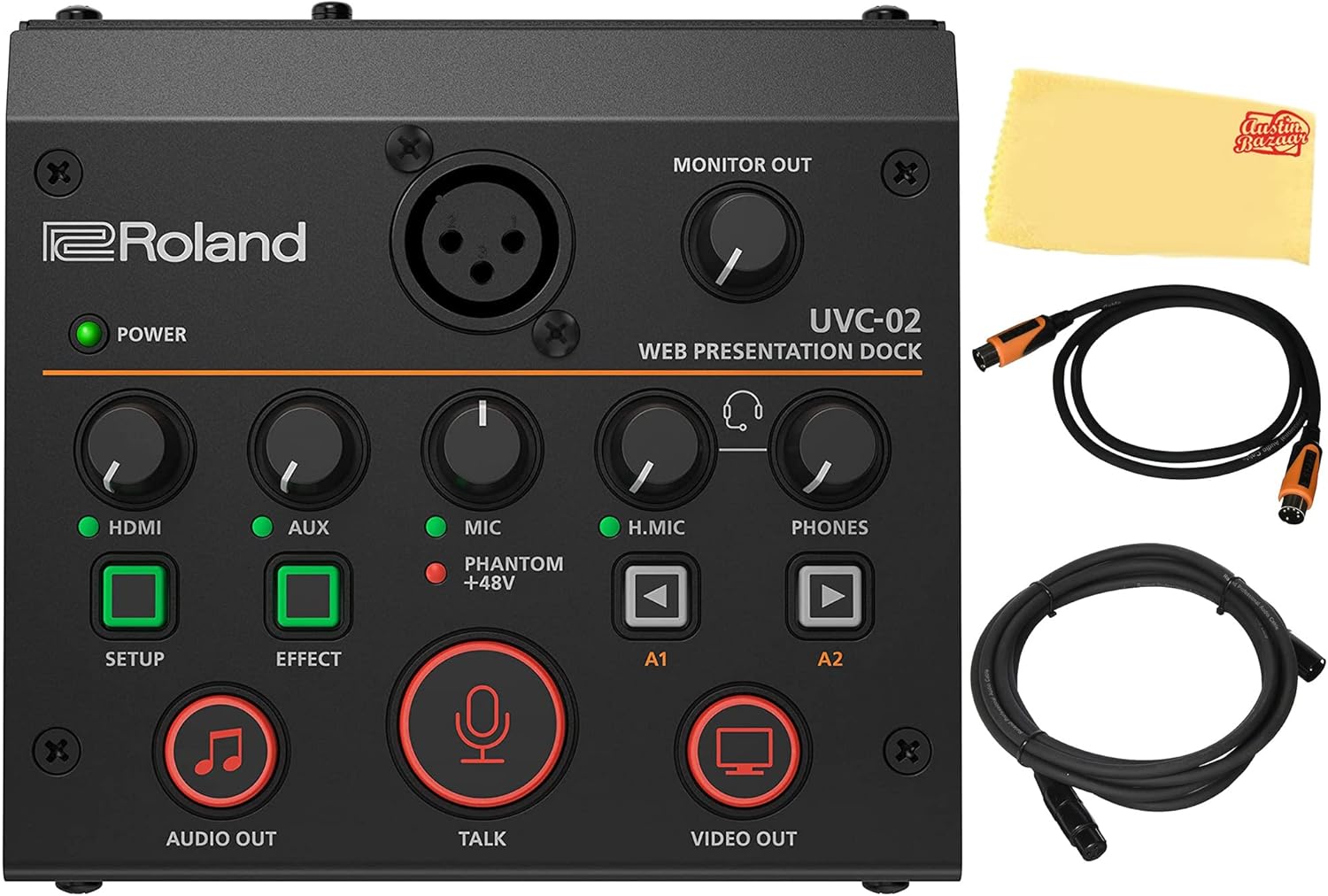
Figure 3.1: Roland UVC-02 Web Presentation Dock and bundled accessories.
3.2. Elementy sterujące na panelu przednim
The front panel of the UVC-02 provides intuitive controls for managing your audio and video inputs.

Figure 3.2: Front Panel of the UVC-02.
- Wskaźnik mocy: Świeci się, gdy urządzenie jest włączone.
- HDMI Knob: Adjusts the input level for the HDMI audio.
- Pokrętło AUX: Adjusts the input level for the AUX IN audio.
- Pokrętło MIC: Reguluje poziom wejściowy dla wejścia mikrofonowego XLR.
- H.MIC Knob: Adjusts the input level for the HEADSET microphone input.
- Pokrętło TELEFONY: Adjusts the volume for the HEADSET output.
- MONITOR OUT Knob: Adjusts the volume for the MONITOR OUT.
- Przycisk USTAWIENIA: Used for accessing setup menus or functions.
- Przycisk EFEKT: Activates or deactivates audio effects.
- AUDIO OUT Button: Controls the main audio output.
- Przycisk ROZMOWA: Wycisza/wyłącza wyciszenie mikrofonu.
- VIDEO OUT Button: Controls the main video output.
- A1/A2 Buttons: User-assignable buttons for custom functions.
3.3. Złącza panelu tylnego
The rear panel houses all the input and output ports for connecting your devices.
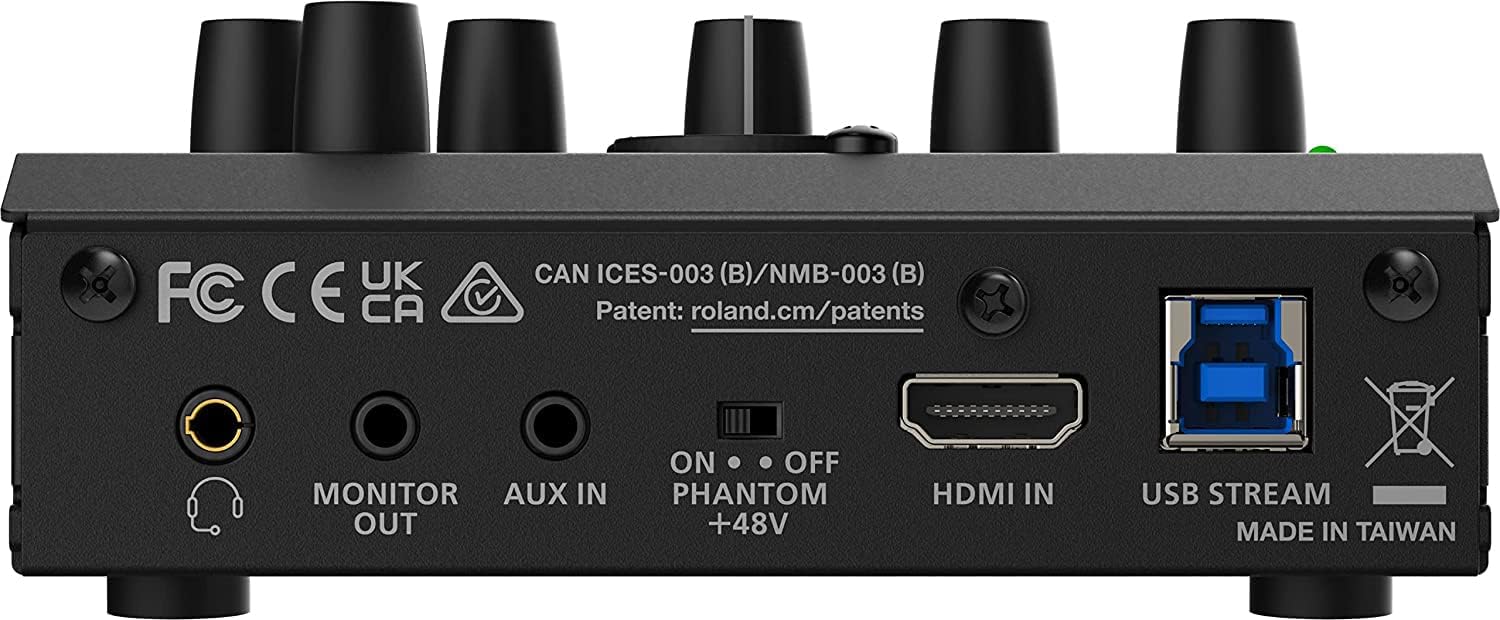
Figure 3.3: Rear Panel Connections of the UVC-02.
- MONITOR WYJŚCIOWY: Stereo miniature phone type output for monitoring audio.
- WEJŚCIE AUX: Stereo miniature phone type input for external audio devices.
- MIKROFON: XLR type input for balanced microphones, with switchable +48V Phantom power.
- WEJŚCIE HDMI: HDMI type A input for video and audio from a camera or other HDMI source.
- USB STREAM: USB 3.0 Type-B port for connection to a computer.
4. Konfiguracja
Follow these steps to set up your Roland UVC-02 Web Presentation Dock.
4.1. Podłączanie do komputera
- Connect the supplied USB 3.0 cable from the USB STREAM port on the UVC-02 to an available USB 3.0 port on your computer.
- The UVC-02 will be recognized as a webcam and audio source by your computer without requiring additional drivers.
4.2. Connecting an HDMI Camera
- Connect an HDMI cable (not included) from your camera's HDMI output to the HDMI IN port on the UVC-02.
- Ensure your camera is set to output a compatible video resolution.
4.3. Podłączanie mikrofonu
The UVC-02 supports both XLR microphones and headset microphones.
XLR Microphone Connection:
- Connect your XLR microphone to the MIKROFON wejście na tylnym panelu.
- If your microphone requires phantom power, ensure the FANTOM +48V switch on the rear panel is set to ON.

Figure 4.1: Roland Microphone Cable (XLR).
Połączenie mikrofonu zestawu słuchawkowego:
- Connect your headset (with a 4-pole stereo miniature plug, CTIA standard) to the HEADSET port na panelu przednim.
4.4. Connecting Auxiliary Audio Devices
- Connect an audio device (e.g., smartphone, music player) to the AUX IN port on the rear panel using a stereo miniature phone type cable.
4.5. Connecting Monitoring Devices
- Connect headphones or external speakers to the MONITOR OUT port on the rear panel for audio monitoring.
5. Operating the UVC-02
The UVC-02 is designed for plug-and-play operation with most web conferencing and streaming applications.
5.1. Podstawowa obsługa
- Once connected to your computer via USB, the UVC-02 will be recognized as a standard webcam and audio device.
- Otwórz preferowany web meeting software (e.g., Zoom, Microsoft Teams, Webex by Cisco) or streaming application.
- In the application's settings, select "Roland UVC-02" as your video input and audio input/output device.
- Use the front panel knobs (HDMI, AUX, MIC, H.MIC) to adjust the input levels for your audio sources.
- Użyj TELEFONY I MONITOR OUT knobs to adjust your monitoring volume.
5.2. Korzystanie z elementów sterujących
- Przycisk ROZMOWA: Press to mute or unmute your microphone. The button's indicator will change to show its status.
- AUDIO OUT / VIDEO OUT Buttons: These buttons control the main audio and video signals sent to your computer. Press to enable or disable the respective output.
- SETUP / EFFECT Buttons: Refer to the detailed Roland UVC-02 reference manual for advanced functions and customization options for these buttons.
- A1 / A2 Buttons: These are assignable buttons. Their functions can be configured via Roland's utility software (if available) or may have default actions depending on the firmware version.
6. Konserwacja
Proper maintenance ensures the longevity and optimal performance of your UVC-02.
- Czyszczenie: Use the included polishing cloth or a soft, dry cloth to wipe down the unit. Do not use abrasive cleaners, waxes, or solvents.
- Składowanie: Gdy urządzenie nie jest używane, należy je przechowywać w chłodnym i suchym miejscu, z dala od bezpośredniego światła słonecznego i ekstremalnych temperatur.
- Pielęgnacja kabli: Handle cables carefully. Avoid sharp bends or kinks, and store them neatly to prevent damage.
7. Rozwiązywanie Problemów
If you encounter issues with your UVC-02, try the following troubleshooting steps.
7.1. Brak wyjścia wideo
- Ensure the HDMI cable is securely connected to both the camera and the UVC-02.
- Verify that your camera is powered on and outputting video via HDMI.
- Check the video settings in your computer's operating system and the web conferencing/streaming application to ensure "Roland UVC-02" is selected as the video input.
- Potwierdź WYJŚCIE WIDEO button on the UVC-02 is active.
7.2. No Audio Output/Input
- Check all audio cable connections (microphone, AUX IN, MONITOR OUT).
- Adjust the respective input level knobs (HDMI, AUX, MIC, H.MIC) on the front panel.
- For XLR microphones, ensure FANTOM +48V is enabled if required by your microphone.
- Verify that "Roland UVC-02" is selected as the audio input and output device in your computer's sound settings and the application you are using.
- Potwierdź WYJŚCIE DZWIĘKU button on the UVC-02 is active.
- If using a microphone, ensure the ROZMAWIAĆ button is not muting the microphone.
7.3. Jednostka nierozpoznana przez komputer
- Ensure the USB 3.0 cable is securely connected to both the UVC-02 and your computer.
- Spróbuj podłączyć urządzenie do innego portu USB 3.0 w komputerze.
- Restart your computer and the UVC-02.
- Try using a different USB 3.0 cable.
8. Specyfikacje
| Funkcja | Specyfikacja |
|---|---|
| Numer modelu | AUS-UVC-02-COMBO-STD |
| Waga przedmiotu | 1.3 funtów (0.59 kg) |
| Wymiary produktu | 2.4" dł. x 4.6" szer. x 4.88" wys. (6.1 x 11.7 x 12.4 cm) |
| Input Connector (Video) | HDMI IN : HDMI type A |
| Output Connector (Computer) | USB STREAM : USB 3.0 Type-B |
| Audio Analog Connectors | MIC : XLR type (Balanced, Phantom power DC 48V, 14 mA Max) HEADSET : Stereo miniature phone type (CTIA, PLUG-IN power) AUX IN : Stereo miniature phone type MONITOR OUT : Stereo miniature phone type |
| Kompatybilne urządzenia | Komputer osobisty |
| System operacyjny | Windows (and generally macOS, though not explicitly listed in provided data) |
| Cotage | 48 watów |
9. Gwarancja i wsparcie
This Roland product is covered by a manufacturer's warranty. For detailed warranty information, please refer to the warranty card included with your product or visit the official Roland webstrona.
For technical support, product registration, or further inquiries, please contact Roland customer support or visit their official support page. Keep your purchase receipt as proof of purchase for warranty claims.
Note: No official product videos were available in the provided data for embedding in this manual.
Ask a question about this manual
Ask about setup, troubleshooting, compatibility, parts, safety, or missing instructions. Manuals+ will review the question and use this page’s manual context to help answer it.