1. Ważne instrukcje bezpieczeństwa
Please read all instructions carefully before using the shredder. Keep this manual for future reference.
- Trzymaj dzieci i zwierzęta z dala od rozdrabniacza.
- Keep loose clothing, jewelry, hair, and hands away from the paper entry slot.
- Nie rozpylać na niszczarkę żadnych łatwopalnych produktów i nie używać jej w pobliżu materiałów łatwopalnych.
- Do not shred metal objects, wet paper, or adhesive materials.
- Odłącz niszczarkę od zasilania, gdy jej nie używasz oraz przed czyszczeniem.
- Do not attempt to repair the shredder yourself. Contact qualified service personnel.
This shredder is equipped with overheat and overload protection features to prevent damage. Refer to the 'Operation' section for details.
2. Koniec produktuview
The Bonsaii C243-A is a cross-cut paper shredder designed for home and small office use. It efficiently shreds confidential documents, credit cards, CDs/DVDs, staples, and paper clips into small, unreadable particles.

Image 2.1: The Bonsaii C243-A cross-cut paper shredder, showing its compact design and the included lubricant sheets.
3. Konfiguracja
- Rozpakowywanie: Ostrożnie wyjmij niszczarkę z opakowania. Zachowaj materiały opakowaniowe do transportu lub przechowywania w przyszłości.
- Umieszczenie: Ustaw niszczarkę na płaskiej, stabilnej powierzchni. Upewnij się, że wokół urządzenia jest wystarczająco dużo miejsca, aby zapewnić wentylację.
- Podłącz zasilanie: Podłącz przewód zasilający do standardowego gniazdka elektrycznego.
- Kosz na śmieci: Ensure the waste bin is correctly inserted into the shredder unit. The shredder will not operate if the bin is not properly seated.
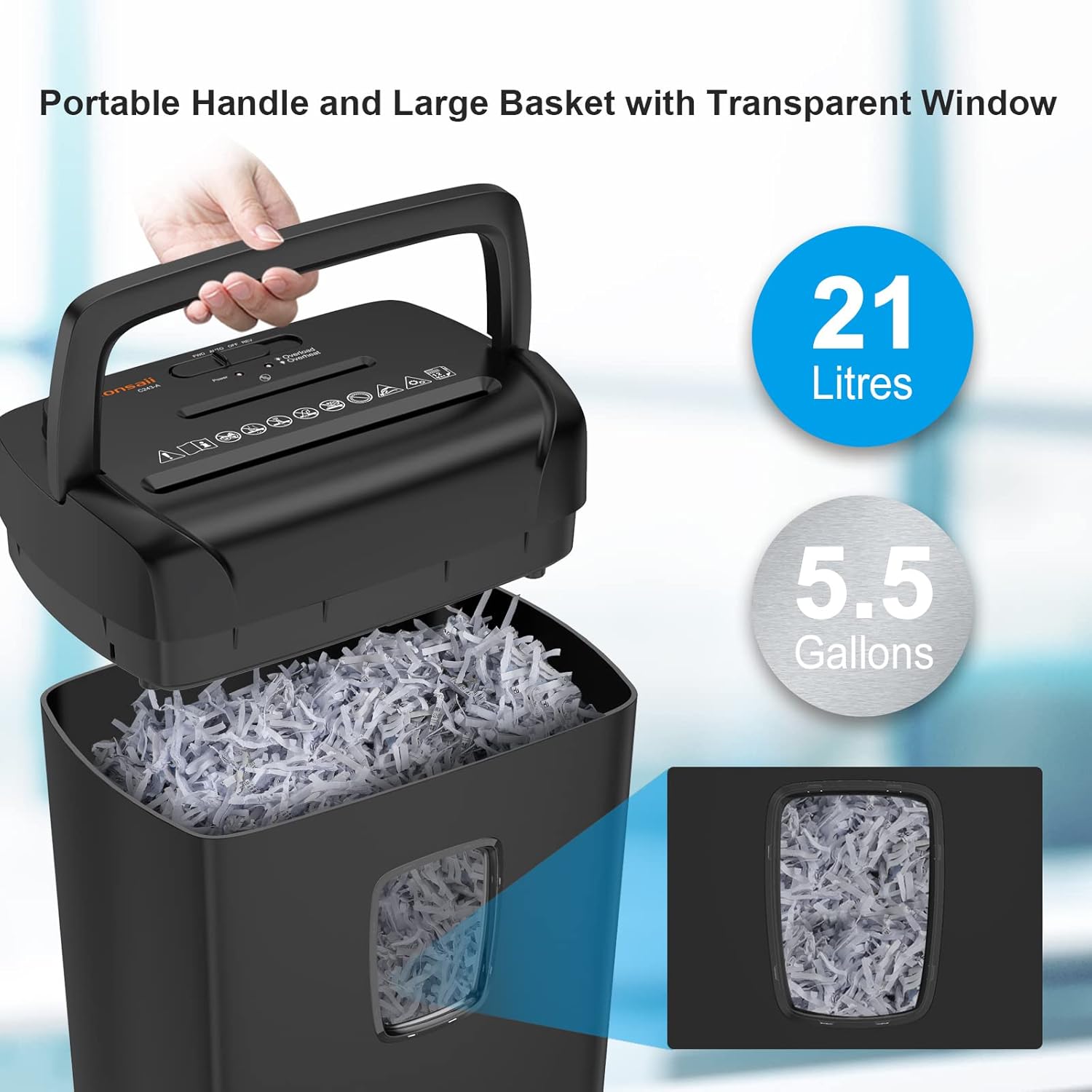
Image 3.1: The shredder's top unit being lifted from the 21-liter waste bin, highlighting the portable handle and transparent window.
4. Działanie
4.1 Control Switches
The shredder features a 3-mode control switch located on the top of the unit:
- AUTOMATYCZNY: The shredder will automatically start when paper is inserted and stop when shredding is complete.
- OFF: The shredder is powered off.
- REV (Wsteczny): This function is used to clear paper jams by reversing the shredder blades.
4.2 Niszczenie papieru
- Ensure the control switch is set to 'AUTO'.
- Insert up to 12 sheets of paper (A4 size) into the paper entry slot. The shredder will automatically begin shredding.
- Remove your hands from the slot once shredding begins.

Image 4.1: Demonstrating the shredder's capability to shred up to 12 sheets of A4 paper per pass.
4.3 Rozdrabnianie innych materiałów
The Bonsaii C243-A can also shred credit cards and CDs/DVDs. Use the dedicated slots for these materials.
- Karty kredytowe: Insert one credit card at a time into the credit card slot.
- Płyty CD/DVD: Insert one CD or DVD at a time into the CD/DVD slot.

Image 4.2: The shredder's versatility in handling various materials including CDs, credit cards, paper, clips, and staples.
4.4 Overheat and Overload Protection
The shredder is designed with safety features:
- Zabezpieczenie przed przegrzaniem: If the shredder operates continuously for more than 5 minutes, it will automatically shut off to prevent overheating. Allow the unit to cool down for approximately 40 minutes before resuming operation. An LED indicator will signal this state.
- Zabezpieczenie przed przeciążeniem: If too many sheets are inserted, the shredder will detect an overload. A red LED light will flash, and the machine will automatically eject the paper. Reduce the number of sheets and re-insert.
5. Konserwacja
5.1 Opróżnianie pojemnika na śmieci
The transparent window on the waste bin allows you to monitor its fullness. When the bin is full, lift the shredder head using the handle and empty the shredded material. Re-insert the bin securely before operating the shredder.
5.2 Smarowanie
Regular lubrication is essential for maintaining optimal shredder performance and extending its lifespan. Use Bonsaii lubricant sheets (Model: LS12) for best results.

Image 5.1: A 12-pack of Bonsaii shredder lubricant sheets, designed to clean and lubricate shredder blades.
- Ensure the shredder is in 'AUTO' mode.
- Feed one lubricant sheet directly into the paper entry slot, just like a piece of paper.
- Once the sheet has been completely shredded, switch the control to 'REV' (Reverse) for approximately 10 seconds to distribute the lubricant evenly across the blades.
- Return the switch to 'OFF' or 'AUTO' as desired.

Rysunek 5.2: Szczegółowy view of the Bonsaii Shredder Lubricant Sheet packaging, showing usage instructions.
6. Rozwiązywanie Problemów
| Problem | Możliwa przyczyna | Rozwiązanie |
|---|---|---|
| Niszczarka nie działa. | Power cord unplugged; waste bin not properly inserted; shredder overheated. | Check power connection; ensure bin is seated correctly; allow 40 minutes for cool-down. |
| Zacięcie papieru. | Too much paper inserted; paper not fed straight. | Switch to 'REV' to clear the jam. If unsuccessful, unplug, remove shredder head, and carefully clear paper. Reduce paper quantity for next shredding. |
| Niszczarka zatrzymuje się w trakcie pracy. | Overheat protection activated; waste bin full. | Allow 40 minutes for cool-down; empty the waste bin. |
| Niszczarka pracuje głośno lub jej wydajność spada. | Ostrza wymagają smarowania. | Use a Bonsaii lubricant sheet as described in the 'Maintenance' section. |
7. Specyfikacje
| Funkcja | Specyfikacja |
|---|---|
| Model | C243-A |
| Marka | Bonsai |
| Rodzaj cięcia | Cięcie krzyżowe |
| Rozdrabniany rozmiar | 13/64 x 1-37/64 inches (5x40mm) |
| Standardowa pojemność arkuszy | 12 sheets (A4, 75g/m²) |
| Ciągły czas pracy | 5 minut |
| Czas wyciszenia | 40 minut |
| Pojemność pojemnika na odpady | 21 litrów / 5.5 galonów |
| Funkcja specjalna | LED Indicator (Overheat/Overload) |
8. Gwarancja i wsparcie
Bonsaii products are manufactured to high-quality standards. For warranty information or technical support, please refer to the warranty card included with your product or visit the official Bonsaii website. Please have your model number (C243-A) and purchase date available when contacting support.