
Wstęp
This manual provides detailed instructions for the setup, operation, and maintenance of your Acogedor Bluetooth 5.0 Receiver Wireless Audio Adapter. Please read this manual thoroughly before using the product to ensure proper function and to prevent damage.

Image: The Acogedor Bluetooth 5.0 Receiver, highlighting its NFC capability.
Informacje dotyczące bezpieczeństwa
- Nie narażaj urządzenia na działanie wody i wilgoci.
- Unikaj ekstremalnych temperatur.
- Do not disassemble the device. This will void the warranty.
- Use only the provided or recommended power adapter (DC 5V).
- Przechowywać w miejscu niedostępnym dla dzieci.
Zawartość opakowania
Sprawdź, czy w opakowaniu znajdują się wszystkie elementy:
- Acogedor Bluetooth 5.0 Receiver
- Kabel audio 3.5 mm
- Kabel audio RCA
- Kabel zasilający USB
- Instrukcja obsługi (ten dokument)
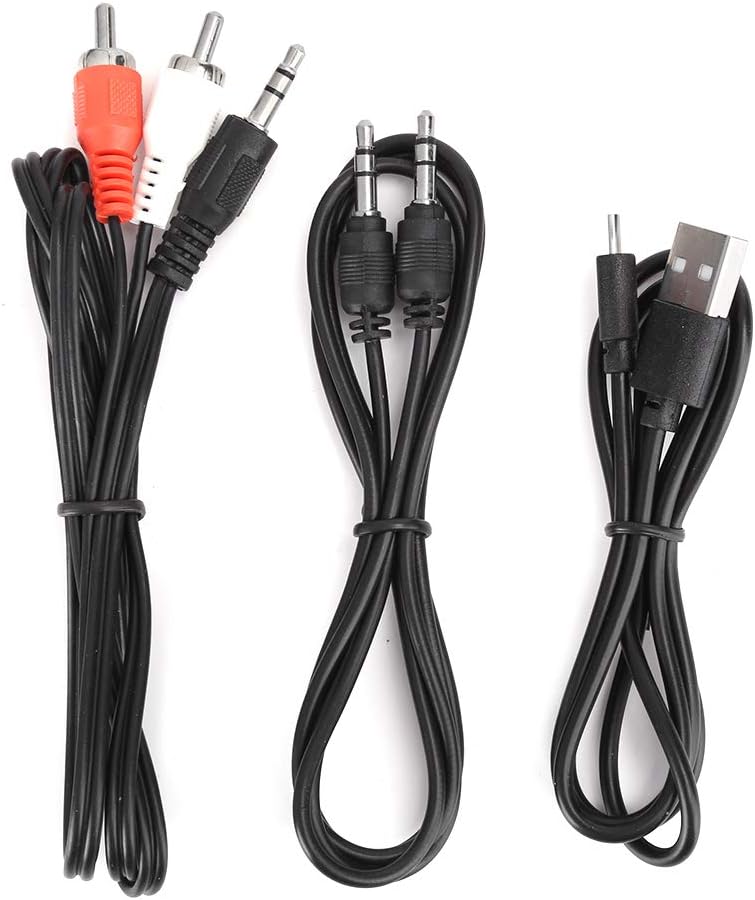
Image: The various audio and power cables included with the receiver.
Produkt ponadview
Familiarize yourself with the ports and controls of the Acogedor Bluetooth 5.0 Receiver.

Image: Rear panel with power input, USB port, RCA audio output, and 3.5mm AUX output.

Image: Top panel with playback control buttons (Previous, Play/Pause, Next).
- Wejście prądu stałego 5 V: Power connection port (Micro USB).
- Port USB: Do odtwarzania z dysku U.
- Wyjście audio (RCA): Red and white RCA jacks for audio output to ampgłośniki lub głośniki.
- Wyjście AUX: 3.5mm jack for audio output to speakers or headphones.
- Przyciski sterujące: Poprzedni utwór, Odtwórz/Pauza, Następny utwór.
- Obszar NFC: For near-field pairing with compatible devices.
Organizować coś
1. Podłączenie zasilania
- Podłącz dostarczony kabel zasilający USB do Wejście DC 5V port na odbiorniku.
- Plug the other end of the USB cable into a 5V USB power adapter (not included) or a USB port on your audio equipment.
- The indicator light on the receiver will illuminate, indicating it is powered on.
2. Podłączenie wyjścia audio
Wybierz jedną z poniższych metod podłączenia odbiornika do systemu audio:
- Używanie kabli RCA: Connect one end of the RCA audio cable to the Wyjście audio (RCA) ports (red to red, white to white) on the receiver. Connect the other end to the corresponding RCA input ports on your ampgłośniki niskotonowe lub aktywne.
- Używanie kabla AUX 3.5 mm: Podłącz jeden koniec kabla audio 3.5 mm do Wyjście AUX port on the receiver. Connect the other end to the 3.5mm AUX input port on your speaker, headphones, or ampliyfikator.

Image: The receiver connected to an external speaker and a smartphone, demonstrating a typical setup.
3. Parowanie Bluetooth
The receiver will automatically enter pairing mode when powered on. The indicator light will flash.
- NFC Pairing (Recommended for NFC-enabled devices):
- Ensure NFC is enabled on your smartphone or other NFC-enabled device.
- Tap your NFC-enabled device gently against the Obszar NFC on the top of the receiver.
- Confirm the pairing request on your device. The receiver will connect automatically.

Image: A smartphone being used to initiate NFC pairing with the receiver.
- Ręczne parowanie Bluetooth:
- Na smartfonie lub urządzeniu z włączoną funkcją Bluetooth przejdź do ustawień Bluetooth.
- Szukaj available devices. The receiver will appear as "Acogedor Bluetooth Receiver" or similar.
- Select the receiver from the list to connect.
- Once connected, the indicator light will become solid blue.
Instrukcja obsługi
Odtwarzanie dźwięku przez Bluetooth
- Ensure the receiver is powered on and successfully paired with your device.
- Start playing audio on your paired device. The sound will be transmitted wirelessly to the receiver and output through your connected speakers.
- Użyj Przyciski sterujące on the receiver or your paired device to manage playback:
- Odtwórz/Pauza: Naciśnij środkowy przycisk.
- Następny utwór: Naciśnij prawy przycisk.
- Poprzedni utwór: Naciśnij lewy przycisk.
Odtwarzanie dysku U
The receiver supports playing audio filebezpośrednio z dysku flash USB.
- Włóż dysk flash USB zawierający dźwięk files do Port USB na odbiorniku.
- The receiver will automatically detect the U disk and begin playing audio.
- Użyj Przyciski sterujące do nawigacji po ścieżkach.

Image: The receiver demonstrating connections for both Bluetooth audio from a smartphone and direct playback from a USB flash drive.
Konserwacja
- Czyść urządzenie miękką, suchą ściereczką. Nie używaj płynnych środków czyszczących ani aerozoli.
- Utrzymuj porty w czystości, bez kurzu i zanieczyszczeń.
- Store the receiver in a cool, dry place when not in use.
Rozwiązywanie problemów
| Problem | Możliwa przyczyna | Rozwiązanie |
|---|---|---|
| Brak kontrolki zasilania. | Power cable not connected or faulty power source. | Ensure the USB power cable is securely connected to both the receiver and a working 5V power source. Try a different USB port or adapter. |
| Nie można sparować przez Bluetooth. | Receiver not in pairing mode; Bluetooth disabled on source device; too many paired devices. | Ensure the receiver is powered on and the indicator light is flashing (pairing mode). Enable Bluetooth on your source device. Forget previous pairings on your device and try again. Move closer to the receiver. |
| Brak dźwięku. | Incorrect audio cable connection; volume too low; wrong input selected on ampwzmacniacz/głośnik. | Sprawdź, czy kable audio są prawidłowo podłączone do Wyjście audio ports on the receiver and the correct input on your speaker/amplifier. Increase volume on both the source device and the connected audio system. Ensure the correct input source is selected on your ampwzmacniacz/głośnik. |
| U Disk playback not working. | U disk not inserted correctly; unsupported file format; U disk corrupted. | Ensure the U disk is fully inserted into the Port USB. Check if audio files are in a supported format (e.g., MP3). Try a different U disk. |
Specyfikacje
| Funkcja | Szczegół |
|---|---|
| Model | Acogedordebyv7h1rw1035 |
| Wersja Bluetooth | 5.0 |
| Technologia łączności | Auxiliary, Bluetooth, NFC, RCA, USB |
| Tryb wyjścia audio | Stereofoniczny |
| Typ złącza | Gniazdo 3.5 mm, RCA, USB |
| Kompatybilne urządzenia | Smartphone, Speaker, Ampżywsze |
| Moc wejściowa | DC 5V (przez Micro USB) |
| Wymiary produktu | 6.3 x 5.12 x 1.57 cala |
| Waga przedmiotu | 5.3 uncji (0.15 kilograma) |
| Zasięg bezprzewodowej | Up to 15 meters / 49.2 feet (barrier-free) |

Image: Key features of the receiver including Bluetooth reception, signal transmission range, USB playback, and decoding chip.
Gwarancja i wsparcie
Acogedor products are designed for reliability and performance. For any questions, technical support, or warranty claims, please contact Acogedor customer service through the retailer where the product was purchased.
Prosimy zachować dowód zakupu w celach gwarancyjnych.