
SPYCLOPS SPY-MNBLT3WIP8
Spyclops SPY-MNBLT3WIP8 4K 8.0-Megapixel Outdoor Fixed Lens Mini Bullet IP PoE Camera
Model: SPY-MNBLT3WIP8
Wstęp
This manual provides comprehensive instructions for the installation, operation, and maintenance of your Spyclops SPY-MNBLT3WIP8 4K 8.0-Megapixel Outdoor Fixed Lens Mini Bullet IP PoE Camera. Please read this manual thoroughly before using the product to ensure proper functionality and safety.
Informacje dotyczące bezpieczeństwa
Aby zapobiec uszkodzeniu produktu lub obrażeniom ciała, należy przestrzegać następujących środków ostrożności:
- Ensure the power source meets the camera's requirements (PoE).
- Nie należy podejmować prób rozmontowania lub modyfikacji aparatu.
- Zainstaluj kamerę w bezpiecznym miejscu, aby zapobiec nieautoryzowanemu dostępowi lubamping.
- Unikaj kierowania aparatu bezpośrednio na silne źródła światła przez dłuższy czas.
- Używaj wyłącznie akcesoriów zatwierdzonych przez producenta.
Zawartość opakowania
Sprawdź, czy w opakowaniu znajdują się wszystkie elementy:
- Spyclops SPY-MNBLT3WIP8 Camera
- Mounting Hardware (screws, wall anchors, hex key)
- Zestaw złączy wodoodpornych
- Instrukcja obsługi

Produkt ponadview
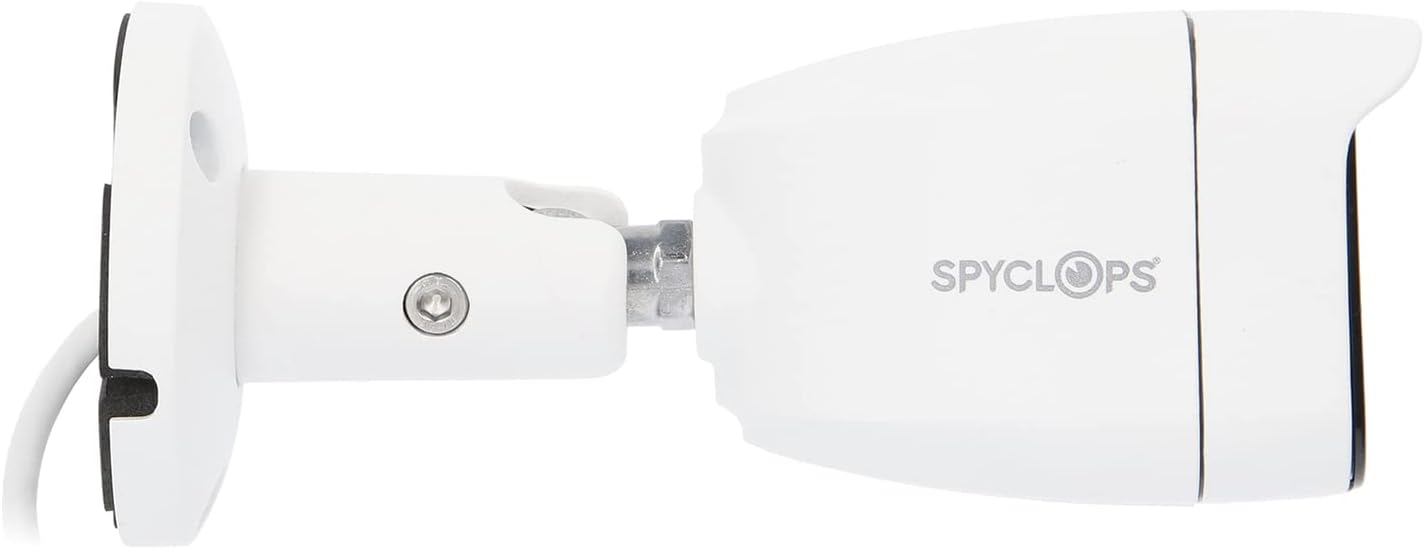
The Spyclops SPY-MNBLT3WIP8 is a 4K 8.0-Megapixel Outdoor Fixed Lens Mini Bullet IP PoE Camera designed for robust surveillance. It features an advanced CMOS sensor for high-resolution video capture and supports both color night vision in low light and black and white in total darkness using smart IR LEDs. The camera includes a built-in microphone for audio recording and utilizes H.265+ video compression to optimize storage and bandwidth.


Organizować coś
1. Instalacja fizyczna
- Wybierz miejsce montażu: Wybierz lokalizację na zewnątrz, która zapewnia pożądane viewing angle and is within reach of your network cable. The camera is water-resistant (IP67).
- Zamontuj kamerę:
- Do zaznaczenia otworów wiertniczych należy użyć dołączonego szablonu montażowego (jeśli jest dostępny).
- W przypadku montażu na płycie gipsowo-kartonowej lub murze wywierć otwory wstępne i włóż kołki rozporowe.
- Secure the camera's base to the surface using the provided screws.
- Adjust the camera's angle and orientation using the adjustable arm and hex key.
- Podłącz kabel sieciowy: Connect an Ethernet cable from your PoE switch or NVR to the camera's RJ45 port. Ensure the connection is secure and use the waterproof connector kit for outdoor installations to protect the connection from moisture.
2. Konfiguracja sieci
The camera is designed to work with IP/PoE systems. It will typically obtain an IP address automatically via DHCP from your network. For initial setup and advanced configuration, you will need to access the camera's web interface or use compatible NVR software.
- Odkryj aparat: Use a network scanner tool or your NVR's discovery function to find the camera's IP address on your network.
- Dostęp Web Interfejs: Otwórz web browser and enter the camera's IP address. Log in using the default credentials (refer to specific documentation or contact support if unknown).
- Konfiguracja wstępna: Change default passwords, set time zones, and configure network settings as required.
Instrukcja obsługi
1. Na żywo View i nagrywanie
Po skonfigurowaniu możesz view the live feed and manage recordings through your NVR or the camera's web interfejs.
- Monitorowanie na żywo: Access the live video stream to monitor the surveillance area in real-time.
- Tryby nagrywania: Configure continuous recording, motion-detection recording, or scheduled recording based on your security needs.
- Odtwarzanie nagranego dźwięku: Review nagrano footage using the NVR or software interface.
2. Zaawansowane funkcje
- Rozdzielczość 4K: The 8.0-megapixel CMOS sensor provides high-definition 4K video, capturing detailed images.
- Kolorowe widzenie nocne: In low-light conditions, the camera can utilize ambient light to provide color video.
- Inteligentne diody podczerwieni: In total darkness, the camera automatically switches to black and white mode, using smart IR LEDs to illuminate the scene without overexposure.
- Nagrywanie dźwięku: The built-in microphone captures audio within the camera's vicinity.
- Kompresja H.265+: This advanced video compression technology reduces file sizes and bandwidth usage while maintaining video quality.
Konserwacja
- Czyszczenie: Okresowo czyść obiektyw i obudowę aparatu miękką,amp ściereczka. Nie należy używać środków czyszczących o właściwościach ściernych ani rozpuszczalników.
- Aktualizacje oprogramowania układowego: Sprawdź producenta website for available firmware updates to ensure optimal performance and security. Follow the provided instructions carefully when updating firmware.
- Kontrola kabla: Regularnie sprawdzaj wszystkie kable i połączenia pod kątem oznak zużycia lub uszkodzeń, szczególnie w przypadku instalacji na zewnątrz.
Rozwiązywanie problemów
| Problem | Możliwa przyczyna | Rozwiązanie |
|---|---|---|
| Brak źródła wideo | No power (PoE), network cable disconnected, incorrect IP address. | Verify PoE connection, check network cable, ensure correct IP configuration. |
| Niska jakość obrazu | Dirty lens, environmental factors, low bandwidth. | Clean the lens, ensure adequate lighting, check network bandwidth. |
| Nie działa noktowizor | IR LEDs obstructed, camera settings. | Clear any obstructions, check night vision settings in the camera's interface. |
| Nie można uzyskać dostępu web interfejs | Incorrect IP address, network issue, firewall blocking access. | Confirm IP address, check network connectivity, temporarily disable firewall for testing. |
Specyfikacje
| Funkcja | Szczegół |
|---|---|
| Nazwa modelu | SPY-MNBLT3WIP8 |
| Efektywna rozdzielczość obrazu nieruchomego | 8.0 megapikseli (4K) |
| Czujnik obrazu | CMOS |
| Obiektyw | Obiektyw stały 2.8 mm |
| Kompresja wideo | H.265 + |
| Protokół łączności | Wi-Fi |
| Źródło zasilania | AC DC |
| Zastosowanie wewnątrz/na zewnątrz | Plenerowy |
| Międzynarodowa Ocena Ochrony | IP67 (wodoodporność) |
| Cechy specjalne | Color Night Vision, Smart IR LEDs, Built-in Microphone |
| Wymiary (dł. x szer. x wys.) | 8.27 x 6.3 x 3.54 cala |
| Waga przedmiotu | 1.29 funta |
| Kolor | Biały |
Gwarancja i wsparcie
For warranty information, technical support, or service inquiries, please refer to the official Spyclops webOdwiedź stronę internetową lub skontaktuj się z działem obsługi klienta. Zachowaj paragon jako dowód zakupu.
Producent: METRA-ETHEREAL
Numer modelu: SPY-MNBLT3WIP8
Ask a question about this manual
Ask about setup, troubleshooting, compatibility, parts, safety, or missing instructions. Manuals+ will review the question and use this page’s manual context to help answer it.