
1. Wprowadzenie
The MustOOL MT336 is a versatile 2-in-1 True RMS Digital Clamp Meter and Oscilloscope. This device allows for non-contact measurement of AC current waveforms, DC/AC voltage, resistance, capacitance, frequency, and temperature. It features a waveform display for quick analysis and includes functions like diode testing and continuity checks. Designed for safety and efficiency, it is an essential tool for electrical measurements.
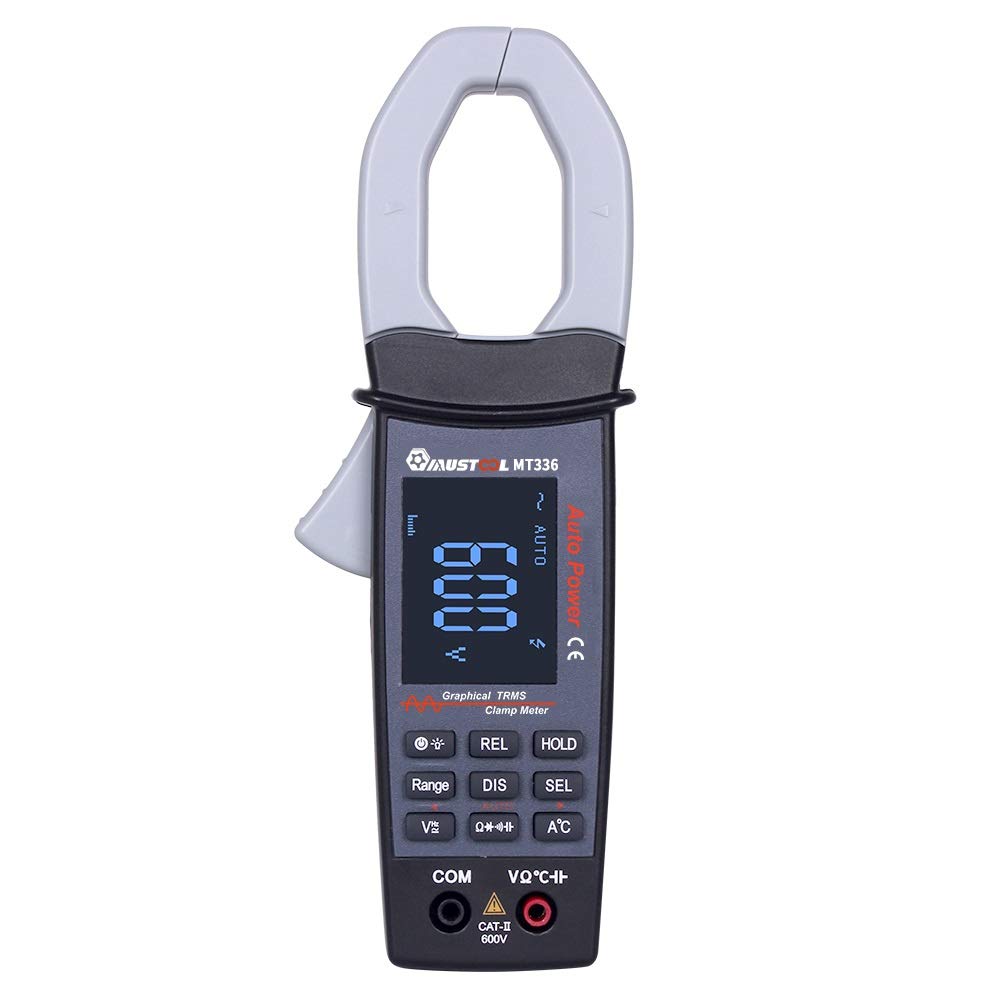
Figure 1: MustOOL MT336 Digital Clamp Meter in use, showing its display.
2. Informacje dotyczące bezpieczeństwa
Zawsze przestrzegaj zasad bezpieczeństwa podczas korzystania z urządzeń pomiarowych. Nieprzestrzeganie ich może spowodować porażenie prądem, obrażenia ciała lub uszkodzenie miernika lub testowanego urządzenia.
- Nie należy przekraczać maksymalnych limitów wejściowych dla żadnej funkcji.
- Ensure the test leads are in good condition and properly connected before use.
- Nie używaj miernika, jeśli wygląda na uszkodzony lub jeśli pokrywa baterii nie jest prawidłowo zamknięta.
- Zachowaj szczególną ostrożność podczas pracy z voltagpowyżej 60 V DC lub 30 V AC RMS.
- Zawsze odłączaj zasilanie obwodu przed dokonaniem pomiarów rezystancji, pojemności lub diody.
- Przed otwarciem komory baterii należy odłączyć przewody pomiarowe od miernika.

Rysunek 2: Tył view of the MT336, highlighting safety warnings and battery information.
3. Składniki produktu
The MustOOL MT336 clamp meter includes the following main components:
- Clamp Szczęka: Do bezkontaktowego pomiaru prądu przemiennego.
- Spust: Otwiera i zamyka kl.amp szczęka.
- Wyświetlacz LCD: Shows measurement readings, waveforms, and function indicators.
- Przyciski funkcyjne: For selecting modes, ranges, and other features.
- Input Jacks (COM, VΩHz): Do podłączania przewodów pomiarowych do pomiaru objętościtagpomiary rezystancji, pojemności, częstotliwości, diody i ciągłości.
- Temperature Probe Input: For connecting the included temperature probe.
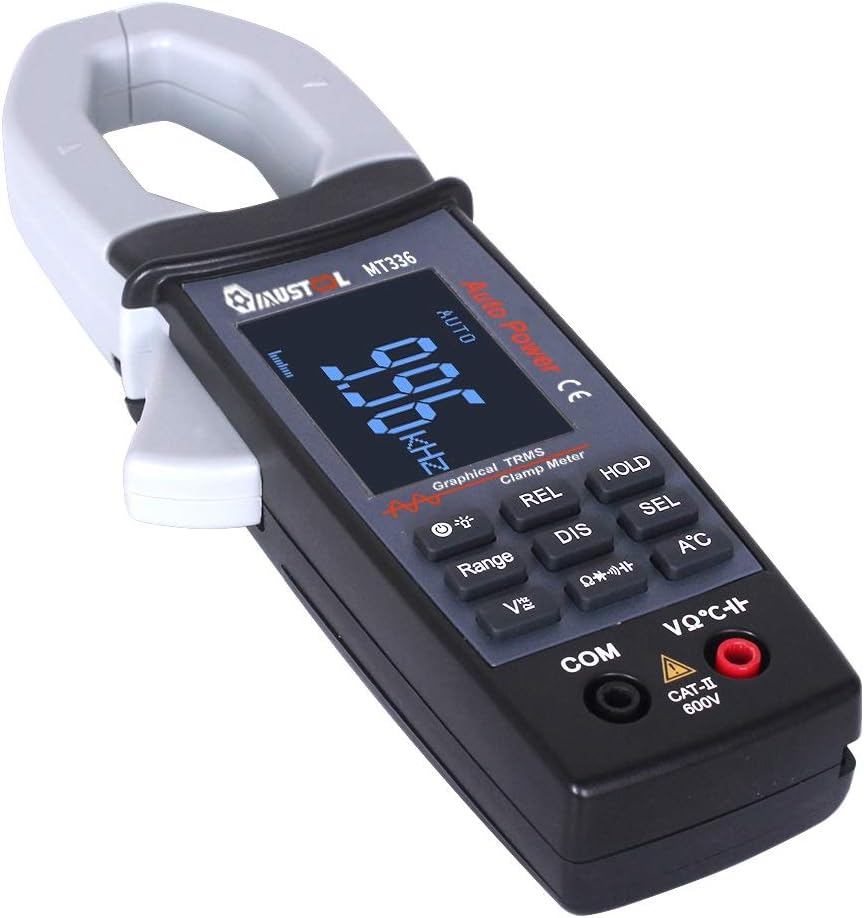
Rysunek 3: Koniecview of the MT336 clamp meter, showing its main parts.
4. Konfiguracja
4.1 Instalacja baterii
- Ensure the meter is powered off and no test leads are connected.
- Znajdź komorę baterii z tyłu miernika.
- Odkręć pokrywę komory baterii.
- Insert three AAA 1.5V batteries, observing correct polarity.
- Załóż pokrywę komory baterii i zabezpiecz ją śrubą.
4.2 Podłączanie przewodów pomiarowych
Dla voltage, pomiary rezystancji, pojemności, częstotliwości, diody i ciągłości:
- Włóż czarny przewód pomiarowy do KOM Gniazdo wejściowe (wspólne).
- Włóż czerwony przewód pomiarowy do VΩ Hz gniazdo wejściowe.
For temperature measurements, connect the temperature probe to the designated input ports.
5. Instrukcja obsługi
5.1 Włączanie/wyłączanie zasilania
Press the power button to turn the meter on. The meter will automatically shut down after 15 minutes of inactivity to conserve battery life. Press the power button again to turn it off manually.
5.2 Pomiar prądu przemiennego (Clamp Funkcjonować)
- Select the AC current mode (usually indicated by 'A~' or a similar symbol).
- Naciśnij spust, aby otworzyć clamp szczęka.
- Zamknij pojedynczy przewód (nie przewód zasilający z wieloma przewodami) w obudowie.amp szczęka.
- Zwolnij spust, aby szczelnie zamknąć szczęki wokół przewodnika.
- Read the AC current value and waveform on the display.

Figure 4: Measuring AC current and waveform using the clamp funkcjonować.
5.3 AC/DC objtage Pomiar
- Podłącz przewody pomiarowe zgodnie z opisem w rozdziale 4.2.
- Wybierz odpowiednią objętośćtage mode (DCV or ACV).
- Touch the red and black test probes to the points where voltage należy zmierzyć.
- Przeczytaj tomtage value on the display. For AC voltage, the waveform may also be displayed.

Rysunek 5: Pomiar objętości prądu przemiennegotage and waveform from a power outlet.
5.4 Rezystancja, pojemność, częstotliwość, dioda i ciągłość
For these functions, ensure the circuit is de-energized before connecting the test leads. Select the desired function using the mode buttons and follow standard measurement procedures for multimeters.
- Rezystancja (Ω): Measures the electrical resistance of a component.
- Pojemność (F): Measures the capacitance of capacitors.
- Częstotliwość (Hz): Mierzy częstotliwość sygnału prądu przemiennego.
- Test diody: Sprawdzanie objętości do przodutagspadek diody.
- Test ciągłości: Indicates if a circuit is complete with a low resistance path (typically with an audible beep).
5.5 Pomiar temperatury
Connect the temperature probe to the meter's designated input. Select the temperature function and place the probe tip on the object or area to be measured. The temperature will be displayed in Celsius or Fahrenheit.
6. Konserwacja
6.1 Czyszczenie
Przetrzyj miernik suchą, miękką ściereczką. Nie używaj środków ściernych ani rozpuszczalników. Utrzymuj zaciski wejściowe w czystości i bez wilgoci.
6.2 Wymiana baterii
When the low battery indicator appears on the display, replace the batteries as described in Section 4.1. Use three new AAA 1.5V batteries.
6.3 Przechowywanie
If the meter is not used for an extended period, remove the batteries to prevent leakage and damage. Store the meter in a cool, dry place away from direct sunlight.
7. Rozwiązywanie Problemów
| Problem | Możliwa przyczyna | Rozwiązanie |
|---|---|---|
| Miernik się nie włącza. | Rozładowane lub nieprawidłowo zainstalowane baterie. | Wymień baterie, zwracając uwagę na prawidłową biegunowość. |
| Brak odczytu lub wyświetlenie komunikatu „OL”. | Open circuit, out of range, or incorrect function selected. | Check connections, select appropriate range/function, or ensure circuit is closed. |
| Niedokładne odczyty. | Low battery, dirty test leads/terminals, or external interference. | Replace batteries, clean leads/terminals, move away from strong electromagnetic fields. |
| Waveform not displayed correctly. | Signal frequency too high/low, or incorrect range. | Ensure signal is within 1kHz ACV/ACA. Adjust range if available. |
8. Specyfikacje
Dane ogólne:
- Wyświetlacz: 128 x 64 LCM with white backlight on black screen (45mm x 35mm)
- Moc: 3 baterie AAA 1.5 V
- Automatyczne wyłączenie: Około 15 minut bezczynności
- Przechowywanie danych: 100 data points, 10 waveforms
- Wymiary: 78mm x 210mm x 36mm
- Waga: 220g (bez baterii)
- Środowisko operacyjne: 0°C to 40°C; <75% RH
- Środowisko przechowywania: -10°C to 60°C; <90% RH
- Ocena bezpieczeństwa: KAT. II 600V
Measurement Specifications (Accuracy ±(rdg + dgt)):
| Funkcjonować | Zakres | Dokładność |
|---|---|---|
| Objętość DCtage | 400mV / 4V / 40V / 400V / 600V | ±(1.5% + 10) |
| AC Objętośćtage (TRMS) | 4V / 40V / 400V / 600V | ±(2.0% + 10) |
| Prąd zmienny | 40A / 400A | ±(2.5% + 10) |
| Opór | 400Ω / 4kΩ / 40kΩ / 400kΩ / 4MΩ / 40MΩ | ±(1.0% + 5) |
| Pojemność | 4nF / 40nF / 400nF / 4uF / 400uF / 4mF | ±(4.0% + 10) |
| Częstotliwość | 9.999Hz do 30kHz | ±(2.0% + 10) |
| Temperatura | -20℃ do 250℃ | ±(2.0% + 3) |
| Test Diody | Obwód otwarty voltage approx. 3V, max test current approx. 2mA | Brak |
| Test ciągłości | Judgment resistance approx. 50Ω | Brak |
| Pasmo analogowe | ACV / ACA 1 kHz | Brak |
9. Gwarancja i wsparcie
For warranty information and technical support, please refer to the official MustOOL webOdwiedź witrynę lub skontaktuj się ze sprzedawcą. Zachowaj paragon jako dowód zakupu.
The package includes: 1x Clamp Meter, 1x Pair of Test Leads, 1x English User Manual, 1x Temperature Probe.