
1. Wprowadzenie
This manual provides instructions for the installation, setup, and operation of the Layfuz Tuya WiFi M515EGWT Intelligent Pull Bead Curtain Motor. This device is designed to automate bead-chain roller blinds, allowing control via a mobile application or voice commands through compatible smart home assistants.
2. Koniec produktuview
The Layfuz M515EGWT motor offers convenient automation for your curtains. It integrates with the Tuya Smart App for remote control and supports voice commands via Amazon Alexa and Google Home. Key features include:
- Sterowanie za pomocą aplikacji mobilnej: Manage your curtains from anywhere using the Tuya Smart App.
- Sterowanie głosowe: Kompatybilny z Amazon Alexa i Google Home, co umożliwia obsługę bez użycia rąk.
- Funkcja pomiaru czasu: Schedule curtain opening and closing times to suit your daily routine.
- Adjustable Travel Limits: Set custom upper, lower, and intermediate stop positions.
- Direct Current Power Supply: Zapewnia bezpieczną i niezawodną pracę.

Rysunek 2.1: Layfuz M515EGWT motor with compatible bead chain types. The motor is designed to work with various bead chain sizes and materials, including 2mm, 4mm, 6mm, 4.5*6mm, 4.5*12mm, metal chain, beaded, and 3.2mm chains.
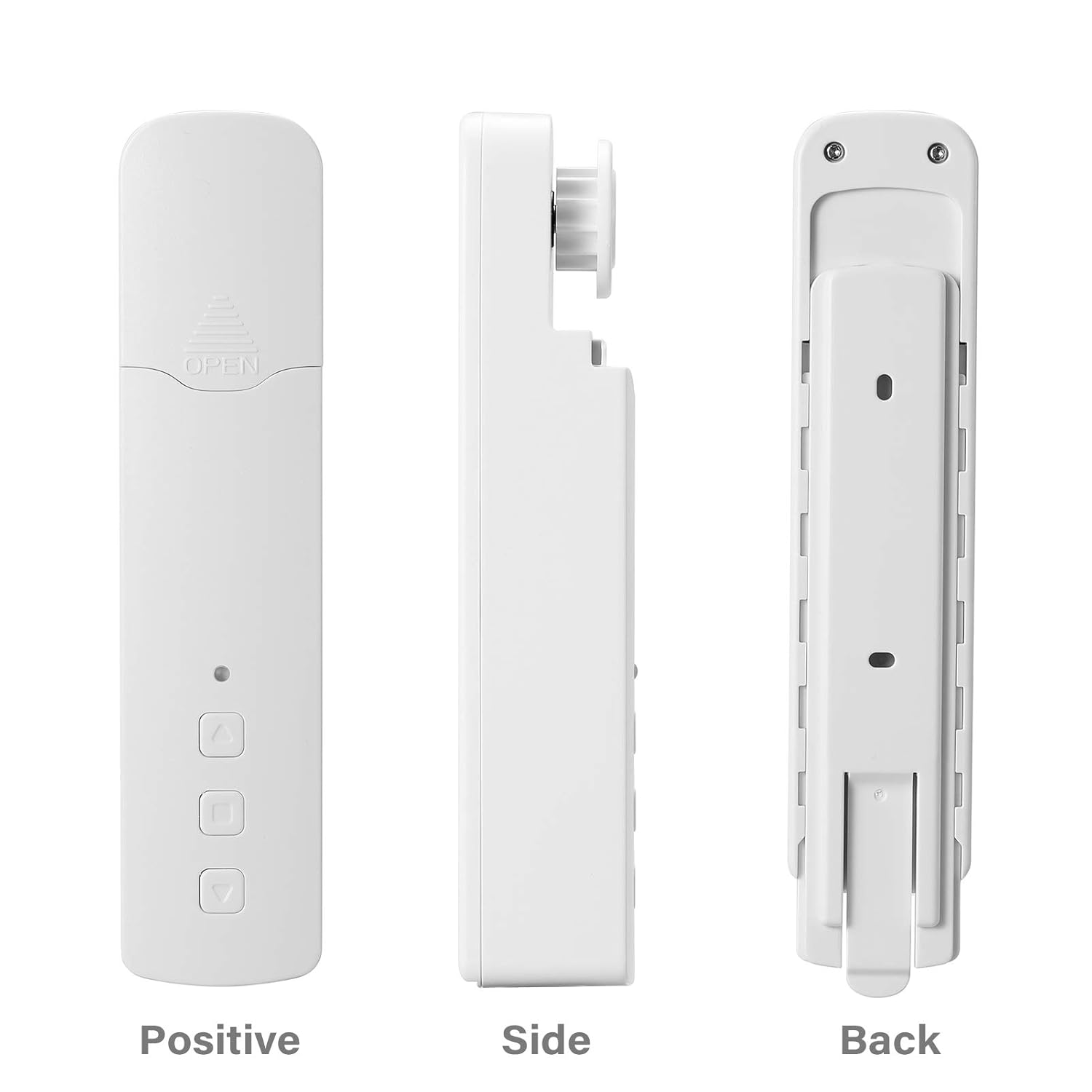
Rysunek 2.2: Różny views of the Layfuz M515EGWT motor, showing its positive (front), side, and back profiles. The front includes an indicator light and control buttons, while the back features mounting points.

Rysunek 2.3: The motor is suitable for various curtain types, including Venetian blinds, vertical blinds, honeycomb shades, triple shades, roller shades, and zebra shades, provided they use a compatible bead chain mechanism.

Rysunek 2.4: This image highlights the motor's control buttons: Up, Stop, and Down. It also shows the Set button and the charging port. Compatibility logos for Amazon Alexa, Google Home, and Tuya Smart are visible, indicating smart home integration.
3. Zawartość opakowania
Sprawdź, czy w przesyłce znajdują się wszystkie elementy:
- 1 x Curtain Motor (M515EGWT)
- 1 x Power Adapter (EU, UK, USA, or AU type, optional based on region)
- 1 x Instrukcja obsługi
4. Specyfikacje
| Funkcja | Specyfikacja |
|---|---|
| Marka | Layfuz |
| Numer modelu | M515EGWT |
| Tworzywo | ABS |
| Kolor | Biały |
| Znamionowa objętośćtage | 5V prądu stałego |
| Moc znamionowa | 6.0 W |
| Moment znamionowy | 0.45Nm |
| Prędkość obrotowa | 30 obr./min |
| Temperatura pracy | -20℃ ~ +65℃ |
| Wbudowana częstotliwość odbioru | 915 MHz, 2.4 GHz |
| Wymiary produktu | Wymiary 22 x 18.5 x 4 cm |
| Waga przedmiotu | 640 gramów |
| Kraj pochodzenia | Chiny |
5. Instalacja
Follow these steps to install the curtain motor. Refer to Figure 5.1 for visual guidance.

Rysunek 5.1: Comprehensive guide for the Layfuz M515EGWT motor, detailing its appearance, step-by-step installation, Tuya Smart App connection process, and instructions for setting and deleting travel limits.
5.1 Product Installation Steps (Refer to '2 Product install' in Figure 5.1)
- Fix the Wall Panel: Secure the mounting panel to the wall at the desired location for the motor.
- Zainstaluj silnik: Slide the motor onto the fixed wall panel until it clicks into place.
- Insert the Bead Chain: Carefully place the curtain's bead chain into the motor's drive wheel. Ensure it is seated correctly.
- Close Wheel Cover: Close the wheel cover and tighten the curtain bead chain to prevent slippage.

Rysunek 5.2: The motor features fast switching capability for different drive gears, making it applicable to multiple models of bead chains. Ensure the correct gear is installed for your curtain's bead chain type.
6. Konfiguracja
After physical installation, proceed with the smart app setup and limit settings. Refer to '3 Instructions for use' and '3.2 Limit Setting' in Figure 5.1.
6.1 Add Tuya Smart App (Refer to '3.1 Add Tuya Smart App' in Figure 5.1)
- Pobierz aplikację: Download the Tuya Smart App from your mobile phone's app store (Google Play or Apple App Store).
- Zarejestruj się/Zaloguj: Otwórz aplikację i zarejestruj nowe konto lub zaloguj się, używając istniejącego.
- Dodaj urządzenie: Click '+' or 'Add Device' in the app. The indicator light on the motor should be flashing red. If not, press and hold the 'Set' key for 3-5 seconds until it flashes rapidly.
- Wybierz typ urządzenia: Choose 'Manual Add' or 'Auto Scan'. For manual, select 'Curtain Motor'.
- Połącz się z Wi-Fi: Enter your 2.4GHz Wi-Fi network name and password. Ensure your phone is connected to the same 2.4GHz Wi-Fi network.
- Łączenie w pary: Aplikacja wyszuka urządzenie i połączy się z nim. Po nawiązaniu połączenia możesz zmienić nazwę urządzenia.
6.2 Limit Setting (Refer to '3.2 Limit Setting' in Figure 5.1)
Setting the upper and lower travel limits is crucial for proper operation. You must set these limits before setting any middle limits.
- Ustaw górny limit: Press the 'Set' key once. The indicator light will flash red. Use the 'Up' key to move the curtain to the desired upper limit. Press the 'Set' key again to confirm. The indicator light will flash red three times, indicating the upper limit is set.
- Ustaw dolną granicę: Press the 'Set' key once. The indicator light will flash red. Use the 'Down' key to move the curtain to the desired lower limit. Press the 'Set' key again to confirm. The indicator light will flash red three times, indicating the lower limit is set.
6.3 Middle Limit Setting (Refer to '3.3 Middle Limit Setting' in Figure 5.1)
You can set an intermediate stop point for your curtain.
- Initiate Middle Limit Setting: Press the 'Set' key once. The indicator light will flash red.
- Przejdź do żądanej pozycji: Use the 'Up' or 'Down' keys to move the curtain to the desired middle stop position.
- Confirm Middle Limit: Press the 'Set' key again. The indicator light will flash red three times, confirming the middle limit is set.
6.4 Delete Middle Limit (Refer to '3.4 Delete Middle Limit' in Figure 5.1)
To remove a previously set middle limit:
- Initiate Deletion: Press the 'Set' key once. The indicator light will flash red.
- Confirm Deletion: Press and hold the 'Set' key for 5 seconds. The indicator light will flash red, release, and then flash red three times, indicating the middle limit has been deleted.
7. Działanie
The Layfuz M515EGWT motor can be operated via its physical buttons, the Tuya Smart App, or voice commands.
7.1 Sterowanie ręczne (przyciski urządzenia)
- Przycisk w górę: Podnosi kurtynę do góry.
- Przycisk w dół: Opuszcza zasłonę.
- Przycisk stopu: Zatrzymuje zasłonę w jej aktualnej pozycji.
- Przycisk Ustaw: Used for pairing and setting travel limits (as described in Section 6).
7.2 Kontrola aplikacji Tuya Smart
Once the motor is successfully paired with the Tuya Smart App (Section 6.1), you can:
- Otwórz/Zamknij zasłony: Use the virtual buttons in the app to fully open or close the curtains.
- Dostosuj pozycję: Precisely control the curtain's position by sliding a bar or setting a percentage.
- Ustaw harmonogramy: Utilize the timing function to create automated schedules for opening and closing curtains at specific times.
- Zdalne sterowanie: Operate your curtains from any location with internet access.
7.3 Sterowanie głosowe
The motor is compatible with Amazon Alexa and Google Home. After linking your Tuya Smart account to your voice assistant, you can use commands such as:
- "Alexa, odsłoń zasłonę."
- „Hej Google, zasłoń zasłonę”.
- „Alexa, ustaw zasłonę na 50%.
8. Konserwacja
To ensure the longevity and optimal performance of your Layfuz M515EGWT motor, follow these maintenance guidelines:
- Czyszczenie: Wipe the motor's exterior with a soft, dry cloth. Do not use abrasive cleaners or immerse the device in water.
- Podłączenie zasilania: Ensure the power adapter and cable are securely connected and free from damage. Disconnect power before cleaning or performing any maintenance.
- Kontrola łańcucha koralikowego: Periodically check the curtain's bead chain for wear, damage, or obstructions that could hinder motor operation. Ensure the chain is properly seated in the motor's drive wheel.
- Warunki środowiskowe: Operate the motor within the specified temperature range (-20℃ to +65℃) and avoid excessive humidity.
9. Rozwiązywanie Problemów
If you encounter issues with your Layfuz M515EGWT motor, refer to the following common problems and solutions:
- Silnik nie reaguje:
- Sprawdź, czy zasilacz jest prawidłowo podłączony i czy silnik jest zasilany.
- Sprawdź, czy gniazdko elektryczne jest sprawne.
- Verify that the bead chain is correctly installed and not jammed.
- Difficulty Connecting to Tuya App:
- Ensure your mobile phone is connected to a 2.4GHz Wi-Fi network. The motor does not support 5GHz Wi-Fi.
- Confirm that the motor's indicator light is flashing rapidly during pairing mode. If not, press and hold the 'Set' button for 3-5 seconds.
- Sprawdź poprawność swojego hasła Wi-Fi.
- Move the motor closer to your Wi-Fi router to improve signal strength.
- Uruchom ponownie router Wi-Fi i spróbuj ponownie przeprowadzić proces parowania.
- Curtain Not Moving to Correct Limits:
- Re-calibrate the upper and lower travel limits as described in Section 6.2.
- Ensure the bead chain is not slipping or obstructed.
- Sterowanie głosowe nie działa:
- Verify that your Tuya Smart account is correctly linked to your Amazon Alexa or Google Home app.
- Sprawdź swoje połączenie internetowe.
- Ensure the device name in the Tuya app is recognized by your voice assistant.
10. Informacje dotyczące bezpieczeństwa
Prosimy o zapoznanie się z poniższymi środkami ostrożności i ich przestrzeganie:
- Urządzenie jest przeznaczone wyłącznie do użytku wewnątrz pomieszczeń.
- Do not expose the motor to water, moisture, or extreme temperatures.
- Ensure the power adapter and cable are not damaged. Do not use if damaged.
- Przechowywać urządzenie w miejscu niedostępnym dla dzieci i zwierząt domowych.
- Do not attempt to disassemble or repair the motor yourself. Contact qualified personnel for service.
- Ensure the curtain's bead chain is installed correctly and securely to prevent accidents.
11. Gwarancja i wsparcie
Aby uzyskać informacje o gwarancji i pomocy technicznej, zapoznaj się z dokumentacją dołączoną do produktu lub skontaktuj się ze sprzedawcą. Zachowaj paragon jako dowód zakupu.