
1. Wprowadzenie
The JHS Pedals 3 Series Chorus is a versatile guitar effect pedal designed to deliver classic chorus and vibrato modulation sounds. Its straightforward controls allow for a wide range of tonal possibilities, suitable for various musical styles. This manual provides essential information for setting up, operating, maintaining, and troubleshooting your 3 Series Chorus pedal.
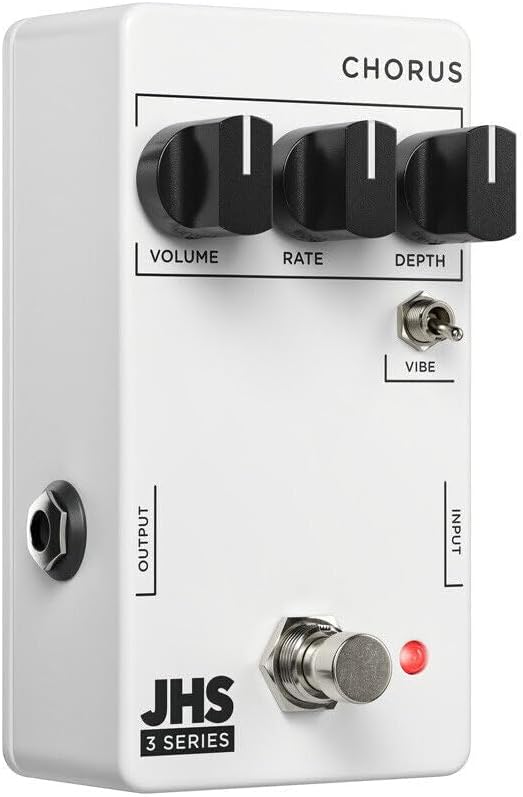
Obraz 1: Przód view of the JHS 3 Series Chorus pedal.
2. Konfiguracja
Follow these steps to properly set up your JHS 3 Series Chorus pedal:
- Podłączenie zasilania: Connect a standard 9V DC negative center power supply to the power input jack. The pedal requires 70mA of current. Ensure your power supply meets these specifications to prevent damage.
- Połączenie wejściowe: Connect your guitar or other instrument to the INPUT jack on the right side of the pedal using a standard 1/4-inch instrument cable.
- Połączenie wyjściowe: Podłącz gniazdo OUTPUT znajdujące się po lewej stronie pedału do swojego amplifier lub kolejny pedał w torze sygnałowym przy użyciu standardowego kabla instrumentalnego 1/4-calowego.
- Aktywacja: Press the footswitch to engage or bypass the effect. The red LED indicator will illuminate when the effect is active.

Obraz 2: Góra view of the JHS 3 Series Chorus pedal, showing input and output jacks.
Konfiguracja ponadview Wideo
Wideo 1: Overview of the JHS 3 Series Pedals, including setup and general features. This video provides a visual guide to connecting and understanding the basic operation of the 3 Series line.
3. Sterowanie operacyjne
The JHS 3 Series Chorus features three primary knobs and one toggle switch for shaping your sound:
- Tom: This knob controls the overall output level of the pedal. Adjust it to match the volume of your bypassed signal or to boost your sound when the effect is engaged.

Image 3: Detail of the Volume control knob.
- Wskaźnik: The Rate knob adjusts the speed of the chorus or vibrato modulation. Turning it clockwise increases the speed, creating faster, more intense wobbles. Counter-clockwise movement slows the modulation for a more subtle, swirling effect.

Image 4: Detail of the Rate control knob.
- Głębokość: This knob controls the intensity or depth of the modulation. A lower setting (counter-clockwise) provides a gentle, less pronounced chorus. Increasing the depth (clockwise) results in a more pronounced, seasick-like modulation.

Image 5: Detail of the Depth control knob.
- Vibe Toggle: This two-position toggle switch alters the character of the effect. When engaged (up position), the Vibe toggle removes the dry signal, transforming the chorus into a true pitch vibrato sound. In the down position, the pedal operates as a standard chorus effect, blending the modulated signal with your dry signal.

Image 6: Detail of the Vibe toggle switch.
4. Specyfikacje
| Marka | Pedały JHS |
| Nazwa modelu | 3 Series Chorus |
| Numer modelu | 3SCHORUS |
| Styl | Chór |
| Kolor | Biały |
| Waga przedmiotu | 0.3 kilograma |
| Tomtage | 9 woltów prądu stałego |
| Ampwymazać | 70 mlnamps |
| Źródło zasilania | Corded Electric (9V DC Negative Center) |
| Efekty wyjścia audio | Chorus, Vibrato |
| Typ formantów | Knob (Volume, Rate, Depth), Toggle (Vibe) |
| Format sygnału | Analog |
| Dźwięk Profile | Warm, Musical, Chorus/Vibrato |
| Wymiary przedmiotu | 4 x 3 x 2 cala |
| UPC | 650415212354 |
5. Konserwacja
To ensure the longevity and optimal performance of your JHS 3 Series Chorus pedal, follow these maintenance guidelines:
- Czyszczenie: Do czyszczenia zewnętrznej części pedału używaj miękkiej, suchej ściereczki. Unikaj stosowania środków czyszczących o właściwościach ściernych i rozpuszczalników, ponieważ mogą one uszkodzić powłokę i elementy wewnętrzne.
- Składowanie: Przechowuj pedał w chłodnym, suchym miejscu, z dala od bezpośredniego światła słonecznego i ekstremalnych temperatur. Jeśli pedał nie jest używany przez dłuższy czas, odłącz go od zasilania.
- Znajomości: Okresowo sprawdzaj wszystkie połączenia kablowe pod kątem zużycia i uszkodzeń. Upewnij się, że gniazda są wolne od kurzu i zanieczyszczeń.
- Zasilanie: Always use a regulated 9V DC negative center power supply that meets the 70mA current requirement. Incorrect power can damage the pedal and void the warranty.
6. Rozwiązywanie Problemów
If you encounter issues with your JHS 3 Series Chorus pedal, refer to the following troubleshooting tips:
- Brak dźwięku:
- Sprawdź wszystkie połączenia kablowe (gitara do wejścia, wyjście do amp).
- Ensure the power supply is correctly connected and providing the specified 9V DC negative center power.
- Sprawdź, czy Twój instrument i amplifier działają prawidłowo poprzez ominięcie pedału.
- Confirm the pedal is engaged (red LED illuminated).
- Słaby lub zniekształcony dźwięk:
- Check the Volume knob setting on the pedal.
- Ensure your power supply is providing stable power. Low battery or an inadequate power supply can cause performance issues.
- Przetestuj różne kable, aby wykluczyć wadliwe połączenia.
- Efekt nie działa zgodnie z oczekiwaniami:
- Adjust the Rate and Depth knobs to explore the full range of the effect.
- Experiment with the Vibe toggle switch to understand its impact on the sound (chorus vs. vibrato).
- If the sound is too subtle, increase the Depth. If it's too fast or slow, adjust the Rate.
7. Gwarancja i wsparcie
The JHS Pedals 3 Series Chorus comes with a 4-year non-transferable warranty within the USA. Product registration is required to activate the warranty.
For warranty claims, technical support, or further assistance, please visit the official JHS Pedals website or contact their customer service department. Always refer to the official JHS Pedals resources for the most accurate and up-to-date support information.
Urzędnik Webstrona: www.jhspedals.com