
Wstęp
This manual provides essential information for setting up, operating, maintaining, and troubleshooting your Lenovo ThinkPad T470 laptop. Please read this guide thoroughly to ensure proper use and longevity of your device.
The Lenovo ThinkPad T470 is a 14-inch business laptop featuring an Intel Core i7-7600U processor, 8 GB RAM, and a 256 GB SSD, running Windows 10 Pro. This particular unit is a renewed product, professionally inspected and tested to function like new.
1. Konfiguracja
1.1 Rozpakowanie i wstępna inspekcja
Carefully remove all components from the packaging. The box should contain the Lenovo ThinkPad T470 laptop and an AC adapter.

Image: Lenovo ThinkPad T470 laptop, open and viewed from an angle, displaying a desktop screen.
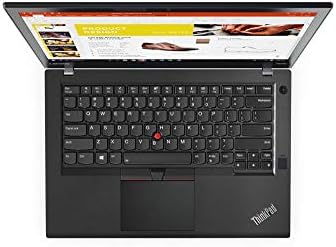
Image: AC power adapter for the Lenovo ThinkPad T470 laptop.
1.2 Podłączanie zasilacza
- Connect the AC adapter cable to the power port on your laptop.
- Plug the AC adapter into a functional electrical outlet.
- Allow the battery to charge for at least 30 minutes before initial use, or until the battery indicator shows sufficient charge.
1.3 Pierwsze włączenie zasilania
- Otwórz pokrywę laptopa.
- Naciśnij przycisk zasilania, który zazwyczaj znajduje się nad klawiaturą lub z boku urządzenia.
- Follow the on-screen instructions to complete the Windows 10 Pro setup process. This may include setting up user accounts, network connections, and basic preferences.

Image: Lenovo ThinkPad T470 laptop displaying the Windows 10 desktop.
1.4 Podłączanie urządzeń peryferyjnych
Your ThinkPad T470 supports various external devices:
- Urządzenia USB: Connect USB devices such as external drives, mice, or keyboards to the available USB ports.
- Ethernet: For a wired network connection, plug an Ethernet cable into the LAN port.
- Bluetooth: Enable Bluetooth in Windows settings to pair with Bluetooth-enabled devices like headphones or speakers.
- Wyświetlacz zewnętrzny: Use the HDMI or DisplayPort outputs to connect to an external monitor.

Obraz: Bok view of the Lenovo ThinkPad T470 laptop showing various ports.
2. Instrukcja obsługi
2.1 Włączanie i wyłączanie zasilania
- Włączanie: Naciśnij przycisk zasilania.
- Zamknięcie: Kliknij przycisk Start systemu Windows, a następnie wybierz Zasilanie > Wyłącz.
- Uruchom ponownie: Kliknij przycisk Start systemu Windows, a następnie wybierz Zasilanie > Uruchom ponownie.
- Spać: Close the laptop lid or click the Windows Start button, then select Power > Sleep.
2.2 Klawiatura i touchpad
The ThinkPad T470 features a Chiclet-style keyboard and a touchpad for navigation.

Obraz: widok z góry view of the Lenovo ThinkPad T470 laptop keyboard and touchpad.
- Klawiatura: Standard QWERTY layout. Use function keys (Fn) in combination with F1-F12 for special features like volume control, brightness adjustment, and wireless toggling.
- Panel dotykowy: Supports multi-touch gestures. Use it to move the cursor, click, scroll, and zoom. The TrackPoint (red dot in the center of the keyboard) can also be used for precise cursor control with its dedicated buttons below the spacebar.
2.3 Ustawienia wyświetlania
- Jasność: Adjust screen brightness using the dedicated function keys (usually F5 and F6) or through Windows Display settings.
- Rezolucja: The native resolution is 1366 x 768 pixels, with a maximum display resolution of 1920x1080. You can change the display resolution in Windows Display settings.
2.4 Łączność
- Wi-Fi: Połącz się z sieciami bezprzewodowymi za pomocą ustawień Wi-Fi w systemie Windows.
- Bluetooth: Pair Bluetooth devices through the Bluetooth & other devices settings.
- Ethernet: Zapewnia stabilne przewodowe połączenie sieciowe o przepustowości do 1000 Mb/s.
3. Konserwacja
3.1 Czyszczenie laptopa
- Ekran: Użyj miękkiej, niestrzępiącej się ściereczki, lekko wyczyśćampPrzemyj wodą lub płynem do czyszczenia ekranów. Unikaj silnych środków chemicznych.
- Klawiatura i obudowa: Use a soft cloth to wipe surfaces. A can of compressed air can remove dust from between keys.
- Zawsze wyłączaj laptopa i odłączaj go od zasilania przed czyszczeniem.
3.2 Pielęgnacja baterii
- Aby przedłużyć żywotność baterii, należy unikać częstego całkowitego rozładowywania baterii.
- Jeśli laptop nie będzie używany przez dłuższy czas, należy go przechowywać w chłodnym i suchym miejscu.
- The laptop has a Lithium-Battery Energy Content of 45 Watt Hours.
3.3 Aktualizacje oprogramowania
Regularly update your Windows operating system and drivers to ensure optimal performance and security. You can check for updates via Windows Update in the Settings menu.
4. Rozwiązywanie Problemów
W tej sekcji omówiono typowe problemy, na które możesz natrafić.
4.1 Problemy z zasilaniem
- Laptop się nie włącza: Upewnij się, że zasilacz sieciowy jest prawidłowo podłączony, a gniazdko elektryczne działa. Sprawdź, czy akumulator jest wystarczająco naładowany.
- Bateria nie ładuje się: Verify the AC adapter and cable are not damaged. Try a different power outlet.
4.2 Problemy z wyświetlaniem
- Brak wyświetlacza: Connect an external monitor to check if the issue is with the laptop's internal screen. Restart the laptop.
- Przyciemnij ekran: Adjust brightness using function keys or Windows settings.
4.3 Problemy z łącznością
- Brak połączenia Wi-Fi: Upewnij się, że Wi-Fi jest włączone w ustawieniach systemu Windows. Uruchom ponownie router i laptopa.
- Urządzenie Bluetooth nie łączy się: Upewnij się, że urządzenie jest w trybie parowania i znajduje się w zasięgu. Sprawdź ustawienia Bluetooth na laptopie.
4.4 Ogólne wykonanie
- Niska wydajność: Close unnecessary applications. Check for malware. Ensure sufficient free disk space.
- System zawiesza się: Perform a hard shutdown by holding the power button for several seconds. Restart the laptop.
5. Specyfikacje
Below are the key technical specifications for the Lenovo ThinkPad T470 laptop:
| Funkcja | Szczegół |
|---|---|
| Marka | Lenovo |
| Nazwa modelu | 20HD0057US |
| Rozmiar ekranu | 14 cali |
| Model procesora | Core i7-7600U (7th Gen) |
| Prędkość procesora | 2.8 GHz |
| Rozmiar zainstalowanej pamięci RAM | 8 GB |
| Maksymalny rozmiar pamięci RAM | 32 GB |
| Rozmiar dysku twardego | Dysk SSD 256 GB |
| System operacyjny | Windows 10 Pro |
| Opis karty graficznej | Zintegrowany |
| Rozdzielczość natywna | 1366 x 768 pikseli |
| Maksymalna rozdzielczość wyświetlacza | 1920x1080 |
| Technologia łączności | Ethernet, USB, Wireless, Bluetooth |
| Łączna liczba portów USB | 2 |
| Porty Ethernet | 1 (1000 Mb/s) |
| Wyjście wideo | HDMI, DisplayPort |
| Waga przedmiotu | 5 funtów |
| Lithium-Battery Energy Content | 45 watogodzin |
| UPC | 786513207630 |
6. Gwarancja i wsparcie
6.1 Informacje o gwarancji
This renewed Lenovo ThinkPad T470 laptop comes with a 90-dniowa ograniczona gwarancja. Please refer to your purchase documentation for specific terms and conditions regarding returns, replacements, or refunds under the Amazon Renewed Guarantee.
6.2 Obsługa klienta
For further assistance, technical support, or warranty claims, please contact the seller or refer to the official Lenovo support webwitryna zawierająca ogólne informacje o produktach i sterownikach.