
1. Wprowadzenie
This manual provides detailed instructions for the safe and effective use of the Walfront PM6508 Digital Temperature Humidity Meter. This device is designed for high-precision measurement of ambient temperature and relative humidity, offering features such as data hold, backlight display, and wet bulb/dew point temperature calculations. It is suitable for various applications including home, office, industrial settings, and environmental monitoring.
2. Informacje dotyczące bezpieczeństwa
Please read and understand all safety warnings and operating instructions before using this instrument. Failure to follow these instructions may result in electric shock, fire, or injury.
- Nie należy używać miernika, jeśli wydaje się uszkodzony lub jeśli pokrywa baterii nie jest prawidłowo zamknięta.
- Avoid exposing the meter to extreme temperatures, direct sunlight, or high humidity for prolonged periods.
- Nie podejmuj prób naprawy ani modyfikacji licznika. Wszelkie prace serwisowe zlecaj wykwalifikowanemu personelowi.
- Aby zapobiec wyciekowi elektrolitu, wyjmij baterie, jeśli miernik nie będzie używany przez dłuższy czas.
- Keep the sensor area clean and free from obstructions to ensure accurate readings.
3. Koniec produktuview
The Walfront PM6508 is a compact and portable digital meter designed for accurate environmental measurements. It features an easy-to-read LCD display with backlight and intuitive button controls.

Rysunek 3.1: Przód view of the Walfront PM6508 meter with key components labeled. This includes the temperature and humidity sensor at the top, the HD display, various control buttons (Power, Max/Min, Data Hold, Data Storage, Unit Switch, Backlight), and an anti-fall protective sleeve.
3.1 Główne cechy
- Czujnik o wysokiej precyzji: Zapewnia dokładne odczyty temperatury i wilgotności.
- Wyświetlacz LCD z podświetleniem: Zapewnia wyraźną czytelność w różnych warunkach oświetleniowych.
- Funkcja zatrzymania danych: Zamraża aktualny odczyt na wyświetlaczu.
- Przechowywanie danych: Przechowuje do 100 grup danych pomiarowych.
- Wet Bulb & Dew Point Temperature: Calculates and displays these critical environmental parameters.
- Przełączanie jednostek: Łatwe przełączanie między stopniami Celsjusza (°C) i Fahrenheita (°F).
- Automatyczne wyłączanie: Oszczędza baterię.
- Wskaźnik niskiego poboru mocy: Ostrzega, gdy baterie wymagają wymiany.
3.2 Zawartość opakowania

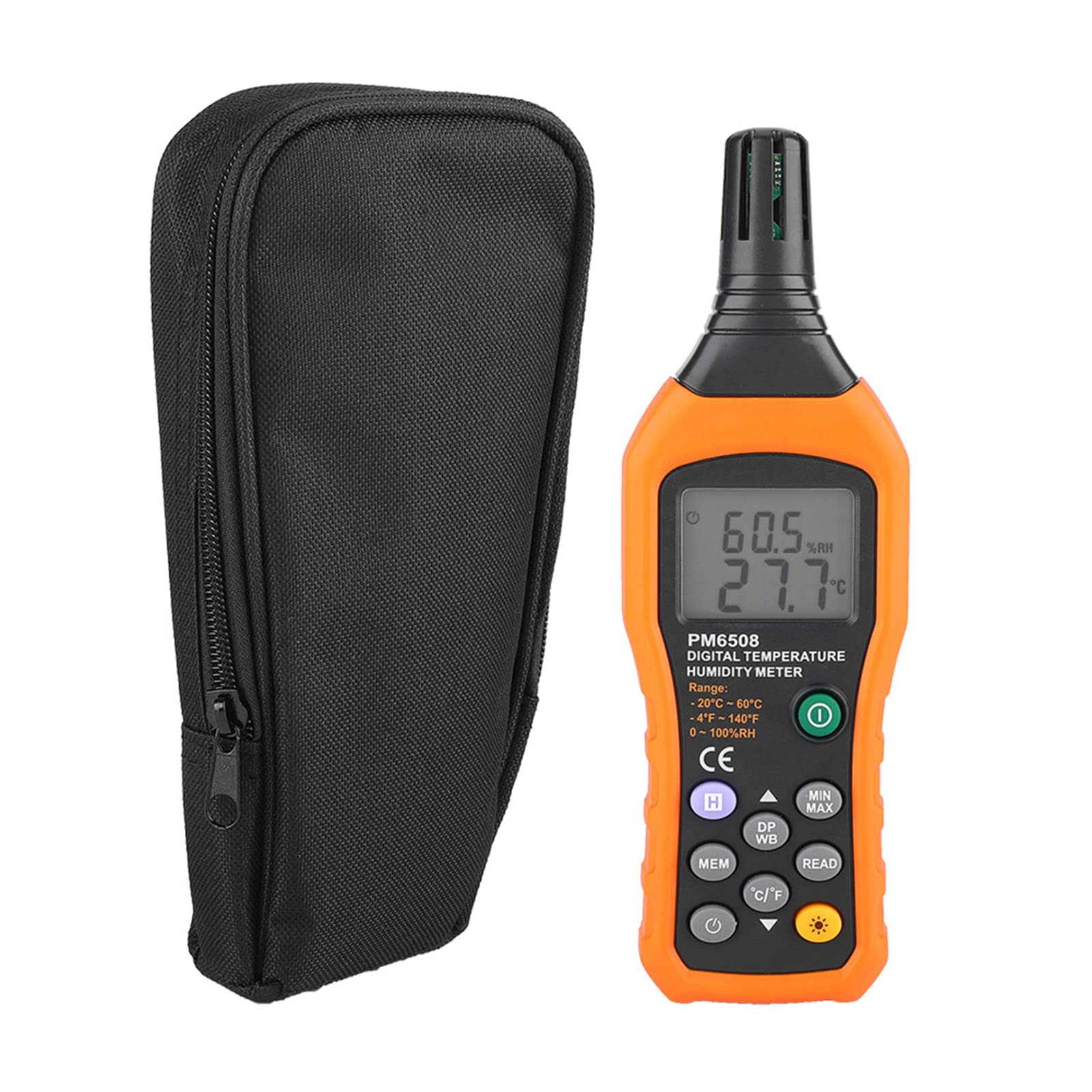
Rysunek 3.2: The Walfront PM6508 meter shown alongside its portable storage bag, indicating typical package contents.
- Walfront PM6508 Digital Temperature Humidity Meter
- Przenośna torba do przechowywania
- Instrukcja obsługi
4. Konfiguracja
4.1 Instalacja baterii
The PM6508 meter requires 4 x 1.5V AAA batteries (not included) for operation.
- Znajdź pokrywę komory baterii znajdującą się z tyłu miernika.
- Przesuń pokrywę baterii w dół, aby ją otworzyć.
- Insert four AAA batteries, ensuring correct polarity (+ and -) as indicated inside the compartment.
- Załóż pokrywę baterii, wsuwając ją z powrotem na miejsce, aż do zatrzaśnięcia.
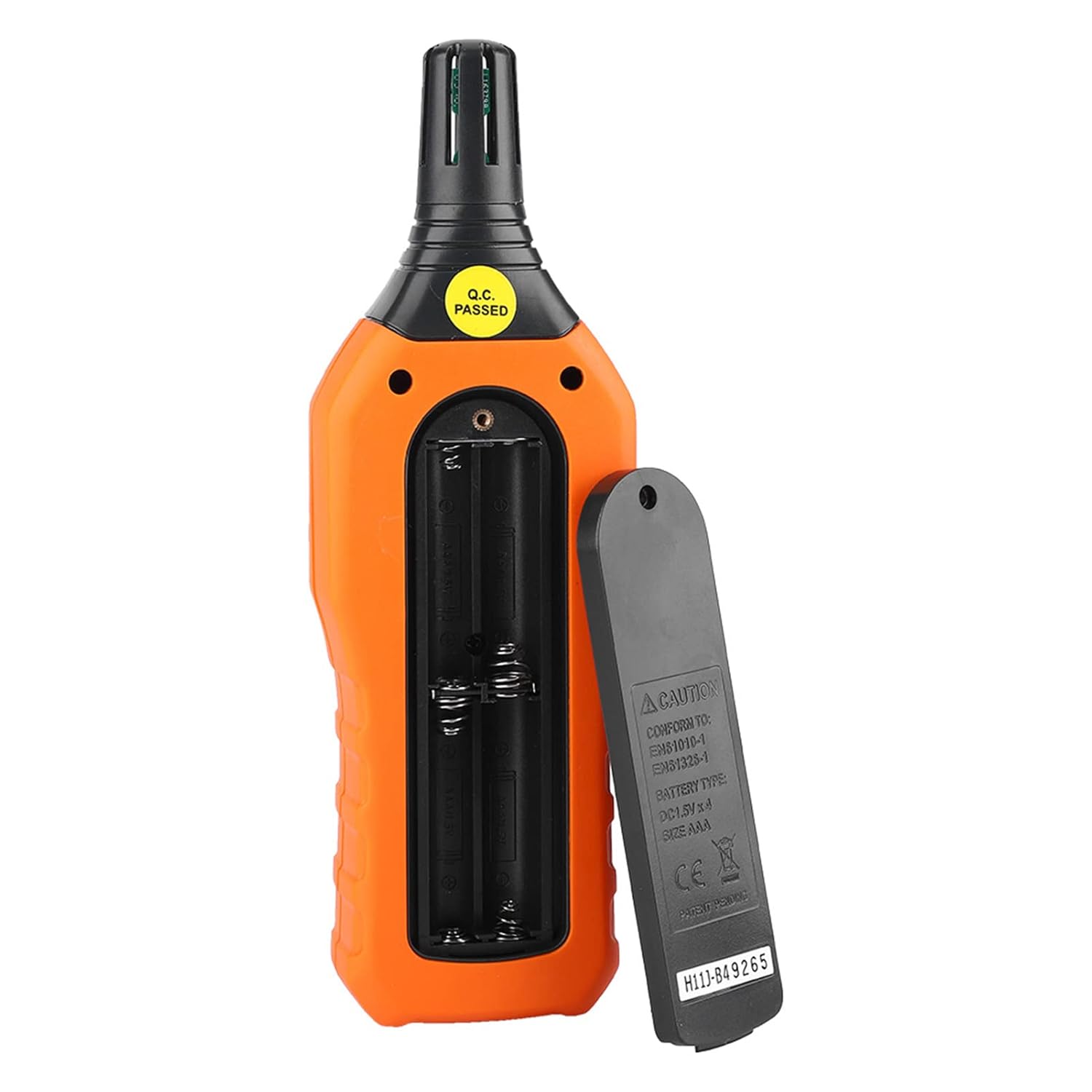
Rysunek 4.1: Tył view of the meter showing the open battery compartment for AAA battery installation.
5. Instrukcja obsługi
5.1 Włączanie/wyłączanie zasilania
- Naciśnij green power button (
 ) aby włączyć miernik.
 - Naciśnij i przytrzymaj gray power button () for approximately 2 seconds to turn the meter off. The meter also features an automatic shut-down function to conserve battery life.
5.2 Wykonywanie pomiarów
Once powered on, the meter will immediately begin displaying real-time temperature and humidity readings on the LCD screen. Ensure the sensor at the top of the device is exposed to the environment you wish to measure.

Rysunek 5.1: The meter in use, displaying temperature and humidity readings on its LCD screen.
5.3 Przełączanie jednostek (°C/°F)
Aby przełączać się między jednostkami temperatury Celsjusza (°C) i Fahrenheita (°F):
- Naciśnij Przycisk °C/°F () located on the keypad. The display will update to show readings in the selected unit.
5.4 Funkcja podświetlenia
Aby włączyć lub wyłączyć podświetlenie wyświetlacza:
- Naciśnij przycisk podświetlenia () to toggle the backlight on or off. This is useful for reading in low-light conditions.
5.5 Przytrzymanie danych (H)
Aby zamrozić bieżące odczyty na wyświetlaczu:
- Naciśnij Przycisk H (). The "H" icon will appear on the display, indicating that the data is held.
- Naciśnij Przycisk H again to release the data hold and resume real-time measurements.
5.6 Maximum/Minimum (MIN/MAX) Measurement
Do view the maximum or minimum recorded values:
- Naciśnij Przycisk MIN/MAX () once to display the maximum temperature and humidity recorded since the meter was powered on or the function was reset.
- Naciśnij Przycisk MIN/MAX again to display the minimum temperature and humidity.
- Naciśnij Przycisk MIN/MAX a third time to exit the MIN/MAX mode and return to real-time readings.
5.7 Data Storage (MEM) and Retrieval (READ)
The meter can store up to 100 groups of measurement data.
- To Store Data: Naciśnij Przycisk MEM () to save the current temperature and humidity readings. The display will briefly show a memory location number.
- To Retrieve Data: Naciśnij przycisk CZYTAJ () to enter data retrieval mode. Use the Przycisk MEM to scroll through stored data records.
- To Exit Retrieval: Naciśnij przycisk CZYTAJ again to exit data retrieval mode.
5.8 Wet Bulb (WB) and Dew Point (DP) Temperature
To display Wet Bulb or Dew Point temperatures:
- Naciśnij Przycisk DP/WB () once to display the Dew Point temperature.
- Naciśnij Przycisk DP/WB again to display the Wet Bulb temperature.
- Naciśnij Przycisk DP/WB a third time to return to standard temperature and humidity display.
6. Konserwacja
6.1 Czyszczenie
- Wytrzyj licznikasing z miękkim, damp ściereczka. Nie należy używać środków czyszczących o właściwościach ściernych ani rozpuszczalników.
- Keep the sensor area clean and free from dust or debris to ensure accurate readings. Do not insert any objects into the sensor opening.
6.2 Przechowywanie
- Jeśli urządzenie nie będzie używane przez dłuższy czas, należy wyjąć baterie, aby zapobiec wyciekowi elektrolitu i uszkodzeniu urządzenia.
- Przechowuj miernik w chłodnym i suchym miejscu, z dala od bezpośredniego światła słonecznego i ekstremalnych temperatur.
- Utilize the provided portable storage bag for protection during storage and transport.
7. Rozwiązywanie Problemów
| Problem | Możliwa przyczyna | Rozwiązanie |
|---|---|---|
| Miernik się nie włącza. |
|
|
| Niedokładne odczyty. |
|
|
| Wyświetlacz jest przyciemniony lub migocze. |
|
|
| Cannot store or retrieve data. |
|
|
8. Specyfikacje
The following table outlines the technical specifications for the Walfront PM6508 Digital Temperature Humidity Meter.


Rysunek 8.1: Detailed technical specifications including ranges, resolution, and precision for temperature, humidity, wet bulb, and dew point measurements, along with general parameters.
| Parametr | Wartość |
|---|---|
| Model | PM6508 |
| Zakres temperatur otoczenia | -20 do 60 °C (-4 do 140 °F) |
| Ambient Temperature Precision | ±1.5 °C (-20 to 0 °C, 45 to 60 °C), ±0.5 °C (0 to 45 °C) |
| Zakres wilgotności względnej | 0% - 100% wilgotności względnej |
| Relative Humidity Precision | ±4.0% (0-20%, 80-100%), ±3.0% (20-80%) |
| Zakres temperatur mokrego termometru | -20 do 60 °C (4 do 140 °F) |
| Wet Bulb Temperature Precision | ±1.5 °C (-20 to 0 °C, 45 to 60 °C), ±0.5 °C (0 to 45 °C) |
| Zakres temperatury punktu rosy | -50 do 60 °C (-58 do 140 °F) |
| Dew Point Temperature Precision | ±1.5 °C (-50 to 0 °C, 45 to 60 °C), ±0.5 °C (0 to 45 °C) |
| Rezolucja | 0.1 °C / °F / %RH |
| Przechowywanie danych | 100 grup |
| Zasilacz | 4 baterie 1.5 V AAA (brak w zestawie) |
| Wymiary (dł. x szer. x wys.) | 180 x 60 x 29 mm (7.1 x 2.4 x 1.1 cala) |
| Waga | 254 g (9 uncji) |
| Wilgotność robocza | 0% - 100% (bez kondensacji) |
9. Aplikacje
The Walfront PM6508 is suitable for a wide range of applications requiring accurate temperature and humidity monitoring.

Rysunek 9.1: Examples of environments where the PM6508 meter can be effectively used for temperature and humidity monitoring.
- Residential and Office Environments: Monitoring indoor climate for comfort and health.
- Industrial Production: Ensuring optimal conditions for manufacturing processes.
- Warehousing and Storage: Protecting goods sensitive to temperature and humidity, such as in wine cellars or general storage.
- Rolnictwo: Monitoring conditions in planting sheds, greenhouses, and aquaculture.
- Research and Development Laboratories: Maintaining precise environmental controls for experiments.
- Systemy HVAC: Assisting in the evaluation and maintenance of heating, ventilation, and air conditioning systems.
10. Gwarancja i wsparcie
Walfront products are designed for reliability and performance. For warranty information, technical support, or service inquiries, please refer to the contact information provided with your purchase or visit the official Walfront webStrona. Zachowaj dowód zakupu na wypadek roszczeń gwarancyjnych.