
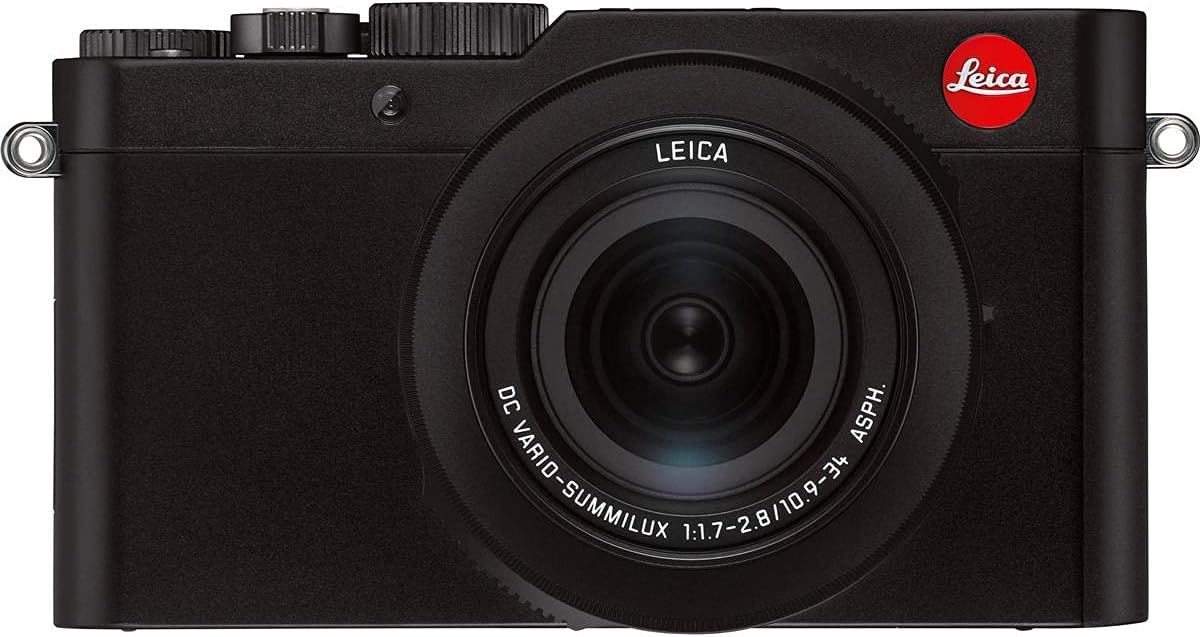
Aparat Leica D-Lux 7
Instrukcja obsługi aparatu kompaktowego Leica D-Lux 7
Model: D-Lux 7
Wstęp
This manual provides comprehensive instructions for the safe and effective operation of your Leica D-Lux 7 Compact Camera. Please read this manual thoroughly before using the camera to ensure proper handling and to maximize its capabilities. Keep this manual for future reference.
Produkt ponadview
The Leica D-Lux 7 is a high-performance compact camera designed for both enthusiasts and professionals. It features a 1-inch BSI CMOS sensor, a fast zoom lens, and advanced connectivity options, delivering exceptional image quality in a portable form factor.


Organizować coś
1. Rozpakowanie i wstępna inspekcja
Ostrożnie wyjmij wszystkie elementy z opakowania. Upewnij się, że znajdują się w nim następujące elementy:
- Korpus aparatu Leica D-Lux 7
- Osłona obiektywu
- Kabel USB
- Bateria
- Pasek na ramię
- Ładowarka baterii
Sprawdź aparat i akcesoria pod kątem ewentualnych uszkodzeń. Jeśli brakuje któregokolwiek elementu lub jest on uszkodzony, skontaktuj się ze sprzedawcą.
2. Ładowanie akumulatora
- Insert the provided battery into the battery charger.
- Connect the battery charger to a power outlet using the appropriate power cable.
- The charging indicator light on the charger will illuminate. It will change or turn off once charging is complete.
- Alternatively, the camera supports USB charging. Connect the camera to a USB power source using the supplied USB cable.
A fully charged battery is essential for optimal camera performance.
3. Wkładanie baterii i karty pamięci
- Otwórz pokrywę komory baterii/karty pamięci znajdującą się na spodzie aparatu.
- Insert the charged battery into the battery slot, ensuring the correct orientation as indicated inside the compartment. Push until it clicks into place.
- Insert a compatible SD/SDHC/SDXC memory card (Class 10 (U1) or higher recommended for 4K video) into the memory card slot with the label facing the correct direction. Push until it clicks.
- Zamknij dokładnie pokrywę komory.
4. Mocowanie paska na ramię
Thread the shoulder strap through the strap lugs on both sides of the camera body. Ensure it is securely fastened to prevent accidental drops.
5. Pierwsze włączenie i ustawienia podstawowe
Press the power button to turn on the camera. Follow the on-screen prompts to set the date, time, and language. These settings are crucial for proper file management and geotagging if connected to a smartphone.
Obsługa aparatu
1. Podstawowe elementy sterujące i pokrętła
Zapoznaj się z głównymi elementami sterowania:
- Spust migawki: Located on the top, press halfway to focus, fully to take a picture.
- Pokrętło trybu: On the top, select shooting modes (Program, Aperture Priority, Shutter Priority, Manual, etc.).
- Pokrętło kompensacji ekspozycji: Dostosowuje kompensację ekspozycji.
- Pierścień przysłony: Located on the lens, controls the lens aperture.
- Pierścień kontrolny: On the lens, can be customized for various functions like zoom or focus.
- Rear Dial/Buttons: Navigate menus, adjust ISO, white balance, and other settings.
- Ekran dotykowy LCD: Use for touch focus, menu navigation, and image review.
- Elektroniczny Viewszukacz (EVF): Provides an alternative for composing shots, especially in bright conditions.
2. Tryby fotografowania
The D-Lux 7 offers various shooting modes to suit different photographic needs:
- Program AE (P): Camera sets aperture and shutter speed automatically.
- Priorytet przysłony AE (A): Ty ustawiasz przysłonę, a aparat czas otwarcia migawki. Idealne do kontrolowania głębi ostrości.
- Priorytet migawki AE (S): Ustawiasz czas otwarcia migawki, a aparat ustawia przysłonę. Idealne do kontrolowania rozmycia w ruchu.
- Ekspozycja ręczna (M): Możesz ustawić zarówno przysłonę, jak i czas otwarcia migawki.
- Inteligentna automatyka (iA): Aparat automatycznie wykrywa scenę i stosuje optymalne ustawienia.
- Tryby scen: Wstępnie ustawione tryby dla określonych sytuacji (np. portret, krajobraz, sport).
3. Skupienie
The camera features Contrast Detection Autofocus. You can select different focus modes:
- AF-S (pojedynczy AF): Focuses once when the shutter button is pressed halfway.
- AF-C (ciągły AF): Continuously focuses on a moving subject.
- MF (ręczne ustawianie ostrości): Allows precise manual focusing using the lens control ring.
Use the AF/MF switch on the side of the lens barrel to quickly switch between autofocus and manual focus.
4. Przechwytywanie obrazu i wideo
The D-Lux 7 supports both still image and video recording.
- Zdjęcia: Capture high-resolution JPEG and RAW files. Adjust aspect ratio (16:9, 1:1, 3:2, 4:3) as needed.
- Nagrywanie wideo: Record stunning 4K video at 24, 25, or 30 frames per second. The camera also supports 4K photo modes for extracting still frames from video.
5. Connectivity (Wi-Fi, Bluetooth, USB)
The camera offers versatile connectivity options:
- Wi-Fi: Connect to the Leica FOTOS app on your smartphone or tablet for remote control, image transfer, and geotagposzedł.
- Bluetooth: Maintain a low-power connection with your smart device for quick pairing and background data transfer.
- USB: Use the USB cable to connect the camera to a computer for file transfer or for in-camera battery charging.
- Micro-HDMI: Connect to an external display for reviewprzeglądanie zdjęć i filmów.
Konserwacja i pielęgnacja
- Czyszczenie obiektywu: Użyj miękkiej, niepozostawiającej włókien ściereczki lub szczoteczki do soczewek, aby delikatnie usunąć kurz. W przypadku smug użyj specjalnego środka do czyszczenia soczewek nałożonego na ściereczkę, a nie bezpośrednio na soczewkę.
- Czyszczenie korpusu aparatu: Przetrzyj korpus aparatu miękką, suchą ściereczką. Unikaj stosowania silnych środków chemicznych i rozpuszczalników.
- Składowanie: When not in use, store the camera in a dry, cool place, away from direct sunlight and extreme temperatures. Use a desiccant packet if storing in humid environments.
- Pielęgnacja baterii: Do not expose batteries to extreme heat or cold. Store them in a cool, dry place. If not using the camera for an extended period, remove the battery.
- Aktualizacje oprogramowania układowego: Periodically check the Leica webwitryna z aktualizacjami oprogramowania sprzętowego zapewniająca optymalną wydajność i dostęp do nowych funkcji.
Rozwiązywanie problemów
| Problem | Możliwa przyczyna | Rozwiązanie |
|---|---|---|
| Kamera się nie włącza. | Bateria jest rozładowana lub nieprawidłowo włożona. | Naładuj akumulator do pełna i upewnij się, że jest włożony prawidłowo. |
| Nie można robić zdjęć. | Karta pamięci jest pełna, zablokowana lub nie została włożona. | Insert a memory card, unlock it, or delete unnecessary files. |
| Obrazy są niewyraźne. | Nieprawidłowa ostrość, drżenie aparatu lub brudny obiektyw. | Ensure proper focus, use a faster shutter speed or image stabilization, clean the lens. |
| Wi-Fi/Bluetooth connection fails. | Incorrect settings, interference, or app issues. | Check camera and device settings, restart both, ensure app is updated. |
| Nagrywanie wideo zostaje nieoczekiwanie przerwane. | Memory card speed is too slow or recording limit reached. | Use a faster memory card (Class 10/UHS-I or higher) and ensure sufficient space. |
Specyfikacje
| Ogólny | |
|---|---|
| Marka | Leica |
| Nazwa modelu | D-Lux 7 |
| Współczynnik kształtu | Kompaktowy |
| Kolor | Czarny |
| Waga przedmiotu | 14.22 uncji |
| Sensor & Image | |
| Technologia czujnika fotograficznego | BSI CMOS |
| Efektywna rozdzielczość obrazu nieruchomego | 17 MP |
| Rozmiar fotokomórki | 1 cali |
| Utrzymany File Format | SUROWY, JPEG |
| Proporcje obrazu | 16:9, 1:1, 3:2, 4:3 |
| Stabilizacja obrazu | Optyczny |
| Obiektyw | |
| Typ soczewki | DC Vario-Summilux 3.1x Zoom Lens |
| Focal Length (35mm equiv.) | 24-75 mm |
| Maksymalna apertura | f/1.7-2.8 |
| Zoom optyczny | 3x |
| Zoom cyfrowy | 4x |
| Wyświetlacz & Viewznalazca | |
| Rozmiar ekranu | 3 cali |
| Typ wyświetlacza | LCD |
| Rozdzielczość wyświetlacza | 1,240,000 XNUMX XNUMX punktów |
| Typ ekranu dotykowego | Pojemnościowy |
| Viewznalazca | Built-In Electronic |
| Wideo | |
| Format przechwytywania wideo | 4K |
| Rozdzielczość wideo | 720p |
| Przechowywanie i łączność | |
| Typ pamięci flash | Single Slot: SD/SDHC/SDXC |
| Recommended Memory Card Speed | Class 10 (U1) or higher |
| Technologia łączności | Bluetooth, Wi-Fi, USB |
| Wyjście wideo | Mikro-HDMI |
| Moc | |
| Typ baterii | Litowo-jonowy |
| Czy baterie są dołączone? | Tak |
Gwarancja i wsparcie
Informacje o gwarancji
The Leica D-Lux 7 Compact Camera comes with a manufacturer's warranty. Please refer to the warranty card included in your product packaging for specific terms, conditions, and duration of coverage. Keep your proof of purchase for warranty claims.
Obsługa klienta
For technical assistance, service, or inquiries regarding your Leica D-Lux 7, please visit the official Leica website or contact their customer support. Contact information can typically be found on the Leica webznajdziesz na stronie lub w dokumentacji dołączonej do aparatu.
Aby uzyskać dodatkowe zasoby i informacje o produkcie, odwiedź stronę Sklep Leica na Amazonie.
Ask a question about this manual
Ask about setup, troubleshooting, compatibility, parts, safety, or missing instructions. Manuals+ will review the question and use this page’s manual context to help answer it.