
1. Wprowadzenie
This manual provides detailed instructions for the installation, operation, maintenance, and troubleshooting of your ASRock B460M PRO4 Motherboard. Designed to support 10th Generation Intel Core Processors (Socket 1200), this motherboard offers a robust platform for personal computing with features like DDR4 2933MHz memory support, multiple PCIe 3.0 slots, and M.2 connectivity.

Image 1.1: ASRock B460M PRO4 Motherboard and its retail packaging.
2. Zawartość opakowania
Verify that all items listed below are included in your motherboard package. If any item is missing or damaged, contact your retailer.
- ASRock B460M PRO4 Motherboard
- Szybki przewodnik instalacji
- Support CD (containing drivers and utilities)
- Osłona We / Wy
- 2 x kable danych SATA
- 3 x Screws for M.2 Sockets
- 1 x Standoff for M.2 Socket
3. Konfiguracja
3.1. Instalacja procesora
The ASRock B460M PRO4 motherboard features an LGA 1200 socket, compatible with 10th Generation Intel Core Processors. Carefully align the CPU with the socket, ensuring the gold triangle on the CPU matches the triangle on the socket. Gently lower the CPU into place without forcing it, then secure the retention arm.
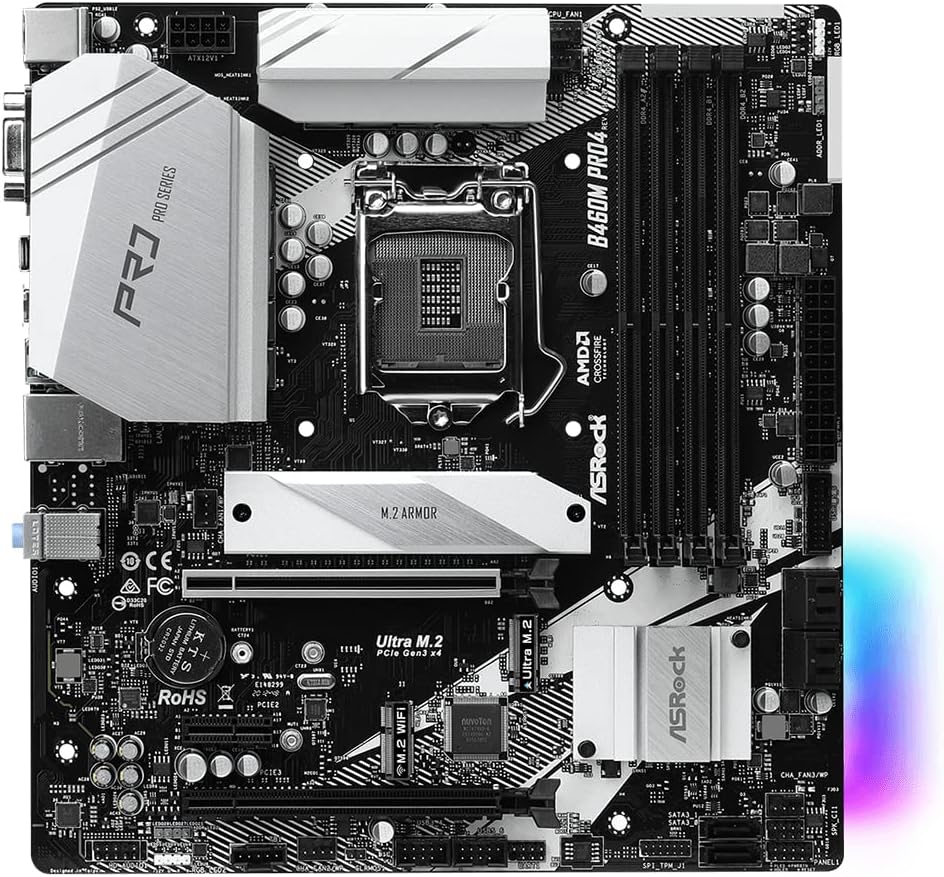
Obraz 3.1: Widok z góry na dół view of the ASRock B460M PRO4 Motherboard, highlighting the LGA 1200 CPU socket.
3.2. Instalacja pamięci (RAM)
This motherboard supports DDR4 memory modules up to 2933MHz. It features four DIMM slots. For optimal performance, install memory modules in matched pairs into the designated primary slots as indicated in the motherboard's detailed manual. Open the retention clips, align the memory module notch with the slot key, and press firmly until the clips snap into place.
3.3. Instalacja urządzenia pamięci masowej
The B460M PRO4 includes M.2 slots for high-speed NVMe SSDs and SATA ports for traditional hard drives or SSDs. Use the provided M.2 screws and standoffs for M.2 drive installation. Connect SATA data cables (included) from your storage devices to the SATA ports on the motherboard.

Obraz 3.2: Pod kątem view of the ASRock B460M PRO4 Motherboard, illustrating the M.2 slots and SATA ports for storage devices.
3.4. Instalacja karty rozszerzeń
The motherboard provides 2 PCIe 3.0 x16 slots for graphics cards and 1 PCIe 3.0 x1 slot for other expansion cards. Additionally, it includes 1 M.2 (Key E) slot specifically for a WiFi module. Ensure expansion cards are properly seated in their respective slots and secured with chassis screws.

Image 3.3: ASRock B460M PRO4 Motherboard, showcasing the various PCIe expansion slots.
3.5. Połączenia zasilania
Connect the 24-pin ATX power connector and the 8-pin CPU power connector from your power supply unit (PSU) to the corresponding ports on the motherboard. The 9 Power Phase Design ensures stable power delivery to critical components.
4. Obsługa
4.1. Konfiguracja BIOS/UEFI
Upon initial boot, press the designated key (usually DEL or F2) to enter the BIOS/UEFI setup utility. Here, you can configure system settings, boot order, and monitor hardware status. Refer to the ASRock website for a detailed BIOS/UEFI user manual specific to your model.
4.2. Instalacja sterownika
After installing your operating system (Microsoft Windows 10 64-bit / 11 64-bit), install the necessary drivers from the included Support CD or download the latest versions from the official ASRock website. This ensures optimal performance and compatibility for all motherboard components.
4.3. Narzędzia programowe
ASRock provides various software utilities to enhance your system's functionality, including monitoring tools, fan control, and system tuning options. These can be found on the Support CD or ASRock's official webstrona.
5. Konserwacja
5.1. Czyszczenie
Regularnie czyść wnętrze komputera, aby zapobiec gromadzeniu się kurzu, który może prowadzić do przegrzewania i spadku wydajności. Użyj sprężonego powietrza, aby usunąć kurz z wentylatorów, radiatorów i innych podzespołów. Przed czyszczeniem upewnij się, że system jest wyłączony i odłączony od zasilania.
5.2. Aktualizacje BIOS-u
Okresowo sprawdzaj ASRock website for BIOS/UEFI updates. Updates can improve system stability, add support for new hardware, or fix bugs. Follow the instructions provided by ASRock carefully when performing a BIOS update to avoid system damage.
6. Rozwiązywanie Problemów
If you encounter issues with your ASRock B460M PRO4 Motherboard, consider the following basic troubleshooting steps:
- Brak zasilania/brak rozruchu: Double-check all power connections (24-pin ATX, 8-pin CPU, GPU). Ensure the power supply is functioning correctly.
- Brak wyświetlacza: Verify that your monitor is connected to the correct graphics output (either integrated graphics or a dedicated graphics card). Reseat your graphics card and RAM modules.
- Niestabilność/awarie systemu: Check RAM seating and compatibility. Ensure all drivers are up-to-date. Monitor CPU and GPU temperatures to rule out overheating.
- Problemy z urządzeniami peryferyjnymi: Test peripherals in different USB ports. Ensure relevant drivers are installed.
For more advanced troubleshooting or persistent issues, consult the detailed troubleshooting section in the full user manual available on the ASRock support website or contact ASRock technical support.
7. Specyfikacje
Below are the key technical specifications for the ASRock B460M PRO4 Motherboard:
| Funkcja | Specyfikacja |
|---|---|
| Marka | ASRock |
| Nazwa modelu | B460M PRO4 |
| Gniazdo procesora | LGA 1200 |
| Kompatybilne procesory | 10. generacja procesorów Intel Core |
| Typ chipsetu | Procesor Intel B460 |
| Technologia pamięci RAM | Pamięć DDR4 SDRAM |
| Prędkość zegara pamięci | 2933MHz |
| Liczba portów USB 2.0 | 2 |
| Wsparcie systemu operacyjnego | Microsoft Windows 10 64-bit / 11 64-bit |
| Wymiary produktu (dł. x szer. x wys.) | 10.9 x 10.3 x 2.5 cala |
| Waga przedmiotu | 2.2 funta |

Image 7.1: Rear I/O panel of the ASRock B460M PRO4 Motherboard, showing various connectivity ports.
8. Wsparcie i gwarancja
For technical assistance, driver downloads, BIOS updates, and detailed product information, please visit the official ASRock support website. You can find comprehensive FAQs and contact information for customer service there.
For specific warranty terms and conditions applicable to your ASRock B460M PRO4 Motherboard, please refer to the warranty card included in your product packaging or visit the ASRock official website. Warranty policies may vary by region and retailer.
Notatka: Produkt ponadview video provided in the source data is for a different motherboard (MSI B760M-P) and is not relevant to the ASRock B460M PRO4. Therefore, no video content has been embedded in this manual.
9. Ważne informacje dotyczące bezpieczeństwa
Always observe the following safety precautions when handling or operating your motherboard:
- Disconnect the power cord from the wall outlet before touching any components inside the computer.
- Przed dotknięciem podzespołów należy założyć opaskę antystatyczną na nadgarstek lub często dotykać uziemionego przedmiotu metalowego, aby rozładować ładunki elektrostatyczne.
- Chroń płytę główną przed wilgocią i ekstremalnymi temperaturami.
- Nie próbuj samodzielnie naprawiać płyty głównej. Skontaktuj się z wykwalifikowanym serwisantem.