
JOYEAUTO JOYEAUTO-Bosch-2013-2018
Instrukcja obsługi bezprzewodowego odbiornika CarPlay Smart Box JOYEAUTO dla Land Rover/Jaguar Evoque Bosch (2013-2018MY)
Comprehensive guide for installation, operation, and features of your JOYEAUTO CarPlay Retrofit Kit.
1. Wprowadzenie
This manual provides detailed instructions for the installation and operation of the JOYEAUTO Wireless CarPlay Receiver Smart Box. This retrofit kit is designed to integrate Apple CarPlay and Android Auto functionalities into compatible Land Rover/Jaguar Evoque Bosch models from 2013-2018MY, enhancing your in-car entertainment and navigation experience while retaining the original vehicle system.
The system supports wireless and wired CarPlay, wired Android Auto, Mirror Link, and integrates with existing vehicle features like steering wheel controls and reverse cameras.
2. Zgodność
This device is compatible with Land Rover/Jaguar Evoque models equipped with the Bosch head unit, manufactured between 2013 and 2018. Please verify your car's display and control panel match the examples provided to ensure compatibility.

Image: JOYEAUTO Smart Box shown with a compatible Land Rover Evoque interior displaying CarPlay.
Obsługiwane modele:
| Model | Model Year (MY) | Funkcje |
|---|---|---|
| Evoque (Bosch) | 2013–2018 |
|
Note: This box is for Land Rover Bosch Head unit. Check if your car model is in the above list, and confirm the control panel is one of the two types shown in product images. Contact support if you are unsure.
3. Zawartość opakowania
The JOYEAUTO Wireless CarPlay Receiver Smart Box package includes the following items:

Obraz: Ponadview of the JOYEAUTO Smart Box and its included accessories.
- JOYEAUTO Multimedia Video Interface (Main Unit)
- AUX Adapter
- Kabel USB
- Kabel LVDS
- Antena WiFi
- Mikrofon
- Kabel AUX
- Power Cable (2 types)
- Instrukcja instalacji (drukowana)
4. Instrukcja instalacji
Installation requires careful disassembly and reassembly of vehicle components. If you are not confident in performing the installation yourself, it is recommended to seek assistance from a qualified professional. Ensure the vehicle's power is off before beginning installation.
4.1 Demontaż
- Carefully disassemble the screen cover panel using appropriate trim removal tools.
- Unscrew and disassemble the main display unit from the dashboard.
- Unplug all cables connected to the back of the display unit.
Video: Detailed installation steps for the JOYEAUTO Wireless CarPlay Android Auto Smart Box, including dashboard disassembly and wiring.
4.2 połączeń przewodów
- Connect the provided 16-PIN power cable to the vehicle's original power harness.
- Connect the LVDS cable from the JOYEAUTO box to the LCD_OUT port. The original LVDS cable will no longer be connected directly to the display.
- Connect the USB cable to the JOYEAUTO box.
- Connect the AUX cable from the JOYEAUTO box's AUDIO-OUT to the vehicle's original AUX port, typically located in the armrest box.
- Connect the WiFi antenna to the JOYEAUTO box.
- Install the external microphone in a convenient location for optimal voice pickup.
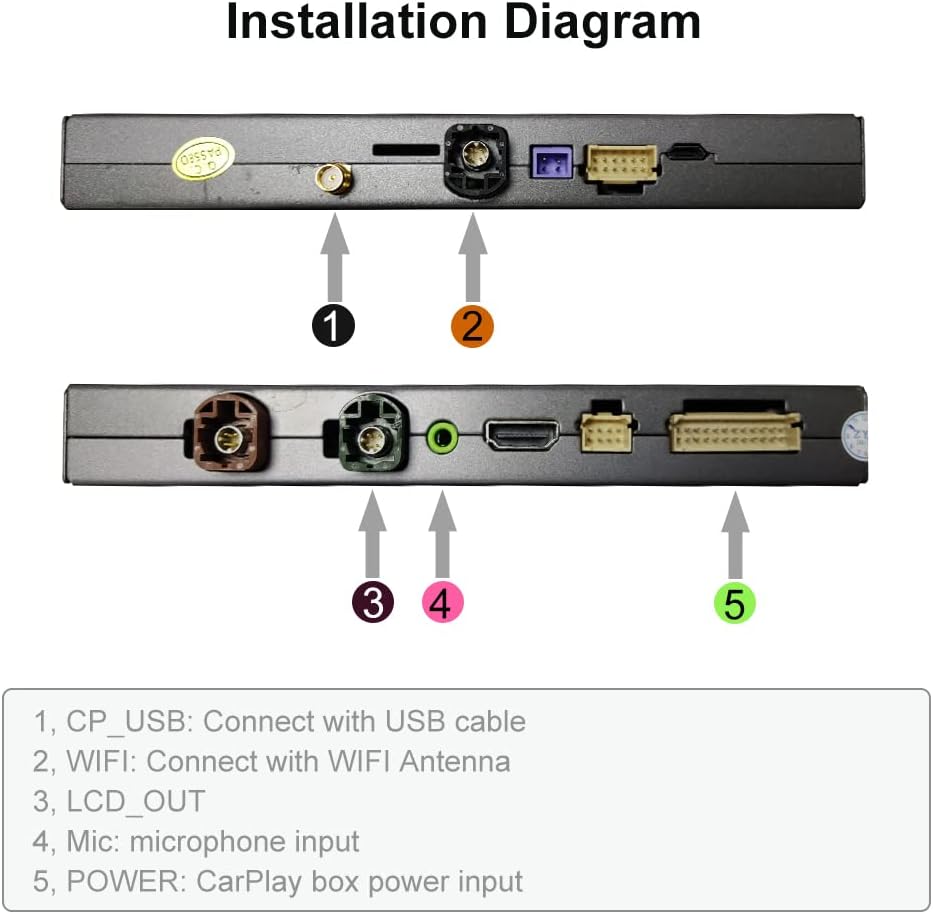
Image: Diagram illustrating the various connection ports on the JOYEAUTO Multimedia Video Interface.
4.3 Setup and Reassembly
- Set up the DIP switches on the JOYEAUTO box according to the provided installation diagram (refer to the printed manual for specific settings).
- Before final reassembly, test all functions of the CarPlay system to ensure proper operation.
- Carefully reassemble the display unit and dashboard components.
- Secure the JOYEAUTO box in a suitable location, such as under the glove box.
5. Instrukcja obsługi
The JOYEAUTO Smart Box allows seamless integration with your smartphone, providing access to various features directly on your car's display.
5.1 Switching to CarPlay/Android Auto
- To switch to the JOYEAUTO system, press and hold the "NAV" button on your car's original control panel.
- Ensure the vehicle's original AUX channel is selected for audio output.
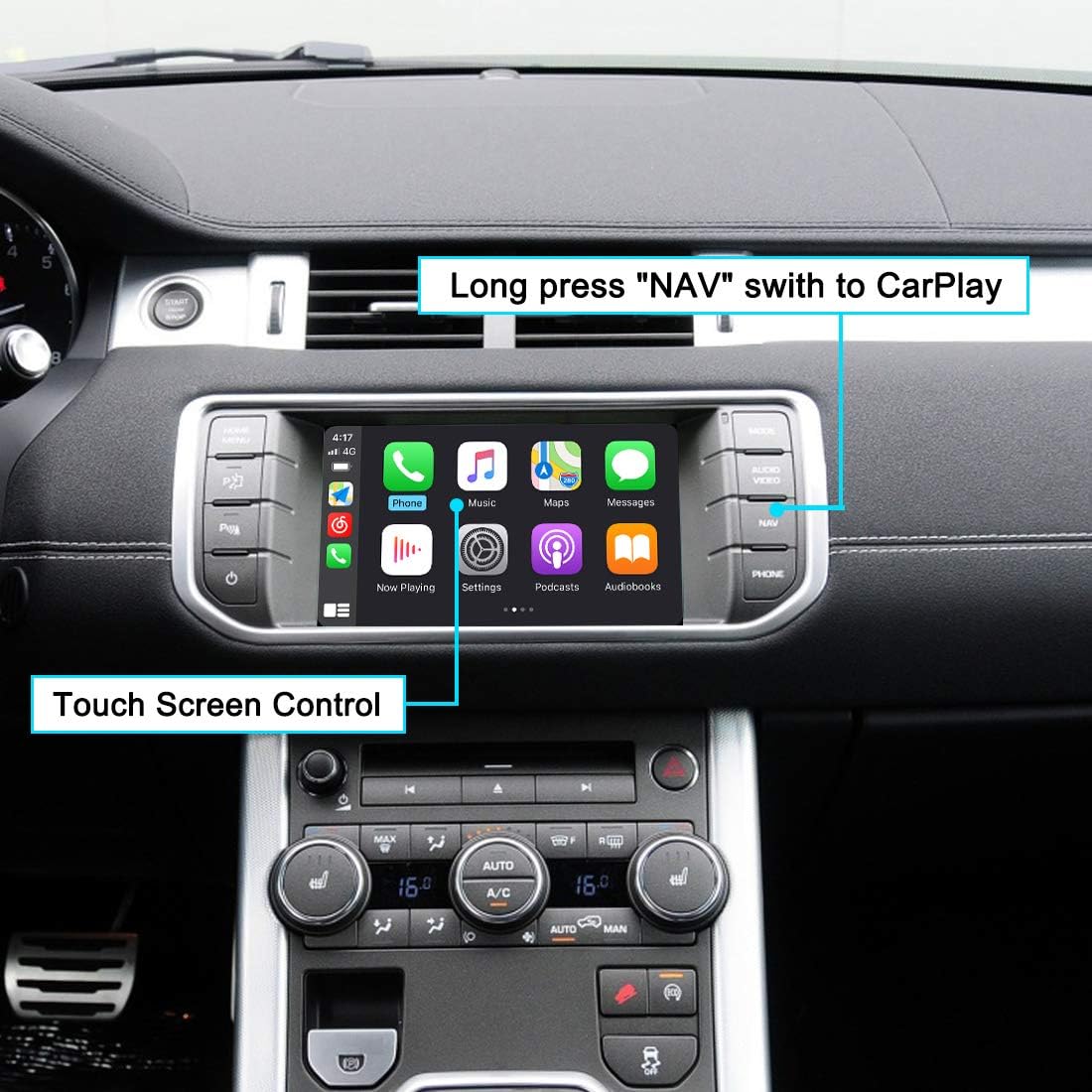
Image: CarPlay interface displayed on the vehicle's screen, highlighting the "NAV" button for switching and touch screen control.
5.2 Podłączanie smartfona
5.2.1 Wireless CarPlay (iPhone)
- Turn on your iPhone's Wi-Fi.
- Pair your iPhone via Bluetooth with the device named "JoyeAuto".
- Your iPhone will display a CarPlay request. Accept it.
- The CarPlay screen will automatically appear on your car's display within 5 seconds.
5.2.2 Wired Android Auto (Android)
- Connect your Android phone to the USB port of the JOYEAUTO box using a USB cable.
- Navigate to the Android Auto option on the car's display.
- Aby nawiązać połączenie, postępuj zgodnie z instrukcjami wyświetlanymi na ekranie.
5.2.3 Mirror Link (iPhone/Android)
- For iPhone: Connect your iPhone to the USB port using a Lightning cable. Select "iOS Mirror" from the settings.
- For Android: Connect your Android phone to the USB port. Select "Autolink" from the settings.
- Your phone's screen will be mirrored on the car's display.
Video: Demonstration of JOYEAUTO Wireless CarPlay features, including music playback, navigation, and hands-free calling.
Wideo: Ponadview of Wireless CarPlay and Android Auto interface features, including navigation, music, and phone functions.
5.3 Główne cechy
- Nawigacja: Use Apple Maps, Google Maps, or Waze for real-time navigation.
- Muzyka: Stream music from Spotify, Apple Music, Amazon Music, and other apps.
- Sterowanie głosowe: Activate Siri for hands-free commands by long-pressing the main menu button.
- Rozmowy telefoniczne: Make and receive calls directly from the car's display.
- Odtwarzanie z USB: Odtwarzaj muzykę i filmy z dysku flash USB podłączonego do portu USB zestawu CarPlay.
- Kamera cofania: Supports original and aftermarket reverse cameras, displaying guidelines.

Image: Visual representation of various features including navigation, music, voice control, mirroring, USB media, and reverse camera.
6. Specyfikacje
| Funkcja | Szczegół |
|---|---|
| Wymiary opakowania | 8.66 x 6.61 x 4.02 cala |
| Waga przedmiotu | 2.25 funta |
| Numer modelu przedmiotu | JOYEAUTO-Bosch-2013-2018 |
| Marka | ZHOYITO (JOYEAUTO) |
| Technologia łączności | Bluetooth, USB |
| Typ kontrolera | Android |
| Funkcja specjalna | Spotify |
| Kompatybilne urządzenia | Smartfon |
| Wszystkie porty HDMI | 1 |
| Typ złącza | USB typu A |
| Tryb wyjścia audio | Stereofoniczny |
| Konfiguracja kanału dźwięku przestrzennego | 4.0 |
| Kodowanie wideo | RM |
7. Rozwiązywanie Problemów
If you encounter issues with your JOYEAUTO Wireless CarPlay Receiver Smart Box, please refer to the following common troubleshooting steps:
- Brak wyświetlacza po instalacji: Double-check all cable connections, especially the LVDS and power cables. Ensure the DIP switches are set correctly according to the installation diagram.
- Bez dźwięku: Verify that the vehicle's original AUX input is selected. Check the AUX cable connection from the JOYEAUTO box to the car's AUX port.
- CarPlay/Android Auto nie łączy się: Ensure Wi-Fi and Bluetooth are enabled on your smartphone. For CarPlay, confirm Bluetooth pairing with "JoyeAuto" and accept the CarPlay request on your iPhone. For Android Auto, ensure the USB cable is securely connected and the "Autolink" option is selected.
- Przerywane połączenie: Ensure the JOYEAUTO box is securely installed and not experiencing loose connections. Check for any potential interference from other electronic devices.
- Screen goes blank randomly: Some users have reported this issue. Try power cycling the device by temporarily disconnecting and reconnecting its power cable. Ensure the device is mounted in an accessible location for this purpose.
- Multiple phones connecting: If multiple phones are present, the system may connect to one randomly. To switch, disconnect the unwanted phone or disable its Bluetooth/Wi-Fi, then connect the desired phone.
- Siri/Voice control not working: Ensure the external microphone is properly connected and positioned. Check your phone's settings for voice assistant permissions.
For further assistance, please contact customer support via Amazon message.
8. Gwarancja i wsparcie
The JOYEAUTO Wireless CarPlay Receiver Smart Box comes with a 1-letnia gwarancja. For any product-related issues or installation queries, please contact the seller directly through Amazon's messaging system. It is crucial to test all features before completing the final reassembly of your vehicle's dashboard.
9. Zastrzeżenie prawne
Please confirm your car has a Bosch head unit before purchase. If unsure, send pictures of your car's display with the main menu to the seller for verification. The seller will not be responsible if an incorrect device is purchased.
Ask a question about this manual
Ask about setup, troubleshooting, compatibility, parts, safety, or missing instructions. Manuals+ will review the question and use this page’s manual context to help answer it.