
1. Wprowadzenie
This manual provides detailed instructions for the safe and effective operation of your PIXEL G1s RGB Video Light. Please read this manual thoroughly before use and retain it for future reference. The PIXEL G1s is a versatile and portable RGB video light designed for various photography and videography applications, featuring app control, a high-capacity battery, and multiple lighting effects.
2. Zawartość opakowania
Sprawdź, czy wszystkie wymienione poniżej elementy znajdują się w Twojej paczce. Jeśli brakuje któregokolwiek z nich lub jest on uszkodzony, skontaktuj się ze sprzedawcą.
- 1 x PIXEL G1s RGB Video Light
- 1 x 1/4” Screw
- 1 x adapter głowicy kulowej
- 1 x kabel ładujący typu C
- 1 x Instrukcja obsługi

Image: Contents of the PIXEL G1s package.
3. Funkcje produktu
- Convenient APP Control: Adjust hue (0-359°), saturation (0-100%), brightness (0-100%), and color temperature (2500K-8500K) via smartphone.
- Bateria o dużej pojemności: Built-in 6400mAh battery provides over 210 minutes of runtime at 100% brightness. Full charge in approximately 2.5 hours via USB Type-C.
- Wszechstronny montaż: 360° rotating arm with cold shoe allows for flexible positioning on cameras, microphones, or smartphones.
- Precision LCD Display: Intuitive screen provides real-time readings of settings and battery level.
- 10 Scene Effects: Pre-programmed lighting effects for various creative scenarios.
- Trwała konstrukcja: Aluminum alloy body ensures longevity and portability.

Obraz: Ponadview of the PIXEL G1s RGB Video Light.
4. Konfiguracja
4.1 Pierwsze ładowanie
Before first use, fully charge the PIXEL G1s using the provided Type-C charging cable. Connect the cable to the USB Type-C port on the device and a compatible USB power source. The LCD display will indicate charging status.

Image: Charging the PIXEL G1s via USB Type-C.
4.2 Attaching the Ball Head Adapter
The included ball head adapter allows for versatile mounting. Screw the 1/4” screw into the bottom of the light, then attach the ball head adapter to the screw. This assembly can then be mounted onto tripods, light stands, or camera hot shoes.

Image: Demonstrating the 360° rotating arm and mounting options.
5. Instrukcja obsługi
5.1 Włączanie/wyłączanie zasilania
To power on the device, slide the power switch located on the side of the unit. To power off, slide the switch back to the OFF position.
5.2 Sterowanie i wyświetlacz
The PIXEL G1s features an intuitive LCD display on the back and control dials/buttons on the side for easy adjustment.

Image: LCD display and control buttons.
5.3 Tryby działania
The light offers several modes for different lighting needs:
- Tryb CCT (temperatura barwowa): Adjust brightness from 0-100% and color temperature from 2500K (warm) to 8500K (cool).
- Tryb RGB: Adjust hue (0-359°), saturation (0-100%), and brightness (0-100%) to achieve any desired color.
- Tryb efektów specjalnych: Choose from 10 pre-programmed scene effects like lightning, ambulance, police, fire truck, candle light, and more.

Image: Visual guide for brightness, color temperature, and RGB adjustments.
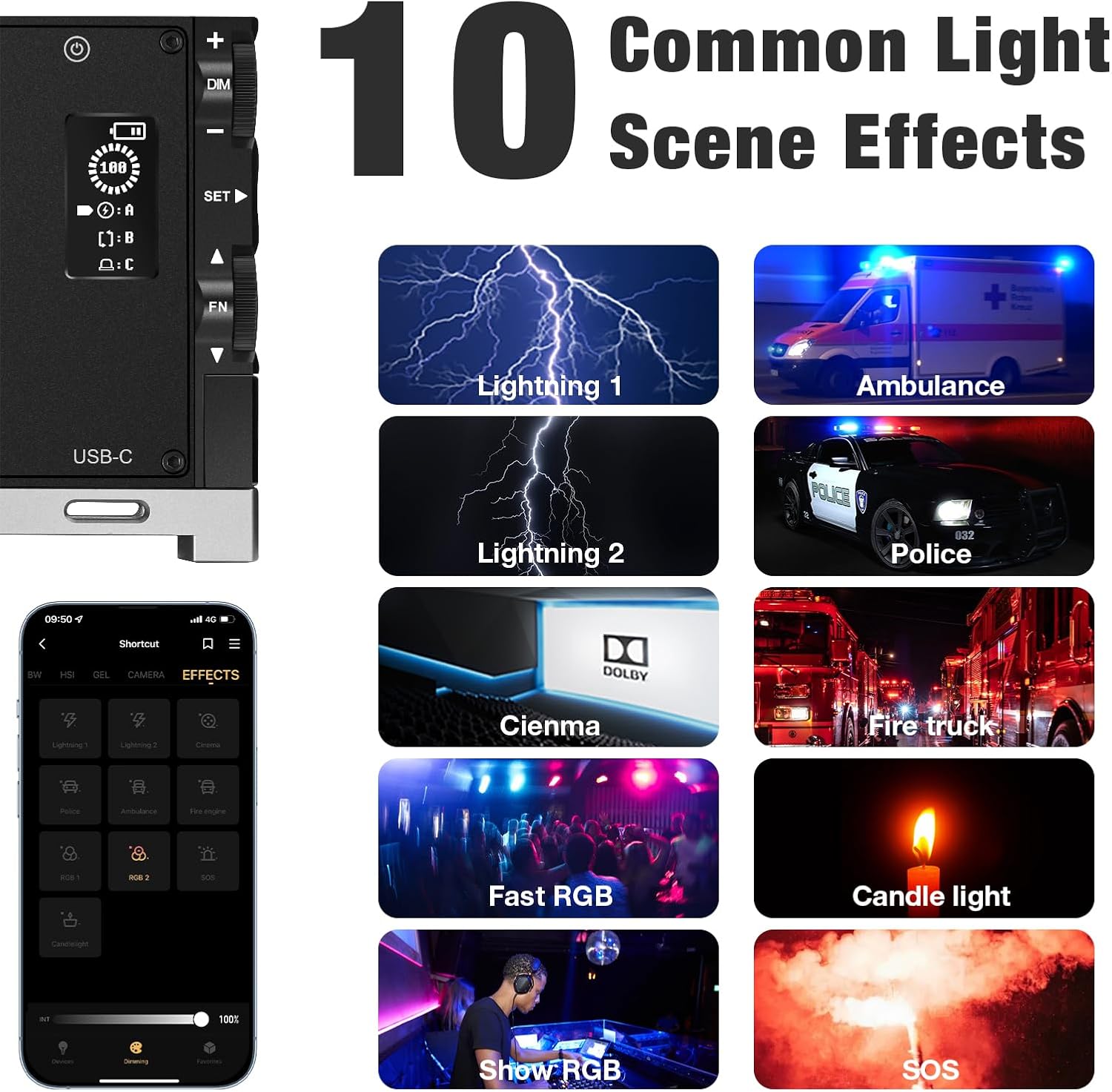
Obraz: Byłyamples of the 10 common light scene effects.
5.4 Kontrola aplikacji
Download the official PIXEL app to control the G1s light wirelessly via your smartphone. The app provides comprehensive control over all settings and effects, offering enhanced flexibility.

Image: Smartphone app interface for wireless control.
Official Product Video: PIXEL G1s RGB Video Light Overview
Ten film przedstawia krótki przeglądview of the PIXEL G1s RGB Video Light's features and functionality.
6. Ładowanie i bateria
The PIXEL G1s is equipped with a 6400mAh rechargeable Lithium-Ion battery. A full charge takes approximately 2.5 hours using the provided USB Type-C cable. The battery provides up to 210 minutes of continuous use at 100% brightness. The device includes built-in overheating protection for safe operation.
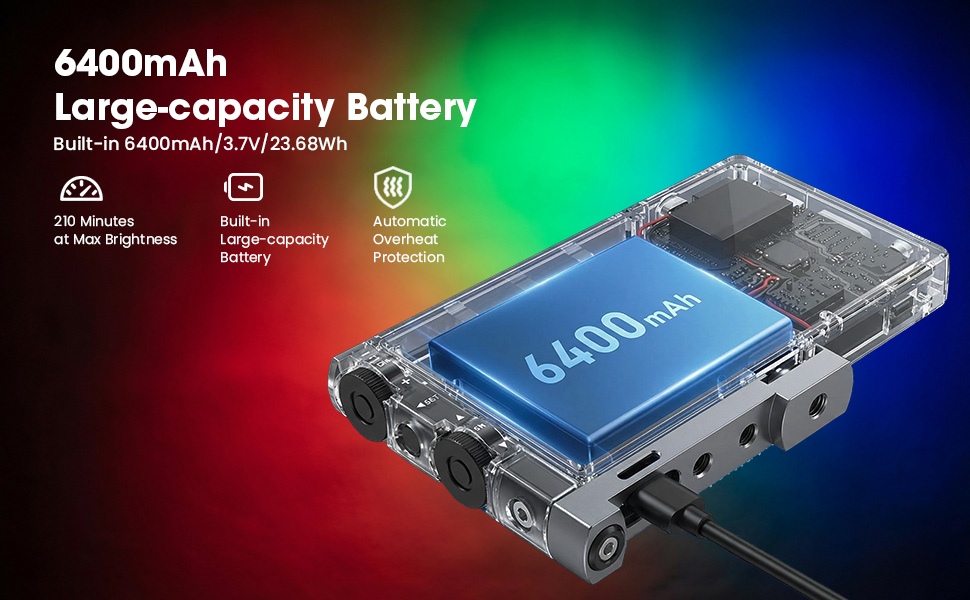
Image: Battery specifications and charging details.
7. Opcje montażu
The PIXEL G1s is designed for flexible mounting:
- 1/4” Screw Hole: Standard screw hole for attaching to tripods, light stands, or other photography accessories.
- Ball Head Adapter: Use the included ball head adapter for 360° rotation and tilt, allowing precise light positioning.
- Mocowanie zimnej stopki: The rotating arm features a cold shoe mount for attaching to cameras or other compatible devices.

Image: Different mounting and positioning examples.
8. Konserwacja
- Przechowuj urządzenie w suchym miejscu. Nie wystawiaj go na działanie wilgoci ani deszczu.
- Czyść panel i obudowę lampy miękką, suchą ściereczką. Unikaj stosowania silnych środków chemicznych i materiałów ściernych.
- Przechowuj urządzenie w chłodnym, suchym miejscu, gdy nie jest używane.
- Unikaj upuszczania i narażania urządzenia na silne uderzenia.
9. Rozwiązywanie Problemów
- Światło się nie włącza: Ensure the battery is charged. Check the power switch position.
- Problemy z połączeniem aplikacji: Ensure Bluetooth is enabled on your smartphone and the light. Restart both the app and the light.
- Nierównomierna jasność/kolor: Check the settings on the LCD display or within the app. Ensure the device is not in a low power state.
10. Specyfikacje
| Specyfikacja | Szczegół |
|---|---|
| Marka | PIKSEL |
| Numer modelu | G1 |
| Wymiary produktu | 5.1" dł. x 0.6" szer. x 2.1" wys. (5.1 x 0.6 x 2.7 cala) |
| Waga przedmiotu | 1.06 funta |
| Typ baterii | 1 bateria litowo-jonowa (w zestawie) |
| Pojemność baterii | 6400mAh |
| Żywotność baterii (100% jasności) | 210 minut |
| Czas ładowania | Około 2.5 godzin |
| Zakres temperatury barwowej | 2500K-8500K |
| Technologia łączności | USB |
| Interfejs sprzętowy | USB |
11. Gwarancja i wsparcie
For warranty information and customer support, please refer to the official PIXEL webOdwiedź witrynę lub skontaktuj się ze sprzedawcą. Zachowaj paragon jako dowód zakupu.