
ROCCAT ROC-12-940-BN
Roccat Vulcan 122 Mechanical Gaming Keyboard User Manual
Model: ROC-12-940-BN
1. Wprowadzenie
The Roccat Vulcan 122 is a high-performance mechanical gaming keyboard designed for precision and durability. It features Roccat's unique Titan switches, advanced AIMO RGB lighting, and a robust aluminum construction. This manual provides detailed instructions for setting up, operating, maintaining, and troubleshooting your keyboard.

Image: The Roccat Vulcan 122 keyboard shown with a Roccat mouse and headset, demonstrating its vivid, dynamic lighting synergy with AIMO.
Główne cechy:
- Unique design with lowered keycaps and reduced reaction time.
- RGB lighting with configurable LED effects and adjustable AIMO effects.
- High-quality and resistant design with robust materials and an anodized aluminum surface.
- Advanced anti-ghosting with N-Key Rollover (NKRO).
- Programmable macro keys and ROCCAT Easy-Shift[+].
2. Konfiguracja
2.1 Podłączanie klawiatury
To connect your Roccat Vulcan 122 keyboard:
- Unpack the keyboard and its accessories.
- Podłącz wtyczkę USB klawiatury do wolnego portu USB w komputerze.
- System operacyjny automatycznie wykryje i zainstaluje niezbędne sterowniki.
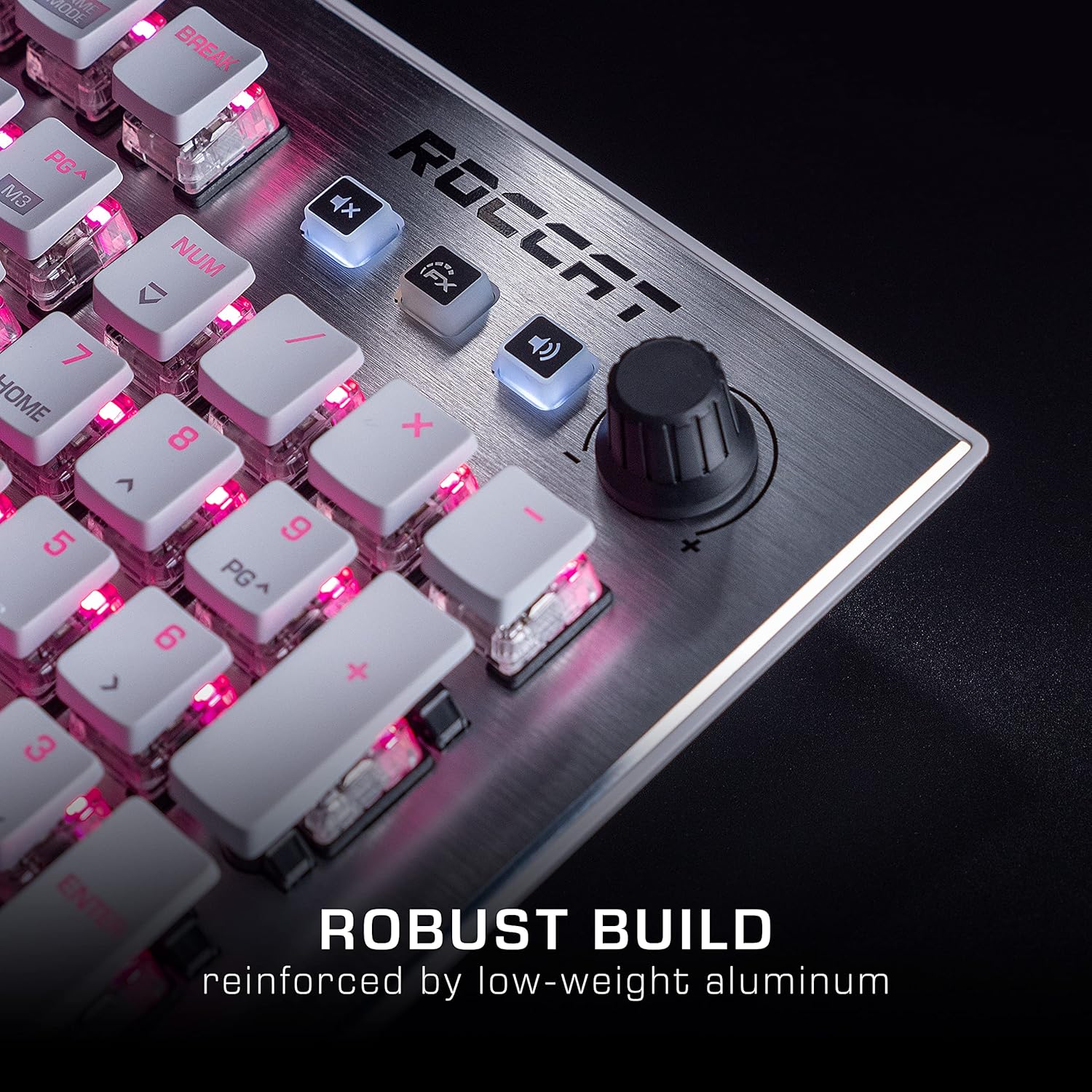
Image: The Roccat Vulcan 122 keyboard shown with its detachable wrist rest, ready for connection.
2.2 Software Installation (ROCCAT Swarm)
For full functionality and customization, install the ROCCAT Swarm software:
- Visit the official ROCCAT webStrona (www.roccat.com) i przejdź do sekcji pomocy.
- Download the latest version of the ROCCAT Swarm software for your operating system.
- Uruchom instalator i postępuj zgodnie z instrukcjami wyświetlanymi na ekranie.
- After installation, launch ROCCAT Swarm to configure your keyboard settings, lighting, and macros.
3. Obsługa klawiatury
3.1 Standardowe funkcje klawiszy
The Vulcan 122 functions as a standard QWERTY keyboard. All alphanumeric keys, function keys (F1-F12), navigation keys, and the numeric keypad operate as expected.
3.2 Media Controls
The keyboard features dedicated media controls for convenient audio management.
- Pokrętło głośności: Located in the upper right corner, rotate to adjust system volume.
- Przycisk wyciszenia: Naciśnij, aby wyciszyć/włączyć dźwięk.
- Przycisk FX: Cycles through lighting effects or other programmable functions.

Obraz: Zbliżenie view of the mixer-style media controls on the Roccat Vulcan 122, including the volume knob and dedicated function keys.
3.3 RGB Lighting Customization (AIMO)
The Vulcan 122 features advanced RGB lighting with Roccat's AIMO intelligent lighting system. Use the ROCCAT Swarm software to:
- Select from various pre-set lighting effects.
- Customize individual key illumination.
- Dostosuj jasność i szybkość efektów.
- Synchronize lighting with other AIMO-compatible devices.
3.4 Programmable Macro Keys and Easy-Shift[+]
The keyboard includes programmable macro keys and the Easy-Shift[+] function, allowing you to assign secondary functions to keys.
- Use the ROCCAT Swarm software to record and assign macros to designated keys.
- Easy-Shift[+] allows you to double the number of assignable functions by holding down the Easy-Shift[+] key (usually Caps Lock by default, configurable in Swarm) and pressing another key.
3.5 Anti-Ghosting with NKRO
The Vulcan 122 features advanced anti-ghosting technology with N-Key Rollover (NKRO), ensuring that every key press is registered accurately, even when multiple keys are pressed simultaneously.

Image: A hand demonstrating typing on the Roccat Vulcan 122 keyboard, emphasizing the ergonomic design of the keys for comfortable use.
4. Konserwacja
4.1 Czyszczenie klawiatury
To ensure the longevity and optimal performance of your Vulcan 122 keyboard, regular cleaning is recommended.
- Przed czyszczeniem odłącz klawiaturę od komputera.
- Użyj miękkiej, niestrzępiącej się ściereczki, lekko wyczyśćampened with water or a mild cleaning solution to wipe the keycaps and surface. Avoid harsh chemicals.
- For dust and debris between keys, use compressed air. The raised keycap design makes cleaning easier.
- Przed ponownym podłączeniem klawiatury należy upewnić się, że jest ona całkowicie sucha.

Image: A close-up of the Roccat Vulcan 122 keyboard keys, illustrating their design which facilitates easy cleaning and resistance to dust and liquids.
5. Rozwiązywanie Problemów
If you encounter issues with your Roccat Vulcan 122 keyboard, refer to the following common problems and solutions:
- Klawiatura nie odpowiada:
- Sprawdź, czy kabel USB jest prawidłowo podłączony do klawiatury i komputera.
- Spróbuj podłączyć klawiaturę do innego portu USB.
- Uruchom ponownie komputer.
- Check if the keyboard is disabled in your operating system's device manager.
- Oświetlenie RGB nie działa lub jest nieprawidłowe:
- Ensure the ROCCAT Swarm software is installed and up to date.
- Check lighting settings within the Swarm software.
- Perform a firmware update for the keyboard via Swarm.
- Klawisze nie rejestrują się lub występują efekty ghostingu:
- Clean the affected keys as described in the Maintenance section.
- Sprawdź, czy oprogramowanie układowe klawiatury jest aktualne.
- Przetestuj klawiaturę na innym komputerze, aby wykluczyć problemy specyficzne dla systemu.
- ROCCAT Swarm software not detecting keyboard:
- Sprawdź, czy klawiatura jest prawidłowo podłączona.
- Restart the Swarm software and your computer.
- Reinstall the ROCCAT Swarm software.
- Check for any conflicting software or drivers.
6. Specyfikacje
| Funkcja | Szczegół |
|---|---|
| Marka | ROCCAT |
| Nazwa modelu | Wulkan 122 |
| Numer modelu | ROC-12-940-BN |
| Opis klawiatury | Mechaniczny |
| Typ przełącznika | Dotykowy |
| Tworzywo | Aluminium |
| Cechy specjalne | Podświetlenie |
| Kompatybilne urządzenia | Laptop (PC) |
| Wsparcie systemu operacyjnego | Windows 10, Windows 7, Windows 8 |
| Wymiary produktu | Wymiary 46.2 x 23.5 x 3.2 cm |
| Waga przedmiotu | 1.15 kilogramów |

Obraz: Wybuch view diagram illustrating the components of a Roccat Titan Tactile mechanical switch, highlighting its design for swift and precise response.
7. Gwarancja i wsparcie
7.1 Informacje o gwarancji
Your Roccat Vulcan 122 keyboard is covered by a manufacturer's warranty. The specific terms and duration of the warranty may vary by region and retailer. Please retain your proof of purchase for warranty claims. For detailed warranty information, refer to the warranty card included with your product or visit the official ROCCAT webstrona.
7.2 Wsparcie techniczne
For technical assistance, driver updates, or further inquiries, please visit the official ROCCAT support page:
Często zadawane pytania, poradniki rozwiązywania problemów i dane kontaktowe do działu obsługi klienta znajdziesz na ich stronie. webstrona.
Ask a question about this manual
Ask about setup, troubleshooting, compatibility, parts, safety, or missing instructions. Manuals+ will review the question and use this page’s manual context to help answer it.