
EOTECH XPS2-0
Instrukcja obsługi celownika holograficznego EOTECH XPS2 XPS2-0
Brand: EOTECH | Model: XPS2-0
1. Koniec produktuview & Cechy
The EOTECH XPS2-0 Holographic Weapon Sight is a compact and robust optic designed for rapid target acquisition and reliable performance. Its advanced holographic technology provides a clear and precise aiming solution for various shooting scenarios.
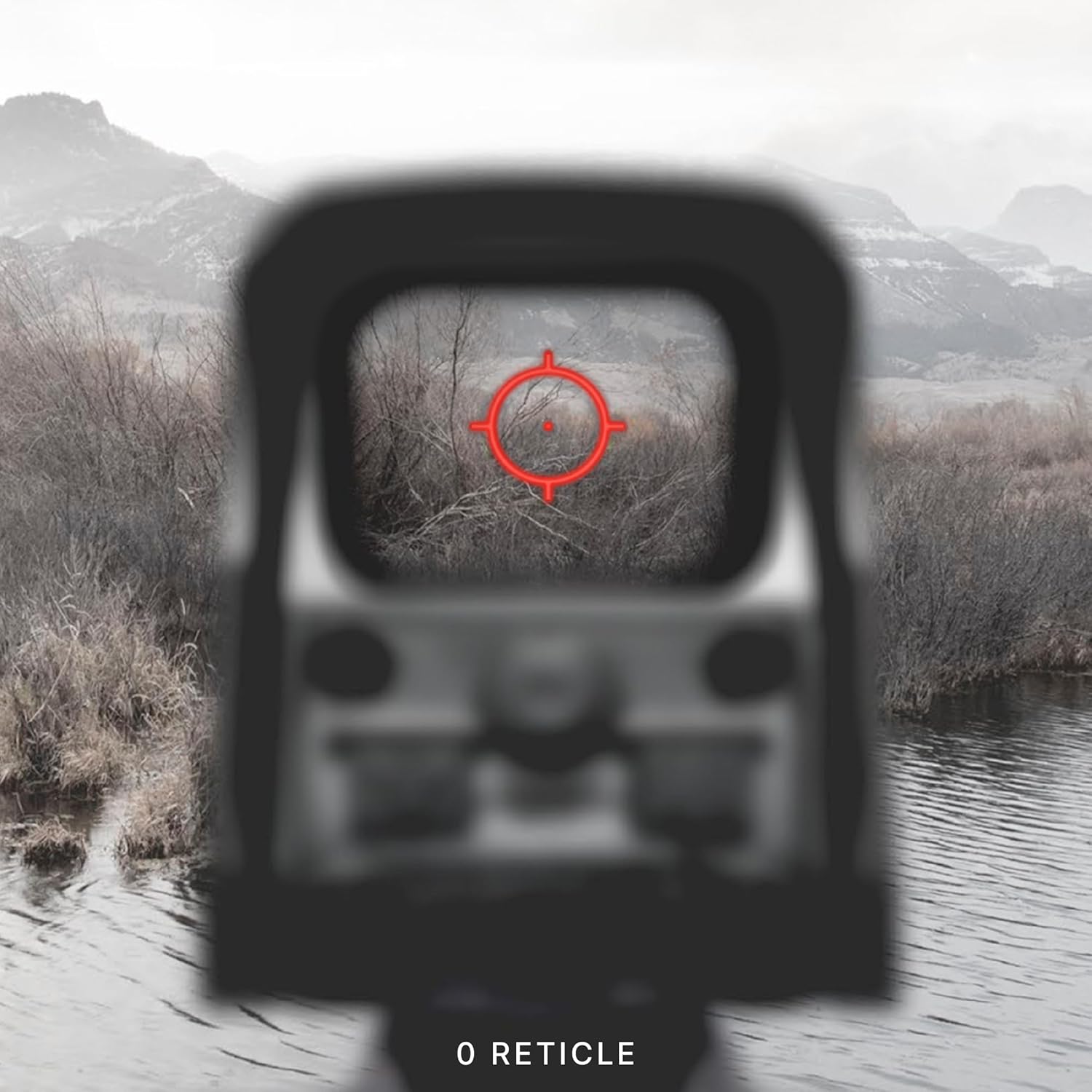
- EOTECH XPS2-0: Holographic Weapon Sight in black with 68MOA ring and (1) 1 MOA dot reticle.
- Wszechstronność montażu: Compatible with both 1" weaver and MIL-STD 1913 rails, offering flexible mounting options.
- Regulowana jasność: Features 20 brightness settings to ensure optimal visibility in any lighting condition, from bright daylight to low-light environments.
- Kompaktowa konstrukcja: Its small footprint leaves ample rail space for additional accessories such as rear iron sights or magnifiers.

2. Konfiguracja
2.1 Montaż celownika
The XPS2-0 is designed for easy mounting on any 1" Weaver or MIL-STD 1913 rail. Ensure the rail is clean and free of debris before mounting. Use the provided thumb-bolt or Allen-type bolt to securely fasten the sight to your firearm's rail. Tighten the bolt firmly to prevent movement under recoil.

2.2 Instalacja baterii
The XPS2-0 uses a single CR123 battery. To install or replace the battery:
- Unscrew the battery cap located on the front right side of the sight.
- Insert the CR123 battery with the positive (+) end facing forward.
- Dokładnie przykręć pokrywkę baterii.
The sight will flash when the battery is at 20% capacity, indicating it's time for replacement soon.
3. Obsługa celownika
3.1 Power On/Off & Brightness Adjustment
The control buttons are located on the rear of the sight:
- Włączanie: Press either the 'Up' (▲) or 'Down' (▼) button.
- Aby dostosować jasność: Press the 'Up' (▲) button to increase brightness or the 'Down' (▼) button to decrease brightness. There are 20 settings available.
- Aby wyłączyć: Simultaneously press both the 'Up' (▲) and 'Down' (▼) buttons.

3.2 Reticle Description
The XPS2-0 features a 68 MOA (Minute of Angle) ring with a 1 MOA dot in the center. This reticle design allows for quick target acquisition while maintaining precision.

3.3 Korekta wiatru i wysokości
Adjustments for windage (left/right) and elevation (up/down) are located on the side of the sight. Each click provides a precise adjustment to the point of impact.

4. Konserwacja
To ensure the longevity and optimal performance of your EOTECH XPS2-0, regular maintenance is recommended:
- Czyszczenie soczewek: Use a soft, lint-free cloth and lens cleaning solution to gently wipe the optical surfaces. Avoid abrasive materials or excessive pressure.
- Czyszczenie ciała: Wytrzyj korpus celownika reklamąamp Ściereczką usuń brud i zanieczyszczenia. Unikaj silnych środków chemicznych.
- Składowanie: Store the sight in a dry, cool place away from direct sunlight and extreme temperatures. Remove the battery if storing for extended periods.
5. Rozwiązywanie Problemów
5.1 Wskaźnik niskiego poziomu naładowania baterii
When the battery life reaches approximately 20%, the reticle will flash upon power-up to indicate a low battery condition. Replace the CR123 battery promptly to ensure continued operation.
5.2 Reticle Blinking Under Recoil
If the reticle blinks or flickers during recoil, this is another indication of a low battery. Replace the battery to resolve this issue.
6. Specyfikacje
| Funkcja | Szczegół |
|---|---|
| Marka | EOTECH |
| Nazwa modelu | XPS2-0 |
| Kolor | Czarny |
| Styl | XPS2-0 |
| Waga przedmiotu | 226.79 gram |
| Tworzywo | Plastikowy |
| Maksymalne powiększenie | 1x |
| Powiększenie minimalne | 1x |
| Kompatybilne urządzenia | Karabin |
| Typ montażu | Góra Weavera |
| Kompatybilny z noktowizorem | NIE |
| Wymiary (dł. x szer. x wys.) | 3.8" x 2.1" x 2.5" |
| Typ baterii | CR123 |
7. Gwarancja i pomoc techniczna
The EOTECH XPS2-0 Holographic Weapon Sight comes with a 10-year limited warranty from the manufacturer, covering defects in materials and workmanship under normal use. For warranty claims or technical support, please refer to the official EOTECH webodwiedź witrynę lub skontaktuj się bezpośrednio z działem obsługi klienta.
It is recommended to register your product online to ensure you are contacted in the event of any product issues and to facilitate warranty service.
8. Ważne informacje dotyczące bezpieczeństwa
OSTRZEŻENIE: Ten produkt zawiera substancje chemiczne, o których w stanie Kalifornia wiadomo, że powodują raka i wady wrodzone lub inne szkodliwe skutki dla rozrodczości.
Ask a question about this manual
Ask about setup, troubleshooting, compatibility, parts, safety, or missing instructions. Manuals+ will review the question and use this page’s manual context to help answer it.