
Wstęp
This manual provides essential information for the safe and effective use of your Canon PowerShot SX740 HS Digital Camera. Please read it thoroughly before operating the camera to ensure proper handling and to maximize its features. The Canon PowerShot SX740 HS is a compact digital camera featuring a 20.3-megapixel CMOS sensor, 40x optical zoom, 4K video recording capabilities, and built-in Wi-Fi and Bluetooth connectivity.

Rycina 1: Przód view of the Canon PowerShot SX740 HS Digital Camera with the lens retracted.
Co jest w pudełku
Sprawdź, czy w pakiecie znajdują się wszystkie poniższe elementy:
- Aparat cyfrowy Canon PowerShot SX740 HS
- NB-13L Lithium-Ion Battery Pack
- CB-2LH Battery Charger
- Pasek na nadgarstek
- Kabel HDMI
- Statyw
- SanDisk 64GB SDHC Memory Card
- Premium Camera Case
- High Speed USB Card Reader
Organizować coś
1. Ładowanie i instalacja akumulatora
- Insert the NB-13L battery into the CB-2LH charger.
- Plug the charger into a power outlet. The charging indicator light will show the charging status.
- Po całkowitym naładowaniu wyjmij akumulator z ładowarki.
- Otwórz pokrywę komory baterii znajdującą się na spodzie aparatu.
- Włóż naładowany akumulator do komory, zwracając uwagę na jego prawidłowe ułożenie. Zamknij szczelnie pokrywę.
2. Wkładanie karty pamięci
- Otwórz pokrywę gniazda karty pamięci, która zazwyczaj znajduje się w pobliżu komory baterii.
- Insert the SDHC memory card with the label facing the front of the camera until it clicks into place.
- Zamknij pokrywę gniazda karty pamięci.
3. Pierwsze włączenie i ustawienia podstawowe
- Naciśnij przycisk zasilania, aby włączyć aparat.
- Postępuj zgodnie z instrukcjami wyświetlanymi na ekranie, aby ustawić datę, godzinę i język.
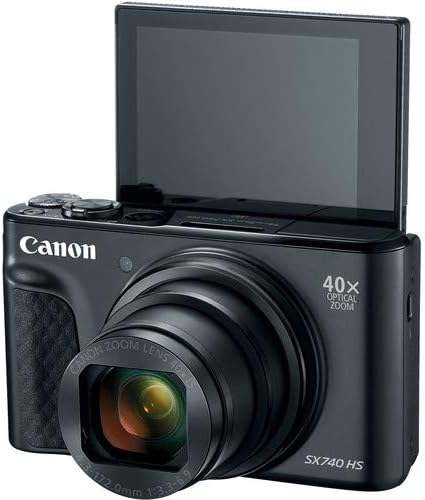
Rycina 2: Przód view of the camera with the LCD screen tilted upwards, ready for use.
Obsługa aparatu
1. Włączanie/wyłączanie zasilania
Naciśnij MOC przycisk znajdujący się na górze aparatu, służący do jego włączania i wyłączania.
2. Tryby fotografowania
The camera offers various shooting modes. Use the mode dial or menu options to select:
- Tryb automatyczny: For simple point-and-shoot operation, where the camera automatically adjusts settings.
- Tryb programu (P): Umożliwia większą kontrolę nad ustawieniami, gdy aparat ustala ekspozycję.
- Tryby scen: Optimized settings for specific scenarios like portraits, landscapes, or night scenes.
- Feature Assistant: Provides on-screen explanations to help you understand and use various camera features.
3. Operacje powiększania
The camera features a 40x optical zoom lens. Use the zoom lever around the shutter button to zoom in (telephoto) or out (wide-angle). Digital zoom can extend the range further, but may reduce image quality.

Rycina 3: Przód view of the camera with the lens extended for zooming.
4. Skupienie
The camera primarily uses autofocus. Point the camera at your subject and half-press the shutter button to focus. The focus frame will appear on the LCD screen. For specific situations, manual focus options may be available in the menu.
5. Nagrywanie wideo
To record videos, switch to video mode (if available via a dedicated button or mode dial) or press the dedicated movie recording button. The camera supports 4K video capture. Press the button again to stop recording.
6. Using the Tilting LCD Screen
The 3.0-inch LCD screen can tilt 180 degrees, allowing for easy framing of selfies or shots from various angles. Adjust the screen to your desired position.

Rysunek 4: Tył view of the camera, displaying the LCD screen and control layout.
7. Łączność Wi-Fi i Bluetooth
The camera features built-in Wi-Fi and Bluetooth for connecting to compatible mobile devices. Download the Canon Camera Connect app to your smartphone or tablet to transfer images, remotely control the camera, and share photos.
- Enable Wi-Fi or Bluetooth in the camera's menu.
- Open the Canon Camera Connect app on your mobile device and follow the pairing instructions.
Konserwacja
1. Czyszczenie aparatu
- Obiektyw: Use a soft, lint-free cloth or a lens brush to gently remove dust. For smudges, use a specialized lens cleaning solution and cloth. Avoid touching the lens directly with your fingers.
- Ekran LCD: Wipe gently with a soft, dry cloth. Do not use harsh chemicals.
- Korpus aparatu: Use a soft, dry cloth to wipe away dust and dirt.
2. Pielęgnacja baterii
- Baterie, które nie są używane, przechowuj w chłodnym i suchym miejscu.
- Aby przedłużyć żywotność akumulatora, należy unikać jego całkowitego rozładowywania.
- Remove the battery from the camera if it will not be used for an extended period.
3. Przechowywanie
When storing the camera for long periods, ensure it is clean, dry, and stored in a protective case to prevent dust and damage. Remove the battery and memory card.
Rozwiązywanie problemów
Jeśli masz problemy z aparatem, zapoznaj się z poniższymi, typowymi rozwiązaniami:
- Kamera się nie włącza: Upewnij się, że bateria jest w pełni naładowana i prawidłowo włożona. Wypróbuj inną, naładowaną baterię, jeśli jest dostępna.
- Błąd karty pamięci: Check if the memory card is inserted correctly. Format the card (this will erase all data) if the error persists, or try a different compatible SDHC card.
- Obrazy są niewyraźne: Ensure the lens is clean. Check your focus settings and make sure the camera has successfully focused on your subject before taking the shot. Use optical image stabilization for handheld shots.
- Wi-Fi/Bluetooth connection issues: Ensure Wi-Fi/Bluetooth is enabled on both the camera and your mobile device. Restart both devices and try pairing again. Confirm the Canon Camera Connect app is up to date.
- Lampa błyskowa nie działa: Check the flash mode settings. Ensure the flash is popped up if it's a manual pop-up type.
For more complex issues or persistent problems, please consult the official Canon support webodwiedź witrynę lub skontaktuj się z obsługą klienta.
Specyfikacje
| Funkcja | Specyfikacja |
|---|---|
| Nazwa modelu | PowerShot SX740 HS |
| Rozdzielczość czujnika fotograficznego | 20.3 megapiksela |
| Zoom optyczny | 40x |
| Format przechwytywania wideo | 4K |
| Procesor obrazu | Canon DIGIC 8 |
| Łączność | Bluetooth, HDMI, USB, Wi-Fi |
| Typ wyświetlacza | Tilting LCD |
| Stabilizacja obrazu | Optyczny |
| Typ baterii | Lithium Ion (NB-13L) |
| Kompatybilna pamięć | SDHC (do 64 GB) |
| Ciągłe fotografowanie | 10 klatek na sekundę |
| Utrzymany File Format | JPG, RAW |
Gwarancja i wsparcie
Your Canon PowerShot SX740 HS Digital Camera is covered by a manufacturer's warranty. Please refer to the warranty card included with your product for specific terms and conditions. For technical support, service, or additional information, please visit the official Canon website or contact Canon customer service directly. Keep your purchase receipt as proof of purchase for warranty claims.
Zasoby internetowe: Canon USA Official Webstrona