
Wstęp
This manual provides instructions for the installation, operation, and maintenance of your Audiovox ELEAUDAX80EXT Wireless Extension. This device is designed to expand the functionality of compatible Audiovox phone models, specifically the AX8001, AX8001E, and AX8101AM, by providing an additional wireless handset.
Zawartość opakowania
Przed przystąpieniem do instalacji sprawdź, czy w opakowaniu znajdują się wszystkie elementy.
- Audiovox ELEAUDAX80EXT Wireless Extension Unit
- Zasilacz (jeśli dotyczy)
- Akumulator (wstępnie zainstalowany lub osobny)
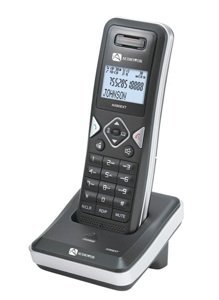
Image: The Audiovox ELEAUDAX80EXT Wireless Extension Unit. This image displays the compact design of the extension handset.
Organizować coś
- Naładuj baterię: If the battery is not pre-installed, insert it into the extension unit according to the markings. Place the extension unit on its charging cradle (if included) or connect the power adapter directly to the unit and a power outlet. Allow the unit to charge for at least 12-16 hours before initial use.
- Register the Extension:
- Ensure your main Audiovox phone base (AX8001, AX8001E, or AX8101AM) is powered on.
- On the main phone base, locate and press the "Register" or "Page" button. Hold it until the indicator light on the base begins to flash (refer to your main phone's manual for exact instructions).
- While the base is in registration mode, on the ELEAUDAX80EXT extension unit, navigate to the "Menu" and select "Register Handset" or a similar option. Follow the on-screen prompts.
- Once registration is successful, the extension unit will display a confirmation message, and the indicator light on the base will stop flashing.
- Połączenie testowe: Make a test call from the extension unit to ensure proper functionality.
Instrukcja obsługi
Wykonywanie połączenia
- Podnieś słuchawkę lub naciśnij ROZMAWIAĆ przycisk.
- Wybierz żądany numer telefonu.
- Naciśnij ROZMAWIAĆ button again or place the handset back on the cradle to end the call.
Odbieranie połączenia
- Gdy zadzwoni telefon, podnieś słuchawkę lub naciśnij ROZMAWIAĆ przycisk.
- Aby zakończyć połączenie, naciśnij KONIEC button or place the handset back on the cradle.
Intercom Function (if supported by base unit)
- Naciśnij AWIOFON przycisk.
- Dial the number of the extension you wish to call (e.g., "2" for the second handset).
- Naciskać ROZMAWIAĆ to initiate the intercom call.
Konserwacja
- Czyszczenie: Przetrzyj urządzenie miękką, damp płótno. Nie używaj ostrych środków chemicznych ani ściernych środków czyszczących.
- Pielęgnacja baterii: For optimal battery life, avoid fully discharging the battery frequently. Keep the unit on its charger when not in use.
- Składowanie: Jeśli urządzenie będzie przechowywane przez dłuższy czas, należy wyjąć baterię i przechowywać ją w chłodnym, suchym miejscu.
Rozwiązywanie problemów
| Problem | Rozwiązanie |
|---|---|
| Brak sygnału wybierania / Nie można wykonywać połączeń |
|
| Słuchawka się nie ładuje |
|
| Słaba jakość połączeń / Szumy |
|
Specyfikacje
- Numer modelu: ELEAUDAX80EXT
- Compatible Base Units: Audiovox AX8001, AX8001E, AX8101AM
- Wymiary (dł. x szer. x wys.): 20 x 40 x 30 milimetrów
- Waga: 20 gram
- Kod UPC: 044476082719
Gwarancja i wsparcie
For specific warranty information and technical support, please refer to the documentation included with your original Audiovox phone system or visit the official Audiovox webZachowaj paragon jako dowód zakupu na wypadek reklamacji.
For further assistance, please contact Audiovox customer service.