
Jabra Talk 15
Instrukcja obsługi zestawu słuchawkowego Bluetooth Jabra Talk 15
Wstęp
This manual provides detailed instructions for the Jabra Talk 15 Bluetooth Headset. The Jabra Talk 15 is engineered for clear hands-free calls, featuring a high-quality microphone and speaker optimized for conversations. It also supports wireless streaming of GPS directions, music, and podcasts from your mobile phone. With up to 6 hours of talk time and 14 days of standby time, the headset offers reliable Bluetooth wireless communication throughout the day on a single charge.

Obraz: Przód view of the Jabra Talk 15 Bluetooth Headset.
Co jest w pudełku
The Jabra Talk 15 package includes the following components:
- 1 Jabra Talk 15 headset
- 3 eargels (one pre-mounted standard eargel)
- 2 earhooks (Small & Large)
- 1 kabel ładujący USB
- Szybki przewodnik
- Warning and warranty leaflets

Image: All components included with the Jabra Talk 15 headset.
Przedłużenie zestawu słuchawkowegoview
Familiarize yourself with the buttons and indicators on your Jabra Talk 15 headset:
- Przycisk wielofunkcyjny: Power on/off, answer/end calls, play/pause audio.
- Przyciski głośności (+/-): Adjust call volume or media volume.
- Wskaźnik LED: Shows battery status, pairing status, and call status.
- Mikrofon: For clear voice transmission during calls.
- Port ładowania Micro USB: Do podłączenia kabla ładującego.
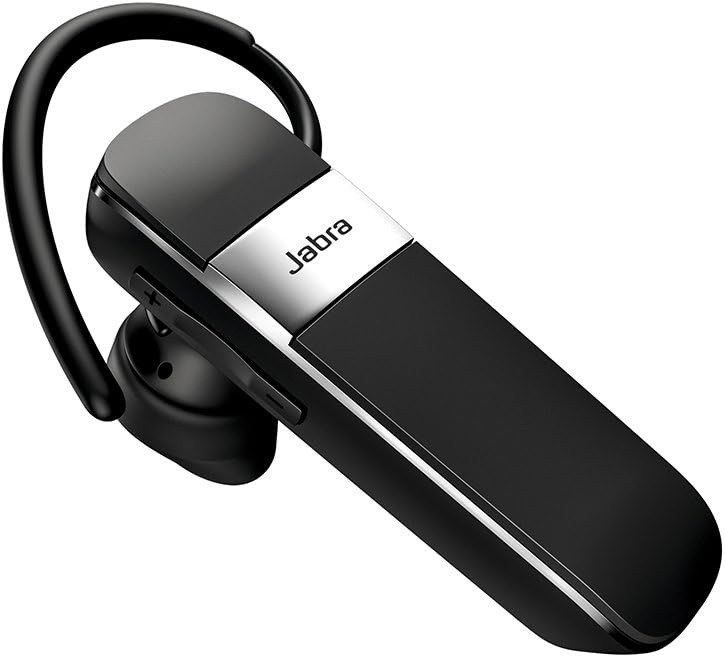
Obraz: Bok view of the Jabra Talk 15 headset, highlighting the volume controls.
Noszenie zestawu słuchawkowego
The Jabra Talk 15 can be worn with or without an earhook. Choose the eargel and earhook combination that provides the most comfortable and secure fit for your ear.
- Select an eargel size (small, medium, or large) that fits snugly in your ear canal.
- Attach the chosen earhook to the headset if desired. The earhook should loop over the back of your ear.
- Gently insert the eargel into your ear and adjust the earhook for stability.

Image: Man wearing the headset comfortably.

Image: Woman wearing the headset comfortably.
Ładowanie zestawu słuchawkowego
Before first use, fully charge your Jabra Talk 15 headset. A full charge takes approximately 6 hours.
- Connect the supplied USB charging cable to the Micro USB port on the headset.
- Connect the other end of the USB cable to a USB power source (e.g., computer USB port or wall charger).
- The LED indicator will show charging status. It will typically turn solid when fully charged.
The headset provides up to 6 hours of talk time and 14 days of standby time on a full charge.
Parowanie z urządzeniem
To use your Jabra Talk 15 headset, you must first pair it with your Bluetooth-enabled mobile device.
- Włącz zestaw słuchawkowy: Slide the On/Off switch to the 'On' position. The LED indicator will flash blue.
- Wejdź w tryb parowania: If this is the first time using the headset, it will automatically enter pairing mode. If not, press and hold the Multi-function button for approximately 3 seconds until the LED flashes blue and announces "Pairing mode".
- Włącz Bluetooth na swoim urządzeniu: Go to the Bluetooth settings on your smartphone or other device.
- Select Jabra Talk 15: From the list of available devices, select "Jabra Talk 15". If prompted for a passcode, enter "0000" (four zeros).
- Potwierdź parowanie: Once paired, the headset will announce "Connected" and the LED will turn solid blue.
The headset can remember up to 8 paired devices. When turned on, it will automatically try to connect to the last connected device.
Obsługa zestawu słuchawkowego
Wykonywanie i odbieranie połączeń
- Odbieranie/kończenie połączeń: Naciśnij przycisk wielofunkcyjny.
- Odrzuć połączenie: Naciśnij i przytrzymaj przycisk wielofunkcyjny przez 2 sekundy.
- Zadzwoń: Wybierz numer na swoim telefonie. Połączenie zostanie automatycznie przekierowane na zestaw słuchawkowy.
- Ponowne wybieranie ostatniego numeru: Double-tap the Multi-function button.
- Dostosuj głośność: Press the Volume + or Volume - buttons during a call.
Streaming Audio
The Jabra Talk 15 allows you to stream audio such as music, podcasts, and GPS directions from your paired device.
- Play/Pause Audio: Naciśnij przycisk wielofunkcyjny.
- Dostosuj głośność: Press the Volume + or Volume - buttons to control media volume.
Asystent głosowy
Activate your smartphone's voice assistant (e.g., Siri, Google Assistant) directly from the headset.
- Aktywuj asystenta głosowego: Press and hold the Multi-function button for 1 second when not on a call or streaming audio.
Konserwacja
To ensure the longevity and optimal performance of your Jabra Talk 15 headset, follow these maintenance guidelines:
- Czyszczenie: Regularly wipe the headset with a soft, dry cloth. Avoid using harsh chemicals or abrasive materials.
- Składowanie: Przechowuj zestaw słuchawkowy w chłodnym, suchym miejscu, z dala od ekstremalnych temperatur i bezpośredniego światła słonecznego.
- Ładowanie: Do not leave the headset connected to a charger for extended periods after it is fully charged.
- Narażenie na działanie wody: While the headset is water-resistant, avoid submerging it in water or exposing it to heavy rain.
Rozwiązywanie problemów
If you encounter issues with your Jabra Talk 15, try the following troubleshooting steps:
| Problem | Rozwiązanie |
|---|---|
| Headset will not turn on. | Upewnij się, że zestaw słuchawkowy jest naładowany. Podłącz go do źródła zasilania za pomocą kabla USB. |
| Nie można sparować z urządzeniem. |
|
| Brak dźwięku lub słaba jakość dźwięku. |
|
| Difficulty with On/Off switch. | The On/Off switch is located on the back of the device. It may be easier to operate before placing the headset on your ear. |
Specyfikacje
| Funkcja | Szczegół |
|---|---|
| Nazwa modelu | Rozmowa 15 |
| Numer modelu przedmiotu | 100-92200900-02 |
| Technologia łączności | Bluetooth, bezprzewodowy |
| Wersja Bluetooth | 5.0 |
| Technologia komunikacji bezprzewodowej | Bluetooth |
| Czas pracy baterii (czas rozmów) | Do 6 godzin |
| Czas czuwania | Do 14 dni |
| Czas ładowania | Około 6 godzin |
| Kontrola hałasu | Aktywna redukcja szumów |
| Mikrofon | Dołączony |
| Poziom wodoodporności | Wodoodporny |
| Wymiary | 4.19 x 1.28 x 6.94 cala |
| Waga przedmiotu | 1.44 uncji |
| UPC | 615822010856 |
Gwarancja i wsparcie
Jabra products are designed for reliability and performance. For detailed warranty information, please refer to the warranty leaflet included in your product packaging or visit the official Jabra webstrona.
For further assistance, technical support, or to download the full user guide, please visit the Jabra support page or refer to the provided PDF documents: