
Wstęp
This manual provides essential instructions for the Jam Audio Out There Active Noise Cancelling On-Ear Bluetooth Headphones. Please read this guide thoroughly to ensure proper use, maintenance, and to maximize your listening experience. These headphones offer active noise cancellation, Bluetooth connectivity, hands-free calling, and a comfortable on-ear design.
Co jest w pudełku
Sprawdź, czy w opakowaniu znajdują się wszystkie elementy:
- Out There Headphones
- Kabel AUX (3.5 mm)
- Kabel ładujący USB
- Szybki przewodnik (szczegółowe instrukcje można znaleźć w tym podręczniku)

Image: Contents of the Jam Audio Out There headphone package, including the headphones, AUX cable, and USB charging cable.
Produkt ponadview i sterowanie
Familiarize yourself with the headphone's layout and controls for optimal use.
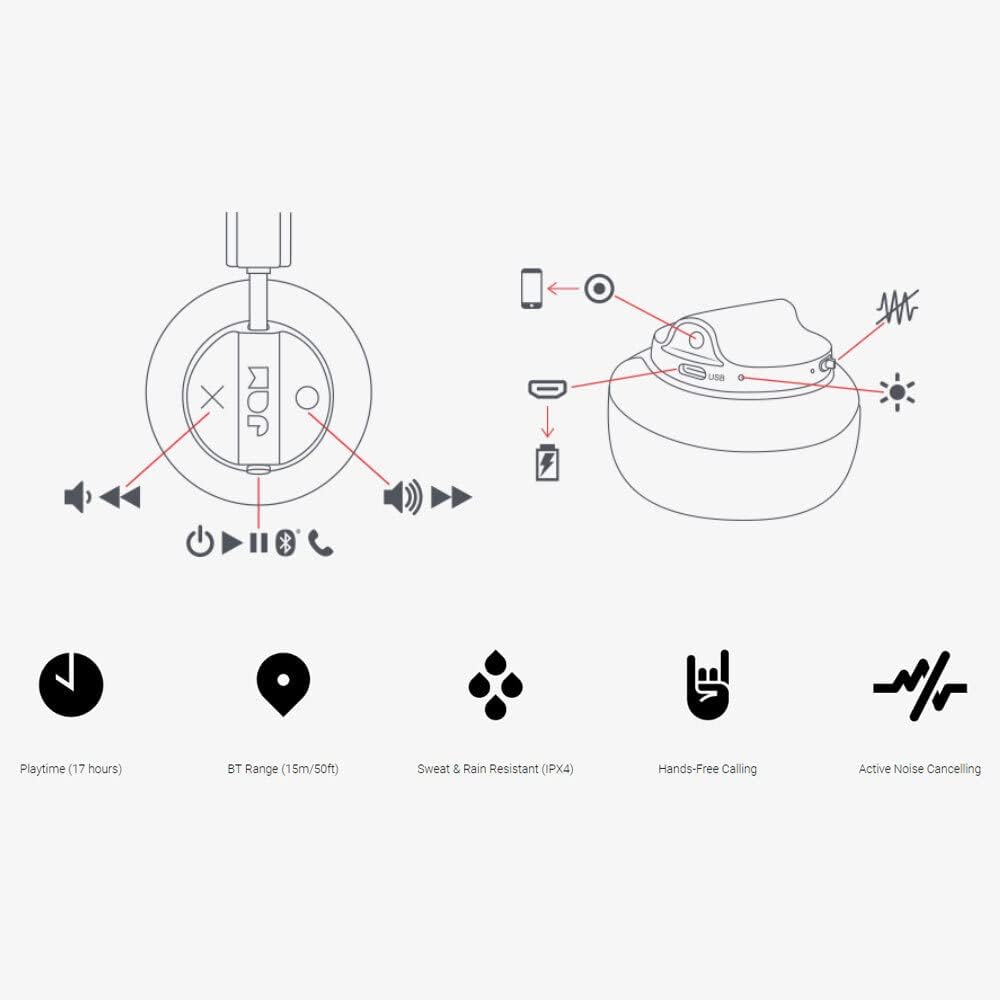
Image: Detailed diagram illustrating the control buttons and ports on the Jam Audio Out There headphones, including power, volume, track navigation, call management, and the charging port.
- Przycisk zasilania: Naciśnij i przytrzymaj, aby włączyć/wyłączyć.
- Zwiększanie głośności/następny utwór: Krótkie naciśnięcie zwiększa głośność, długie naciśnięcie przełącza na następny utwór.
- Zmniejszenie głośności/Poprzedni utwór: Krótkie naciśnięcie powoduje zmniejszenie głośności, długie naciśnięcie powoduje przejście do poprzedniego utworu.
- Odtwórz/wstrzymaj/odbierz połączenie: Single press to play/pause music or answer/end a call.
- Active Noise Cancelling (ANC) Switch: Toggle to activate or deactivate noise cancellation.
- Port ładowania: Port micro USB do ładowania.
- Port wejściowy AUX: Gniazdo 3.5 mm do przewodowego połączenia audio.
Organizować coś
1. Ładowanie słuchawek
Before first use, fully charge your headphones. Connect the provided USB charging cable to the charging port on the headphones and the other end to a USB power source. The LED indicator will show charging status and turn off when fully charged. A full charge takes approximately 2 hours and provides up to 17 hours of playtime.

Image: The Jam Audio Out There headphones provide up to 17 hours of playtime on a single charge.
2. Włączanie/wyłączanie zasilania
- To power on: Press and hold the Power button for 3 seconds. The LED indicator will flash.
- To power off: Press and hold the Power button for 3 seconds. The LED indicator will turn off.
3. Parowanie Bluetooth
- Upewnij się, że słuchawki są wyłączone.
- Press and hold the Power button for 5 seconds until the LED indicator flashes red and blue, indicating pairing mode.
- Na swoim urządzeniu (smartfonie, tablecie, komputerze) włącz Bluetooth i wyszukaj dostępne urządzenia.
- Select "JAM Out There" from the list of devices.
- Po sparowaniu dioda LED na słuchawkach zaświeci się na niebiesko.
- The headphones have a Bluetooth range of up to 15 meters (50 feet).

Image: The Jam Audio Out There headphones offer Bluetooth compatibility, allowing a range of up to 15 meters or 50 feet from your connected device.
Instrukcja obsługi
Odtwarzanie muzyki
- Odtwórz/Pauza: Naciśnij raz przycisk Odtwórz/Pauza.
- Następny utwór: Naciśnij i przytrzymaj przycisk zwiększania głośności.
- Poprzedni utwór: Naciśnij i przytrzymaj przycisk zmniejszania głośności.
- Regulacja głośności: Naciśnij krótko przycisk zwiększania lub zmniejszania głośności.
Rozmowy bez użycia rąk
- Odbieranie/kończenie połączeń: Naciśnij raz przycisk Odtwórz/Pauza.
- Odrzuć połączenie: Naciśnij i przytrzymaj przycisk Play/Pause przez 2 sekundy.
- Zadzwoń: Initiate the call from your connected device. The audio will automatically transfer to the headphones.
- Music will automatically pause during a call and resume after the call ends.
Aktywna redukcja szumów (ANC)
- To activate ANC: Slide the ANC switch to the ON position. The ANC indicator light will illuminate.
- To deactivate ANC: Slide the ANC switch to the OFF position. The ANC indicator light will turn off.
- Using ANC can reduce ambient noise, enhancing your listening experience. Note that ANC can be used independently or with Bluetooth audio.
Wired Connection (AUX-in)
For a wired connection, use the provided 3.5mm AUX cable. Plug one end into the headphone's AUX-in port and the other into your audio device. This allows you to continue listening even if the headphone battery is depleted or if Bluetooth is not available.
Konserwacja
- Czyszczenie: Przetrzyj słuchawki miękką, suchą ściereczką. Nie używaj silnych środków chemicznych ani materiałów ściernych.
- Składowanie: Przechowuj słuchawki w chłodnym i suchym miejscu, chroniąc je przed ekstremalnymi temperaturami.
- Wodoodporność: These headphones are IPX4 rated, meaning they are resistant to sweat and light splashes of water. Do not submerge them in water or expose them to heavy rain. Ensure the charging port cover is securely closed when not charging to maintain water resistance.
- Pielęgnacja baterii: Aby przedłużyć żywotność baterii, unikaj częstego całkowitego rozładowywania słuchawek. Ładuj je regularnie, nawet jeśli nie są używane przez dłuższy czas.
Rozwiązywanie problemów
| Problem | Rozwiązanie |
|---|---|
| Słuchawki się nie włączają | Upewnij się, że słuchawki są naładowane. Podłącz je do źródła zasilania za pomocą kabla USB. |
| Nie można sparować przez Bluetooth |
|
| Brak dźwięku lub niska głośność |
|
| Active Noise Cancelling not working | Ensure the ANC switch is in the ON position and the ANC indicator light is illuminated. |
| Headphones falling apart or breaking | While the product is designed for durability, excessive force or improper handling can cause damage. Handle with care. If issues persist, refer to warranty information. |
Specyfikacje
- Nazwa modelu: Tam na zewnątrz
- Numer modelu: HX-HP303BK
- Łączność: Bluetooth, 3.5 mm Jack (AUX-in)
- Zasięg bezprzewodowy: Do 15 metrów (50 stóp)
- Czas pracy baterii: Do 17 godzin
- Kontrola hałasu: Aktywna redukcja szumów
- Wodoodporność: IPX4 Rated (Sweat and Rain Resistant)
- Umieszczenie ucha: Na ucho
- Tworzywo: Guma, silikon
- Waga przedmiotu: 5.1 uncji (0.32 funta)
- Wymiary produktu: 8.58 x 3.19 x 8.66 cala
- Zawartość zestawu: Headphones, Charging Cord, AUX Cable
Film o produkcieview
Obejrzyj ten oficjalny film o produkcie, aby uzyskać wizualny podglądview of the Jam Audio product line, including the Out There headphones.
Video: An official Jam Audio sizzle video showcasing various products, including the Out There headphones, highlighting their design and features.
Gwarancja i wsparcie
For warranty information, product registration, or technical support, please refer to the official Jam Audio webOdwiedź witrynę lub skontaktuj się z działem obsługi klienta. Zachowaj dowód zakupu na wypadek reklamacji.