
1. Koniec produktuview
The LOFTER LED Rechargeable Cabinet Light is a versatile lighting solution designed for various indoor spaces. Featuring advanced motion and light sensing capabilities, it provides convenient and efficient illumination. Its rechargeable battery eliminates the need for frequent battery replacements, offering an energy-saving and cost-effective lighting option.

Image: The LOFTER LED Rechargeable Cabinet Light, showcasing its sleek, elongated design with integrated LED bulbs and a central sensor.
2. Zawartość opakowania
Sprawdź, czy w przesyłce znajdują się wszystkie elementy wymienione poniżej:
- 1 x LOFTER LED Rechargeable Cabinet Light
- 1 x kabel ładujący USB
- 1 x 3M Adhesive Magnetic Strip
- 2 x Śruby
- 2 x kotwy ścienne
- 1 x Instrukcja obsługi (ten dokument)

Image: All components included in the LOFTER LED Motion Sensor Light package, laid out on a wooden surface.
3. Specyfikacje
| Funkcja | Szczegół |
|---|---|
| Ilość diod LED | 62 diody LED |
| Kolor światła | Czysta biel (6000K) |
| Moc wyjściowa | 230 LM |
| Pojemność baterii | Bateria litowa 1600mAh |
| Tomtage | 5 wolty |
| Cotage | 2.5 watów |
| Kąt czujnika | 120 stopni |
| Zasięg czujnika | Do 3 metrów (10 stóp) |
| Wymiary produktu | 15.9" dł. x 1.5" szer. x 0.7" wys. |
| Tworzywo | Aluminum Alloy, Polycarbonate |
Image: A detailed diagram illustrating the technical components and dimensions of the LOFTER LED Cabinet Light.
4. Instalacja
The LOFTER LED Cabinet Light offers two convenient installation methods:
Method 1: Magnetic with 3M Adhesive Strip
This method is ideal for quick and flexible placement, allowing easy removal for charging or relocation.
- Clean the surface where you intend to install the light. Ensure it is dry and free of dust.
- Peel off the protective backing from the 3M adhesive on the magnetic strip.
- Firmly press the magnetic strip onto the desired surface. Hold for a few seconds to ensure strong adhesion.
- Attach the LOFTER LED Cabinet Light to the magnetic strip. The built-in magnets will securely hold the light in place.
Metoda 2: Montaż śrubowy
For a more permanent installation, use the provided screws and wall anchors.
- Identify the desired mounting location. Mark the positions for the two screw holes on the surface.
- Drill pilot holes at the marked positions. If installing into drywall, insert the wall anchors.
- Align the magnetic strip with the drilled holes and secure it using the provided screws.
- Attach the LOFTER LED Cabinet Light to the magnetic strip.

Image: A visual guide demonstrating both the adhesive magnetic strip installation and the screw mounting method for the light.
5. Instrukcja obsługi
The LOFTER LED Cabinet Light features a multi-functional switch to cycle through its 4 operating modes. The sensor is located in the middle of the light bar. Ensure the sensor is pointed towards the area where motion is expected for optimal performance.

Image: A diagram illustrating the four operating modes and the location of the power switch/mode button on the light.
Wybór trybu:
- Mode 1: Motion & Light Sensor Mode
Long press the switch for 3 seconds. A red indicator light will illuminate. In this mode, the light will only turn on automatically when motion is detected within 3 meters (10 feet) AND the ambient brightness is less than 10 Lux (i.e., it's dark enough). The light will turn off 20 seconds after motion ceases.
- Mode 2: ONLY Motion Sensor Mode
Long press the switch for 1 second. A blue indicator light will illuminate. In this mode, the light will turn on automatically when motion is detected within 3 meters (10 feet), regardless of ambient light conditions. The light will turn off 20 seconds after motion ceases.
- Mode 3: Always On Mode
Press the switch for 1 second from Mode 2. The light will remain continuously on until manually switched off or battery depletes.
- Mode 4: Off Mode
Long press the switch for 3 seconds from any mode to turn the light completely off.

Image: A comparative diagram illustrating the functionality of the "ONLY Motion Sensor Mode" and "Motion & Light Sensor Mode" based on daylight conditions and motion detection.

Image: The LOFTER LED Cabinet Light installed under a kitchen cabinet, demonstrating its illumination and motion/light sensor functionality in a real-world setting.
Ładowanie akumulatora:
The light has a built-in 1600mAh rechargeable lithium battery. When the battery is low, the indicator light may flash yellow (though not explicitly stated in the provided text, it's a common feature for low battery indicators). To charge:
- Locate the Micro-USB charging port on the side of the light.
- Connect the provided USB charging cable to the light's port and to a standard USB power source (e.g., computer, USB wall adapter).
- During charging, a red indicator light will be solid. Once fully charged, the indicator light will turn solid blue.
- Charging typically takes 4-6 hours. A full charge can last over 3 hours in "Always On" mode.
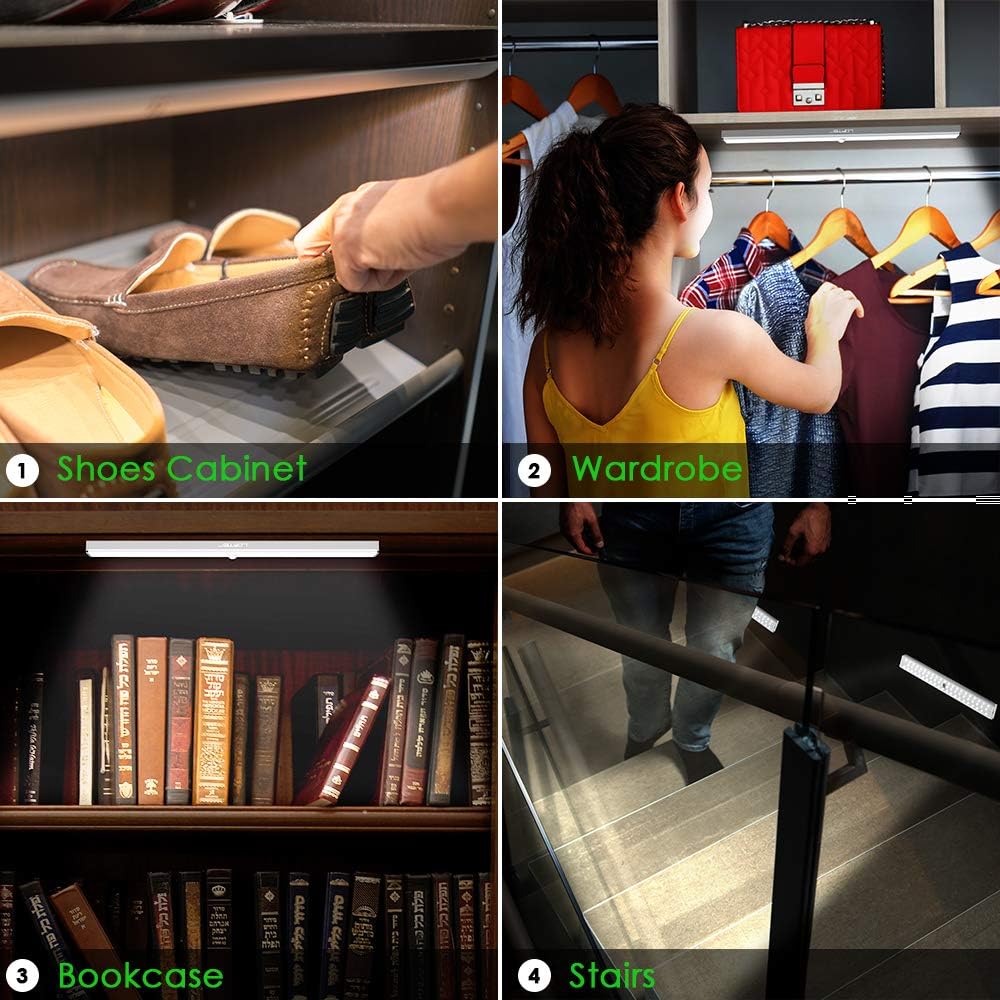
Image: A diagram highlighting the high battery capacity and the location of the Micro-USB charging port on the light, along with charging indicator colors.
6. Konserwacja
- Czyszczenie: Use a soft, dry cloth to wipe the surface of the light. Avoid using abrasive cleaners or solvents.
- Pielęgnacja baterii: To prolong battery life, avoid completely draining the battery frequently. Recharge the light when the indicator suggests low battery.
- Składowanie: If storing the light for an extended period, charge it fully before storage and recharge every 3-6 months to maintain battery health.
- Środowisko: This light is designed for indoor use. Avoid exposing it to extreme temperatures, high humidity, or direct water contact.
7. Rozwiązywanie Problemów
| Problem | Możliwa przyczyna / rozwiązanie |
|---|---|
| Light does not turn on in Motion & Light Sensor Mode (Mode 1). |
|
| Light does not turn on in ONLY Motion Sensor Mode (Mode 2). |
|
| Światło gaśnie zbyt szybko. |
|
| Światło nie ładuje się. |
|
8. Gwarancja i wsparcie
LOFTER provides a 12-month replacement warranty and a 30-day money-back guarantee for this product. For any product-related inquiries, technical support, or warranty claims, please contact LOFTER customer service through the platform where you purchased the product. Please have your order number and product model (USLED-0186 Version) ready for faster assistance.
You may also visit the official LOFTER store for more information: LOFTER Store
9. Przeznaczenie i zastosowania
This LOFTER LED Cabinet Light is designed for indoor use and is ideal for illuminating dark areas where a permanent light system is not available or desired. Its motion-sensing capabilities make it particularly useful for spaces requiring temporary, automatic lighting.
Typowe zastosowania obejmują:
- Sypialnie
- Closets and Wardrobes
- Kitchen Cabinets and Under Counters
- Pantries and Cupboards
- Workshops and Basements
- Garaże
- Schody
- Regały na książki
- Any dark area requiring temporary illumination

Obraz: Byłyamples of the LOFTER LED Cabinet Light installed in various locations such as a shoe cabinet, wardrobe, bookcase, and stairs, demonstrating its versatility.