
Wstęp
This manual provides detailed instructions for the setup, operation, and maintenance of your La Crosse Technology C84428 5-in-1 Professional Wireless Weather Station. This system offers comprehensive weather monitoring capabilities, including wind speed, rainfall, temperature, humidity, and time/date display. It features a main display unit, a 5-in-1 outdoor sensor, and a bonus temperature and humidity station for additional monitoring.
The C84428 weather station is designed for ease of use, with wireless connectivity and integration with the La Crosse View™ app for enhanced features and remote monitoring. All necessary batteries and an AC power adapter are included for immediate use.
Produkt ponadview
The La Crosse Technology C84428 system consists of three primary components:
- Główny wyświetlacz: Provides a clear LCD display of all collected weather data, forecasts, time, and date. It supports Wi-Fi connectivity for advanced features.
- Czujnik zewnętrzny 5 w 1: A single integrated unit that measures wind speed, wind direction, rainfall, outdoor temperature, and outdoor humidity.
- Bonus Temperature & Humidity Station: A secondary display unit for monitoring indoor temperature and humidity in another room.
Główne cechy:
- Wireless 5-in-1 outdoor sensor with 400 ft range.
- Main display with Wi-Fi connection indicators and forecast display (wind, rainfall, temperature, humidity).
- National Weather Service (NWS) forecast integration (selectable on display).
- National Institute of Standards and Technology (NIST) for automatic time and date setting.
- Personal message display option on the main unit.
- Expandable system to view compatible additional sensor readings.
- Bonus temperature and humidity station for indoor monitoring.
- Wall hanging or free-standing options for display units.
- Self-emptying rain bucket and replaceable wind cups on the outdoor sensor.

Image: The retail packaging for the La Crosse Technology C84428 weather station, showing the main display, 5-in-1 outdoor sensor, and bonus display. The packaging highlights key features like Wi-Fi connectivity and the La Crosse View aplikacja.

Obraz: Ponadview of the La Crosse Technology C84428 weather station components and features, including details on forecast, wind, rainfall, temperature, humidity, time/date, and other functionalities like 400 ft wireless range and data stream technology.
Organizować coś
1. Zasilanie jednostek
- Główny wyświetlacz: Insert the included AC power adapter into the main display unit and plug it into a wall outlet. For backup, install 3 AA batteries (not included, despite description saying "All batteries... included" - clarifying this discrepancy).
- Czujnik zewnętrzny 5 w 1: Install 3 AA batteries (not included) into the outdoor sensor's battery compartment. Ensure correct polarity.
- Bonus Temperature & Humidity Station: Install 2 AA batteries (not included) into the bonus display unit.
Note: While the product description states "All batteries and AC Power included," it is common for AA batteries for the sensors and backup to be sold separately. Please check your package contents.
2. Umiejscowienie czujnika zewnętrznego
Proper placement of the 5-in-1 outdoor sensor is crucial for accurate readings. Consider the following:
- Wysokość: Mount the sensor at least 5-6 feet (1.5-1.8 meters) above the ground for optimal wind and rain measurement.
- Luz: Ensure there are no obstructions (trees, buildings) directly above or around the sensor that could interfere with wind flow or rainfall collection.
- Światło słoneczne: Place the sensor in a location that receives adequate airflow but is not in direct, prolonged sunlight, which can affect temperature readings.
- Zakres: The sensor has a wireless range of up to 400 feet (121 meters) line-of-sight. Minimize walls and obstacles between the sensor and the main display.
- Pozioma powierzchnia: Mount the sensor on a level surface to ensure accurate rainfall measurement.
3. Wi-Fi Connection (Optional)
The C84428 weather station can function as a standalone unit. For enhanced features, including National Weather Service forecasts and remote monitoring via the La Crosse View™ app, connect the main display unit to your home Wi-Fi network.
- Download the free La Crosse View™ app from the App Store (iOS) or Google Play Store (Android).
- Follow the in-app instructions to create an account and add your C84428 weather station.
- The app will guide you through connecting the main display to your Wi-Fi network. This typically involves entering your network name (SSID) and password.

Obraz: strona A view of the product packaging highlighting the La Crosse View™ app, showing its interface on a smartphone screen. The app allows for on-the-go home monitoring, enhanced display features, and sharing with family and friends.
Instrukcja obsługi
Główny wyświetlacz
- Tryby wyświetlania: The LCD display automatically alternates between various data points, including indoor/outdoor temperature, humidity, wind speed, rainfall, and forecast icons.
- Prognoza: The display integrates National Weather Service (NWS) forecasts, showing wind, snow, sky conditions, and the percent chance of severe weather (tornadoes, hail, thunderstorms).
- Data i godzina: The unit automatically sets its time and date based on your zip code via the National Institute of Standards and Technology (NIST) signal when connected to Wi-Fi.
- Personal Message: You can enter a custom message of up to 20 characters for special events or reminders, which will scroll across the display. Refer to the full manual for specific button presses to set this.
- Odczyty czujnika: The display shows current readings from the 5-in-1 outdoor sensor. If additional compatible sensors are added to your system, their readings can also be viewwyd.
Bonus Temperature & Humidity Station
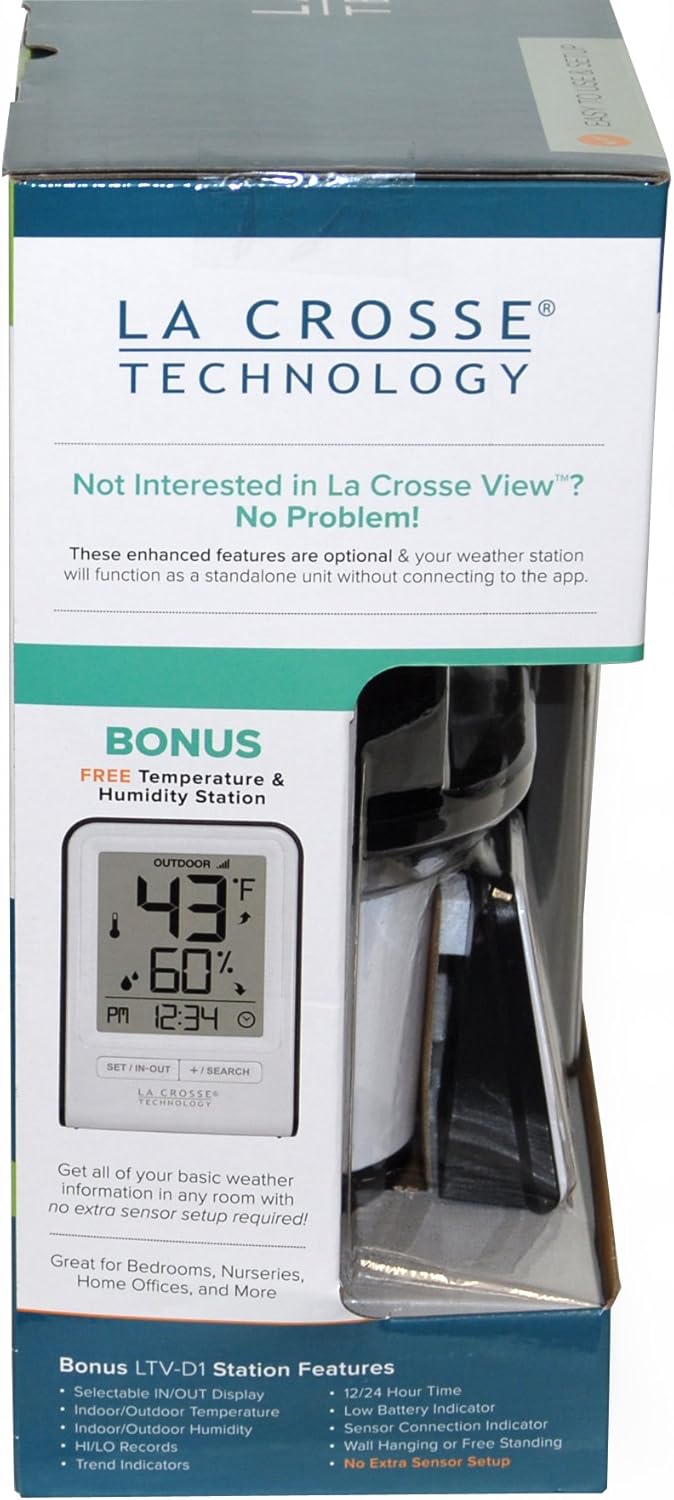
Image: The bonus temperature and humidity station, highlighting its features such as selectable indoor/outdoor display, 12/24 hour time, low battery indicator, and wall hanging or free-standing options. This unit provides basic weather information without requiring extra sensor setup.
- This compact unit displays indoor/outdoor temperature and humidity.
- It features a 12/24 hour time display and a low battery indicator.
- Use the buttons on the unit to switch between indoor and outdoor readings or to adjust settings.
Konserwacja
- Wymiana baterii: Replace batteries in the outdoor sensor and bonus display unit annually, or when the low battery indicator appears on the respective displays. For the main display, replace backup batteries as needed.
- Czyszczenie czujnika zewnętrznego:
- Rain Bucket: Periodically check and clean the self-emptying rain bucket to ensure no debris (leaves, insects) obstructs the tipping mechanism.
- Puchary Wiatrowe: Ensure the wind cups spin freely. If they become stiff, gently clean around the axle. Replacement wind cups are available if damaged.
- Ogólne sprzątanie: Wipe down the sensor housing with a damp cloth as needed to remove dirt or grime. Avoid abrasive cleaners.
- Display Unit Cleaning: Use a soft, lint-free cloth to clean the display screens. Do not use chemical cleaners, which may damage the screen.
Rozwiązywanie problemów
| Problem | Rozwiązanie |
|---|---|
| No outdoor sensor data on main display. |
|
| Main display not connecting to Wi-Fi. |
|
| Incorrect time/date display. |
|
| Niedokładne odczyty temperatury/wilgotności. |
|
Specyfikacje
- Model: C84428
- Marka: Technologia La Crosse
- Źródło zasilania: Main Display: AC Power Adapter (included), 3 AA batteries (backup, not included). Outdoor Sensor: 3 AA batteries (not included). Bonus Display: 2 AA batteries (not included).
- Łączność: Wi-Fi (2.4GHz), Wireless Sensor (400 ft range)
- Typ wyświetlacza: LCD
- Tworzywo: Metal (implied for some components, plastic for others)
- Dokładność temperatury: 1 °C
- Górna ocena temperatury: 122 Degrees Fahrenheit (50 °C)
- Wymiary opakowania: 20.2 x 13.9 x 5.98 cala
- Waga przedmiotu: 5.69 funta
- Data pierwszej dostępności: 20 września 2017 r.
Gwarancja i wsparcie
For warranty information, technical support, or to purchase replacement parts, please visit the official La Crosse Technology weblub skontaktuj się z działem obsługi klienta. Szczegółowe dane kontaktowe można zazwyczaj znaleźć na stronie producenta. webmiejscu lub w opakowaniu produktu.
Możesz również odwiedzić Sklep La Crosse Technology na Amazon Aby uzyskać więcej informacji o produkcie i zasobów.