
SatLink WS-6933
SatLink WS-6933 DVB-S/S2 Satellite Meter Finder User Manual
Modele: WS-6933
1. Wprowadzenie
The SatLink WS-6933 is a compact, lightweight, and intuitive handheld digital satellite meter designed for the installation and verification of digital TV services in residential homes or multi-dwelling units. It is fully compliant with DVB-S/S2 standards and offers a rich set of features for efficient satellite signal acquisition and analysis.
2. Ważne instrukcje bezpieczeństwa
- Przed przystąpieniem do użytkowania urządzenia należy uważnie przeczytać wszystkie instrukcje.
- Trzymaj urządzenie z dala od wody i wilgoci.
- Nie próbuj samodzielnie demontować ani naprawiać urządzenia. Wszelkie czynności serwisowe zlecaj wykwalifikowanemu personelowi.
- Use only the provided power adapter for charging to prevent damage.
- Podczas korzystania z urządzenia należy zapewnić odpowiednią wentylację.
- Unikaj wystawiania urządzenia na działanie ekstremalnych temperatur lub bezpośredniego światła słonecznego.
3. Rozpakowanie i zawartość opakowania
Carefully open the product packaging and ensure all items listed below are present. The device comes protected by a yellow silicone case for durability.
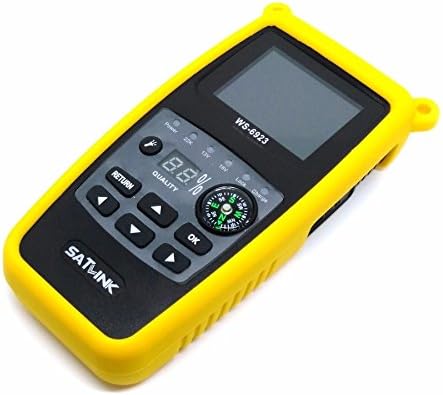
Figure 3.1: SatLink WS-6933 Satellite Meter Finder with its protective yellow silicone case.
Zawartość opakowania:
- 1 x WS-6933 Satellite Finder
- 1 x Silicone Case (pre-installed)
- 1 x USB Upgrade Cable
- 1 x Power Adapter (AC/DC 12V/1A)
- 1 x Instrukcja obsługi w języku angielskim
- 1 x Pas nośny

Figure 3.2: The power adapter, USB cable, and carrying belt included with the device.
Film z rozpakowywania:
Video 3.1: An unboxing video demonstrating the contents of the SatLink WS-6933 package and initial device overview.
4. Koniec produktuview and Illustration
The WS-6933 features a 2.4-inch LCD screen, a built-in compass, and intuitive controls for easy operation.

Rycina 4.1: Przód view of the WS-6933, highlighting the screen, control buttons, and compass.
Funkcje panelu przedniego:
- 2.4-calowy ekran LCD: Displays menu, signal information, and settings.
- Przyciski sterujące: Navigation (Up, Down, Left, Right), OK, Return.
- Kompas: Integrated for directional guidance during satellite alignment.
- Kontrolki: Display power status, 22KHz tone, 13V/18V LNB power, Lock, and Charge status.
- Quality Display: Digital percentage display for signal quality.

Rysunek 4.2: Strona view of the WS-6933, showing the power switch, LNB input, USB port, and DC input.
Side and Rear Features:
- Przycisk zasilania: Przełącznik włączania/wyłączania urządzenia.
- Wejście LNB: F-type connector for connecting to the LNB.
- Port USB: For software upgrades and file transfer via PC.
- DC IN: Wejście zasilania umożliwiające ładowanie urządzenia.
- Flesz: Integrated LED light for use in low-light conditions.

Rysunek 4.3: Tył view of the WS-6933, showing the flashlight and ventilation.
5. Konfiguracja
- Naładuj urządzenie: Before first use, fully charge the internal 7.4V/800mAh Li-Ion battery using the provided 12V/1A AC/DC adapter. Connect the adapter to the DC IN port on the side of the device and plug it into a power outlet. The 'Charge' indicator light will illuminate.
- Attach Carrying Belt (Optional): For convenience during outdoor work, attach the carrying belt to the designated loops on the device's silicone case.
- Włączanie: Flip the power switch located on the side of the device to the 'ON' position. The SatLink logo will appear on the screen, followed by the main menu.
6. Instrukcja obsługi
The WS-6933 features a user-friendly interface with a main menu providing access to various functions. Use the navigation buttons (Up, Down, Left, Right) to move between options and the 'OK' button to select. Use the 'Return' button to go back to the previous screen.
Menu główne ponadview:
- Sat Setting: Configure satellite parameters.
- Signal Scan: Measure signal strength and quality.
- Narzędzia: Access calculation tools for satellite alignment.
- Sat Manage: Add, edit, or delete satellite entries.
- TP Manager: Add, edit, or delete transponder entries.
- Zestaw systemowy: Adjust general device settings.
Szczegółowe funkcje:
- Sat Setting:
Navigate to 'Sat Setting' and press 'OK'. Here you can select the satellite name, LNB type, and input frequency parameters (Low Freq, High Freq, TP Num, Frequency). This is crucial for accurate signal detection.
- Signal Scan:
Select 'Signal Scan' from the main menu. This screen displays real-time signal strength (S) and quality (Q) percentages, along with other parameters like BER, PWR, S/N, and LNB power (13V/18V). The device also supports 22KHz tone and DISEQC 1.0/1.1 for multi-LNB setups. Sound and light alarms will indicate signal lock.
- Narzędzia:
Access 'Tools' for helpful calculations. This section provides information such as Satellite Name, Sat Longitude, Local Longitude, Local Latitude, Azimuth, Elevation, and Polarization, assisting in precise dish alignment.
- Sat Manage:
In 'Sat Manage', you can 'Add Satellite', 'Edit Satellite', or 'Delete Satellite' entries. This allows customization of the satellite list based on your specific needs and regional bands.
- TP Manager:
The 'TP Manager' allows you to 'Add Transponder', 'Edit Transponder', or 'Delete Transponder' entries. This is useful for managing specific transponder frequencies and symbol rates.
- Zestaw systemowy:
Under 'System Set', you can configure various device preferences:
- Język OSD: Change the display language (default is English, other options available).
- Dzwięk klawiszy: Turn button press sounds ON/OFF.
- Lock TONE: Turn signal lock tone ON/OFF.
- Flesz: Turn the built-in flashlight ON/OFF.
- Jednostka PWR: Adjust power unit display.
- Lokalna długość/szerokość geograficzna: Input local coordinates for accurate azimuth and elevation calculations.
Film demonstracyjny operacji:
Video 6.1: A demonstration of the SatLink WS-6933's menu navigation and key functions, including signal scanning and system settings.
7. Konserwacja
- Czyszczenie: Do czyszczenia urządzenia należy używać miękkiej, suchej ściereczki. Nie należy używać płynów czyszczących ani aerozoli.
- Składowanie: Przechowywać urządzenie w chłodnym i suchym miejscu, z dala od bezpośredniego światła słonecznego i ekstremalnych temperatur.
- Pielęgnacja baterii: Aby przedłużyć żywotność baterii, unikaj częstego całkowitego rozładowywania baterii. Regularnie ładuj urządzenie, nawet jeśli nie jest używane przez dłuższy czas.
- Aktualizacje oprogramowania: Okresowo sprawdzaj producenta website for software updates to ensure optimal performance and access to new features. Use the provided USB cable for updates.
8. Rozwiązywanie Problemów
| Problem | Możliwa przyczyna | Rozwiązanie |
|---|---|---|
| Urządzenie nie włącza się. | Niski poziom naładowania baterii lub wyłączone zasilanie. | Charge the device. Ensure the power switch is in the 'ON' position. |
| Nie wykryto sygnału. | Incorrect satellite settings, LNB not connected, or dish misalignment. | Verify satellite settings in 'Sat Setting'. Check LNB cable connection. Adjust dish alignment using the signal scan feature. |
| Signal quality is low. | Weak signal from LNB, cable issue, or minor dish misalignment. | Check LNB and cable for damage. Fine-tune dish alignment. |
| Ekran nie reaguje. | Urządzenie zostało zawieszone. | Power off the device, then power it back on. If the issue persists, contact support. |
9. Specyfikacje
| Funkcja | Specyfikacja |
|---|---|
| Numer modelu | WS-6933 |
| Wymiary produktu | 6.3 x 3.15 x 1.57 cala (16 x 8 x 4 cm) |
| Waga przedmiotu | 1.34 funta (610 gramów) |
| Wyświetlacz | 2.4-calowy ekran LCD |
| Bateria | 7.4V/800mAh Li-Ion Battery (1 Lithium Ion battery required) |
| Zasilacz | 12V/1A AC/DC Adapter |
| DVB Compliance | DVB-S / S2 |
| DISEQC Support | DISEQC 1.0/1.1, 0/22KHz Tone |
| Zasilacz LNB | 13V/18V (Max 300mA) |
| Łączność | USB (for software upgrade and file przenosić) |
| Dodatkowe funkcje | Mechanical Compass, Beep Integrated, LNB short protect, Flashlight |
10. Gwarancja i wsparcie
For warranty information and technical support, please refer to the contact details provided on the product packaging or visit the official SatLink webZachowaj paragon jako dowód zakupu na wypadek ewentualnych roszczeń gwarancyjnych.